


Microsoft’s switch from Windows 10 to Windows 11 left many PCs supposedly obsolete. This is sad news for many PC owners, but good news for you if you’re in the market for a NAS or a homelab.
Although Windows 11 adoption has been slow, the market is still flooded with used PCs. And those PCs are an absolute goldmine for building your first NAS, as long as you know what to look for.
Windows 10 reached end of life, and now millions of PCs are obsolete
Or so Microsoft says.

Windows 10 has officially reached end of support in October 2025. Those PCs didn’t all spontaneously combust, though, and most of them are still running just fine—with some major caveats.
Some PCs get a longer lease on life through the extension program, but for many, this means the end. No more OS updates, no more bug fixes, and no more security patches. To more risk-conscious users, this is the end of Windows 10, but it’s not just the consumers who have to make the switch. Many companies need to swap out their entire PC fleets because their old computers aren’t able to meet Windows 11’s security requirements, including TPM, Secure Boot, and a CPU that’s included on the official support list.
Whether people like it or not, that shift to Windows 11 is inevitable.
Dell said in a recent earnings call that the Windows 11 transition is still underway. Dell’s COO Jeffrey Clarke noted that Windows 10 is currently installed in around 1.5 billion units, 500 million of which can run Windows 11 and just haven’t made the switch yet, while another 500 million can’t meet the requirements and will need to upgrade their PC.
Those PCs may not be good enough for Windows 11, but they’re often more than good enough to repurpose as a NAS.
Why “can’t run Windows 11” hardware is still great for a NAS
You’re probably not going to use Windows 11 on your NAS, anyway.

A NAS couldn’t care less about the hardware requirements for Windows 11, which is why you can easily repurpose an older PC for it, provided it meets what you’re looking for in a homelab or a data storage PC.
Windows 11 requirements are largely irrelevant to NAS PCs because you’re typically going to run a dedicated NAS OS, anyway. It’s not that you can’t build a NAS on Windows—you absolutely can. But Windows has more overhead and is generally an unpopular choice in the NAS enthusiast circles. Most use TrueNAS or Unraid, although alternative NAS OS options also exist. None of them require the kind of modern hardware Windows 11 is enforcing.
Those platforms mainly care about CPU support for virtualization (which you may or may not care about as well), enough RAM, and plenty of ports and storage bays to support your needs. For basic file sharing and backups, you don’t need a recent CPU at all; almost any 64-bit CPU from the last decade will do. Intel has an edge in media servers, as its integrated graphics are a popular pick for Plex hardware transcoding due to Intel Quick Sync.
What’s actually worth your money in the post-Windows 10 era
Lots of options, but which are worth buying?
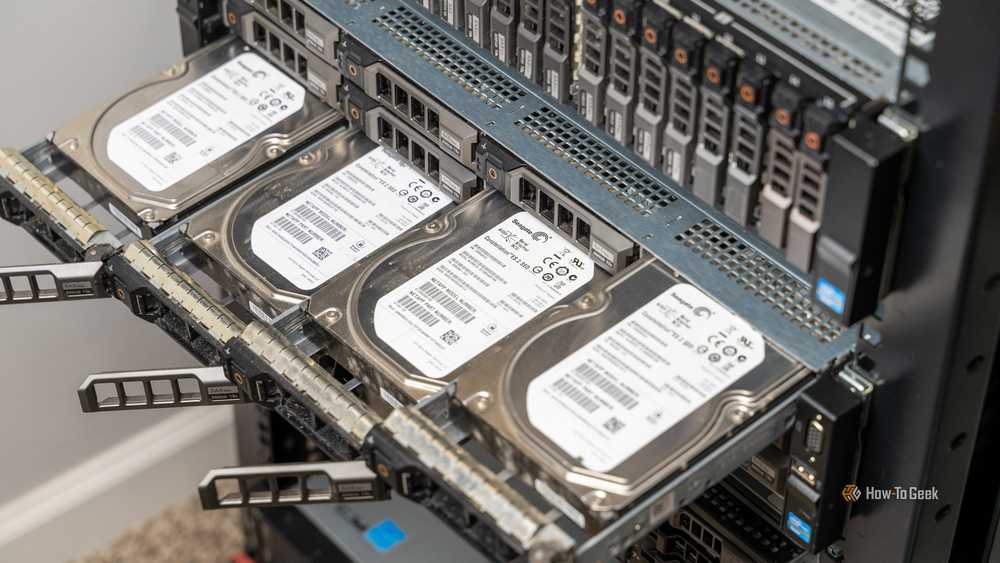
The requirements for a starter NAS are really modest. TrueNAS only calls for 8GB of RAM at a minimum, although 16GB is usually better. Most retired office PCs can make that threshold.
Beyond that, you really just need a PC that works and offers enough storage space to meet your needs; everything else can be worked around. Of course, this is only true if you’re not looking to dabble in heavy transcoding, lots of VMs, or fast multi-user workloads, at which point you need to invest in better hardware.
That means that there are currently loads of freshly-retired desktops that are ripe for the picking if you want to build a NAS.
Ex-office PCs can be picked up for as little as $100, and they can be a good starting point, but a lot of them may fail to meet the “enough room to grow” factor of a starter NAS. Still, PCs like the Dell Optiplex 7040 tick most of the boxes you need.
At a minimum, look for at least one usable PCIe slot, at least one 3.5-inch drive bay, and enough SATA ports for the drives you plan to add. An M.2 slot is great for extra fast storage, but you can also use a 2.5-inch SATA SSD in a pinch, even though less popular in other scenarios.
NAS units are generally small and quiet, but if you’re buying a desktop PC to repurpose as a NAS, you might want to go with a mini-tower (MT) instead of a small form factor (SFF) computer—simply because they’re more likely to have room for multiple HDDs. Network-wise, you’re fine to start with 1Gb/s Ethernet and expand later on, so it’s not a big concern from the get-go.
Ex-Windows 10 PCs can be great, but be mindful when you shop
It’s easy to buy the wrong thing.

One look at eBay, Amazon, and local Facebook groups will tell you that you can pick up a NAS-ready PC in no time. It probably won’t cost you much, either. It’s never been easier to pick up a computer that still works reasonably well and not pay a fortune for it, especially given the fact that we’re in the midst of an AI-driven RAM and SSD shortage.
Keep in mind, though, that buying that starter PC for $100 to $200 is not as optimized as buying a specialized NAS unit. It’s an affordable way to get started, and those PCs have their benefits, but temper your expectations to avoid disappointment.
For starters, ex-office PCs were built for exactly that: office work. They’re sometimes, but not always, used to running 24/7. They may be reasonably quiet, but they weren’t built for constant drive-heavy storage duty. They may have weaker airflow than you’d like to see, or fewer 3.5-inch drive bays than you’d prefer. Some may also have proprietary parts that cannot be upgraded.
Lastly, beware of scope creep. Today, you want a PC for backups, but tomorrow, it’s Docker, then VMs, then a media server. Really cheap PCs may have a limited upgrade path compared to a pricier ex-gaming PC, so plan accordingly before you shop.
Whether you want a powerful base for a homelab or a cheap PC to use as a NAS, the post-Windows 10 era is a fantastic time to pick something up and make it your own. Plan ahead, double-check all specs, and shop from trustworthy sellers, and you should be fine. Most of all, remember: it’s alright to start small and branch out over time.
