



Key Takeaways
- Keyword cannibalization happens when multiple pages target the same keyword and intent, causing them to compete and dilute your rankings.
- Spot it quickly with a site search in Google, the Pages view in Search Console, or a keyword cannibalization report in your SEO platform of choice.
- Fix it by choosing a primary page and then merging overlapping content and 301-redirecting weaker URLs to consolidate authority.
- If merging isn’t an option, reoptimize each page around a distinct keyword intent.
- Prevent keyword cannibalization going forward with a keyword map that assigns one primary keyword and intent per URL.
Keyword optimization is a core part of most digital marketing strategies. While it is a pillar of good SEO, it can backfire if keyword cannibalization sneaks in.
Repeating keywords across multiple pages turns those pages against each other in search results. Because Google doesn’t know which one to prioritize, they both lose ground.

Think of it this way: If you’re looking for “the best running shoes” and see two articles from the same site with near-identical titles, you won’t know which to click.
That’s keyword cannibalization, and it happens more than you might realize. This guide covers what it is and how to fix it before it drags down your rankings.
What Is Keyword Cannibalization?
Keyword cannibalization is when multiple pages on your site target the same search query, leading them to compete rather than reinforce a single strong result.
The consequences pile up quickly:
- It dilutes your authority across multiple URLs, so none of them stand out as the “best” result.
- Click-through rate (CTR) can take a hit when Google serves the wrong page for a given search intent.
- Google gets mixed signals about which page should rank, which often leads to unstable positions.
- Because signals are spread thin, nothing ranks as high as it could.
What Are Examples of Keyword Cannibalization?
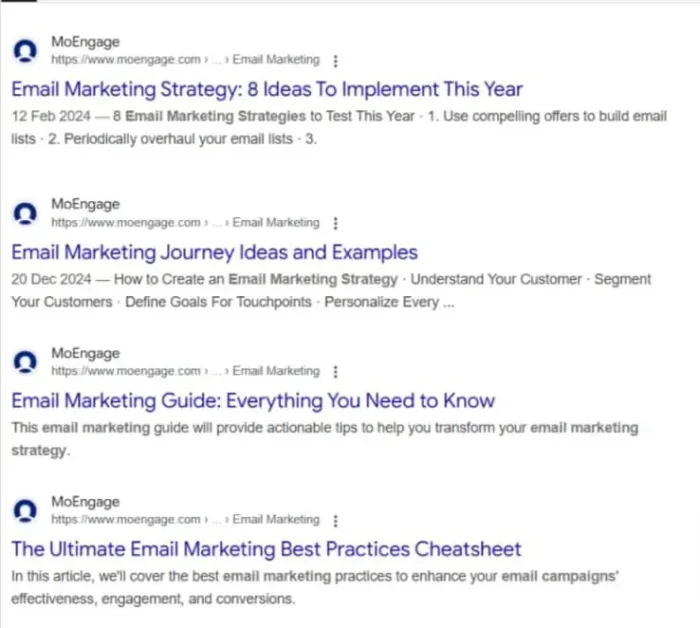
Here’s a real-world example of keyword cannibalization: a site search for “email marketing” on MoEngage.com.
Source: https://moz.com/blog/keyword-cannibalization
The results show multiple MoEngage.com blogs ranking for the same keyword. That’s a textbook cannibalization problem, and it’s dragging down the performance of every page in that cluster.
If a search of your site also reveals keyword cannibalization, don’t worry. My own blog has had the same issue. Here’s a historical example:
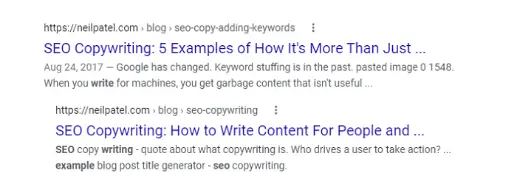
Two posts were splitting authority and muddying which page Google should rank. We’ve fixed it since, which is exactly what this guide will show you how to do.
How Do I Find Cannibalized Keywords?
If you think your site is suffering from keyword cannibalization, here’s how to find out for sure.
Do a Quick Google Site: Search
Type this into Google: site:yourdomain.com “target keyword”
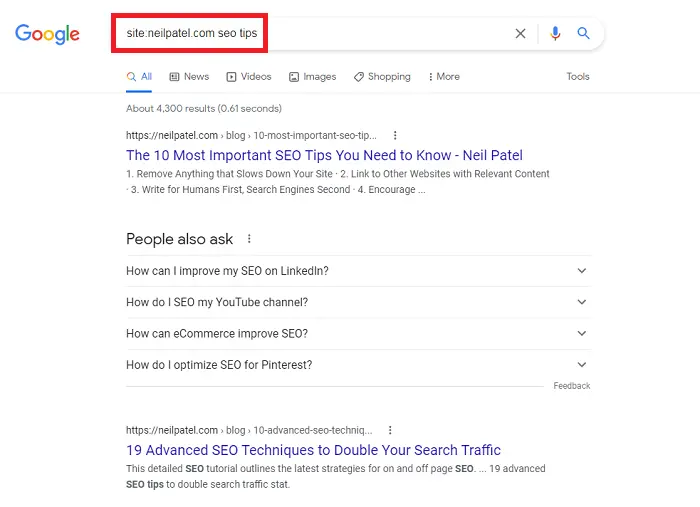
This brings up every page on your domain associated with that keyword. If you see multiple pages that look like they’re trying to rank for the same term (or answering the same intent), you likely have a cannibalization problem.
Review Google Search Console Queries
Open Google Search Console, then click “Search results” under “Performance.”
- Pick a query you want to investigate (or use the filter to type it in).
- Click into the Pages view.
- Look for more than one URL getting impressions and clicks for the same query.
If two (or more) pages are trading impressions for the same keyword over time, Google’s basically saying, “I’m not sure which one is the best match.”
Use SEO Tools to Spot Overlapping URLs
You can also use keyword research tools to simplify things and get comprehensive data for better keyword planning. Tools like Ubersuggest, Semrush, and Ahrefs support keyword research and can help you spot URLs that are competing for the same queries.
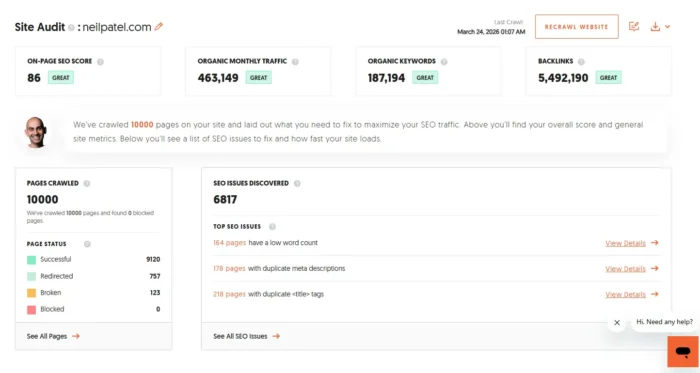
Start with Ubersuggest if you want a straightforward audit:
- Enter your domain URL into Ubersuggest.
- Go to the Site Audit section.
- Review flagged issues for duplicate keywords and pages competing for the same search terms.
Ahrefs and Semrush also have helpful functionality:
- Ahrefs’ Site Explorer: Plug in your domain, then check which pages are ranking for the same keyword.

Source: https://ahrefs.com/academy/how-to-use-ahrefs/site-explorer/intro
- Semrush’s Keyword Cannibalization Report: This feature highlights keywords where your site has multiple competing URLs.
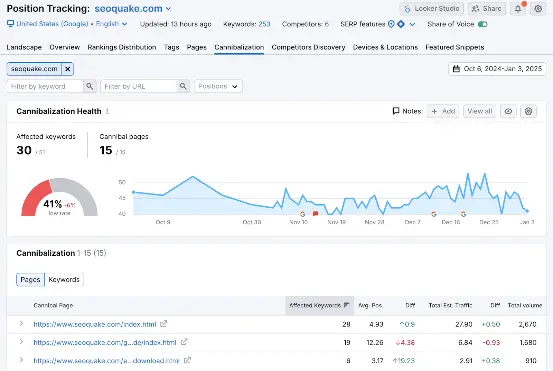
Source: https://www.semrush.com/kb/1066-position-tracking-cannibalization-report
All three tools show cannibalization patterns across your entire site in minutes, showing you which URL is winning. That way, you know where to focus.
Create a Content Inventory or Keyword Map
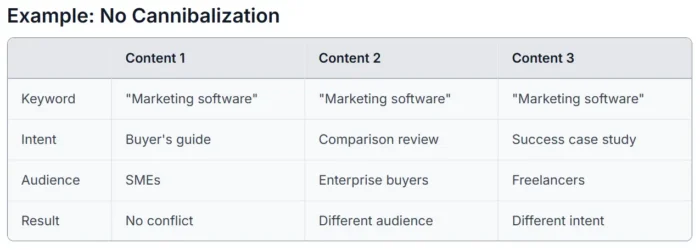
A keyword map gives you a single source of truth for your content. Set one up with four columns:
- Keyword
- Intent
- Audience
- Result
Here’s an example:
Source: https://machined.ai/blog/keyword-cannibalization-guide
Keeping everything in one place makes cannibalization easier to spot before it becomes a problem.
If two pages are competing for the same keyword, you have two basic options: Merge them into one stronger page, or redirect the weaker URL to the primary one so all authority flows to a single source. We’ll have more on this later.
A keyword map makes those calls obvious rather than reactive and helps new content get planned against existing pages before conflicts develop.
Common Causes of Keyword Cannibalization
Keyword cannibalization tends to happen when content grows fast, but strategy doesn’t keep up. Here are some common triggers:
- Too much overlapping content. Publishing multiple posts on the same topic from slightly different angles causes each new post to chip away at the relevance of the last one. “SEO tips” versus “SEO best practices” is a classic example.
- Duplicate keyword targeting. This could be two writers independently picking the same target keyword or refreshing an old post that accidentally overlaps with a newer piece. Solid keyword research and clear ownership by intent prevent this.
- Poor internal linking. If you don’t clearly link to the main page using consistent anchor text, Google has to guess which URL matters most. That can lead to unstable rankings.
- Product or category pages competing with blog content. When a category page and a blog post both target the same commercial keyword, Google may rank the wrong one or rotate between them, hurting conversions.
How to Fix Keyword Cannibalization
Here are some expert-recommended methods to prevent keyword cannibalization and improve your digital marketing plan.
1. Create a Targeted Keyword Strategy
The most direct way to prevent cannibalization is to make sure no two pages are competing for the same query. Each page should have one primary keyword tied to a distinct search intent.
Rather than stacking pages around “SEO tips,” point each one at a distinct query. “SEO for beginners” targets a different reader than “advanced SEO strategies,” for example, even though the topics are related.
Each page stays on brand while targeting various short and long-tail keywords relevant to your industry.
A few tools can help you with this. Google Trends and Google Search Console are free starting points for spotting demand and query data. Ubersuggest, AnswerThePublic, and Moz Keyword Explorer are great options for going deeper into keyword ideas and competitive gaps.
2. Track Keyword Rankings and Performance for Anomalies
A keyword strategy only works if you’re watching how those keywords perform over time.
The goal here is to spot early signs of keyword cannibalization before it drags traffic down.
Watch for these anomalies:
- Rank swapping: The same keyword bounces between two URLs (Page A ranks, then Page B, then back again).
- Split signals: Impressions and clicks for one query get spread across multiple pages in Google Search Console.
- Unexplained CTR drops: You’re still ranking, but the page Google displays aren’t the best match for the query, so fewer people click.
- Sudden dips after publishing or updating: A new post goes live (or an old one gets refreshed), and another page’s rankings and traffic slide.
Consistent tracking helps you see which keywords are performing and which may be caught in a cannibalization loop.
Use Search Console for query and page overlap. For rank volatility over time, Ubersuggest, Semrush, and Ahrefs all track keyword movement well.
3. Focus on Topics and Search Intent First and Keywords Second
If you chase keywords without mapping them to a specific search intent, you’ll end up with multiple pages answering the same question in slightly different ways. That’s when Google starts bouncing between URLs, and none of them becomes the clear winner.
Start by identifying the topic and the intent behind it: Is someone comparing options, looking for a how-to, or ready to buy? Build one strong main page for that intent, and use supporting content to cover subtopics rather than duplicate the core answer.
To uncover topic and intent ideas, you can:
Quora and Reddit also showcase real audience questions, and Google’s “People Also Ask” results show you what searchers want answered.
Shifting focus from keywords to topics tends to produce content that covers a subject more thoroughly, which can support stronger organic reach over time.
4. Do Regular Content Audits
A quarterly content audit helps you catch overlap early, and it’s worth running one after any major content push or site update.
Review your top topic clusters and flag any pages that target the same keyword or answer the same question. If two posts meet the same criteria, one of them is probably redundant.
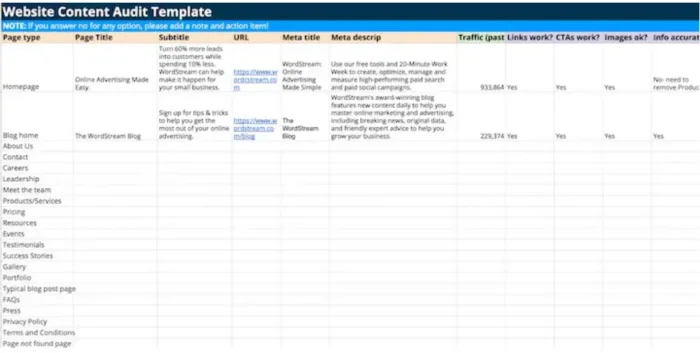
Here’s an example audit:
Source: https://neilpatel.com/blog/content-audit/
During the audit, ask:
- Are your topics still relevant?
- Is the information you’re posting outdated?
- Are the statistics correct?
- Are you prioritizing the right keywords?
- Are you prioritizing topics and keywords that align with your current marketing goals?
Add one final check: Do we have one clear primary page for this intent?
If not, you know what to fix. Merge or refocus your content so Google (and readers) see a single best answer.
5. Consolidate Competing Pages
When you spot two pages competing for the same keyword and intent, the fix is usually to merge them into one stronger piece.
For example, if you have “best SEO tools” and “top SEO software” going after the same search, combine them into one updated, evergreen guide.
Keep the strongest sections from each post, fill any gaps, and organize the structure with clear headers. A table of contents helps if the page runs long.
Then set up a 301 redirect from the old, weaker URL to the new primary URL. That way, authority flows to one page, and Google has a clear winner to rank.
6. Reoptimize Page-Level SEO
After you’ve picked your priority page, make it painfully obvious to Google (and readers) that this is the best match for the query.
Start by revisiting the on-page fundamentals:
- Rewrite the title tag to reflect the primary keyword and the specific intent behind the query.
- Tighten your H1 and H2s so they reinforce one clear topic. If your headers drift into adjacent topics, you’re basically inviting overlap with other pages.
- Refresh the intro and key sections to answer the query quickly, then support that answer with deeper subtopics.
- Check the body copy for mixed intent. If the page is informational, for example, don’t randomly pivot into “buy now” language halfway through.
Internal linking does the rest. Link to the priority page from related posts using descriptive anchor text and update older overlapping pages so they point to the priority URL, starting with intros and high-traffic sections.
This is how you consolidate signals without merging everything.
7. Use Canonical Tags
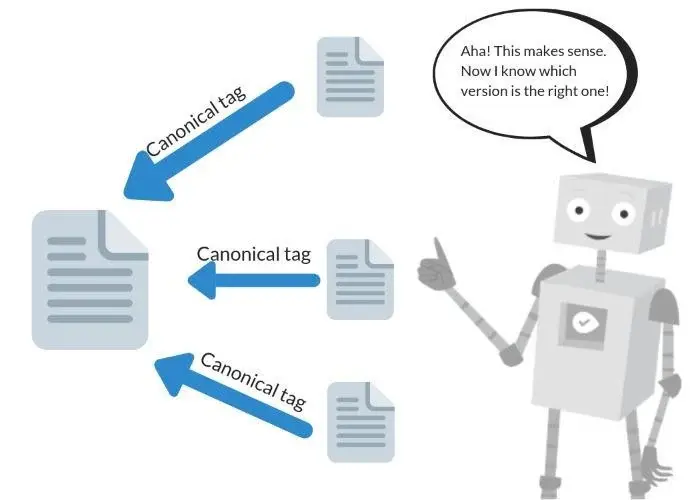
Canonical tags are Google’s tiebreaker signal. When you have two (or more) very similar pages, a canonical URL tells search engines which version you want treated as the primary one.
You’re basically saying, “These pages are related, but this is the page that should get the ranking credit.”
This is ideal when you need multiple versions to exist:
- Product pages with filtered or sorted variations (same core content with different parameters)
- Location or language versions that are mostly the same
- Near-duplicate landing pages for campaigns where consolidation isn’t practical
Add a canonical tag on the duplicate/similar page that points to the preferred main URL. That helps consolidate signals like links and relevance, reducing the odds of Google ranking the wrong page.
Source: https://www.woorank.com/en/edu/seo-guides/canonical-tags
One important note: canonicals are a hint, not a guarantee. If the pages aren’t truly similar, Google may ignore the tag. For pages with heavy content overlap that you need to keep live, canonicals are generally a reliable option.
Addressing Keyword Cannibalization Proactively
Prevention is more efficient than fixing cannibalization after the fact. Most accidental overlap happens when teams publish quickly without a shared record of which topics and keywords are already covered.
Start with a simple keyword map and content calendar. One shared doc where every URL is tied to a primary keyword and a clear intent is all you need. That alone prevents the most common source of cannibalization: two pages answering the same question in slightly different ways.
Before you publish anything new, run a quick site search (site:yourdomain.com “target keyword”) for a quick Google gut-check.
If a page already exists for that keyword or intent, you have options: Refresh or expand the existing piece, or write a supporting article that targets a different subtopic instead of competing head-on.
Then keep an eye on performance in Google Search Console.

Source: https://developers.google.com/search/docs/monitor-debug/google-analytics-search-console
Watch for multiple URLs ranking for the same query in Search Console, or rankings that bounce between pages over time.
Internal linking is also a key part of prevention. Link related articles to the priority page using descriptive anchor text so Google understands which URL is the authoritative source on that topic.
Follow these steps consistently, and each topic on your site has one strong page behind it rather than several weaker ones splitting the same ground.
Keyword Cannibalization Frequently Asked Questions
What is keyword cannibalization?
Keyword cannibalization happens when multiple pages on your site target the same keyword (and usually the same search intent). Instead of helping you rank more, those pages compete. That can dilute authority and confuse Google, keeping either page from reaching its full ranking potential.
What’s the difference between keyword stuffing and keyword cannibalization?
Keyword stuffing is cramming too many keywords into a single page to try to manipulate rankings. Keyword cannibalization is spreading the same keyword across too many pages. Both hurt your SEO, but in different ways. Stuffing makes one page look spammy to Google. Cannibalization makes multiple pages compete against each other, so none of them ranks as well as it could.
How can I prevent keyword cannibalization?
The best way to prevent keyword cannibalization is to be proactive. Use a keyword map so every important URL has one primary keyword and intent. Before publishing anything new, run a site search (site:yourdomain.com “keyword”) to see what already exists. Then use internal links to point related posts to the main page for that topic. Finally, watch Search Console for queries that trigger multiple URLs.
How do I solve keyword cannibalization?
Start by identifying overlapping URLs in Google Search Console by filtering a query and checking the Pages tab. Pick the strongest page to serve as the primary one based on rankings, links, and conversions. From there, either merge competing content into that page and 301 redirect the weaker URL, or re-optimize the secondary page around a different keyword and intent. Update internal links to reinforce the primary page, and add a canonical tag if you need to keep both URLs live.
Keyword Cannibalization Conclusion
Targeting the same keyword across multiple pages means competing with yourself, and that split weakens all of them.
The fix is straightforward: Pick a “winner” page for each topic and intent, then consolidate or retarget everything else. Focus each post on a distinct keyword and intent. Where topics overlap, a single comprehensive page will almost always outperform a cluster of thin ones.
The structure that makes this easiest to scale is pillar pages supported by topic clusters. This gives each page a clear role, keeping overlap manageable and providing Google with consistent signals as your site grows.
Start with a content audit and a keyword map. From there, the path forward is straightforward.
Unlock Thousands of Keywords with Ubersuggest
Ready to Outrank Your Competitors?
- Find long-tail keywords with High ROI
- Find 1000s of keywords instantly
- Turn searches into visits and conversions
Free keyword research tool
