



AI prompts to write a strong LinkedIn headline
Your headline decides in seconds if people click to learn more or scroll right past you. It’s also key for the LinkedIn algorithm, where keywords make or break your visibility. You only get 220 characters maximum to make your case.
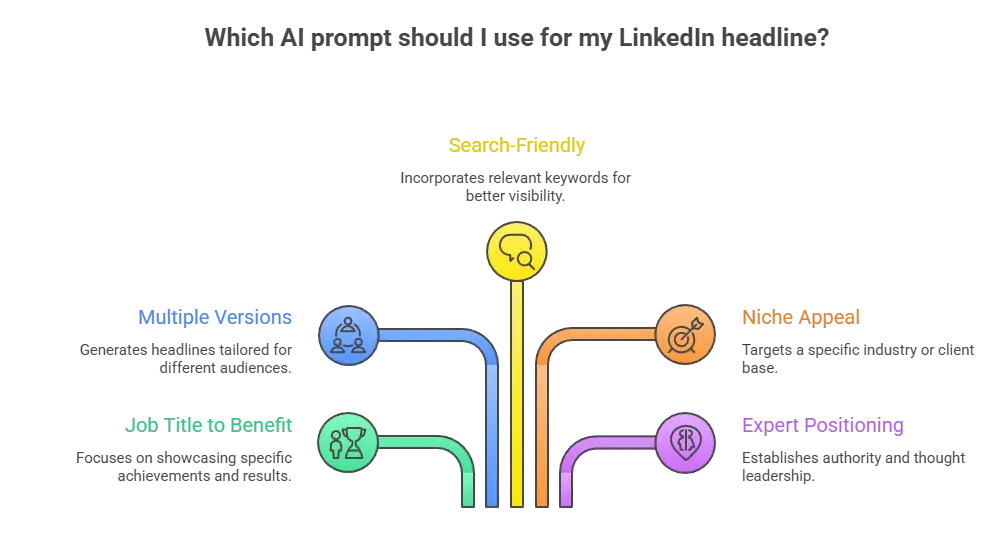
Forget the generic job titles that everyone uses. Instead, mix in searchable keywords, clear benefits, and just enough personality to stand out.
Here are a few sample prompts you can use anytime to write your LinkedIn headline:
- Write a LinkedIn headline that transforms my role from [job title] into a clear value statement by showing who I help, how I help them, and the results I deliver, including specific outcomes like growth, revenue, or efficiency.
- Generate 3 different LinkedIn headline options tailored to [target audience: recruiters, founders, clients] in [industry], each highlighting a different strength such as results, specialization, or unique positioning.
- Create a keyword-rich LinkedIn headline for someone in [industry/role] that naturally includes relevant skills (e.g. [keywords]) while still focusing on outcomes and avoiding keyword stuffing.
- Write a niche-specific LinkedIn headline for someone working with [target audience or industry], emphasizing the type of results they deliver and what makes their approach different.
- Rewrite my LinkedIn headline to position me as an expert in [industry], making it clear why someone would trust my expertise and what kind of impact I create.
- Turn my current headline into a more compelling version by replacing generic terms with specific results, clearer positioning, and a stronger value proposition.
- Write a LinkedIn headline that balances credibility and personality by combining my role, key strengths, and a short, memorable phrase that makes me stand out.
- Create a LinkedIn headline for someone targeting [specific role or opportunity], focusing on relevant experience, transferable skills, and the value they bring.
- Rewrite my headline so it clearly communicates my personal brand by answering: what I do, who I help, and what results I deliver in a concise, easy-to-scan format.
- Write a LinkedIn headline that includes measurable impact (e.g. percentages, growth, outcomes) while keeping it natural, not overly promotional or exaggerated.
Here’s an example of a LinkedIn headline that properly communicates to the audience:
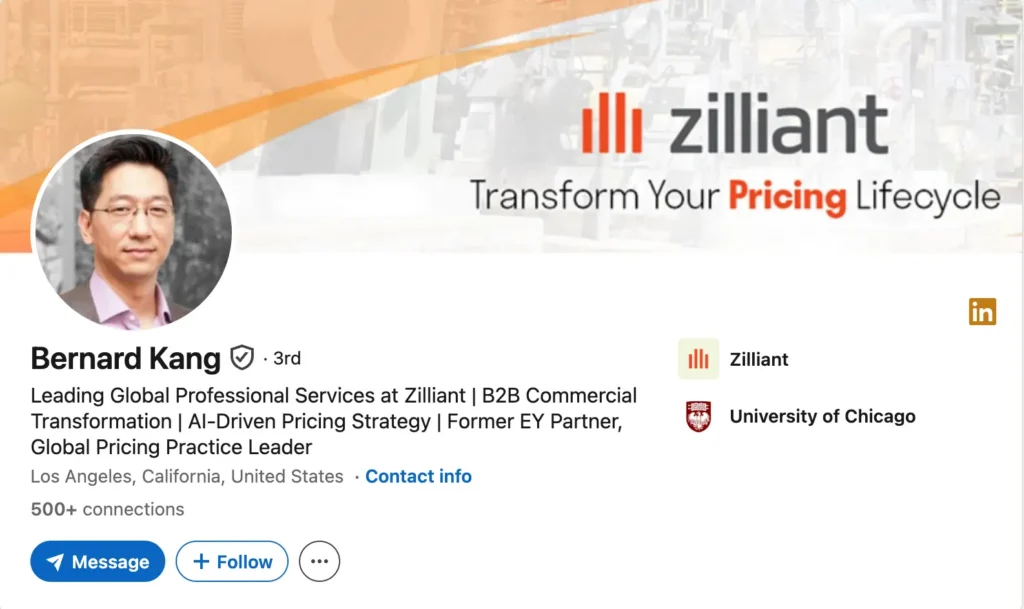
Test different versions each week. Check your profile views in LinkedIn analytics. The best headlines through a prompt for a LinkedIn post bring way more traffic to everything else on your profile.
AI prompts to rewrite your LinkedIn ‘About’ section
Many LinkedIn profiles lose readers in the About section. The text is often too long, vague, or reads like a copy of a resume. Busy recruiters scan quickly, so if the first few lines are unclear, they move on.
A strong About section should quickly show your expertise, value, and the type of industry or work you focus on. The goal is not to tell your entire career story but to give readers a clear reason to keep reading your LinkedIn profile.
A simple structure works well for your LinkedIn About section:
- Strong opener: explain who you help and what you help them achieve.
- Background: briefly share your experience and industry focus.
- Key achievements: highlight results, projects, or measurable impact.
- Skills and expertise: show the right skills and areas where you add value.
- Call to action: invite people to connect, collaborate, or reach out.
Here’s a practical example of an About section that works well. It starts with a clear hook, briefly explains the person’s background, and then highlights their expertise, skills, and the value they bring.
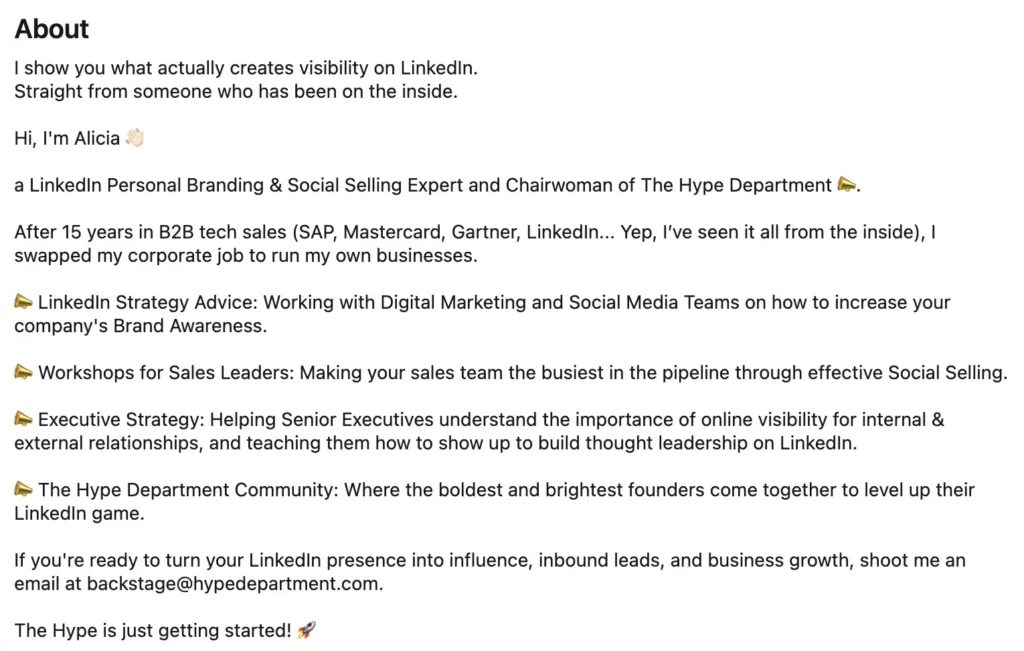
This works because the structure is simple: a clear opener, a short background, specific areas of expertise, and a call to action. It quickly shows what the person does, who they help, and why their experience matters.
You can use the following AI prompts for LinkedIn profile writing to improve your About section, highlight your expertise, and make a stronger first impression on recruiters and potential clients:
- Write a LinkedIn About section that clearly defines:
- who I help (target audience),
- the specific problems I solve,
- and the measurable results I deliver (include metrics or examples where possible).
- Rewrite my About section to position me as a specialist in [industry], using:
- clear positioning,
- 2–3 concrete achievements,
- and a strong value proposition.
- Turn my experience into a compelling LinkedIn About section that includes:
- a strong hook in the first 2 lines,
- key accomplishments with data,
- and a clear call to action.
- Improve my About section to attract [specific audience: recruiters/clients/founders] by:
- highlighting relevant results,
- aligning with what they care about,
- and removing generic statements.
- Rewrite my About section to focus on impact, not responsibilities by:
- replacing tasks with outcomes,
- adding metrics (%, revenue, growth, etc.),
- and showing before/after results.
- Write a LinkedIn About section that positions me as a thought leader by:
- including unique perspectives or opinions,
- referencing trends in my industry,
- and showcasing how I approach problems differently.
- Rewrite my About section to sound confident, natural, and human by:
- removing buzzwords and clichés,
- shortening sentences,
- and making the tone conversational but professional.
- Optimize my About section for LinkedIn search by:
- naturally including keywords like [insert keywords],
- avoiding keyword stuffing,
- and keeping it readable.
- Turn my career story into a short, engaging narrative that:
- shows progression,
- highlights defining moments,
- and connects to what I do today.
- Rewrite my About section to clearly communicate my personal brand by answering:
- What am I known for?
- What makes me different?
- Why should someone choose to work with me?
AI prompts to highlight your experience without sounding boring
Your job titles give context, but your bullet points are what convince recruiters to keep reading your LinkedIn profile.
Many people describe their work as tasks:
Managed marketing campaigns
Handled client accounts
Created reports
These lines explain what you did, but they don’t show your value, expertise, or the impact you had on the business.
Instead, focus on results. Turn duties into clear outcomes using numbers and strong action verbs.
Example:
Before: Managed social media accounts.
After: Grew Instagram by 15K followers and increased engagement by 28% through a structured content system.
A simple prompt that works well is: “Turn these duties into results-driven bullet points. Use real numbers and strong action verbs.” Then paste the job description or your original bullet list.
This approach helps highlight key achievements, improve profile views, and attract recruiters who are scanning profiles for real impact.
Here are some other prompts to use to improve your Experience section:
- Rewrite my LinkedIn experience so it clearly shows the business impact of my work, replacing vague responsibilities with specific outcomes and including metrics such as growth percentages, revenue impact, or efficiency improvements wherever possible.
- Turn my current job responsibilities into achievement-focused bullet points by adding context about what I was trying to improve, the actions I took, and the measurable results that came out of it.
- Improve my experience section by restructuring each bullet point so it follows a clear logic: what I did, how I did it, and what result it generated for the company or team.
- Rewrite my role to highlight the value I brought to the company, making it clear which problems I solved and how my work contributed to broader business goals like growth, retention, or operational efficiency.
- Transform my experience into high-impact statements by removing generic phrases, adding specific tools or strategies I used, and clearly showing the outcomes of my work.
- Rewrite my experience so it focuses on results rather than tasks, emphasizing before-and-after improvements, measurable progress, and tangible contributions.
- Optimize my experience section for recruiters by making it concise, keyword-relevant for my industry, and easy to scan, while still keeping the content natural and credible.
- Rewrite my experience to better reflect leadership and ownership, highlighting where I took initiative, influenced decisions, or contributed to team or project outcomes.
- Improve my experience section by incorporating specific tools, channels, and methods I used, and connecting them directly to the results they helped achieve.
- Turn my experience into business-focused achievements by clearly linking my work to outcomes like revenue growth, cost savings, improved performance, or user engagement.
- Rewrite my experience for a specific role I’m targeting, prioritizing the most relevant achievements and removing anything that doesn’t directly support that direction.
- Strengthen my experience section by replacing generic claims with concrete examples and proof, making the content more credible and specific.
- Transform my bullets into quantified achievements by estimating realistic metrics where exact numbers aren’t available, while keeping everything believable and grounded.
- Rewrite my experience so it’s easier to scan, using shorter sentences, simpler phrasing, and a structure that highlights the most important achievements first.
- Identify the strongest achievements in this role and rewrite the section to prioritize them, making sure the most impressive results are immediately visible.
- Rewrite my experience to highlight cross-functional collaboration, showing how I worked with other teams and what outcomes came from that collaboration.
- Turn this role into a clear, results-driven LinkedIn entry that feels cohesive, structured, and focused on impact rather than a list of responsibilities.
Common mistakes to avoid when using AI for LinkedIn
Even strong AI prompts for LinkedIn profile writing can fail if you make a few common mistakes. Many professionals generate good drafts but forget to refine them before publishing.
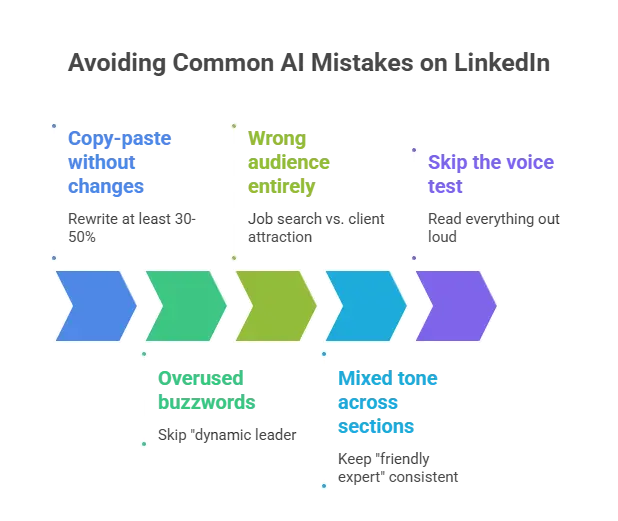
Here are some practical mistakes to avoid when optimizing your LinkedIn profile.
Copy-paste without changes
One of the biggest mistakes is copying AI output directly into your profile.
AI can generate a good starting point, but your LinkedIn headline, About section, and experience entries should still reflect your background, skills, and personal voice.
Always rewrite at least 30–50% of the text so it sounds natural and aligned with your personal brand.
Overused buzzwords
Generic phrases like “dynamic leader,” “results-driven professional,” or “passionate innovator” rarely add value.
Instead of vague claims, highlight real results and key achievements.
For example:
Instead of:
Dynamic marketing leader with strong skills.
Write:
Led marketing campaigns that increased qualified leads by 40%.
Concrete results strengthen your credibility and show your real expertise.
Targeting the wrong audience
Your LinkedIn profile should match your main goal.
If your goal is job hunting, focus on the right skills, key achievements, and keywords recruiters search for.
If you want to attract clients or grow a business, emphasize expertise, results, and the problems you solve for companies.
Trying to speak to everyone usually makes your profile less effective.
Mixed tone across sections
Your LinkedIn headline, About section, and experience entries should sound consistent.
If your headline sounds professional but your experience reads like a formal resume, the profile feels disconnected.
Choose one tone and keep it consistent. Many professionals aim for a friendly expert voice that shows both credibility and approachability.
Skipping the voice test
A simple trick is to read your profile out loud.
If a sentence feels awkward or overly formal, rewrite it. Your LinkedIn profile should sound natural and easy to understand.
This step helps ensure your profile makes a strong first impression when recruiters scan it.
How to measure if your AI-optimized profile is working
After updating your LinkedIn profile, you should track whether the changes actually improve your visibility.
You only need to monitor three simple metrics:
- Profile views
- Connection requests
- Messages from recruiters or companies
If these numbers increase, your LinkedIn headline, skills section, and experience updates are helping your profile appear in more search results.
Here’s how you can track the result of an AI-optimized LinkedIn profile:
- Record your current numbers: Write down your baseline, for example:
- Profile views: 23 per week
- Connection requests: 2 per week
- Messages: 0
- Change one section at a time: Start with your headline, then update your About section or experience later. Wait about two weeks before making another change.
- Check the results: If your profile views increase or recruiters start reaching out, the update worked. If nothing changes, refine another section.
A stronger profile often leads to:
- Noticeably higher profile views
- More connection requests from people in your industry
- Messages from recruiters or potential collaborators
