


With so many social media platforms available, it can be difficult to keep track of the various social media image sizes and formats that each platform requires for optimized visuals.
Here are the social media image sizes we’ll be talking about:
- Facebook image sizes
- Twitter image sizes
- LinkedIn image sizes
- Pinterest image sizes
- Instagram image sizes
- YouTube image sizes
- Google Business Profile sizes
1. Facebook Image Sizes
With an impressive 2.989 billion monthly users, Facebook doesn’t show any signs of stepping down as social media’s world leader. So, to ensure that you leverage Facebook as a marketing channel by creating high-performing visual content, you have to familiarize yourself with the different social media image sizes for Facebook.
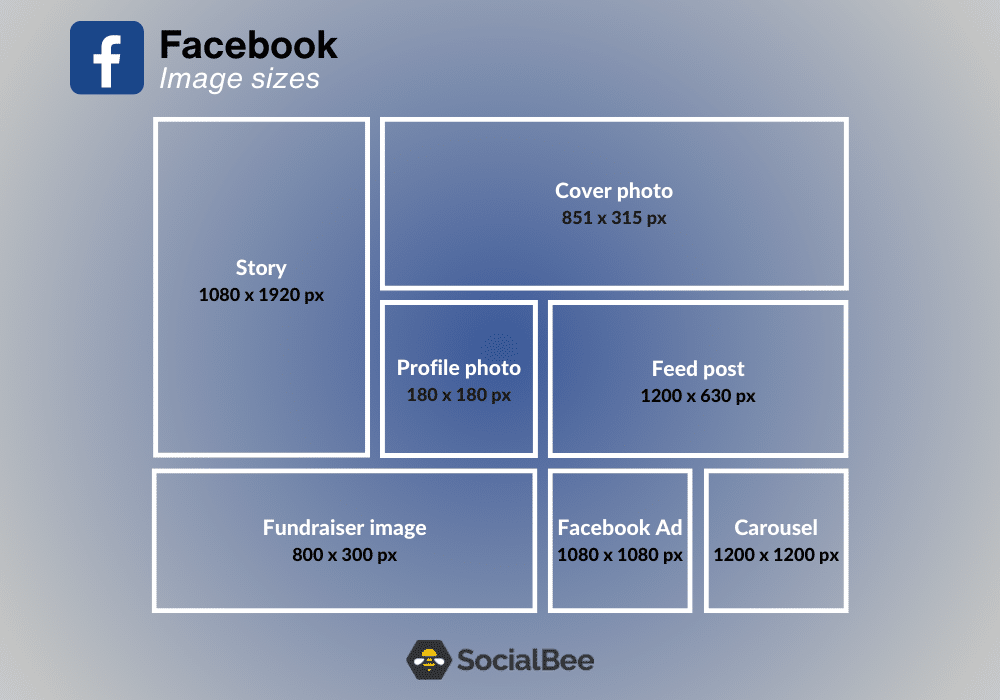
Here are all the types of Facebook image sizes:
- Facebook profile picture size: 180 x 180 pixels
- Facebook cover photo size: 851 x 315 pixels
- Facebook feed post image size: 1200 x 630 pixels
- Facebook event image size: 1920 x 1005 pixels
- Facebook fundraiser image size: 800 x 300 pixels
- Facebook Stories image size: 1080 x 1920 pixels
- Facebook ad image size: 1080 x 1080 pixels
A. Facebook Profile Picture Size: 180 x 180 Pixels
The typical Facebook image size for a profile picture on a desktop is 180 x 180 pixels. However, regarding how it looks on a smartphone, the size is slightly smaller, meaning 128 x 128 pixels.
B. Facebook Cover Photo Size: 851 x 315 Pixels
Facebook cover photos are perhaps the first thing you see when checking out a profile or a business page.
The recommended size for a Facebook cover photo is 851 x 315 pixels. Keep in mind that the minimum is 400 x 150 pixels.
C. Facebook Feed Post Image Size: 1200 x 630 Pixels
If you wish to always post high-quality images on your Facebook, make sure that you go by the recommended rules. Therefore, you should always upload images that have 1200 x 630 pixels.
As for the photos you add to your carousels, they should have 1200 x 1200 pixels.
D. Facebook Event Image Size: 1920 x 1005 Pixels
The Facebook event image size is ideally 1920 x 1005 pixels. This dimension ensures that the image appears sharp and well-optimized on various devices, including desktop and mobile.
However, keep in mind that Facebook might slightly resize and crop the image when displaying it in different sections of the platform.
E. Facebook Fundraiser Image Size: 800 x 300 Pixels
Raising money for a good cause on social media can be an idea capable of changing the world. Keep in mind that the ideal image size for Facebook fundraisers is 800 x 300 pixels.
F. Facebook Stories Image Size: 1080 x 1920 Pixels
With Facebook Stories, you can finally grow your brand and stand out from the rest of your fiercest competitors.
To start, you should know that the recommended size for this type of content is 1080 x 1920 pixels.
G. Facebook Image Size for Ads: 1080 x 1080 Pixels
Thinking of purchasing ads on Facebook in order to promote your products or services? There are some design recommendations you should be aware of.
The aspect ratio that’s typically supported is 1.91:1 to 1:1 and the resolution should at least be 1080 x 1080 pixels. Also, the maximum file size should not surpass 30 MB.
Tips
Here are some handy tips on how to go about Facebook image sizes:
- Always upload your images as a JPG or PNG file
- In the case of Facebook event cover photos, you won’t be able to edit their sizes once they get uploaded to the event page. Therefore, you should make sure that the size is just right.
- When utilizing the carousel display feature on Facebook to share 2-10 images in your brand’s post, it is recommended to use images with 1200 x 1200 pixels.
2. Twitter Image Sizes
Twitter is where people come to discuss the day’s latest news. It’s also the go-to social media platform for representing your brand and making sure that you communicate with your followers.
Without further ado, let’s dive straight into the topic of social media image sizes.
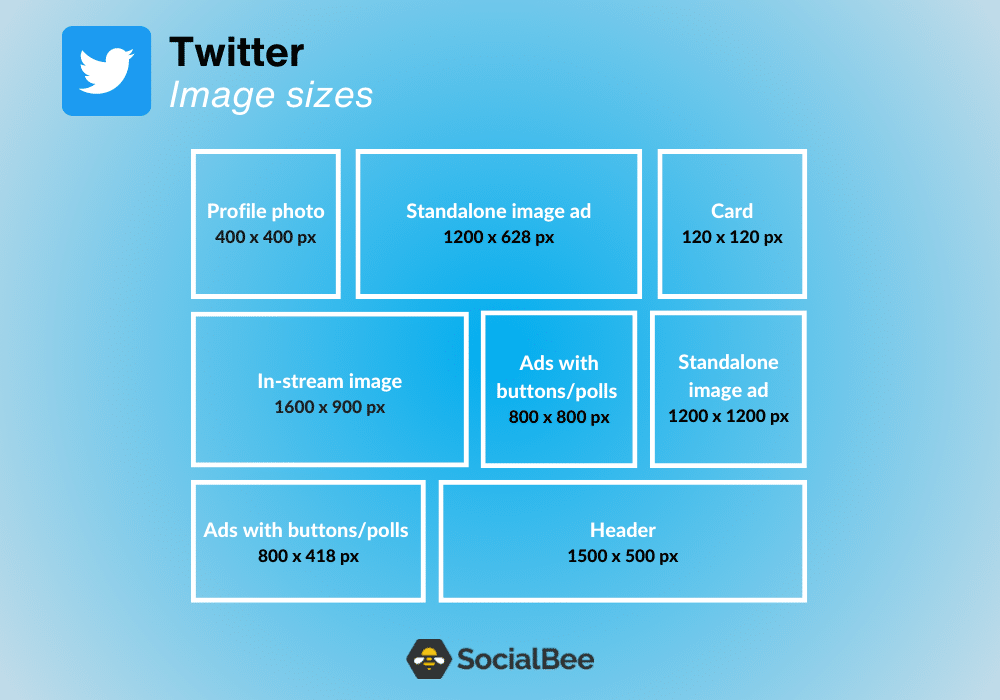
Here are all the types of Twitter images and their sizes:
- Twitter profile picture size: 400 x 400 pixels
- Twitter card image size: 120 x 120 pixels
- Twitter header image size: 1500 x 500 pixels
- Twitter in-stream image size: 1600 x 900 pixels
- Twitter image ad with app buttons size: 800 x 418 pixels / 800 x 800 pixels
- Twitter image ad with conversation buttons size: 800 x 418 pixels
- Twitter image ad with polls size: 800 x 418 pixels / 800 x 800 pixels
- Twitter image ad with website buttons size: 800 x 418 pixels / 800 x 800 pixels
- Twitter standalone image ad size: 1200 x 1200 pixels / 1200 x 628 pixels
A. Twitter Profile Picture Size: 400 x 400 Pixels
Your Twitter profile picture should ideally have 400 x 400 pixels and a minimum image size of 200 x 200 pixels.
B. Twitter Card Image Size: 120 x 120 Pixels
By utilizing Twitter Cards, you can enhance your tweets by attaching visually engaging photos, videos, and media content, which can drive increased website traffic.
Keep in mind that the size of a Twitter card is 120 x 120 pixels.
C. Twitter Header Image Size: 1500 x 500 Pixels
Much like Facebook’s cover photo, a Twitter header is what catches people’s attention once they’re checking out your profile.
You should know that the recommended header size is 1500 x 500 pixels and that all header images must fit the 3:1 aspect ratio.
D. Twitter In-Stream Photo Image Size: 1600 x 900 Pixels
The ideal image size for in-stream photos is 1600 x 900 pixels and the aspect ratio you should always go for varies, depending on whether you’re using a desktop or mobile phone.
For desktops, the ideal aspect ratio should always be between 2:1 and 1:1. As for mobile, there are three options you can go for, namely 2:1, 3:4, and 16:9.
Finally, if you’re planning on posting single or multi-image tweets, make sure that they both have 600 x 335 pixels.
E. Twitter Image Sizes for Ads
Advertising on Twitter can be a great idea, especially if your target audience loves this platform.
Here are some Twitter ad types and their consequent image sizes:
- Image ads with app buttons: For an aspect ratio of 1.91:1, it is recommended to use an image size of 800 x 418 pixels. Conversely, for a 1:1 aspect ratio, the recommended image size is 800 x 800 pixels.
- Image ads with conversation buttons: 800 x 418 pixels for a 1.91:1 aspect ratio.
- Image ads with polls: For an aspect ratio of 1.91:1, it is recommended to use an image size of 800 x 418 pixels. Conversely, the recommended image size for a 1:1 aspect ratio is 800 x 800 pixels. GIFs are not supported.
- Image ads with website buttons: For an aspect ratio of 1.91:1, it is recommended to use an image size of 800 x 418 pixels. Conversely, the recommended image size for a 1:1 aspect ratio is 800 x 800 pixels. GIFs are not supported.
- Standalone image ads: Due to the 1:1 aspect ratio, we recommend using an image size of 1200 x 1200 pixels. On the other hand, for a 1.91:1 aspect ratio, the recommended image size is 1200 x 628 pixels. Using larger images will provide better optimization when users click to expand the images.
Tips
Here are some tips for Twitter image size optimization:
- Start using JPG and PNG as your go-to file formats
- Aim for an aspect ratio of 2:1
- Compress your images to prevent the slowing down of the loading time of your tweets
3. LinkedIn Image Sizes
Ready to share your skills with the world? What about your career experience? With LinkedIn, both individuals and companies can connect with employers, peers, and other brands in the blink of an eye.
If you’re ready to make a great first impression on one of the world’s most popular social media platforms, discover the recommended social media image sizes.
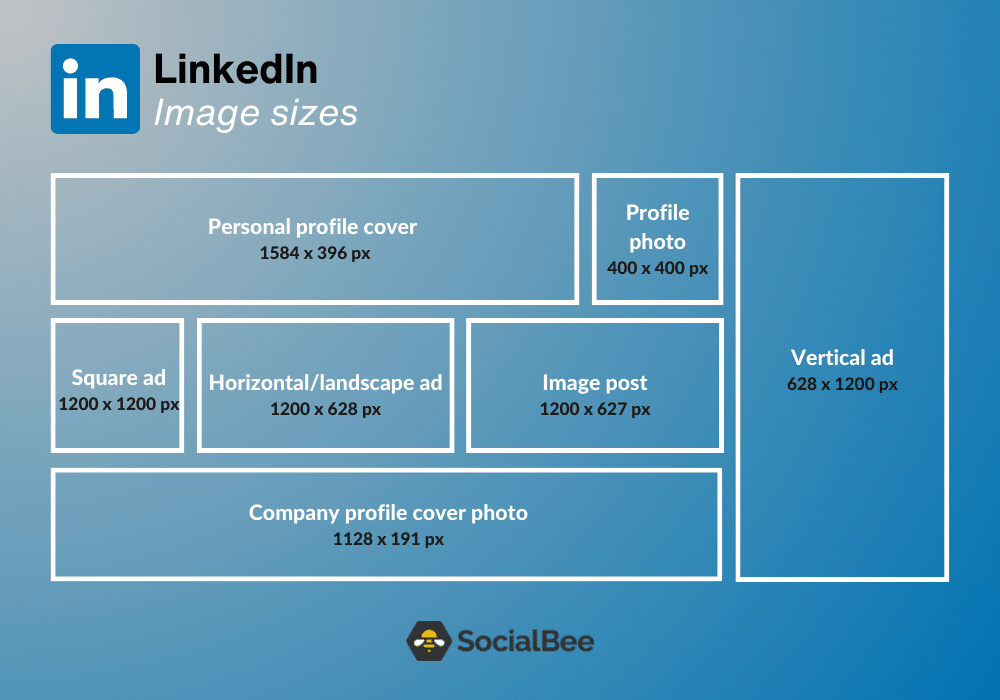
Here are all the types of LinkedIn images and their sizes:
- LinkedIn personal profile picture size: 400 x 400 pixels
- LinkedIn personal cover photo size: 1584 x 396 pixels
- LinkedIn company logo image size: 300 x 300 pixels
- LinkedIn company cover photo size: 1128 x 191 pixels
- LinkedIn post and link image sizes: 1200 x 627 pixels
- LinkedIn Life Tab main image size: 1128 x 376 pixels
- LinkedIn Life Tab custom modules size: 502 x 282 pixels
- LinkedIn Life Tab company photo size: 900 x 600 pixels
- LinkedIn horizontal/landscape image ad size: 1200 x 628 pixels
- LinkedIn square image ad size: 1200 x 1200 pixels
- LinkedIn vertical image ad size: 628 x 1200 pixels / 600 x 900 pixels / 720 x 900 pixels
A. LinkedIn Personal Profile Image Size: 400 x 400 Pixels
For LinkedIn profile pictures, it is recommended to use an image size of 400 x 400 pixels or larger, and LinkedIn can support photos as large as 7680 x 4320 pixels.
Additionally, the platform has a maximum file size of up to 8MB, so it is advised to upload images with the largest size possible to ensure future compatibility.
B. LinkedIn Personal Cover Photo Size: 1584 x 396 Pixels
For personal profile cover photos on LinkedIn, the recommended image size is 1584 x 396 pixels, with an aspect ratio of 4:1.
C. LinkedIn Company Logo Image Size: 300 x 300 Pixels
Your company’s logo needs to be instantly recognizable, especially on a busy platform such as LinkedIn.
Therefore, upload your company logo to the social media platform and make sure it has 300 x 300 pixels.
D. LinkedIn Company Cover Photo Size: 1128 x 191 Pixels
Did you know that cover sizes differ on LinkedIn, depending on whether you own a personal or a company account?
For companies, the allowed cover photo size is 1128 x 191 pixels.
E. LinkedIn Image Sizes for Posts and Links: 1200 x 627 Pixels
Capture attention on the LinkedIn feed with your image and link posts by using the recommended image size of 1200 x 627 pixels, which creates a visually appealing 1.91:1 aspect ratio.
F. LinkedIn Life Tab Image Sizes
The Life tab in your application requires specific image sizes for optimal display: the main image should be 1128 x 376 pixels.
Custom modules should be sized at 502 x 282 pixels.
Finally, company photos should have dimensions of 900 x 600 pixels.
G. Linkedin Image Sizes for Ads
Do you want to make your LinkedIn ads better? Then make sure your visuals are perfectly sized so that they look good on every device.
Here are the ideal image sizes for all the different types of LinkedIn ads:
- Minimum: 640 x 360 pixels
- Maximum: 7680 x 4320 pixels
- Recommended: 1.91:1 aspect ratio, 1200 x 628 pixels
- Minimum: 360 x 360 pixels
- Maximum: 4320 x 4320 pixels
- Recommended: 1:1 aspect ratio, 1200 x 1200 pixels
- Minimum: 360 x 640 pixels
- Maximum: 1254 x 2400 pixels
- Recommended: 628 x 1200 pixels, 600 x 900 pixels, 720 x 900 pixels
Tips
Here are some final tips for posting image updates to your company page on LinkedIn:
- Use PNG or JPG images for your LinkedIn posts.
- Use an aspect ratio of 1.91:1 for your images. This ratio will ensure that your visuals appear properly and in an appealing format on LinkedIn.
- Resize your images to 1200 x 628 pixels before posting on LinkedIn. LinkedIn recommends this size and will help maintain the quality and clarity of your images.
4. Pinterest Image Sizes
Did you know that Pinterest shoppers have 85% bigger online baskets than any other social media platform users? Cool, right? To make the most of this potential, it’s crucial to ensure that your images are professional and optimized for the platform.
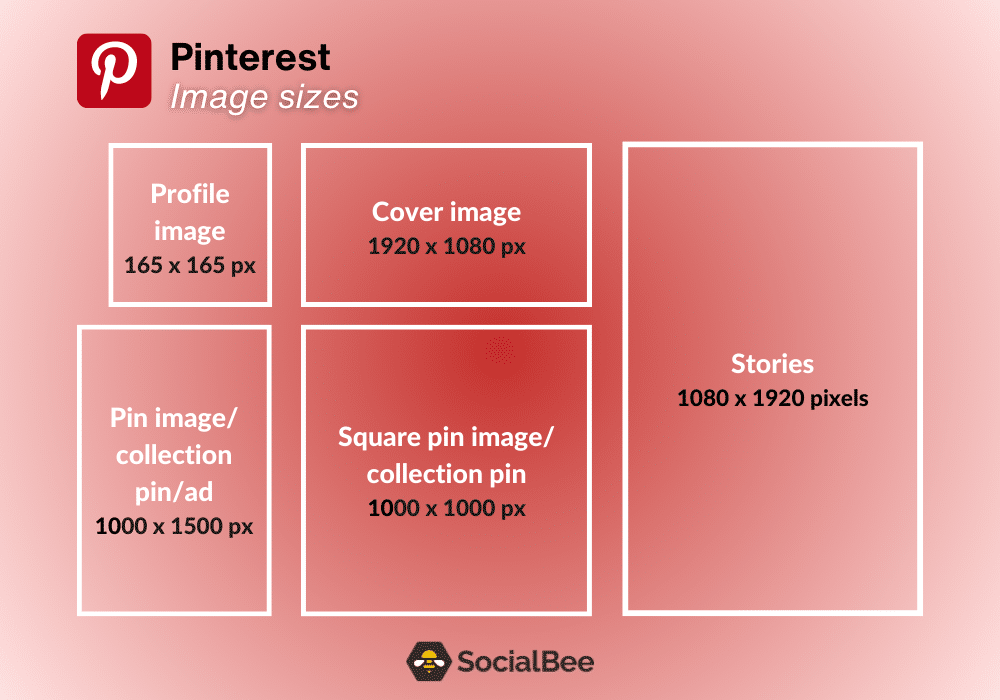
Here are all the types of Pinterest images and their sizes:
- Pinterest profile image size: 165 x 165 pixels
- Pinterest profile cover image size: 1920 x 1080 pixels
- Pinterest Pin image size: 1000 x 1000 pixels / 1000 x 1500 pixels
- Pinterest collection Pin image size: 1000 x 1000 pixels / 1000 x 1500 pixels
- Pinterest Story Pin image size: 1080×1920 pixels
- Pinterest standard image ad size: 1000 x 1500 pixels
- Pinterest standard width video ad sizes: 1080 x 1080 pixels / 720 x 1080 pixels / 864 x 1080 pixels / 1080 x 1920 pixels
- Pinterest max. width video ad size: 1080 x 1080 pixels
- Pinterest carousel ad sizes: 1080 x 1080 pixels / 1000 x 1500 pixels
- Pinterest collection ad sizes: 1080 x 1080 pixels / 1000 x 1500 pixels
- Pinterest idea ad size: 1080×1920 pixels
A. Pinterest Profile Image Size: 165 x 165 Pixels
For your Pinterest profile photo, it is recommended to use an image size of 165 x 165 pixels.
B. Pinterest Image Sizes for Pins
Optimal dimensions for square pins are 1000×1000 pixels, providing a balanced and visually appealing square format.
For a visually pleasing display, it is recommended to use a size of 1000×1500 pixels with a 2:3 aspect ratio. This allows for more vertical space and captures attention effectively.
Also, ensure that your pin files have a maximum file size of 20MB limit to ensure smooth uploading and sharing on Pinterest.
C. Pinterest Profile Cover Photo Size: 1920 x 1080 Pixels (Recommended)
Your picturesque Pinterest profile would not be complete without a cover image. It is recommended that you go for a 16:9 ratio, meaning a photo that has 1920 x 1080 pixels.
Aim for a 16:9 aspect ratio for your cover photo. This ratio ensures that the image is well-suited and visually appealing in the designated space.
D. Pinterest Image Sizes for Collection Pins
When creating collection pins on Pinterest, you have the flexibility to choose between two recommended dimensions: either 1000 x 1000 pixels or 1000 x 1500 pixels.
You can opt for a square format with a 1:1 aspect ratio or a vertical format with a 2:3 aspect ratio.
E. Pinterest Image Size for Story Pins: 1080 x 1920 Pixels
For Pinterest Stories, it is recommended to use an image size of 1080×1920 pixels, with an aspect ratio of 9:16.
F. Pinterest Image Sizes for Ads
Planning on advertising your latest products and services on Pinterest? We have the ultimate ads guide for you!
Here are the main Pinterest ad types and their size specs:
- Standard image ads: Since this type of ad features only one static image, make sure that it has a 2:3 aspect ratio, or 1000 x 1500 pixels.
- Standard width video ads: This type of video ad should have the same size as a regular Pin, meaning either square – 1:1 aspect ratio, 1080 x 1080 pixels or vertical – 2:3 (720 x 1080 pixels), 4:5 (864 x 1080 pixels), or 9:16 (1080 x 1920 pixels)
- Max. width video ads: This type of video ad spreads across people’s entire feeds on mobile, so it’s best to go for the recommended 1:1 aspect ratio, meaning 1080 x 1080 pixels.
- Carousel ads: You can only add 2-5 images per carousel, all of which should go for either the 1:1 ratio, meaning 1080 x 1080 pixels, or the 2:3 ratio, meaning 1000 x 1500 pixels.
- Collections ads: The main image (a hero creative) must have either a 1:1 ratio, meaning 1080 x 1080 pixels, or a 2:3 ratio, meaning 1000 x 1500 pixels. As for the three smaller images (secondary creatives) accompanying the hero creative, they should all the same ratio, either the 1:1 or the 2:3.
- Idea ads: For idea ads, Pinterest advises selecting 1080×1920 pixels (9:16 ratio) for full-bleed images and videos.
Tips
Here are some key points to consider when creating pins on Pinterest:
- Use both PNG and JPEG file formats for your Pins.
- If you choose to develop Pins with a different aspect ratio, be aware that Pinterest crops images from the bottom.
- Pins are typically displayed with a fixed width of 236 pixels on the feed.
5. Instagram Image Sizes
Around 20.3% of the planet’s population uses Instagram as we speak. That’s a lot if you really take a moment to think about it.
Instagram is a social media platform that has established itself as a highly visual channel where people spend time building an aesthetic around their lives.
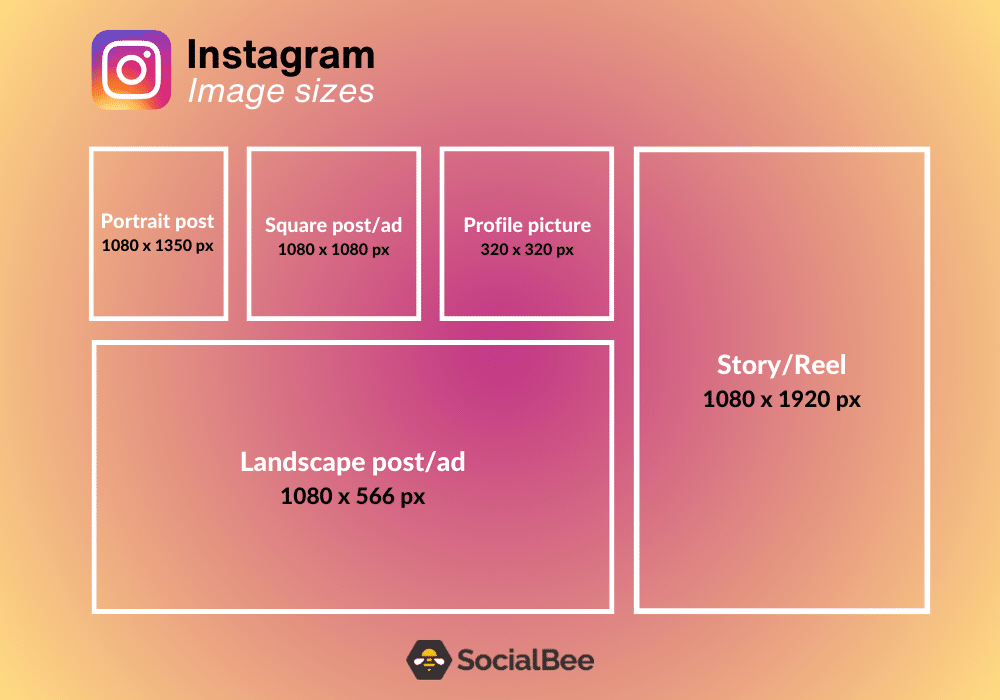
Now that Instagram has switched its grid from a 1:1 to a 4:5 aspect ratio, you’ll want to upload images in that format, specifically 1080 x 1350 px, if you want your photos to look good on your grid.
Here are all the types of Instagram images and their sizes:
- Instagram profile picture size: 320 x 320 pixels
- Instagram feed post sizes: 1080 x 1350 pixels / 1080 x 1080 pixels / 1080 x 566 pixels / 1080 x 1440
- Instagram Story image size: 1080 x 1920 pixels
- Instagram carousel image size: 1080 x 566 pixels / 1080 x 1080 pixels / 1080 x 1350 pixels / 1080 x 1440
- Instagram Reels size: 1080 x 1920 pixels
- Instagram landscape ad size: 1080 x 566 pixels
- Instagram square ad size: 1080 x 1080 pixels
A. Instagram Profile Picture Size: 320 x 320 Pixels
For Instagram profile photos, the displayed size is 110 x 100 pixels. However, it is important to note that the image files are stored at a larger size of 320 x 320 pixels.
B. Instagram Image Sizes for Feed Posts
Here are the Instagram image sizes for feed posts:
- Portrait posts (RECOMMENDED): Opt for an image size of 1080 x 1350 pixels with a 4:5 aspect ratio for vertically-oriented images.
- Square posts: Use an image size of 1080 x 1080 pixels with a 1:1 aspect ratio for square images.
- Landscape posts: Choose an image size of 1080 x 566 pixels with a 1.91:1 aspect ratio for horizontally-oriented images.
C. Instagram Story Image Sizes: 1080 x 1920 Pixels
Always make sure to create Stories with an image size of 1080 x 1920 pixels, ensuring a vertical format with a 9:16 aspect ratio.
D. Instagram Carousel Image Sizes
Consider the following carousel image size recommendations for different orientations on Instagram:
- Portrait (RECOMMENDED): Choose an image size of 1080 x 1350 pixels for portrait-oriented images, with an aspect ratio of 4:5.
- Landscape: Optimal dimensions for landscape images are 1080 x 566 pixels, maintaining an aspect ratio of 1.91:1.
- Square: Square images should be sized at 1080 x 1080 pixels, maintaining a 1:1 aspect ratio.
E. Instagram Reels Size: 1080 x 1920 Pixels
All Reels on Instagram should have a size of 1080 x 1920 pixels and an aspect ratio of 9:16.
Also, the cover photo you can upload for your Reels should also have 1080 x 1920 pixels.
F. Instagram Ads Image Sizes
When creating Instagram ads, make sure that your landscape ads are 1080 x 566 pixels, ensuring a visually appealing wide format.
As for square ads, they should be sized at 1080 x 1080 pixels, providing a balanced and versatile format.
6. YouTube Image Sizes
Known as the world’s second most active social media platform, YouTube shows no signs of slowing down. Its impressive video selection is nothing short of fascinating and it would be a great idea to create a channel for your brand.
Now, let’s talk about image sizes.
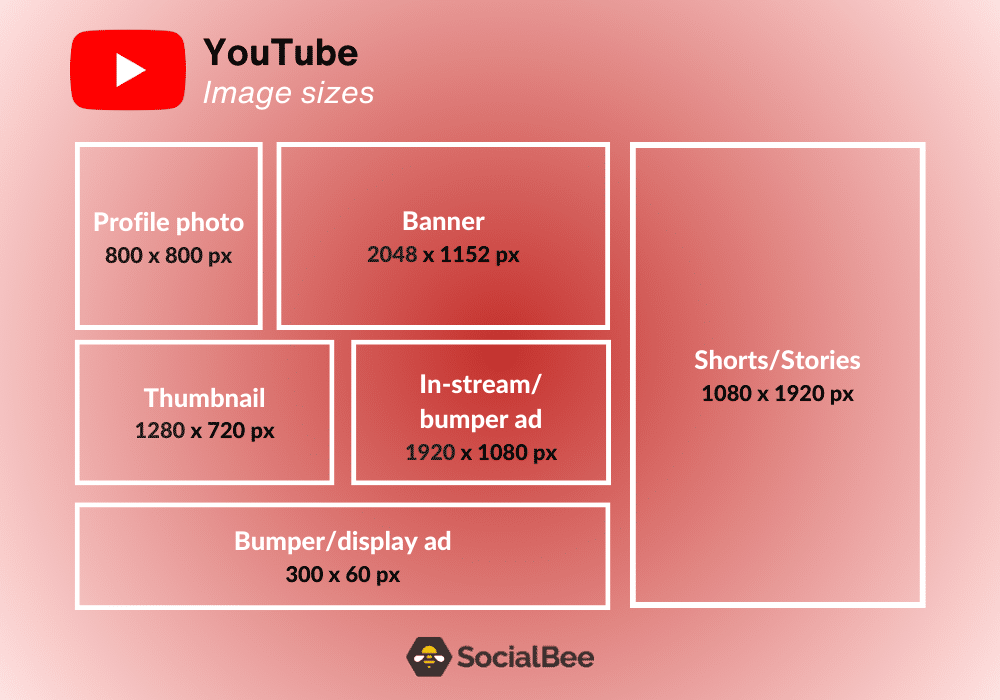
Here are all the types of YouTube images and their sizes:
- YouTube profile photo size: 800 x 800 pixels
- YouTube banner image size: 2048 x 1152 pixels
- YouTube video size: 1920 x 1080 pixels (recommended)
- YouTube Shorts video size: 1080 x 1920 pixels
- YouTube thumbnail image size: 1280 x 720 pixels
- YouTube Stories: 1080 x 1920 pixels
- YouTube in-stream ad size: 1920 x 1080 pixels
- YouTube in-feed ad size: 1280 x 720 pixels
- YouTube bumper ad size: 1920 x 1080 pixels and 300 x 60 pixels
- YouTube display ad size: 300 x 60 pixels
- YouTube overlay ad size: 1920 x 1080 pixels / 1080 x 1920 pixels / 1080 x 1080 pixels
A. YouTube Profile Photo Size: 800 x 800 Pixels
For your YouTube profile photo, it is recommended to use an image size of 800 x 800 pixels. To achieve the best results, ensure that the focal point of your photo is centered.
Accepted file formats for the profile photo include JPEG, GIF, BMP, or PNG, while animated GIFs are not supported. Keep in mind that the rendered size of the photo will be 98 x 98 pixels.
B. YouTube Banner Image Size: 2048 x 1152 Pixels
For your YouTube banner image, it is recommended to use a minimum size of 2048 x 1152 pixels, maintaining an aspect ratio of 16:9.
Additionally, keep in mind that the maximum file size for your banner image should has a maximum file size of 6MB.
C. YouTube Video Size: 1920 x 1080 Pixels (recommended)
For YouTube videos, the recommended minimum size is 1280 x 720 pixels, ensuring a high-definition (HD) standard. However, using a higher pixel count of 1920 x 1080 pixels is advisable.
Both of these dimensions adhere to the 16:9 aspect ratio, which is commonly used for widescreen displays.
D. YouTube Shorts Video Size: 1080 x 1920 Pixels
Introduced back in 2020, YouTube Shorts give creators the chance to reach audiences with quick and engaging vertical videos. 1080 x 1920 pixels is the size you should always go for.
E. YouTube Thumbnail Size: 1280 x 720 Pixels
The recommended size for YouTube thumbnails is 1280 x 720 pixels, with an aspect ratio of 16:9. Thumbnails are the small preview images that represent your videos and help attract viewers.
F. YouTube Stories: 1080 x 1920 Pixels
Do you need to share something urgent with your YouTube subscribers? Do it with the help of YouTube stories. They expire after seven days and should always have 1080 x 1920 pixels.
G. YouTube In-Stream Ad Size: 1920 x 1080 Pixels
You’re most likely accustomed to seeing in-stream ads on YouTube. They are typically either skippable or non-skippable and they usually roll before, after, and during a YouTube video. If you wish to use this type of ad, make sure that your sponsored video has at least 1920 x 1080 pixels.
H. YouTube In-Feed Ad Size: 1280 x 720 Pixels
Your audience can see your in-feed ad as soon as they access their home pages. Make sure that the photo you choose has 1280 x 720 pixels for best results.
I. YouTube Bumper Ad Size: 1920 x 1080 Pixels and 300 x 60 Pixels
With bumper ads, you can talk directly to your target audience. While your video ad runs, a photo will accompany it. Make sure that the video has at least 1920 x 1080 pixels and that the image has 300 x 60 pixels.
J. YouTube Display Ad Size: 300 x 60 Pixels
Remember that image that displays at the top of your recommended videos as you watch content on YouTube? You guessed it, it should have 300 x 60 pixels.
K. YouTube Overlay Ad Sizes
Last, but not least, overlay ads. They are completely free and helpful for marketers all over the world.
If you choose to go with overlay ads, you should know that they typically have 468 x 60 pixels or 728 x 90 pixels.
Tips
Here are three tips for optimizing your YouTube sizes:
- Aim for a minimum resolution of 1280 x 720 pixels (HD) for your videos. Higher resolutions like 1920 x 1080 pixels (Full HD), or 3840 x 2160 pixels (4K) are recommended for higher-quality content.
- Create eye-catching thumbnails with a size of 1280 x 720 pixels, maintaining the 16:9 aspect ratio.
- Design your YouTube banner with dimensions of 2560 x 1440 pixels to ensure it displays well across different devices.
7. TikTok Image Sizes
You could call TikTok the new kid on the block. However, most brands are perfectly aware of its incredible power to convert and bring in some much-needed sales.
Let’s check out TikTok’s image sizes!
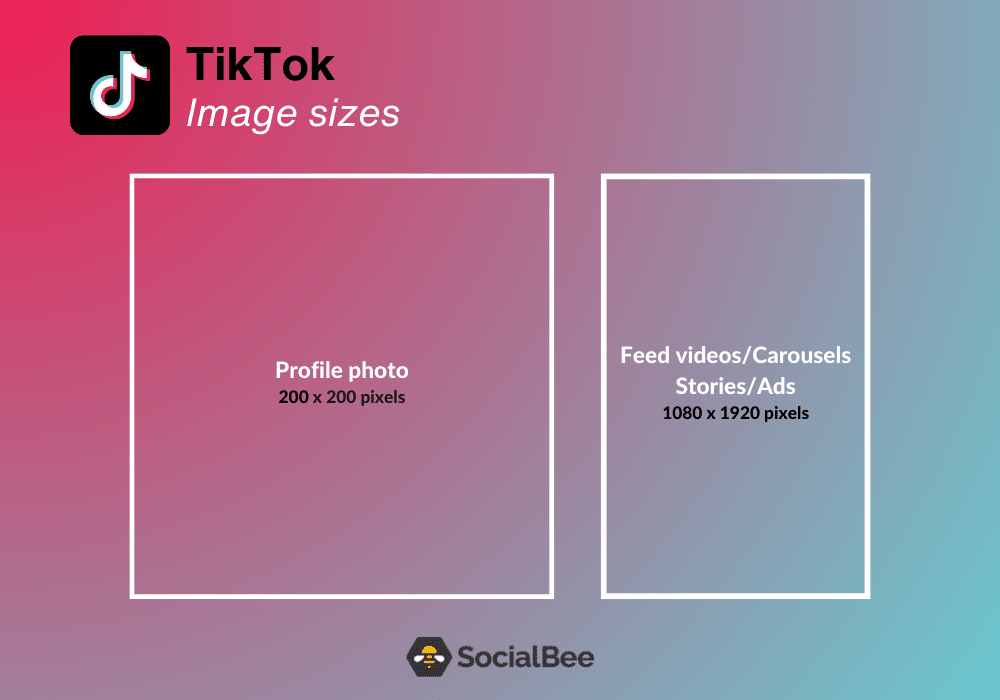
Here are all the types of TikTok images and their sizes:
- TikTok profile image size: 200 x 200 pixels
- TikTok video size: 1080 x 1920 pixels
- TikTok Story size: 1080 x 1920 pixels
- TikTok carousel video/image size: 1080 x 1920 pixels
- TikTok ad size: 1080 x 1920 pixels
A. TikTok Profile Image: 200 x 200 Pixels (recommended)
For your TikTok profile photo, the optimal upload size is 200 x 200 pixels. However, it is recommended to upload a higher-quality photo.
By choosing a photo with higher resolution and clarity, you can ensure that your profile photo appears sharp and visually appealing on TikTok.
B. TikTok Video Size: 1080 x 1920 Pixels
When it comes to TikTok videos, the recommended size is 1080 x 1920 pixels, which corresponds to a 9:16 aspect ratio.
C. TikTok Story Size: 1080 x 1920 Pixels
Want to share a quick sneak peek of your behind-the-scenes events? If so, TikTok stories are the ultimate way to do this. They disappear in 24 hours and should have a size of 1080 x 1920 pixels.
D. TikTok Carousel Image Size: 1080 x 1920 Pixels
For optimal results, the recommended size for TikTok carousel images is 1080 x 1920 pixels. It is advised to adhere to an aspect ratio of 9:16 or 1:1 for these images, although images with a 4:5 ratio can also be posted.
E. TikTok Ad Size: 1080 x 1920 Pixels
Ads can help you promote your brand and increase your TikTok follower count. You should know that the size for TikTok ads is currently 1080 x 1920 pixels.
Tips
Here are three tips for optimizing the sizes of your TikTok content:
- Aim for a video resolution of 1080 x 1920 pixels, which corresponds to a 9:16 aspect ratio.
- For TikTok carousel images, aim for a size of 1080 x 1920 pixels. It is ideal to maintain an aspect ratio of 9:16 or 1:1 for these images, although a 4:5 ratio is also acceptable.
- While the minimum size for a TikTok profile picture is 200 x 200 pixels, it is recommended to use a higher resolution image to maintain quality.
8. Google Business Profile Image Sizes
Last, but certainly not least, we’re here to give you a quick size guide on none other than Google Business Profile. Ready? We hope so!
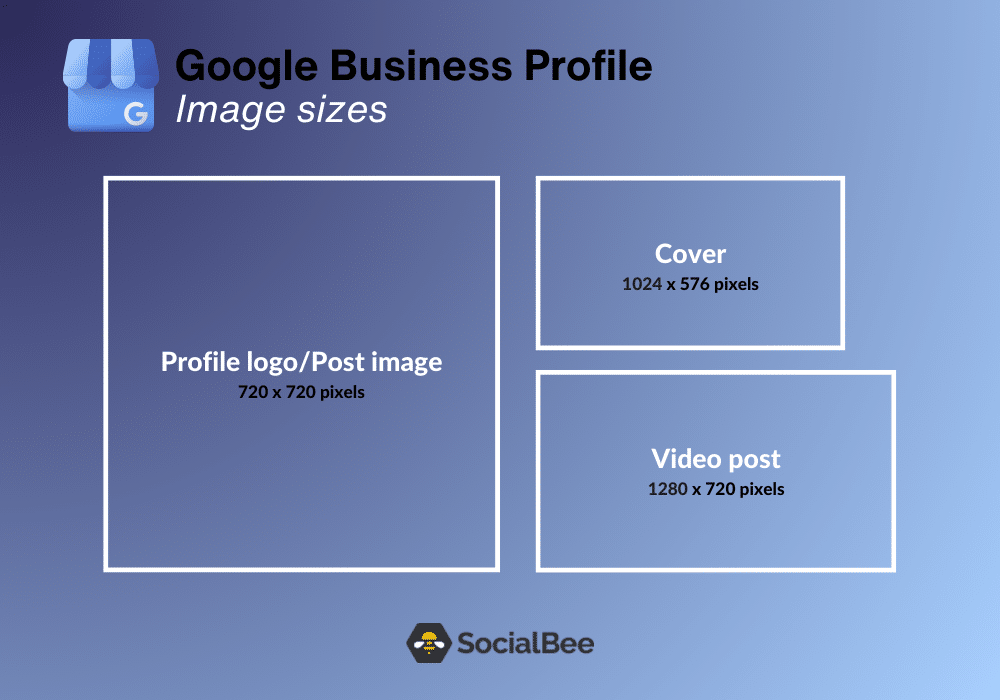
Here are all the types of Google Business Profile images and their sizes:
- Google Business Profile logo image size: 720 x 720 pixels
- Google Business Profile cover photo size: 1024 x 576 pixels
- Google Business Profile image post size: 720 x 720 pixels
- Google Business Profile video post size: 1280 x 720 pixels (minimum)
A. Google Business Profile Logo Image Size: 720 x 720 Pixels
For your Google Business Profile logo, it is recommended to use an image size of 720 x 720 pixels in a square shape. For your logo to be high-quality, it is advised to save it in the PNG file format.
This file format ensures that the image retains its clarity and sharpness when uploaded. Additionally, the maximum file size is 5MB.
B. Google Business Profile Cover Photo Size: 1024 x 576 Pixels
How about a cover photo that best represents your business? As soon as you decide to make this addition to your business profile, make sure that the cover photo has 1024 x 576 pixels for the best results.
C. Google Business Profile Image Post Size: 720 x 720 Pixels (Recommended)
In terms of resolution, it is recommended to have a 720 x 720 pixels profile photo. However, the minimum resolution should be at least 250 x 250 pixels.
D. Google Business Profile Video Post Size: 1280×720 Pixels (Minimum)
Keep the duration of your videos within a maximum length of 30 seconds.
Also, the maximum file size is 75MB to ensure smooth playback.
Lastly, it is recommended to have a resolution of at least 720p (1280 x 720 pixels) or higher for clear and high-quality visuals.
Tips
Here are three tips to ensure your profile is visually appealing and displays correctly:
- Follow the suggested image dimensions provided by Google, such as 720 x 720 pixels for logos or other profile images.
- Compress your images to make your load time faster.
- View your Google Business profile on multiple devices, including desktops, smartphones, and tablets, to ensure that your images are displayed correctly.
SocialBee’s post assistant, powered by AI, can help you streamline your content creation process considerably and improve your posts. By using this tool, you can produce engaging content and enhance the overall quality of your posts. This is a great way to advance your social media efforts.
