



When I’m managing multiple Pinterest accounts or clients, separate workspaces and approval workflows make it feel more like a Pinterest manager than a simple pin scheduler.
What I like about SocialBee for Pinterest
- One tool for Pinterest plus other social media platforms (great if you don’t want to juggle other tools)
- Category-based scheduling that keeps your Pinterest content mix balanced over time
- AI Copilot and AI generators for writing pin copy, descriptions, and title variations
- Visual calendar for a bird’s eye view of all your pins, published and scheduled content
- Built-in integrations with Canva, Unsplash, and GIPHY for faster content optimization
- Solid Pinterest analytics alongside other networks, so you don’t have to jump between dashboards
What could be better about SocialBee
- The initial setup (categories, schedules, board mapping) takes a bit of time, especially if you manage many boards
SocialBee pricing
2. Pinterest native scheduler
When I just need to schedule some posts on Pinterest natively and test something quickly, I still use the built-in Pinterest scheduler. It’s available for any Pinterest business account and works both on desktop (Create → Create Pin) and in the Pinterest app.
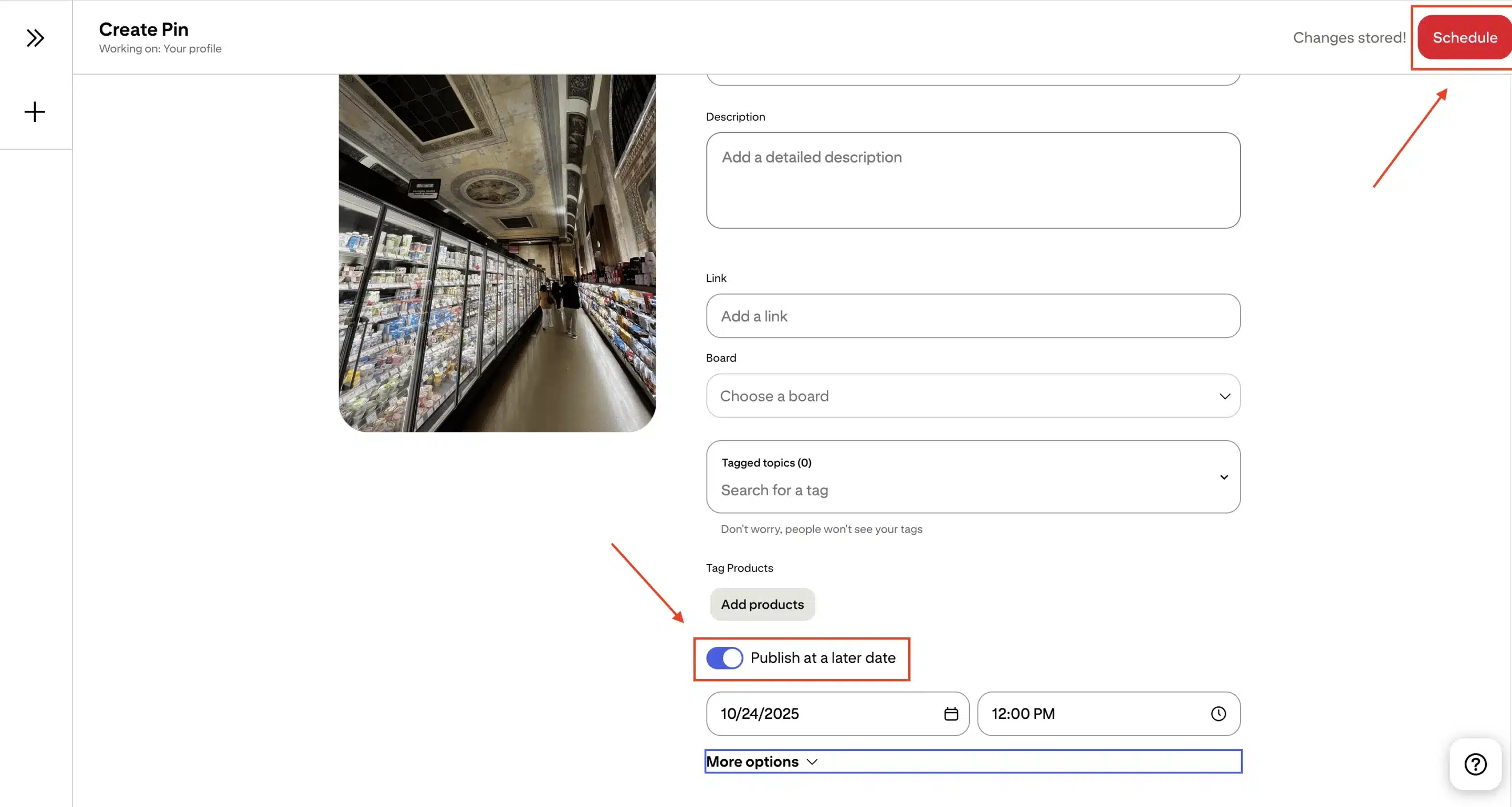
The native Pinterest scheduler currently lets you schedule standard pins up to 30 days in advance, with a small scheduled queue (up to around 10 pins), and you can adjust the schedule date, board, title, and description later via the pencil icon, or delete pins from the scheduled section if plans change.
You can’t replace the media once it’s queued, which is a common limitation people run into.
What I like about Pinterest’s native scheduling
- Completely free for Pinterest business accounts
- Simple scheduling process right inside the Pinterest app or browser
- Full access to the latest pin formats and Pinterest tools (Trends, Analytics, etc.)
- Good fit if you only need to schedule Pinterest posts occasionally and manage one account
What could be better about the Pinterest native scheduler
- Limit on how many pins you can schedule at once (only 10), and only up to 30 days ahead
- No true calendar view, board lists, or bird’s eye view of your Pinterest content
- No bulk upload, no multi-account support, and no advanced Pinterest analytics beyond what the platform already provides
Pinterest native scheduling pricing
- Free, included with any Pinterest business account
3. Tailwind
When someone asks me for a Pinterest-first scheduling tool, Tailwind is usually the second name I bring up after SocialBee. Tailwind is one of Pinterest’s longest-standing official partners and is built very specifically around Pinterest marketing best practices: optimal posting times, fresh pin creation, and multi-week queues.

In my experience, Tailwind shines when you’re scheduling your pins in batches. You can use the drag-and-drop calendar, smart schedule suggestions, and browser or Chrome extension to create pin after pin, attach them to multiple boards, and fill your queue for weeks.
Tailwind Communities can also help if your Pinterest game relies heavily on collaboration and niche-based sharing.
What I like about Tailwind
- Deep Pinterest focus: smart schedule, board lists, and bulk pin creation
- Strong Pinterest analytics and recommendations tailored to Pinterest best practices
- Tailwind Communities for collaborative Pinterest marketing and niche discovery
- Handy browser/Chrome extension for creating pins as you browse
What could be better about Tailwind
- The interface can feel busy if you only need basic Pinterest scheduling
- Pricing tiers and post limits can be overkill if you just want to schedule a handful of pins per week
Tailwind pricing
- Free plan with limited posts
- Paid plans start at $29.99/month
4. RecurPost
RecurPost is a good fit if you’re focused on evergreen Pinterest content and want a budget-friendly social media scheduling tool that still supports Pinterest via the official Pinterest API. It lets you organize posts into content libraries, set recurring schedules, and keep a steady flow of Pinterest pins going out without having to recreate everything from scratch.

In practice, I’ll often see teams use RecurPost to queue up blog post pins, product pins, and other long-life content, then let the scheduler re-surface them according to their marketing strategy.
It’s not as Pinterest-specialized as Tailwind, but it gives you a simple way to manage Pinterest scheduling alongside other platforms without paying enterprise prices.
What I like about RecurPost
- Categorized libraries for evergreen pins and other social media posts
- Best-time scheduling options that help distribute your content automatically
- Supports multiple social accounts, including Pinterest, from one dashboard
- Competitive pricing for solo creators and small businesses
What could be better about RecurPost
- Interface and reports feel more basic compared to other Pinterest schedulers
- Occasional feedback about bugs or quirks, especially in more complex setups
RecurPost pricing
- 14-day free trial
- Paid plans start at $9/month
5. Later
Later is a visual content planner first and a Pinterest scheduler second, which can be exactly what you want if your content is heavily design-driven. I like using it when teams want a drag-and-drop calendar to coordinate Pinterest pins, Instagram posts, TikTok videos, and more in one place.
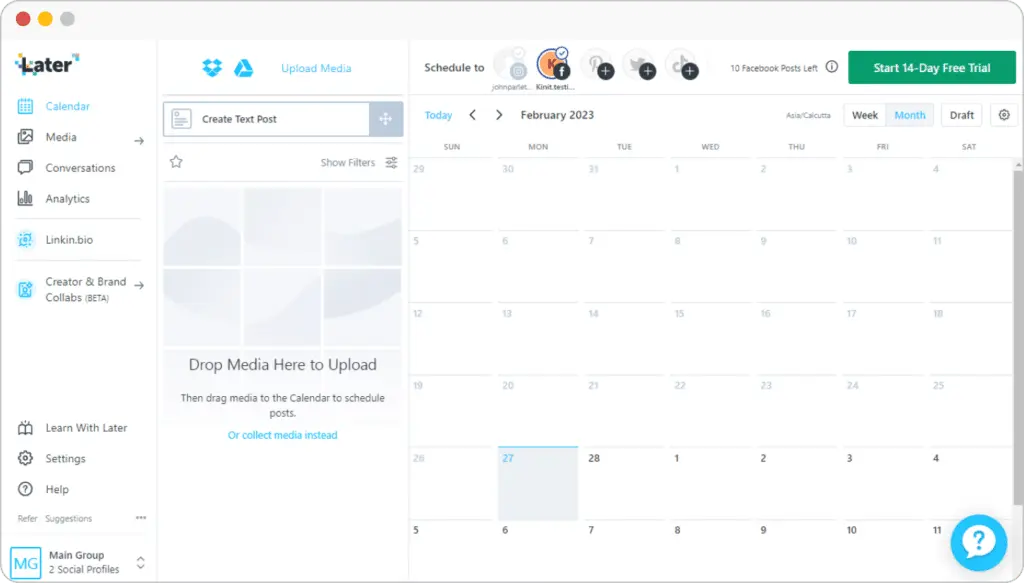
For Pinterest, Later lets you upload images, set your pin title and pin copy, choose the correct Pinterest board, and bulk schedule pins to go out at a later date. The built-in media library, saved captions, and link-in-bio tools can help you keep destination links consistent across campaigns and different social media platforms.
It’s quite user-friendly if you prefer a strong visual calendar and simple analytics over deeper features for just Pinterest.
What I like about Later
- Clean, visual calendar for planning Pinterest content alongside other platforms
- Central media library to reuse images and video pins across campaigns
- Built-in link-in-bio feature to drive traffic from your social profiles
- Pinterest analytics that cover basic performance metrics without overwhelming you
What could be better about Later
- Post caps, extra social sets, and add-ons can make the real cost higher than it first appears
- Fewer Pinterest-specific features (like communities or advanced board lists) compared to dedicated pin schedulers
Later pricing
- 14-day free trial
- Paid plans start at $25/month
Tips for optimizing your Pinterest posting schedule
If you want your pins to perform reliably, it’s not enough to queue content and hope for the best. These four steps help you build a posting schedule that supports consistent reach, stronger search visibility, and a more organized Pinterest workflow.
Here’s how to optimize your Pinterest posting schedule:
- Customize your content for Pinterest
- Schedule posts at the right times
- Build a simple review process
- Monitor your analytics and refine your strategy
1. Customize your content for Pinterest
Tailored pins almost always perform better than generic cross-posted content.
“The only way to grow a Pinterest account is by creating relevant and useful content. You need to create pins that have a purpose, that are relevant to your audience, and, most importantly, are aesthetically pleasing. This is going to get people to click on the pin, save it, interact with it, and that’s what’s going to push you out to the masses.” says Gia, digital marketer.
Design your visuals using Pinterest’s recommended 2:3 aspect ratio, so they appear properly in the feed. Craft clear pin titles, write keyword-rich descriptions based on how users search, and choose destination links that align with the pin’s purpose.
In my experience, even small adjustments, like rewriting the description to match seasonal trends or updating the title with a long-tail keyword, can noticeably increase saves and clicks.
If your scheduler supports it, create a dedicated Pinterest version of each post. This keeps your content native to the platform, even when you’re repurposing assets from other social media posts or blog articles.
2. Schedule posts at the right times
Your posting schedule should reflect when your audience is most active and when Pinterest engagement naturally peaks.
Start by reviewing your analytics to see which days and times historically bring in more impressions, saves, or clicks. Pinterest usage often surges around afternoons, evenings, and weekends, but patterns vary by audience and niche.
Once you identify a few high-performing windows, schedule future pins around those optimal times so your content is consistently published when people are searching and saving.
The goal isn’t to chase a single “perfect” time but to create a schedule that stays consistent and predictable. Over time, that consistency helps you build stronger visibility in Pinterest search, which can generate more traffic to your website or product sales.
Fun fact: You can use Google Analytics to track website traffic from Pinterest.
3. Build a simple review process
A quick review before pins go live can prevent avoidable mistakes and keep your brand aligned across boards and campaigns.
Before scheduling a pin, verify these essentials:
- The image is sized correctly and clearly communicates the topic
- The pin title and description match your keyword strategy
- The destination link works and matches user intent
- The pin is assigned to the most relevant board
If several people are involved in your Pinterest strategy, put a lightweight approval step in place so visuals, copy, and links are checked by someone else before publishing. This reduces errors and makes your workflow more dependable.
4. Monitor your analytics and refine your strategy
A strong Pinterest schedule is built on data, not guesswork.
Review your Pinterest analytics regularly to track which pins, boards, and formats perform best. Impressions help you understand reach, saves show which content people want to revisit later, and clicks indicate stronger interest or buying intent.
Use these insights to adjust future posting times, refine your pin design style, experiment with new formats like video pins, or shift more content toward boards that consistently perform well. Over time, this feedback loop strengthens your Pinterest strategy and makes your schedule increasingly effective.
Frequently asked questions
1. How far in advance can I schedule Pinterest posts?
Pinterest’s built-in scheduler allows you to schedule posts up to two weeks ahead. If you need a longer planning window, third-party tools such as SocialBee let you schedule content months in advance, manage multiple boards, and store drafts in one workspace.
2. Can I edit a scheduled pin?
With Pinterest’s native scheduler, you cannot edit a pin after scheduling it; you must delete and recreate it. Third-party scheduling tools offer more flexibility, allowing you to adjust titles, descriptions, links, and publishing times without starting over.
3. How often should I post on Pinterest?
Most marketers post between 3 and 10 pins per day, depending on their content library and goals. The key is consistency: steady posting signals to Pinterest that your account is active, which can improve distribution. A scheduler makes it easier to maintain this pace without posting manually.
Start scheduling pins to make your work easier
The real advantage of using a Pinterest scheduler is the structure it brings to your workflow. Instead of checking Pinterest throughout the week or managing posts one by one, you can map out your content once, assign each pin to the right board, and let the schedule run in the background.
At this point, the next step is simply testing what this looks like in practice. A tool like SocialBee gives you space to experiment with a visual calendar, create Pinterest-specific versions of your posts, and see how a centralized workflow feels over a couple of weeks.
The 14-day free trial is enough time to test whether a structured scheduling system actually supports the way you work.
