


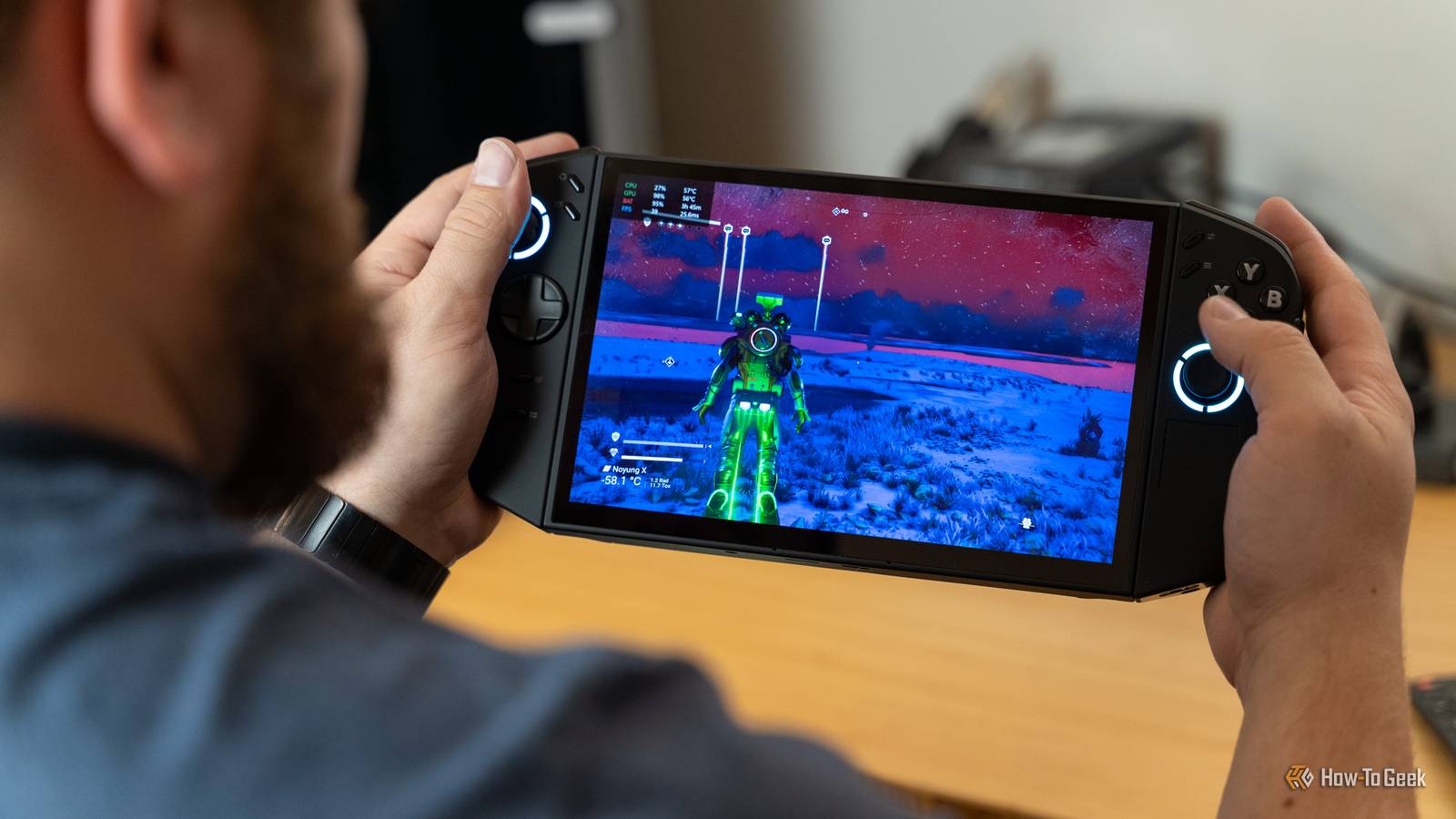
The latest Lenovo Legion Go 2 sports the recently-released AMD Ryzen Z2 and Z2 Extreme processors, an 8.8-inch FHD+ OLED panel, and fantastic software. In fact, the experience is so good that it almost made me fall in love with portable gaming handhelds—but it didn’t fully persuade me.


7/10
- Dimensions
-
295.6 x 136.7 x 42.25 mm
- Brand
-
Lenovo
- Weight
-
2.03 pounds
- Chipset
-
AMD Ryzen Z2/Extreme
The Lenovo Legion Go 2 features the AMD Ryzen Z2/Z2 Extreme processor, up to 32GB of RAM, and an 8.8-inch OLED 144Hz display for gaming on-the-go. With a solid battery lift lasting over two hours of intense gaming, the Legion Go 2 is ready for whatever you throw at it.
- Solid performance in newer games
- Crisp and bright OLED display
- Feels great in the hands
- Good battery life
- Pricey for what you get
- Only has microSD for storage expansion, no user-accessible NVMe drive

How We Test and Review Products at How-To Geek
We go hands-on with every product to ensure it’s worth your time and money.
Price and availability
The Lenovo Legion Go 2 comes in two versions, one with the AMD Ryzen Z2 and 16GB of RAM for $1,100, and the other with the AMD Ryzen Z2 Extreme and 32GB of RAM for $1,350. It is available to purchase at Best Buy and Abt Electronics.
I am reviewing the Z2 Extreme model, which seems to be unavailable at all retailers at the time of writing.
- Dimensions
-
295.6 x 136.7 x 42.25 mm
- Brand
-
Lenovo
- Weight
-
2.03 pounds
- Chipset
-
AMD Ryzen Z2/Extreme
- RAM
-
16GB/32GB LPDD5X
- Storage
-
Up to 2TB NVMe
- Wireless Connectivity
-
Wi-Fi 6E, Bluetooth 5.3
- Display
-
8.8-inch OLED 1920×1200 144Hz
- Ports
-
2x USB-C USB4, microSD UHS-II, 3.5mm headphone jack
- Battery
-
74Wh
- Speakers
-
2 X 2W Integrated Speakers System with Nahimic Audio
This is one of the best-feeling gaming handhelds I’ve used

I’ve used several gaming handhelds over the years, from the Switch to the Steam Deck to a few Windows-based gaming handsets—and the Lenovo Legion Go 2 has to be the best that I’ve held.
While the Legion Go 2 is definitely on the beefier side of things, with a weight of just over two pounds, I feel it’s balanced very well. The controllers feel great in-hand, and I never got tired of holding the system while gaming.
I will say, the trackpad on the right controller was a bit odd to use and move my thumb down to. It’s not impossible to use, but it’s definitely not in an ergonomic position—I also didn’t find much use for the trackpad itself
The rest of the controller layout was pretty great. I felt at home as if I was using a normal console controller most of the time, which is something that I haven’t always experienced on previous gaming handhelds that I’ve used. The power button also doubles as a fingerprint sensor and worked just about every time I tried to use it, which I was very happy with.
However, the extra macro buttons on the controllers were very strange to me. The positioning of M1 and M2 were essentially unusable for me, M3 and M4 around the back of the right controller were a bit better positioned. Y1 and Y2 on the left controller were in the perfect position to use.
The oddest inclusion here though is the mouse wheel on the right controller. I can somewhat understand why Lenovo included it, but I just don’t see a use for a mouse wheel on a gaming handheld. I think Lenovo would have done just fine leaving both the touchpad on and mouse wheel off the right controller.
Lenovo nailed the software of the Legion Go 2
The software experience of any gaming system makes or breaks the experience, and Lenovo absolutely nailed it with the Legion Go 2. There’s a quick access menu which has all the settings you could want easily accessible.
Within the quick access menu (top left button on the right controller face) you’ll immediately be dropped into the performance tab, which gives you a performance monitor, thermal mode, and even access to a fan mode with curve adjustments. On the performance screen, you can also toggle the FPS limiter and the OS’ power mode.

Next up is the general tab, which has brightness and volume sliders, Bluetooth and Wi-Fi toggles, and even things like resolution, refresh rate, and frame monitors (with a toggle for Radeon Super Resolution).
Continuing on within this quick access menu, you have controller mapping, system quick settings, and more, all within a single layer. I really enjoy using this mode for turning things like the frame monitor on and off (of which there are three versions of to use). The frame monitor is extremely well-built, and I’ve enjoyed using the normal version, which gives CPU and GPU percentages and temperatures, battery percentage with estimated life left, as well as frames per second and frame rendering time.
The Legion app I found myself rarely touching, however. It’s a decent app and works well as a gaming and settings hub, but I found that all the settings I needed were within the quick access window and I just used native game launchers instead.
At the end of the day, though, I really felt like Lenovo built the software for the Legion Go 2 well. It functions great without getting in the way and is easy to access—what more could I want?
microSD expansion only is a bit of a letdown

While the Lenovo Legion Go 2 does have an M.2 2280 PCIe 4.0 x4 slot, it’s not user-accessible, so don’t expect to buy the lower storage model and easily upgrade it. If the included SSD isn’t enough for you, Lenovo did put a microSD slot on the bottom of the Legion Go 2 that you can use to add additional storage.
This is a pretty big letdown to me. It really wouldn’t have been that hard to add an access door under the kickstand to be able to swap the SSD out for a larger one. It might have taken some reworking of internals, but I’m sure Lenovo could have figured it out.
A microSD card isn’t the worst option in the world—at least Lenovo gives a way to expand the storage. The main problem comes from the fact that most microSD cards are still pretty slow compared to NVMe storage. The microSD UHS-II standard that Lenovo is leveraging here maxes out at around 300MB/s transfer rates, while PCIe 4.0 NVMe SSDs can hit upward of 8,000MB/s.
I wouldn’t use a microSD card to store games on because of how slow they are, but it is great to have for storing other documents, photos, downloads, and more on. The microSD card could also be used to move games to that you’re not actively playing to keep from having to constantly redownload titles.
The problem is, these are all just temporary solutions. I really wish Lenovo would have just made it possible to swap the NVMe drive myself.
The Legion Go 2 offers pretty good performance, with one catch

I was quite impressed with the performance of the Legion Go 2 after playing several games on it. I tested the Legion Go 2 with some of my favorite games, including No Man’s Sky and Starfield.
I found that, without frame generation enabled, I was able to hit around 25 to 30 FPS in most titles when pushing high or ultra graphics. Turning things down to standard or low definitely increased FPS without frame generation to a pretty solid 80 or higher—and I really didn’t notice much fidelity difference on the small 8.8-inch FHD+ display.
Turning frame generation on (in supported titles) definitely gave me an FPS bump, though. I was able to push No Man’s Sky to high settings and typically sit in the 40-50 FPS range, while standard easily netted me 60 FPS or more. Starfield was a little less demanding for me, and I easily hit 60 FPS or higher with frame generation on high settings, with low settings delivering even better performance, dipping into the 90 FPS range.

While I did have to use frame generation for the best performance possible (on high settings), that’s what it’s made for. I don’t think you should need frame generation to achieve playable FPS with a top-tier graphics card, but something low-power like this gaming handheld? Well, that’s exactly what frame generation is designed for.
What’s the catch I referenced? To achieve the best experience with great frame rates, you need to be playing a modern title that supports frame generation. If you’re playing something older without that type of support, then you might not have the best experience overall—though those older games are often less demanding.
Out of all the Windows gaming handhelds that I’ve used, the Legion Go 2 has come the closest to persuading me to play PC games on-the-go. I want to play my favorite titles away from my desk, I really do, I just can’t bring myself to embrace it full-time yet. The experience has been great for a handheld, but it still doesn’t match playing games at my desk yet—and it might never achieve that.

I have considered buying a Windows gaming handheld many times, and the Legion Go 2 comes the closest to convincing me to do so. The price to performance is one of the main hold backs for me to fully embrace it. My gaming desktop offers a much better overall experience, and I didn’t spend much more than what the Legion Go 2 costs to build it (though it’s a few years old now). I could easily build a gaming desktop that outpaces the Legion Go 2 for the same price, and enjoy much more upgradability with it.
Regardless of all that, I was quite happy with how the Legion Go 2 performed when gaming. The 8.8-inch OLED 1920×1200 144Hz display (which can get pretty bright at 1,100 peak nit in HDR and 500 nit typical with SDR) was a joy to game on. With the large 74Wh battery, I could easily game for around two hours on full brightness, even with more demanding titles.
There’s also a solid set of I/O on this handheld, with two USB4 40Gb/s ports, Wi-Fi 6E, Bluetooth 5.3, and DisplayPort 2.1 support (over USB-C). You’ll also find an included 65W USB-C PD charger in the box, though I just used my Anker USB-C charging hub that I keep at my desk to charge the Legion Go 2 and never had any problems.
Should you buy the Lenovo Legion Go 2?

I really like the Lenovo Legion Go 2, and think that it’s possibly one of the better Windows gaming handhelds on the market today. The main problem I have with it is its starting price of $1,100. That’s just such a high price to ask for a portable gaming handheld that has decent, but not insanely crazy good performance.
The overall experience with the Legion Go 2 has been wonderful, and I am very happy with how the system holds up. I just wish Lenovo had priced it a few hundred dollars lower than they did. That would have made it a steal.
As it stands, if you can find the Legion Go 2 on sale, I think it’s absolutely the system to buy right now. At MSRP, however, I think it’s worth holding off for a sale. Lenovo’s biggest competitor in this space is the ASUS ROG Xbox Ally X, which comes with the AMD Ryzen Z2 Extreme, 24GB of RAM, and 1TB of storage for $1,000—a full $100 below Lenovo’s Z2 model of the Legion Go 2, and $350 below the Z2 Extreme version.
At the end of the day, the Lenovo Legion Go 2 is a really great handheld that’s limited only by price and storage expansion—but primarily by price
7/10
- Dimensions
-
295.6 x 136.7 x 42.25 mm
- Brand
-
Lenovo
- Weight
-
2.03 pounds
- Chipset
-
AMD Ryzen Z2/Extreme
The Lenovo Legion Go 2 features the AMD Ryzen Z2/Z2 Extreme processor, up to 32GB of RAM, and an 8.8-inch OLED 144Hz display for gaming on-the-go. With a solid battery lift lasting over two hours of intense gaming, the Legion Go 2 is ready for whatever you throw at it.
