Close Menu
SkytikSkytik

    Subscribe to Updates

    Get the latest creative news from FooBar about art, design and business.

    What's Hot

    At Least 32 People Dead After a Mine Bridge Collapsed Due to Overcrowding

    November 17, 2025

    Here’s how I turned a Raspberry Pi into an in-car media server

    November 17, 2025

    Beloved SF cat’s death fuels Waymo criticism

    November 17, 2025
    Facebook X (Twitter) Instagram
    • About Us
    • Contact Us
    SkytikSkytik
    • Home
    • AI Tools
    • Online Tools
    • Tech News
    • Guides
    • Reviews
    • SEO & Marketing
    • Social Media Tools
    SkytikSkytik
    Home»Online Tools»Navigate Feedly Faster with Go To
    Online Tools

    Navigate Feedly Faster with Go To

    AwaisBy AwaisApril 7, 2026No Comments2 Mins Read0 Views
    Facebook Twitter Pinterest LinkedIn Telegram Tumblr Email
    Feedly
    Share
    Facebook Twitter LinkedIn Pinterest Email

    15-Second summary:

    Feedly gives you a powerful arsenal of capabilities to track threats: AI Agents, Insights Cards, AI Feeds, Boards, and more. Go To makes it easy to navigate directly to the right one, instantly.

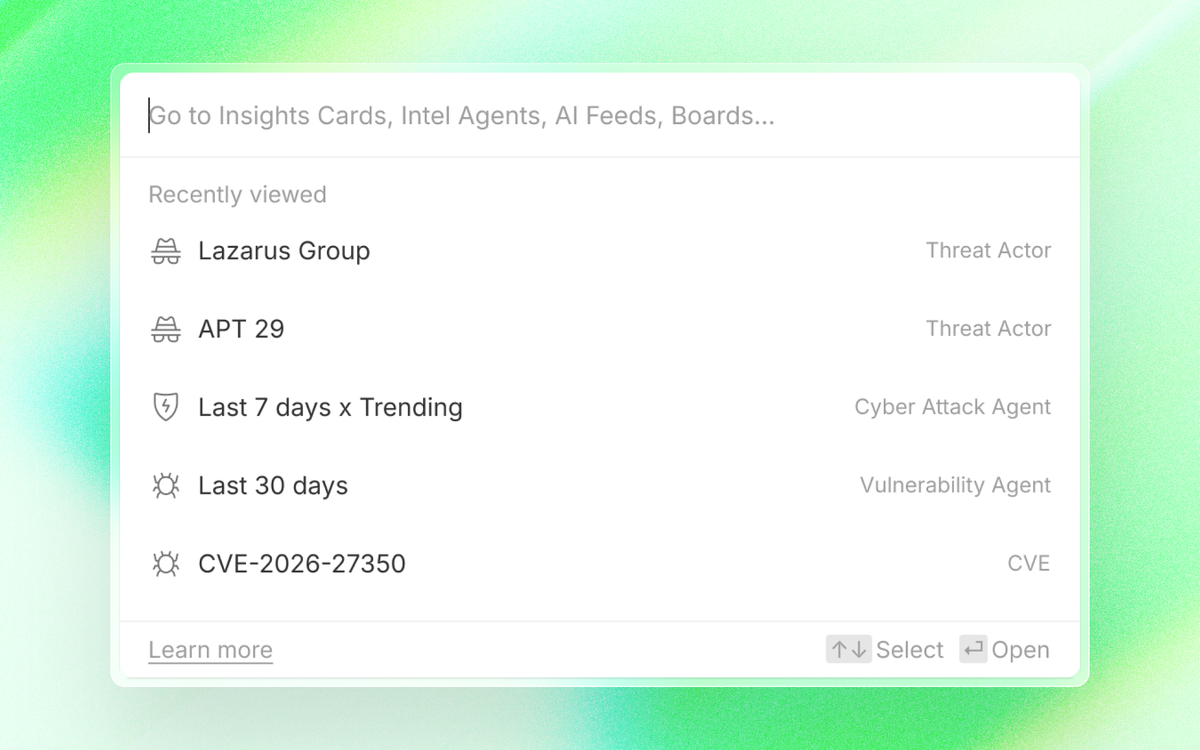
    Simply hit ‘Cmd + K’ or click ‘Go To’ in the left navigation, and go to your recent pages, or type in any actor, malware, vulnerability, or IoC , and instantly see all related features, including Insights Cards, Intel Agents, AI Feeds, and Boards.

    Overview

    Go To offers an easier way to track your threats by quickly finding what you need in your Feedly account. Just hit Cmd + K (or Ctrl + K on Windows), or click Go To in the left navigation, and search for what you need.

    Here’s what you can search for:

    • Insights Cards: Navigate to any threat actor, malware, CVE, or cyberattack in two clicks.
    • Intel Agents, AI Feeds, Folders, and Boards: Find anything you’ve set up to track in your account by name.
    • Recently viewed pages: Shown automatically when you open Go To, so you can pick up right where you left off.

    Navigate to any Insights Card in two clicks

    Go To lets you find any Insights Card by typing the threat actor, malware family, or vulnerability you are looking for. The matching Insights Card appears right in the results for easy access.

    Find AI Feeds, Folders, and Boards by name

    With Go To, you can type the name of any saved AI Feed, Folder, or Board and jump straight to it, no need to toggle through Folders or remember where things are organized.

    Pick up where you left off

    When you open Go To, it automatically shows your recently viewed pages. This means you can jump back to whatever you were tracking with a single click, without relying on your browser’s history or back button.

    Go To is available now across all Feedly plans. Open it anytime with Cmd + K (Mac) or Ctrl + K (Windows), or click Go To in the left navigation.

    faster Feedly navigate
    Share. Facebook Twitter Pinterest LinkedIn Tumblr Email
    Awais
    • Website

    Related Posts

    What is AI lead generation? (+tools)

    April 7, 2026

    The 9 best calendar apps for iPhone in 2026

    April 6, 2026

    Turn your Zapier integration into an AI growth channel

    April 6, 2026

    Defining the “minimum lovable prompt” for AI automation

    April 6, 2026

    How to manage multiple Gmail accounts

    April 4, 2026

    Perform 30,000+ actions in your AI tool

    April 3, 2026
    Leave A Reply Cancel Reply

    Top Posts

    At Least 32 People Dead After a Mine Bridge Collapsed Due to Overcrowding

    November 17, 20250 Views

    Here’s how I turned a Raspberry Pi into an in-car media server

    November 17, 20250 Views

    Beloved SF cat’s death fuels Waymo criticism

    November 17, 20250 Views
    Don't Miss

    Higher standards, AI influence, and a web still catching up

    April 7, 2026

    Is it possible to get an accurate view of the current state of SEO? There…

    Optimal Distribution Vector Merging Is Better than Data Mixing for Continual Pre-Training

    April 7, 2026

    What is AI lead generation? (+tools)

    April 7, 2026

    Navigate Feedly Faster with Go To

    April 7, 2026
    Stay In Touch
    • Facebook
    • YouTube
    • TikTok
    • WhatsApp
    • Twitter
    • Instagram
    Latest Reviews

    The Top 6 Search Engines & The AI Search Engines To Know

    April 6, 2026

    Is AI Killing Web Traffic? How AI Overviews Impact Organic Website Traffic

    April 6, 2026
    Most Popular

    13 Trending Songs on TikTok in Nov 2025 (+ How to Use Them)

    November 18, 20257 Views

    How to watch the 2026 GRAMMY Awards online from anywhere

    February 1, 20263 Views

    Corporate Reputation Management Strategies | Sprout Social

    November 19, 20252 Views
    Our Picks

    At Least 32 People Dead After a Mine Bridge Collapsed Due to Overcrowding

    November 17, 2025

    Here’s how I turned a Raspberry Pi into an in-car media server

    November 17, 2025

    Beloved SF cat’s death fuels Waymo criticism

    November 17, 2025

    Subscribe to Updates

    Get the latest creative news from FooBar about art, design and business.

    Facebook X (Twitter) Instagram Pinterest YouTube Dribbble
    • About Us
    • Contact Us
    • Privacy Policy
    • Terms & Conditions
    • Disclaimer

    © 2025 skytik.cc. All rights reserved.

    Type above and press Enter to search. Press Esc to cancel.