


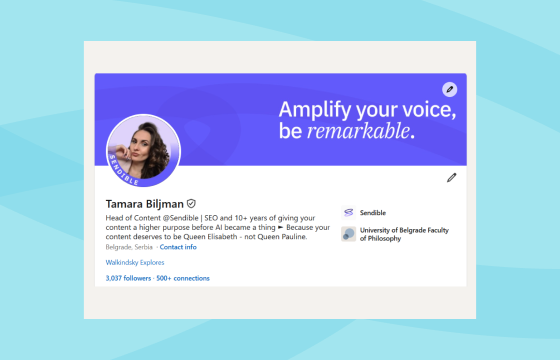
Want to get noticed, stand out, and make a bigger impact on LinkedIn this year? Whether you’re building a personal brand or attracting new business, LinkedIn profile best practices will help you achieve your goals.
With over 1.3 billion users, LinkedIn is a powerful platform for professionals, business owners, and marketers alike. A well-optimised profile can help you grow your network, build credibility, and open doors to new opportunities.
In this guide, we’ll cover the most important LinkedIn profile best practices for 2026, with clear, actionable tips you can implement right away.
Why your LinkedIn profile matters in 2026
Your LinkedIn profile is often your first impression — and first impressions matter.
In 2026, recruiters, clients, and even journalists are checking LinkedIn before reaching out. Whether you’re job hunting, selling a service, or networking, your profile needs to tell a compelling story.
LinkedIn profiles that are fully completed and regularly active get up to 40X more opportunities. It’s no longer enough to just exist on LinkedIn — you need to show up and stand out.
LinkedIn profile optimisation checklist
LinkedIn profile essentials
- Professional photo (400 x 400 pixels recommended)
- Custom banner image (1584 x 396 pixels, 4:1 ratio)
- Get verified (via CLEAR or work email for 60% increase in trust)
Headline and summary
- Optimise your headline with keywords (under 220 characters)
- Use “I help [audience] [achieve result]” format or keyword-rich approach
- Craft a compelling summary with first-person storytelling
- Include a clear call-to-action (CTA)
- Add visual media (case studies, videos, links)
Keywords, SEO & AI = GEO
- Add keywords to the headline, summary, job titles, and skills
- Use natural, relevant keywords (not stuffing)
- Optimize for AI search and Generative Engine Optimization (GEO)
- Complete every profile section
Social proof
- Request recommendations from clients/colleagues
- Collect endorsements for top skills
- Choose your 3 most visible endorsed skills
Content and engagement
- Post 2–5 times per week
- Use images (2.3X more engagement) and videos (5X more engagement)
- Include 3–5 relevant hashtags per post
- Add clear CTAs to posts
- Comment on industry posts regularly
Job seekers
- Turn on “Open to Work”
- Use job-specific keywords
- Highlight measurable achievements
- List relevant tools and certifications
What are the current LinkedIn profile best practices?
Use this checklist to make sure your profile ticks all the right boxes:
What is the best LinkedIn banner size and format?
At the top of your profile is space for a banner image, which is prime real estate for showcasing who you are and what you do visually. Below and to the left is space for a profile photo, usually a professional headshot.
Make use of both. Similarly, company pages have space for a logo and a banner image. The dimensions and guidelines for both are identical.
Here are the most recent guidelines for banner sizes and formats, and for your profile photo:
LinkedIn banner size guidelines
- Image upload size (recommended): 1584 x 396 pixels
- Aspect ratio: 4:1
- Maximum file size: 8 MB
- File type (recommended): JPG, PNG, or GIF
LinkedIn profile photo size guidelines
- Image upload size (recommended): 400 x 400 pixels
- Minimum image size: 268 x 268 pixels
- Maximum file size: 3 MB
- File type (recommended): JPG or PNG
Members with a profile photo can get up to 14 times as many profile views as members without one.
Here’s how Neil Patel is promoting his profile with a professional headshot and a banner image featuring the promotion of what his business does:
How do I optimise my LinkedIn headline for SEO?
- Use your LinkedIn headline as a 1-line summary of the value you create
- Go beyond your job title
- Use this formula: I help [audience] [achieve result]
- Add relevant keywords and keep it under 220 characters
Some people like to use the bold statement format: I help [insert your ideal client or industry] to [what do you do for them]. For example, Tor Magne Refsland’s headline is:
Other people use keywords and phrases broken up by separators. For example, Neal Schaffer’s headline is:
How can I use the LinkedIn ‘Featured’ section to win clients?
- Speak in the first person and tell your story
- Use short paragraphs, headers, and bullets
- Lead with a hook that invites people to read more
- Add media to showcase your work or achievements
You don’t want your summary to be a resume. You need to use this section as a key point in your conversion funnel, whether you’re looking for a job or new clients.
How to use keywords strategically in my LinkedIn profile?
Search and AI engines use social media, including profiles, to generate results and answers. Every keyword in your profile is doing a job. The goal is to use keywords to attract the kind of opportunities you want, and this is how:
- Include keywords in your headline, summary, job titles, and skills
- Think about what people would search to find someone with your skills or service offerings
How to use AI in SEO on LinkedIn?
Use the same approach as above to identify what people will ask AI tools or AI-generated search results (known as Generative Engine Optimisation (GEO))
AI is even more important on LinkedIn in 2026. As they recently announced: “[we have] introduced AI Job Search and AI-powered People Search, which go beyond keyword matching and better understand member intent.”
How do I get endorsements and recommendations for my LinkedIn profile?
Being active on LinkedIn involves doing the following and asking for endorsements and recommendations. To do this, you need to:
- Share updates, articles, tips, or lessons learned
- Comment on posts from others in your industry
- Visibility = value. Show up consistently.
Recommendations and endorsements will help to boost your profile. It’s one thing to write about yourself, but recommendations from people who know you and have worked with you enhance your credibility.
The best time to ask for a recommendation is when a client or a colleague has just thanked you for your excellent work. Ask them to take a minute to write a LinkedIn recommendation and add it to your profile.
There’s no limit to how many recommendations or endorsements you can display on your profile. Your last two recommendations will always be visible, with the option to view more. But with endorsements, you can choose which three are visible.
LinkedIn profile best practices: Optimise your profile summary
Your summary is where you tell your story — and sell your value.
Here’s how to write one that converts:
- Lead with your audience’s need: Speak directly to their challenges or goals
- Keep it skimmable: Use short paragraphs, bullets, and white space
- Use first-person storytelling: Be human, relatable, and confident
- Include a clear CTA: Invite readers to connect, message, or book a call
- Add visuals: Embed case studies, videos, carousels, PDFs, or links to relevant content
How should I use keywords in my LinkedIn profile?
Think of your LinkedIn profile as your personal SEO page.
Where to use keywords:
- Headline
- Summary
- Experience/job titles
- Skills section
- Hashtags in “Talks About”
LinkedIn for business tips:
- Use keywords naturally in sentences, not just lists
- Avoid keyword stuffing — write for humans first
- Look at job descriptions or competitor profiles for inspiration
- Complete every section — LinkedIn favours full profiles
- Use consistent titles and company names across job titles
- Link to your profile from your website, blog, email signature, or portfolio
- Avoid copy-pasting from your CV — use original, value-led language
How to optimise your LinkedIn profile for job searches
If you’re job hunting, here’s how to make your profile work harder:
- Turn on “Open to Work” and specify your preferences
- Use job-specific keywords and results-focused bullet points
- Show off your achievements with measurable outcomes (e.g., “increased engagement by 45%”)
- List relevant tools, certifications, and skills
- Ask for recommendations from previous managers or colleagues
How often should I post on LinkedIn?
The sweet spot for visibility in 2026 is 2–5 posts per week in your content calendar. If you’re struggling to get started and come up with ideas, we suggest you start by outlining your content pillars. Think of them as topics or themes you’ll break down into multiple posts.
You can then use a tool like Sendible to group them into “campaigns” so you can track their performance and see what’s working.
In the meantime, here are some content pillar ideas. All of which are a key part of social media management on LinkedIn:
- Lessons learned from your work.
- Industry trends or commentary.
- Behind-the-scenes content (BTS).
- Quick tips, how-tos, or myth-busting posts.
- Client success stories (with permission).
- Write an engaging hook. Avoid anything generic.
- Use images. LinkedIn posts with images receive 2.3X more engagement than text-only posts.
- Use videos whenever possible. Videos receive 5X more engagement than other content types. Short, informative videos that provide value or tell a story can significantly boost your reach and engagement rates.
- Use 3 to 5 hashtags. Research shows that text posts with 3 to 5 relevant hashtags perform best on LinkedIn.
- Always include a clear call to action in your posts. Just try to avoid the generic “Agree?” You want to get noticed for being smart, funny, or informative, not being a “hustle bro” who’s all about “crushing it.”

Real LinkedIn profile examples that follow best practices
Zaria Parvez
- Headline that features her role, company, keywords, and awards.
- Smart use of long-tail keyword (the owl on TikTok).
- Brief about the section that highlights who she is and her biggest achievement: “built @duolingo from 50K followers to 5M+. Now have a dope content team that’s brought to where it is today at 15M+!”
- Duolingo-branded background image featuring a screenshot of one of Duo’s most famous responses on social media.
Olivia Mae Hanlon
- Clear headline that features her brand, title, and what she’s famous for.
- A teaser for a new product launch.
- Background image that promotes her podcast.
- Consistent branding.
- About section that highlights what she does and what’s next.
Tim Soulo
- Clear headline that features his role, brand, and success.
- A link to his website.
- Branded background with a highlighted success metric.
- An engaging about section that invites users to share their thoughts on his last posts.
Final checklist: LinkedIn profile best practices
✅ Add a professional photo and branded banner
✅ Write a headline that captures attention and includes keywords
✅ Craft a story-driven summary with a strong hook and CTA
✅ Use relevant keywords throughout your profile
✅ Collect endorsements and recommendations for social proof
✅ Post regularly and comment to stay visible

