Close Menu
SkytikSkytik

    Subscribe to Updates

    Get the latest creative news from FooBar about art, design and business.

    What's Hot

    At Least 32 People Dead After a Mine Bridge Collapsed Due to Overcrowding

    November 17, 2025

    Here’s how I turned a Raspberry Pi into an in-car media server

    November 17, 2025

    Beloved SF cat’s death fuels Waymo criticism

    November 17, 2025
    Facebook X (Twitter) Instagram
    • About Us
    • Contact Us
    SkytikSkytik
    • Home
    • AI Tools
    • Online Tools
    • Tech News
    • Guides
    • Reviews
    • SEO & Marketing
    • Social Media Tools
    SkytikSkytik
    Home»Guides»If you hate AI clutter, Vivaldi’s new tab tiling is for you
    Guides

    If you hate AI clutter, Vivaldi’s new tab tiling is for you

    AwaisBy AwaisJanuary 29, 2026No Comments2 Mins Read0 Views
    Facebook Twitter Pinterest LinkedIn Telegram Tumblr Email
    If you hate AI clutter, Vivaldi's new tab tiling is for you
    Share
    Facebook Twitter LinkedIn Pinterest Email

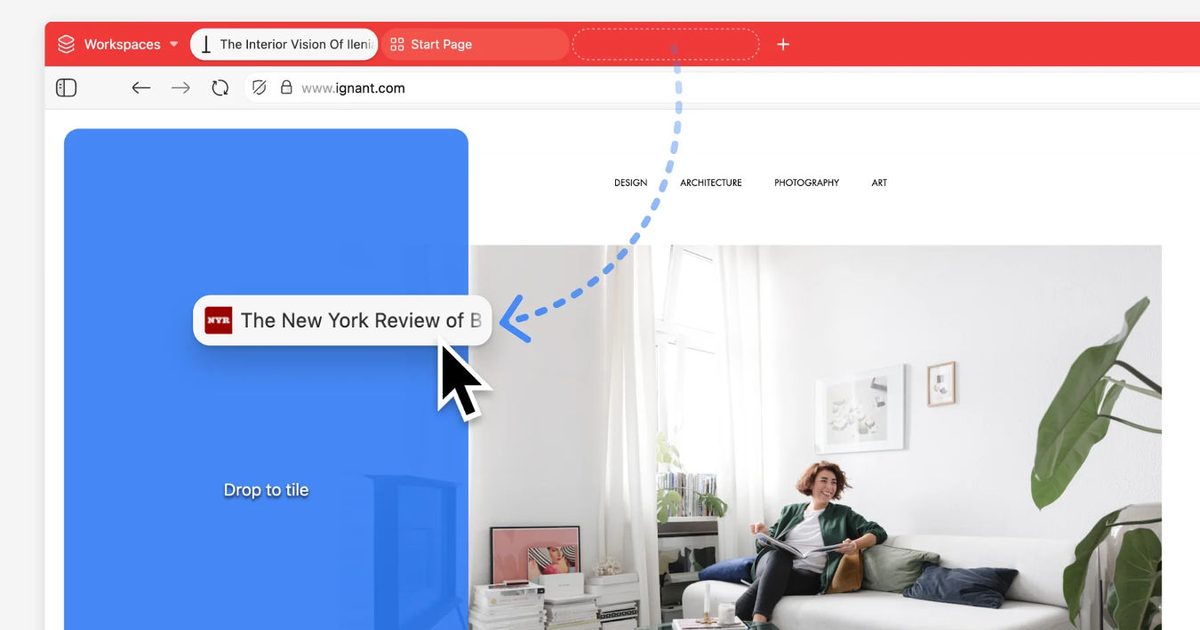
    Vivaldi is drawing a line with version 7.8, it wants the browser to feel like a tool, not a billboard for AI features. The headline upgrade is Vivaldi tab tiling that’s quicker to set up, easier to adjust, and built for people who keep a lot of work in one window.

    The change is tactile. You grab a tab, or a batch of tabs, and drop them into the page area to form a side-by-side or grid layout.

    Vivaldi also adds a way to open a link directly into an existing tile, so you can branch out without losing the page you’re anchored to. That’s the kind of detail you notice after a long day of research, shopping comparisons, or juggling docs and sources.

    Drag, drop, keep moving

    Tab tiling in 7.8 is designed to feel like a natural extension of tabs, not a separate mode you have to manage. After you build a layout, you can resize and rearrange panels as the task shifts. It should keep up.

    That matters because split views only work when they stay flexible. If you can’t reshape them fast, you end up back in tab sprawl.

    Vivaldi highlights use cases like monitoring one panel while working in another, including pairing a tiled page with periodic reloading. It’s a small example, but it matches how power users actually browse.

    A productivity play, not AI

    A lot of browsers are chasing assistants and chat buttons. Vivaldi is selling a calmer promise here, more control, fewer distractions, and workflows that live inside your tabs.

    The practical win is speed. Faster setup plus a stable layout makes comparisons easier to maintain, whether you’re checking sources, tracking updates, or keeping notes beside a draft.

    The fastest way to try it

    If you’re curious, start with two panels and use the open-link-into-tile option to keep your main page fixed while you explore. Put it through a real task, not a demo.

    If Vivaldi tab tiling clicks for your routine, it becomes a default habit. If it doesn’t, you’ll know quickly and you can move on.

    clutter hate tab tiling Vivaldis
    Share. Facebook Twitter Pinterest LinkedIn Tumblr Email
    Awais
    • Website

    Related Posts

    How to daisy-chain multiple monitors from a single cable

    February 19, 2026

    I finally found a great use for my TV’s USB port

    February 19, 2026

    A 32-inch 4K OLED 240Hz monitor for $799.98 is the kind of “finish the setup” deal that’s hard to ignore

    February 18, 2026

    AI is helping hackers make new malware faster and more complex than ever – and things may only get tougher

    February 18, 2026

    Is your Galaxy Z Trifold at risk of breaking? Fresh reports detail worsening screen issues

    February 18, 2026

    Apple Cider Vinegar’s Real Benefits, According to Registered Dietitians

    February 18, 2026
    Leave A Reply Cancel Reply

    Top Posts

    At Least 32 People Dead After a Mine Bridge Collapsed Due to Overcrowding

    November 17, 20250 Views

    Here’s how I turned a Raspberry Pi into an in-car media server

    November 17, 20250 Views

    Beloved SF cat’s death fuels Waymo criticism

    November 17, 20250 Views
    Don't Miss

    How to Effectively Review Claude Code Output

    March 18, 2026

    can produce an incredible amount of content in a short span. This could be creating…

    Google adds video visibility to Performance Max reporting

    March 18, 2026

    Everything You Need to Know About Recursive Language Models

    March 17, 2026

    Google Removes ‘What People Suggest,’ Expands Health AI Tools

    March 17, 2026
    Stay In Touch
    • Facebook
    • YouTube
    • TikTok
    • WhatsApp
    • Twitter
    • Instagram
    Latest Reviews

    Top Blog Platforms for SEO: Which Sites to Conside

    March 17, 2026

    Self-Hosting Your First LLM | Towards Data Science

    March 17, 2026
    Most Popular

    13 Trending Songs on TikTok in Nov 2025 (+ How to Use Them)

    November 18, 20257 Views

    How to watch the 2026 GRAMMY Awards online from anywhere

    February 1, 20263 Views

    Corporate Reputation Management Strategies | Sprout Social

    November 19, 20252 Views
    Our Picks

    At Least 32 People Dead After a Mine Bridge Collapsed Due to Overcrowding

    November 17, 2025

    Here’s how I turned a Raspberry Pi into an in-car media server

    November 17, 2025

    Beloved SF cat’s death fuels Waymo criticism

    November 17, 2025

    Subscribe to Updates

    Get the latest creative news from FooBar about art, design and business.

    Facebook X (Twitter) Instagram Pinterest YouTube Dribbble
    • About Us
    • Contact Us
    • Privacy Policy
    • Terms & Conditions
    • Disclaimer

    © 2025 skytik.cc. All rights reserved.

    Type above and press Enter to search. Press Esc to cancel.