


Let’s be honest: we have all been there.
It’s Friday afternoon. You’ve trained a model, validated it, and deployed the inference pipeline. The metrics look green. You close your laptop for the weekend, and enjoy the break.
Monday morning, you are greeted with the message “Pipeline failed” when checking into work. What’s going on? Everything was perfect when you deployed the inference pipeline.
The truth is that the issue could be a number of things. Maybe the upstream engineering team changed the user_id column from an integer to a string. Or maybe the price column suddenly contains negative numbers. Or my personal favorite: the column name changed from created_at to createdAt (camelCase strikes again!).
The industry calls this Schema Drift. I call it a headache.
Lately, people are talking a lot about Data Contracts. Usually, this involves selling you an expensive SaaS platform or a complex microservices architecture. But if you are just a Data Scientist or Engineer trying to keep your Python pipelines from exploding, you don’t necessarily need enterprise bloat.
The Tool: Pandera
Let’s go through how to create a simple data contract in Python using the library Pandera. It’s an open-source Python library that allows you to define schemas as class objects. It feels very similar to Pydantic (if you’ve used FastAPI), but it is built specifically for DataFrames.
To get started, you can simply install pandera using pip:
pip install panderaA Real-Life Example: The Marketing Leads Feed
Let’s look at a classic scenario. You are ingesting a CSV file of marketing leads from a third-party vendor.
Here is what we expect the data to look like:
- id: An integer (must be unique).
- email: A string (must actually look like an email).
- signup_date: A valid datetime object.
- lead_score: A float between 0.0 and 1.0.
Here is the messy reality of our raw data that we recieve:
import pandas as pd
import numpy as np

# Simulating incoming data that MIGHT break our pipeline
data = {
    "id": [101, 102, 103, 104],
    "email": ["[email protected]", "[email protected]", "INVALID_EMAIL", "[email protected]"],
    "signup_date": ["2024-01-01", "2024-01-02", "2024-01-03", "2024-01-04"],
    "lead_score": [0.5, 0.8, 1.5, -0.1] # Note: 1.5 and -0.1 are out of bounds!
}

df = pd.DataFrame(data)
If you fed this dataframe into a model expecting a score between 0 and 1, your predictions would be garbage. If you tried to join on id and there were duplicates, your row counts would explode. Messy data leads to messy data science!
Step 1: Define The Contract
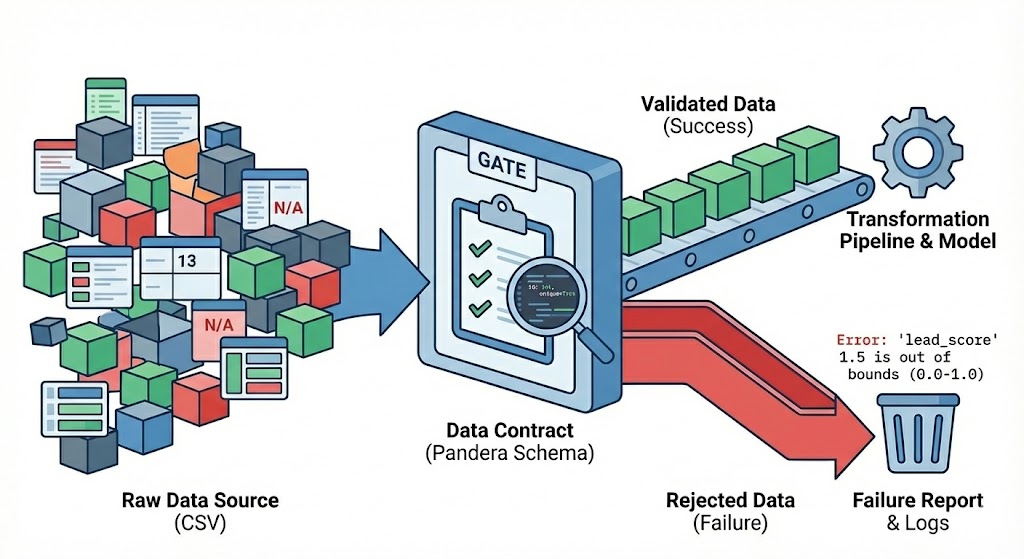
Instead of writing a dozen if statements to check data quality, we define a SchemaModel. This is our contract.
import pandera as pa
from pandera.typing import Series

class LeadsContract(pa.SchemaModel):
    # 1. Check data types and existence
    id: Series[int] = pa.Field(unique=True, ge=0)

    # 2. Check formatting using regex
    email: Series[str] = pa.Field(str_matches=r"[^@]+@[^@]+\.[^@]+")

    # 3. Coerce types (convert string dates to datetime objects automatically)
    signup_date: Series[pd.Timestamp] = pa.Field(coerce=True)

    # 4. Check business logic (bounds)
    lead_score: Series[float] = pa.Field(ge=0.0, le=1.0)

    class Config:
        # This ensures strictness: if an extra column appears, or one is missing, throw an error.
        strict = True
Look over the code above to get the general feel for how Pandera sets up a contract. You can worry about the details later when you look through the Pandera documentation.
Step 2: Enforce The Contract
Now, we need to apply the contract we made to our data. The naive way to do this is to run LeadsContract.validate(df). This works, but it crashes on the first error it finds. In production, you usually want to know everything that is wrong with the file, not just the first row.
We can enable “lazy” validation to catch all errors at once.
try:
    # lazy=True means "find all errors before crashing"
    validated_df = LeadsContract.validate(df, lazy=True)
    print("Data passed validation! Proceeding to ETL...")

except pa.errors.SchemaErrors as err:
    print("⚠️ Data Contract Breached!")
    print(f"Total errors found: {len(err.failure_cases)}")

    # Let's look at the specific failures
    print("\nFailure Report:")
    print(err.failure_cases[['column', 'check', 'failure_case']])
The Output
If you run the code above, you won’t get a generic KeyError. You will get a specific report detailing exactly why the contract was breached:
⚠️ Data Contract Breached!
Total errors found: 3

Failure Report:
        column                 check      failure_case
0        email           str_matches     INVALID_EMAIL
1   lead_score   less_than_or_equal_to             1.5
2   lead_score   greater_than_or_equal_to         -0.1
In a more realistic scenario, you would probably log the output to a file and set up alerts so that you get notified with something is broken.
Why This Matters
This approach shifts the dynamic of your work.
Without a contract, your code fails deep inside the transformation logic (or worse, it doesn’t fail, and you write bad data to the warehouse). You spend hours debugging NaN values.
With a contract:
- Fail Fast: The pipeline stops at the door. Bad data never enters your core logic.
- Clear Blame: You can send that Failure Report back to the data provider and say, “Rows 3 and 4 violated the schema. Please fix.”
- Documentation: The
LeadsContractclass serves as living documentation. New joiners to the project don’t need to guess what the columns represent; they can just read the code. You also avoid setting up a separate data contract in SharePoint, Confluence, or wherever that quickly get outdated.
The “Good Enough” Solution
You can definitely go deeper. You can integrate this with Airflow, push metrics to a dashboard, or use tools like great_expectations for more complex statistical profiling.
But for 90% of the use cases I see, a simple validation step at the start of your Python script is enough to sleep soundly on a Friday night.
Start small. Define a schema for your messiest dataset, wrap it in a try/catch block, and see how many headaches it saves you this week. When this simple approach is not suitable anymore, THEN I would consider more elaborate tools for data contacts.
If you are interested in AI, data science, or data engineering, please follow me or connect on LinkedIn.
