


Sometimes words can’t quite get the job done. You try to explain why your sourdough starter failed or how it feels to juggle parenting and work, and your listener’s eyes glaze over. And that’s when visual explanation saves the day.
It’s the difference between a tangled explanation and a single image that instantly clicks. AI image generators can help translate those ideas into pictures that speak volumes.
Frame the narrative
You wouldn’t tell a story out of order unless you wanted to confuse everyone, and the same goes for explanatory images. When you’re illustrating a concept that involves change over time, a cause-and-effect relationship, or a process, framing the image like a tiny visual story works wonders. This isn’t about adding a caption. It’s about structuring the image to show a clear sequence or progression.
Imagine you want an image that illustrates how a sourdough starter develops over a week. If you write your prompt simply asking for a jar with bubbles, the image might show a generic jar floating in space.
But if you guide the AI by describing the story of the starter from day one to day seven in a sequence across a horizontal layout, the outcome will show progression. You might describe each stage in the prompt as a series of jars with changing textures and bubble formations. By giving the model a sense of movement over time, you are effectively writing a micro-screenplay for the image to follow.

A narrative frame can be as simple as specifying the order of events or the flow from one state to another. Say you’re trying to show your personal time dilation theory: that five minutes spent microwaving food feels longer than five minutes waiting for a bus.
Here’s a useful prompt: “Side-by-side comparison image. Left: A person staring at a microwave, surrounded by melting clocks in Dali-style surrealism. Right: Same person at a bus stop, clocks moving fast like wind, everything blurry with motion.” The result becomes a visual argument.

Analogy scaffolding

If your idea is abstract, anchor it to something familiar. That’s where analogy comes in. Humans are great at understanding one thing in terms of another. So are image generators, if you write the prompt accordingly. The trick is to pick a metaphor with a strong visual identity and then spell it out.
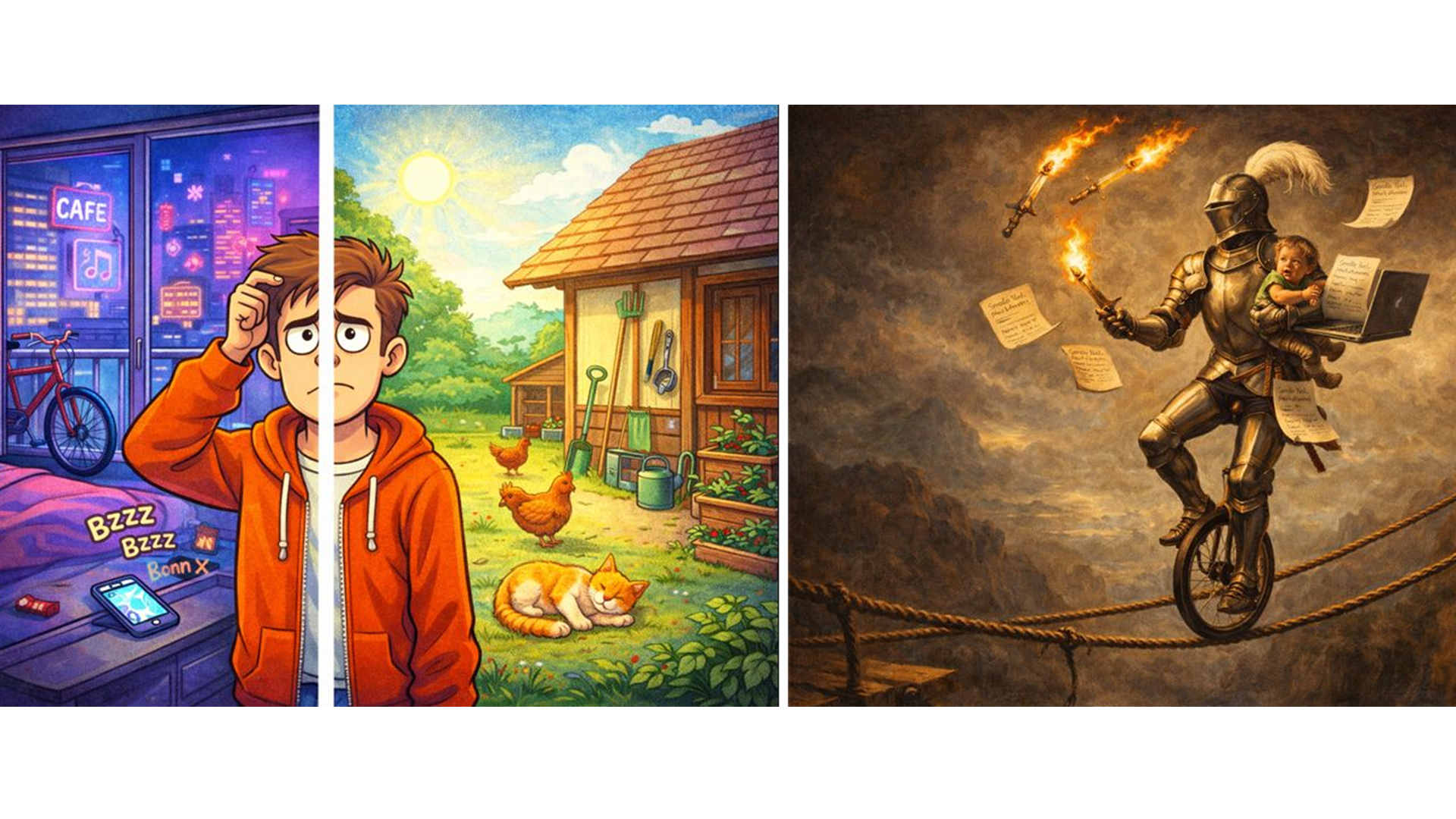
Let’s say you’re trying to explain the mental load of parenting. Rather than just saying it’s a lot, you might write: “A medieval knight juggling flaming swords, school permission slips, a toddler, a grocery list, and a laptop while riding a unicycle across a rope bridge, dramatic lighting, Renaissance painting style.”
That’s not just exaggeration, it’s a visual metaphor that people can take in at a glance.
Organize space

Spatial composition matters. If you want your idea to land visually, think of the image like a tiny stage. Where do the important players go? Who’s in front? What’s looming? A prompt that includes layout direction gives the AI a framework to build from, and avoids those awkward, over-stuffed collages where everything fights for attention.
It’s useful when describing a choice as well. Suppose you’re torn between moving to a city or staying in a small town. You could explain how you feel by asking for the following: “Split-screen image: left side shows a busy urban apartment. The right side shows a quiet country house. Same person in both scenes, looking uncertain.”
Instead of just listing pros and cons, you’ve made a mood board that tells your emotional truth.
Style sets mood
An idea explained visually is about how it feels as much as its content. Style is a secret weapon in that regard. Do you want your concept to come across as serious, playful, dreamy, or scientific? A watercolor gives softness, a schematic gives clarity, and a vintage illustration style adds charm. Don’t leave it to chance. Specify the tone.
Say you’re explaining how friendships evolve over time. You could go sentimental: “A gentle watercolor showing two children as tree saplings growing side-by-side, then growing apart as tall trees with roots still tangled underground.” It works because the style complements the metaphor.

Even mundane tasks benefit. Suppose you’re explaining how to get through airport security without losing your mind. You could ask to get: “A mid-century travel poster style image showing a calm traveler gliding through checkpoints like an Olympic diver, surrounded by chaotic travelers in sepia tones.” It’s a funny way to show your feelings, and the aesthetic does a lot of the work.
Ideas get stuck in our heads all the time, half-formed and hard to explain. But when you turn those ideas into images, they become easier to share and remember. Framing your prompt correctly gives the AI something to build with beyond your initial idea.

Follow TechRadar on Google News and add us as a preferred source to get our expert news, reviews, and opinion in your feeds. Make sure to click the Follow button!
And of course you can also follow TechRadar on TikTok for news, reviews, unboxings in video form, and get regular updates from us on WhatsApp too.
