


Growing up, asking my dad (a graphic designer for a map-making company) about his day at work meant at least 20 minutes of scripting and graphics jargon I just had to nod along to and pretend to understand. But now I see that same glazed-over expression when I tell someone what I write about for a living. Most people assume AI and automation will just go right over their heads.
But in reality, you don’t really need to be technical or computer-savvy to understand—or get the most out of—AI and automation. No-code platforms, off-the-shelf AI tools, and smarter integrations have made it possible for regular business teams to build workflows that handle real work automatically, without writing a line of code or filing a single IT ticket.
This guide is for those teams. I’ll walk you through what AI business automation actually is, which business functions deliver the fastest ROI, and how to start building without overbuilding. Then it’ll be your turn to impress (annoy?) people at parties with terms like “AI orchestration” and “agentic workflows.”
Table of contents:
What is AI for business automation?
AI for business automation means layering artificial intelligence into your workflows so your systems can do more than follow rigid rules.
Traditional workflow automation is already powerful. Think things like creating a CRM contact when a form is submitted, or notifying the right team when a ticket is opened. The same trigger gets the same action, every time, with no variation. But that means it can break the moment the input doesn’t match exactly what you anticipated.
AI automation fills that gap. Artificial intelligence can read an unstructured email and determine whether it’s a sales inquiry or a support request (or spam). It can extract invoice fields from a PDF that’s formatted slightly differently every time. It can summarize a 20-message thread into three sentences. That kind of judgment is what makes AI-powered workflows handle real-world messiness instead of just the clean, idealized version of your processes.
Think of it on a spectrum, with fully rule-based automation at one end and autonomous AI agents at the other. Most businesses live in the middle, with automated workflows that include one or two AI steps where interpretation is needed, while the rest of the workflow stays predictable and auditable.
The underlying principle is that AI handles the judgment calls, while automation handles the execution. When someone submits a support ticket, AI classifies it by urgency and topic, then the workflow routes it to the right queue, creates the right record, and sends the right notification—the same way, every time.
This setup, sometimes called deterministic AI, keeps outcomes reliable even when inputs vary. It’s why teams can trust these workflows in production, not just in demos.
What can AI actually automate in a business?
I’m not one of those people who struggle to delegate. But even I know that sometimes, if I want a task done the way I want it, I just need to do it myself. Just ask my husband (whose entire closet is shades of gray and navy) if I’ve ever let him shop for home decor.
Similarly, not every task is worth automating. If a process is inconsistent, happens rarely, or requires deep human judgment every single time, it’s probably not where you want to start. The best candidates are high-volume, follow a predictable pattern, and involve at least some interpretation that would be tedious to encode manually as rules.
Here’s where AI tends to deliver the fastest return.
Customer support
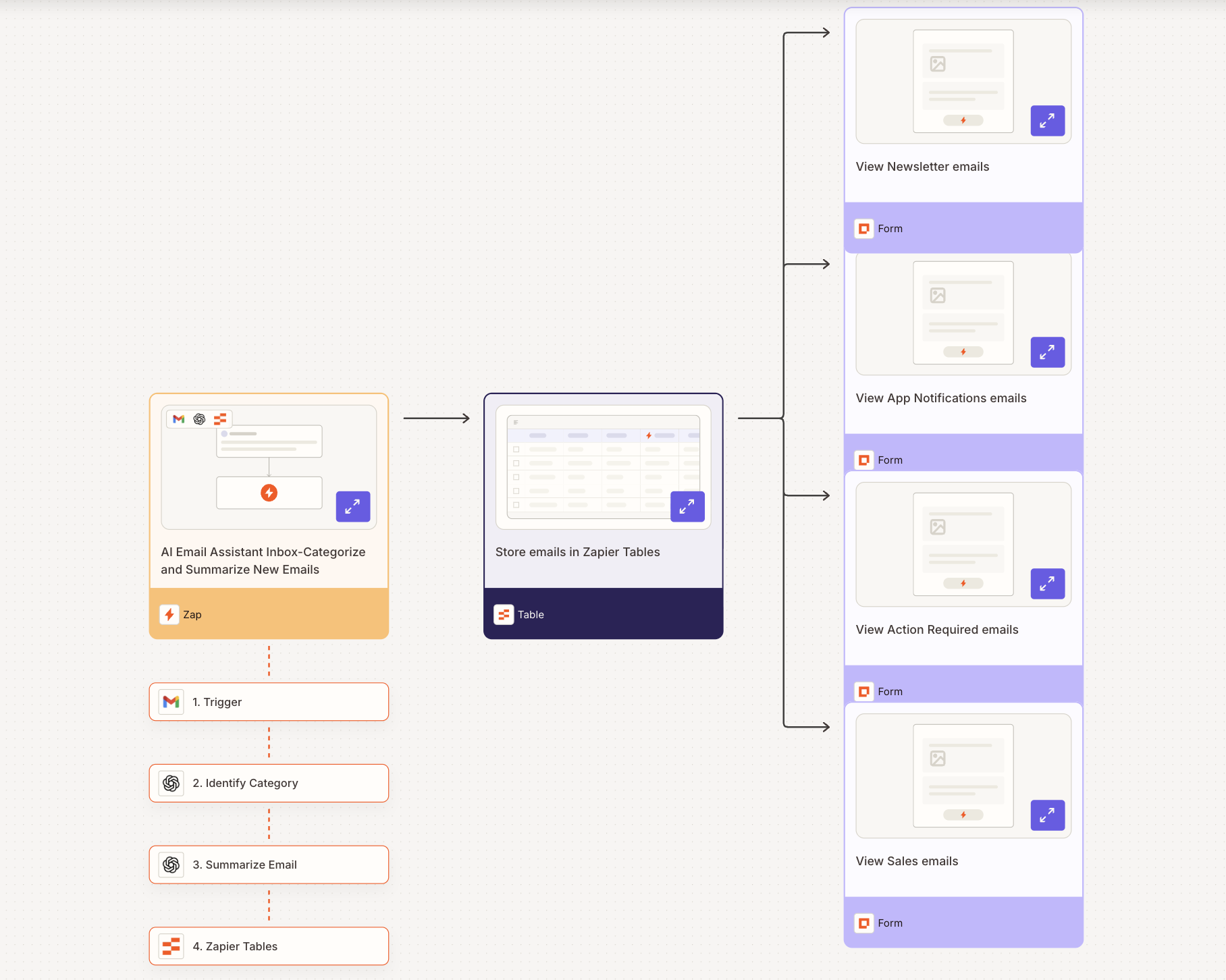
Customer support generates a lot of repetitive work that looks like it requires human judgment, but often doesn’t. Classifying tickets by urgency, routing them to the right team, pulling customer history before a rep picks up the conversation, drafting a first-response acknowledgment—all of this can run automatically, with humans handling the actual resolution.
For example, IPSY uses AI-powered, automated workflows to monitor support queues for rare but critical signals (like allergy mentions) and alert the right people immediately. And Vector Media uses AI to summarize and suggest responses for each incoming inquiry, so agents start from a near-complete reply instead of a blank page. Both approaches save meaningful time without removing humans from the decisions that matter.
Learn more about automating your customer support, or check out our library of customer support templates to get started.
Sales and lead management
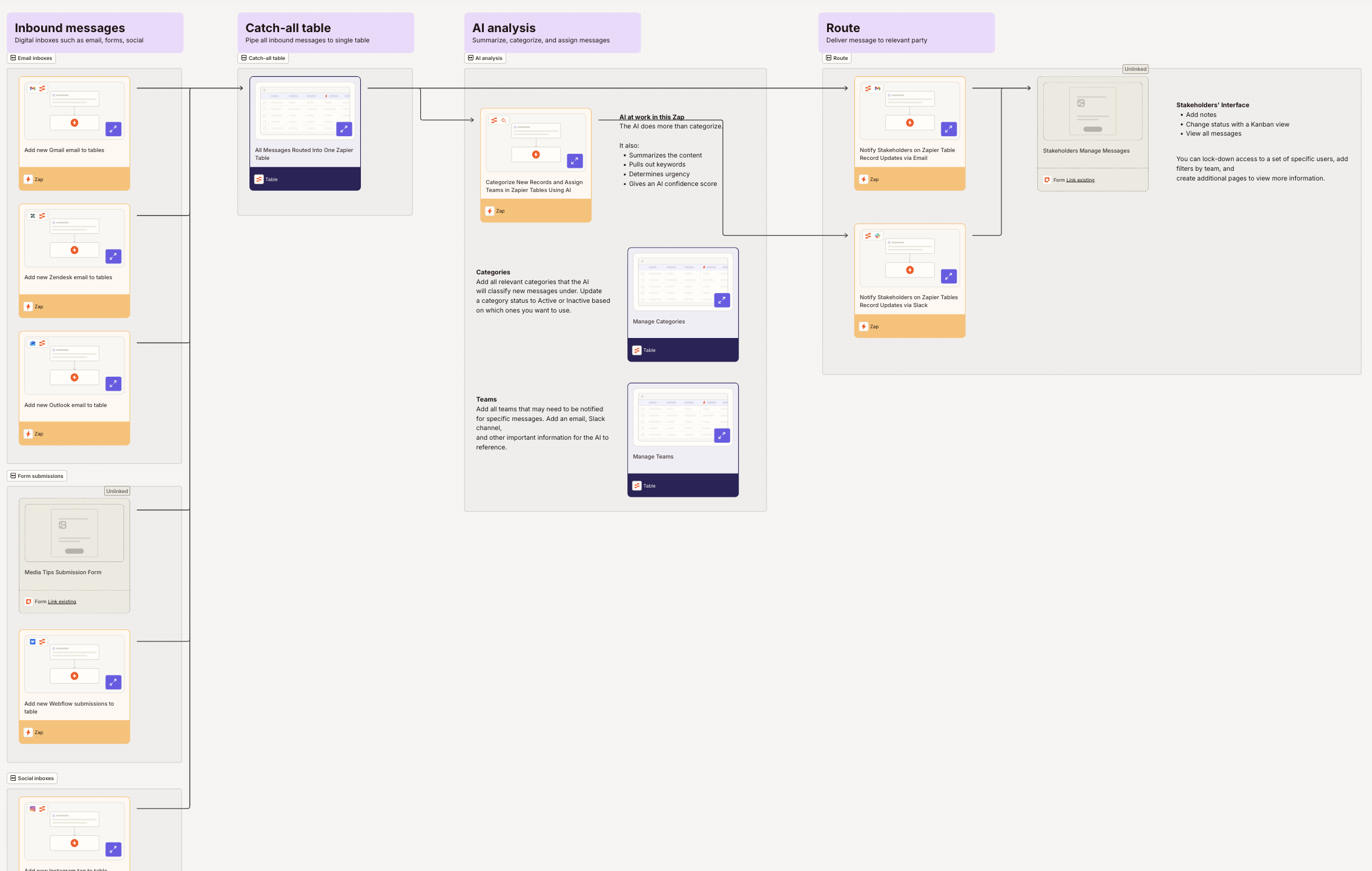
Sales teams lose a surprising amount of time to work that happens around selling. Things like researching accounts, logging notes, routing inbound leads, and chasing follow-ups that should have kicked off automatically can all take time away from the core work.
Popl built a system using Zapier and OpenAI that now handles hundreds of inbound leads a day without manual intervention. When a demo request comes in through HubSpot, a Zap instantly verifies the lead data, notifies the right Slack channel, and routes the contact to the right rep based on region and company size. On top of that, AI triages inbound emails, filters noise from legitimate inquiries, and enriches leads by pulling in company data from email domains. With over 100 workflows, Popl has seen $20,000 in annual savings, and its sales team actually spends its time selling.
NisonCo built an AI agent that scans industry news sources daily, extracts company names and leadership details, and compiles potential leads into a Google Sheet. What previously required three to five part-time researchers now runs largely on its own, surfacing more leads than the old approach.
Learn more about automating RevOps and sales processes, or get started with our library of AI automation templates for the sales pipeline.
Marketing
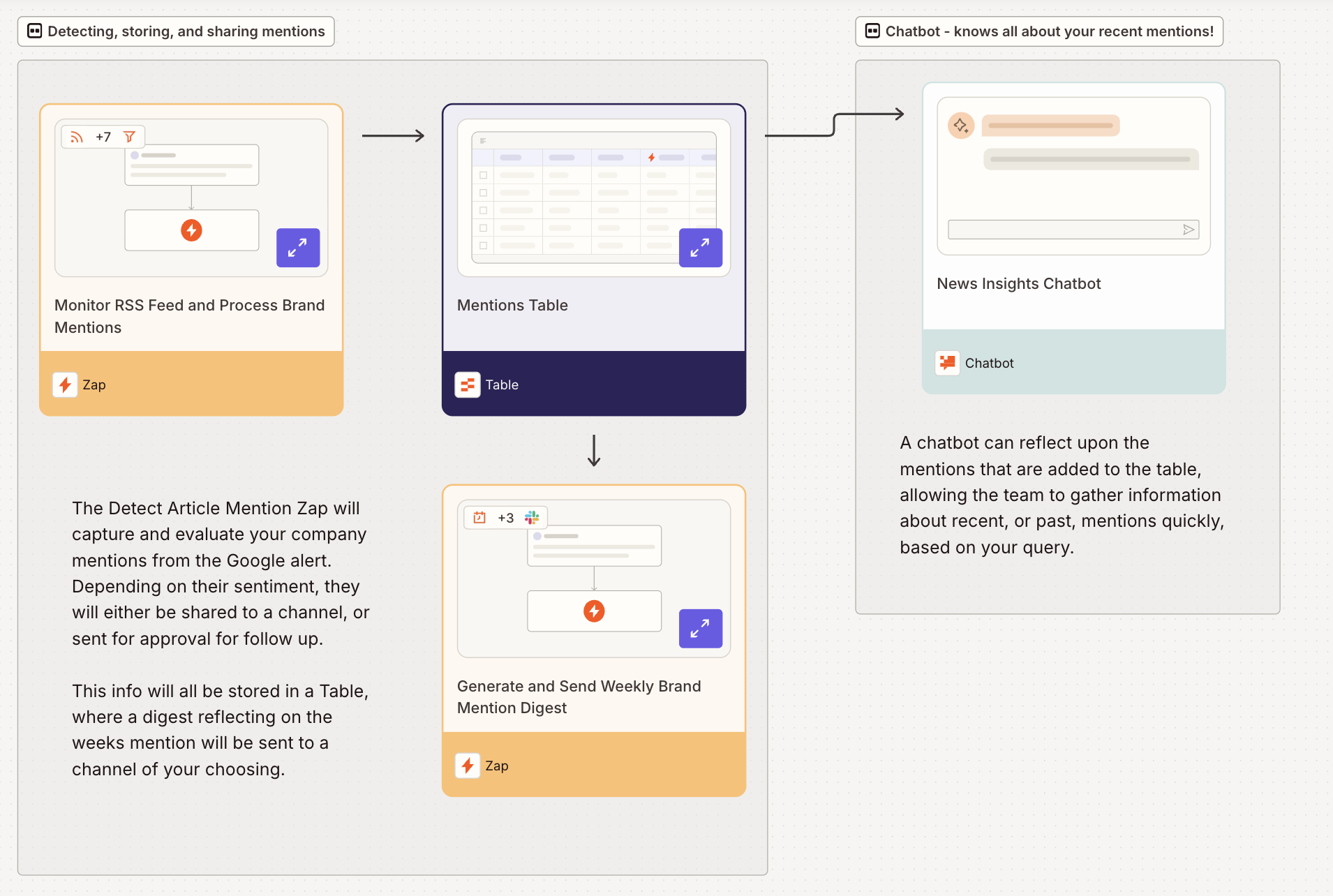
Marketing automation breaks into two buckets:
Backend operations like tracking brand mentions, getting lead data into the right systems, and monitoring performance without manual exports.
Content and outreach like generating drafts, personalizing messaging, and distributing at scale.
On the ops side, AI workflows can pull leads from every ad platform, enrich them with AI research, and drop them directly into your CRM the moment they arrive. They can also do things like logging campaign performance to a central dashboard with insights, or triggering nurture sequences based on specific behaviors without anyone manually configuring a filter.
On the content side, JBGoodwin REALTORS managed the online presence of 900+ real estate agents with a single marketing coordinator. They used an AI agent that researches local news, drafts blog posts and social content, and distributes them for review. There’s consistent output with no bottleneck, and the coordinator’s actual job is strategy and quality control rather than writing and scheduling.
Learn more about how to automate your marketing processes, or check out our marketing campaign template library.
HR and onboarding
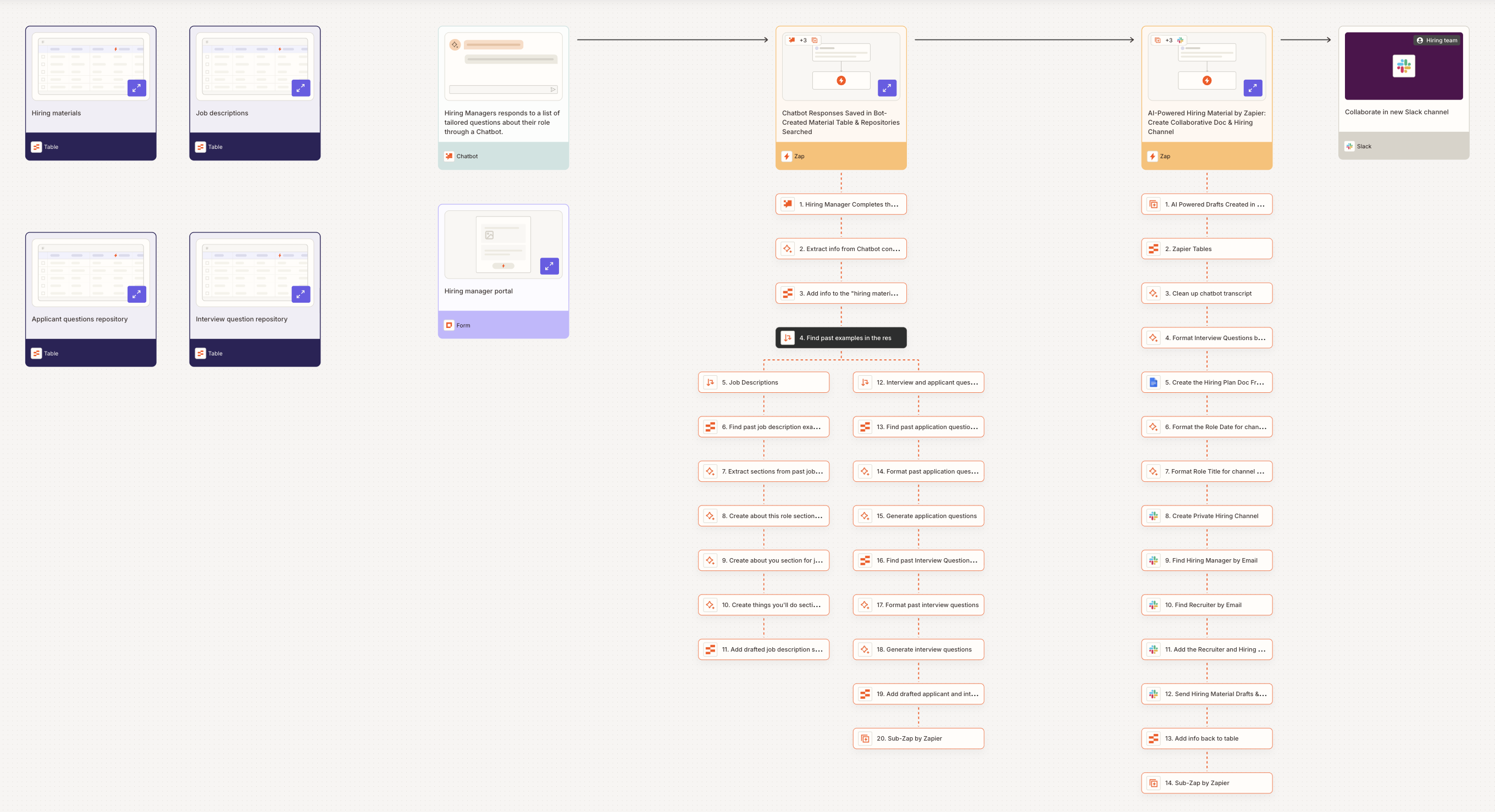
HR teams deal with enormous amounts of structured, repetitive work. They collect applications, schedule interviews, send onboarding documents, and provision access for new hires with the right tools and access. Most of it follows predictable patterns and is tedious to manage manually—and most importantly, it takes time away from the human part of human resources.
For example, you can use AI and automation to send custom follow-ups to candidates, draft personalized outreach emails from interview transcripts, and automate handoffs so recruiters have more time to focus on actually connecting with candidates. You can also build an AI-supported hiring materials generator to keep your job descriptions and interview rubrics both consistent and fast to implement.
On the onboarding side, automated workflows can update HRIS records when a hire is added, send welcome emails with the correct documents, create accounts in key tools, and assign training checklists—without anyone managing it manually step by step.
Learn more about HR automation, or get started with a template from our human resources starter kit.
How to use AI for business automation
The trick to AI adoption that actually helps your business workflows (instead of adding a bunch of em dashes to your content and hallucinating Slack notifications) is to not start with the AI at all. Start with the process.

1. Audit your time first
Before you automate anything, understand what’s actually consuming your team’s hours. Track where time is spent for one to two weeks—informally or with a time-tracking tool—and separate tasks into two buckets: strategic work that genuinely requires judgment, and operational work that follows a consistent pattern.
Operational tasks are your targets. “Decide how to handle this unusual customer situation” requires judgment. “Copy contact info from a form submission into the CRM” does not. You’re looking for the latter, especially the ones that happen repeatedly.
2. Start with one high-volume process
Pick the single task eating the most time with the most predictable pattern. Don’t try to automate five things at once. Get one workflow running reliably before you build anything else.
The best first automation is usually something you’d barely notice had been automated—it just handles itself. Think things like routing inbound leads, syncing data between two tools, and sending a follow-up message after a specific trigger. These are ideal starting points because the value is immediate and the risk is low.
3. Choose your tools
For most teams, the right stack is a workflow automation platform plus the apps you already use. Zapier connects 8,000+ apps and lets you embed AI steps anywhere in a workflow without writing code. That’s really all you need to start.
One thing worth knowing: if your team uses AI assistants like ChatGPT or Claude for day-to-day work and you want them to actually do things in your business tools instead of just generating text for you to copy-paste, that’s where MCP (Model Context Protocol) comes in.
MCP is a standard that lets AI assistants connect directly to external apps to read data, update records, send messages, and execute tasks on your behalf. Think of it as giving your AI assistant a set of hands. Zapier MCP is one way to make this happen without any engineering work: connect your existing tools, and your AI assistant gains the ability to take action inside them.
It’s not a replacement for workflow automation; you’ll still want Zaps for reliable, repeatable execution. But for people who want to use Claude or ChatGPT as a more capable hands-on assistant across their business tools, MCP is worth trying.
4. Build a simple automation, test it, then expand
Start with two steps: a trigger and an action. Make sure it works reliably before adding anything else. A typical progression might look like this:
New form submission → create CRM contact. Build two steps with no AI, so you can test it to make sure it works as expected.
Add an AI step that summarizes the submission and drops it into the contact’s notes field.
Add routing logic that flags high-value leads and posts them to a Slack channel.
The trick is to build incrementally, with every new layer validated before you stack the next one. Adding complexity before you’ve established reliability tends to make debugging much harder.
5. Keep humans in the loop for high-stakes decisions
Automation doesn’t mean removing people from the process. It just means removing people from the parts that don’t need them. For anything customer-facing, financially sensitive, or high-stakes, build in a review (also known as human-in-the-loop) step.
AI should handle the interpretation and prep work, but a human should make the final call on anything that actually matters.
6. When you’re ready: graduate to AI agents
Once you have a few reliable automations running, it’s time to level up. AI agents don’t follow a fixed sequence of steps—instead, they take a goal and figure out how to achieve it. Give an agent an objective like “research this new lead and log a summary in the CRM,” and it will navigate across tools, make decisions along the way, and complete the work without you spelling out every action in advance.
That flexibility makes agents well-suited for work that’s multi-step and context-dependent, like qualifying leads, monitoring for signals across multiple systems, and drafting personalized outreach based on account history. Anything where what to do next depends on what the previous step returned.
Zapier Agents connects agents to the same 8,000+ apps your Zaps already use, so you’re not starting from scratch. A good first agent is something low-stakes but time-consuming, like a daily research task or an inbox triage. Get one running, see how it behaves, and build from there the same way you did with automation.
Read more: AI agent use cases: How real teams are using AI agents at work
AI tools for business automation
You don’t need an overwhelming AI stack to get started using AI and automation to streamline your business workflows. Here are the main categories with a few starting points:
For a broader view, check out our roundup of the 50+ best AI productivity tools.
Common mistakes to avoid with AI business automation
When the team at Zapier started experimenting with AI, it was pretty common to get random messages in the #general channel from people’s rogue agents. While that kind of thing can be a fun opportunity for friendly ribbing at first, it’s not exactly ideal.
AI is a powerful tool, but it’s not infallible—and throwing an LLM at a problem without being thoughtful just invites chaos. Here are a few mistakes to avoid:
Automating a broken process. Automation makes things faster. But if the underlying process is bad, you’ll just make bad things happen faster. Start by mapping the workflow, fixing the obvious problems, and then automate.
Trying to automate everything at once. The teams that get the most from automation start small and expand. One reliable workflow running in the background beats five half-built ones that need constant babysitting.
Not reviewing AI outputs before they reach customers. AI makes mistakes, and customer-facing mistakes are expensive in ways that aren’t always visible immediately. Build in a review step for anything going directly to customers—at least until you’ve validated the system over time.
Picking tools before identifying the problem. Starting with a new AI tool and working backward to justify it usually leads to solutions in search of problems. Start with the operational pain you want to address, then find the right tool.
Ignoring integration. Isolated AI tools create new information silos. An AI that drafts email responses but doesn’t connect to your CRM is solving half the problem. Think in terms of connected systems rather than standalone tools that save a few clicks.
If you want a platform that connects your existing apps, lets you embed model-agnostic AI steps wherever interpretation is needed, and doesn’t require an engineering team to build and maintain, Zapier is the place to start. The free plan is enough to get your first workflow running, and you can build from there.
AI for business automation: FAQs
What is the 30% rule for AI?
The “30% rule” gets used a couple of different ways:
If a task accounts for more than 30% of someone’s working time and follows a predictable pattern, it’s a strong candidate for automation. That’s because the efficiency gains scale with volume.
Another usage relates to AI confidence thresholds. You should keep a human review step in place when AI accuracy falls below a certain level (say, 70%) to catch edge cases before they cause problems.
The main gist is to automate the right work (not all the work), and keep humans involved where the stakes are high.
What is the difference between AI and traditional business automation?
Traditional automation follows fixed rules: if this happens, do that, always. It’s fast and predictable, but it breaks when inputs don’t match the expected template.
AI automation adds a layer of interpretation. Instead of encoding every possible edge case as a rule, AI can read context, infer intent, and make judgment calls on inputs that don’t fit a clean pattern. The two work best together: AI handles the messy input, while traditional automation handles the reliable execution once AI has processed it.
Can small businesses use AI for automation?
Yes. The barrier to entry is low, but the potential is high. A single person can sign up for Zapier, connect their existing tools, and have a working automated workflow running in an afternoon, with no IT team in sight.
Small businesses tend to start with high-volume, repeatable tasks like lead capture, follow-up emails, data syncing, and invoice processing. These free up time for the higher-value work that only you can do. And the same platform scales with you—most of the businesses I mentioned earlier are mid-to-large companies running hundreds of workflows on Zapier.
How much does AI business automation cost?
It varies, but the more useful frame is ROI. Most workflow automation platforms, including Zapier, offer free tiers sufficient for simple use cases, with paid plans that scale based on volume. AI API costs—for tools like OpenAI—charge per token and typically run fractions of a cent per request at normal business volumes.
If an automation saves your team two hours a week and your time is worth $75/hour, that’s $7,800 a year in recovered capacity. A $50/month tool pays for itself quickly when you look at it that way.
Is AI automation safe to use for customer-facing processes?
With the right guardrails, yes. The key is building human review into any step that directly affects customers—especially when you’re getting started. AI can draft a response, classify an issue, or pull relevant context, but a human reviews before it goes out.
Over time, as you validate that outputs are consistently accurate, you can reduce that friction. Default to more review early on. The cost of an AI mistake that reaches a customer tends to outweigh the time saved by skipping the review.
Related reading:
