


I joined LinkedIn in 2020 as an eager freelance writer, but I didn’t get the hype. Everyone looked so polished, and I felt like I had nothing valuable to add. So I left, convinced the platform wasn’t for me.
When I later niched down into SaaS writing, something shifted. My ideal clients — marketers, founders, content leads — were all active on LinkedIn. If I wanted to reach them, I had to show up here. At first, I wasn’t sure what to post or how to stay consistent.
But five years after that first attempt, I’ve:
- Done a 90-day posting streak from January 1 to March 31, 2025
- Posted every weekday since then
- Recently landed a freelance writing gig with Userpilot, through a referral on LinkedIn
In this article, I’ll share the framework and a simple Google Sheets template that changed things for me. I’ll also share how you can replicate this system, post consistently on LinkedIn, and build relationships that will lead to tangible opportunities.
The KLA Framework
I’d read plenty of posts that made me cringe. They felt performative or overly polished. I knew I didn’t want that for my feed.
So I asked myself, what would feel authentic to share?
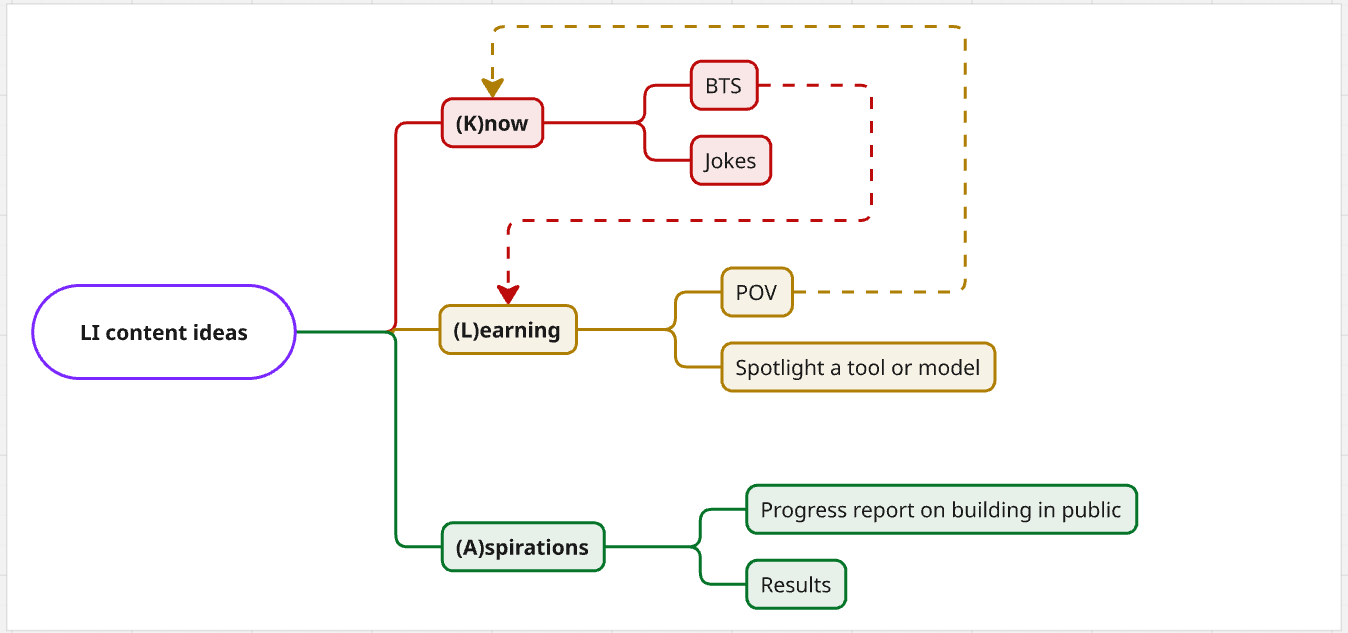
That’s when I landed on three simple themes:
- What I know
- What I’m learning
- My aspirations
This led to the KLA Framework — my personal approach to staying authentic on LinkedIn.
K: What do you know?
When I started thinking of what to post, I began with one question: What do I actually know well enough to talk about confidently?
For me, the answer was simple: SEO writing. I’ve been doing it since 2020, so it was easy to narrow my content buckets.
- Content research: how I find topic ideas and proof points
- Content writing: how I follow briefs and self-edit
- AI in content: how I use AI for research and writing
But here’s the catch: if you only post your ideas as they are in your notes, you’ll run out of what to post.
The solution is to find angles on the same idea. This could mean a quick tip, a joke/take, or a behind-the-scenes (BTS) walkthrough.
For example, I once shared two different angles on writing intros (from my content writing bucket):
- Take post: a contrarian POV on how to start articles
- BTS post: a 5-part series showing how I actually wrote intros for 5 different articles
Same theme. Same idea. Different angles to show my credibility.
Starting with what I know made posting less intimidating. I wasn’t overthinking or trying to sound smart. I was just sharing what I’d practiced for years.
L: What are you learning?
If you’re trying a new niche, like I was, you might not know what to say, let alone say it authoritatively. But you can gain exposure by sharing what you’re learning.
In my case, I wanted SaaS writing gigs. But posting about generic SEO writing wouldn’t help me stand out. So I started spotlighting two things.
- The models: SaaS creators and companies I admire
- The strategies: My take on product-led content, Bottom of Funnel (BoFU), and Middle of Funnel (MoFU) pieces
Interestingly, people liked the idea.
One of my first examples was a post where I broke down Float’s content strategy — just my honest POV on what I thought they were doing well.
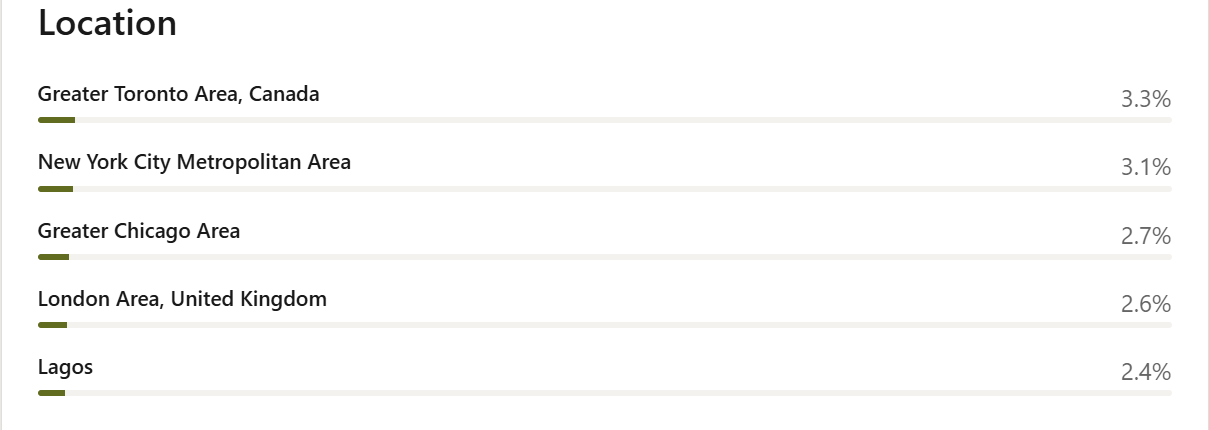
The post pulled in an audience beyond my usual circles, even showing up in locations I’d never reached before.
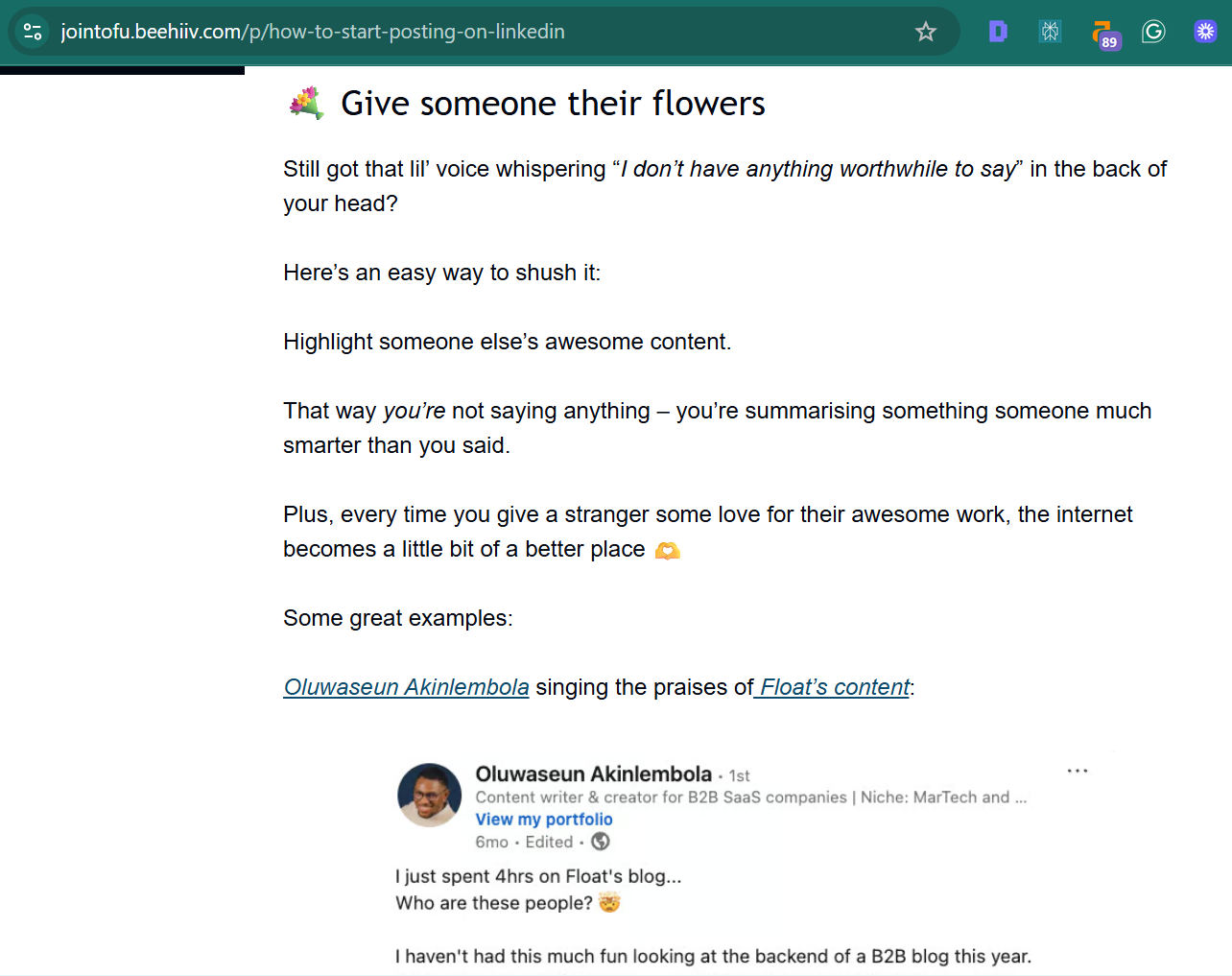
Even better, it got featured in Top of the Funnel’s newsletter, which gave me even more visibility.
A: What are your aspirations?
Once you’ve built credibility and exposure, the next step is simple: share your aspirations.
When you speak openly about your goals, you stay top of mind when opportunities arise, attract people who want to help, and build accountability around your journey.
Here are three ways you can do it:
- Proof: Share results from past projects so people see what you can deliver.
- Milestones: Post updates on your journey to show progress and momentum.
I’ve found that sharing aspirations works in two ways. First, it leads to offers of guidance from people who’ve walked the same path.
Second, it creates a sense of ownership in your audience. When my account was banned after the 90-day streak, my community rallied, escalated the issue, and I regained access.
That experience showed me something important — when you share your aspirations openly, your audience doesn’t just root for you; they start to feel part of your story.
I got the framework, why the Google Sheet?
The framework gave me content themes/buckets, but I needed a way to:
- Track my posts and see what resonates
- Ascertain what posts led to DMs
- Gamify consistency
So, I devised a simple Google Sheet template to track and experiment with my LinkedIn posts.
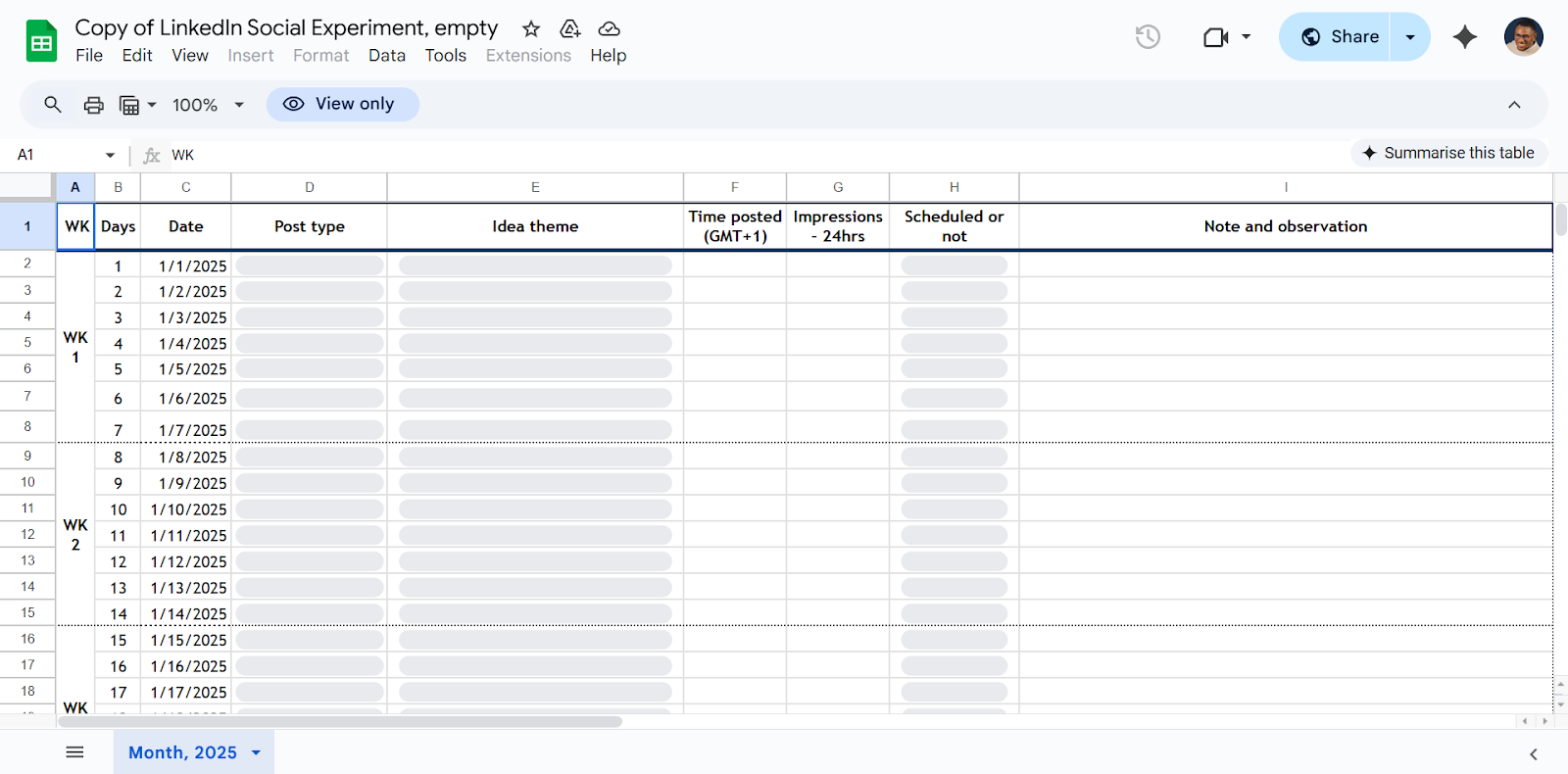
🔗 Here’s a link to create your own copy
And it worked. For the first time in 5 years, I wasn’t just consistent on LinkedIn, I was having fun.
How to use the framework + the sheet
The KLA Framework gave me themes to post around, but the sheet made it possible to stay consistent, see what was actually working, and refine my approach over time.
Below is how you can combine both.
What to track and why it matters
Tracking is where the Sheet does the heavy lifting. But don’t overcomplicate it — focus on metrics that tie back to your goals.
- If you want leads: Track posts that brought you DMs, referrals, or profile visits.
- If you want reach: Track impressions and posting times to see what drives visibility.
- If you want engagement: Track likes, comments, or reposts to see what sparks conversation.
My main goal was visibility that led to opportunities, so my sheet monitored two metrics:
- Best posting times: I tested different time slots, logged impressions for each, and eventually found the time that consistently gave me the most reach.
- Posts that led to conversations: Any post that brought a DM or referral got tagged using the “Note” column. That way, I could see the difference between posts that just got attention and posts that led to real work.
Once you know what matters to you, set up columns in the sheet to log it daily.
What to post
The sheet isn’t only for numbers. It also helps you manage your content rotation.
Here’s how I tie it back to the framework:
- Framework (KLA): I rotate between posts on what I know, what I’m learning, and my aspirations.
- Google Sheet: I track which category performs best. So, when I need visibility or leads, I know what to lean on.
Formats matter too. Beyond text, I experiment with videos, carousels, memes/GIFs, and pictures.
By logging my posts in the Google Sheet, I can see what my audience prefers. Sometimes, the same idea in a different format performs way better. I also started spotting trends: my “learning” posts tend to get more saves, while my “what I know” posts drive the most DMs and leads.
How to review and double down on what works
This part is simple but crucial: review your sheet regularly. Otherwise, you’re just collecting numbers.
Here’s the review process I use for this:
- I check every post at the 24-hour mark. Since impressions and engagement usually peak in that window, and I post daily, it’s the perfect cadence for reviewing performance.
- I color-tag the posts for quick scanning:
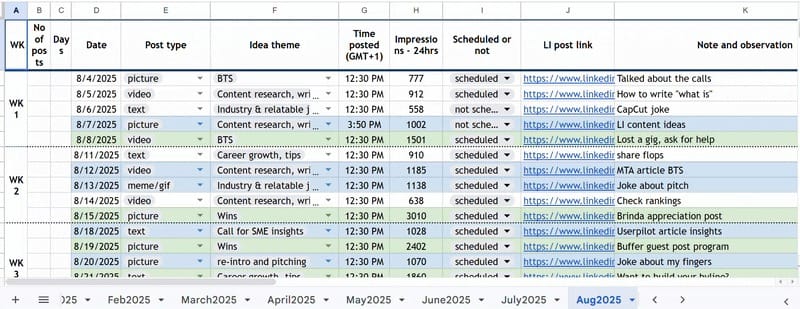
- 🔴 Red = poor (<500 impressions)
- ⚪ White = normal (500–999)
- 🔵 Blue = good (1000–1499)
- 🟢 Green = outstanding (1500+)
After a few weeks, certain patterns become obvious. You’ll know the time to post, which KLA themes work best, and in which formats drive engagement.
From there, you can double down: Do more “greens” and “blues”, tweak or cut the “reds”, and keep experimenting.
That simple review loop helped me refine my strategy week after week. It made my consistency even more intentional.
The framework and sheet are great — but people make it work
Consistency on LinkedIn is just the start. Posting gets you visibility, but relationships turn visibility into opportunities.
Here’s how I build connections alongside posting:
- Proactive commenting: I leave thoughtful comments on posts from people I want to connect with. Not just “great post,” but adding my perspective, making a joke, or asking a follow-up question.
- DMs for collaboration and opportunities: I reach out to connections to get insights for my articles, and I follow the same pattern to vet gigs, know who to pitch, and send warm pitches.
- Share opportunities with your network: When I come across a gig that isn’t a fit for me, I tag people who might be a better match. Interestingly, my best gig so far (as of writing this) came from someone I’d once connected to another opportunity.
In short, framework + sheet + people = An effective LinkedIn system
Is this system actually effective?
For visibility and gigs? Yes — even better than I’d hoped. Some of my results:
- Inbound leads: 5 (2 turned into short-term gigs)
- Referrals: 1 (landed the Userpilot gig)
- Follower growth: From 583 to 2,083
- Podcast invites: 3 (2 already done)
- Rates: Doubled in 9 months
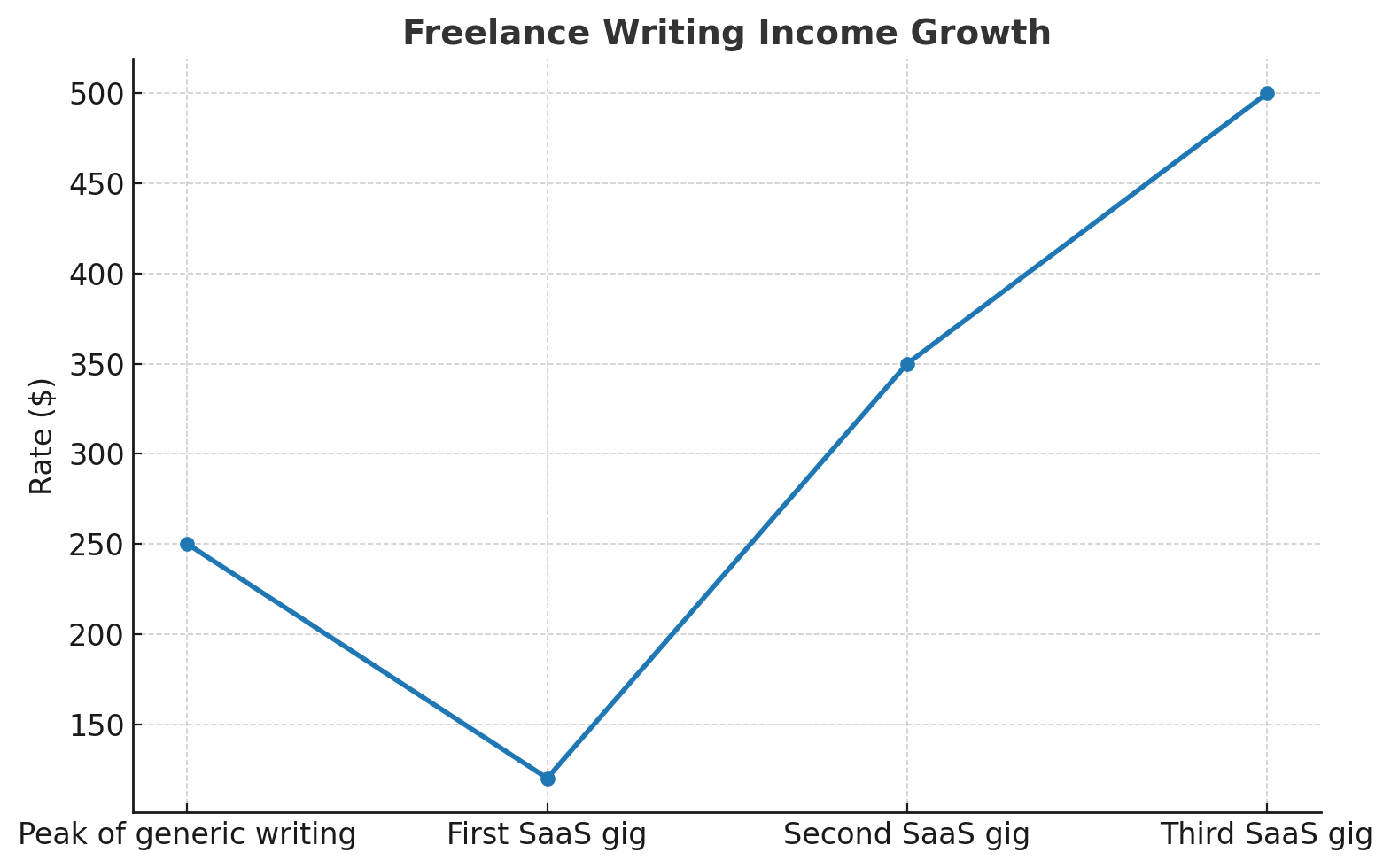
These are not the most amazing numbers by internet standards, but they mean a great deal to me.
Each one validated that the system works, and more importantly, that it’s repeatable.
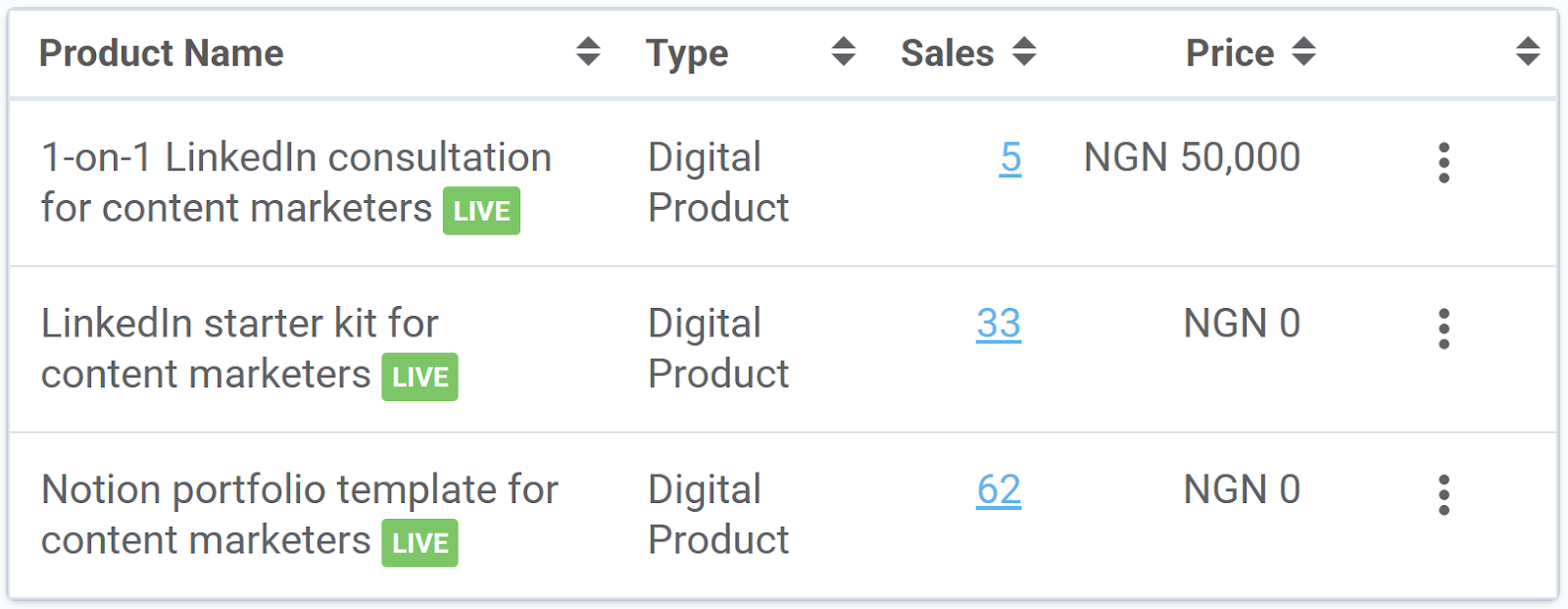
Plus, the visibility is transferable. For example, sharing my store details on LinkedIn led to 100 sales in just 3 months.
LinkedIn is less work (and more fun) when you share insights from your routine
For 5 years, I couldn’t stay consistent on LinkedIn. But the KLA Framework, a simple tracking sheet, and building real connections finally changed that.
- The KLA Framework: It turns everyday experiences into posts people relate to.
- The Google Sheet: It helps you see what works and what doesn’t, and keeps you accountable.
- Connections: Content gets you visibility, but relationships get you opportunities.
That’s the system. It’s not glamorous — even seems too simple to work. But it does work.
Try it for 90 days and join a support/accountability program. You’ll be surprised by the results.
