Close Menu
SkytikSkytik

    Subscribe to Updates

    Get the latest creative news from FooBar about art, design and business.

    What's Hot

    At Least 32 People Dead After a Mine Bridge Collapsed Due to Overcrowding

    November 17, 2025

    Here’s how I turned a Raspberry Pi into an in-car media server

    November 17, 2025

    Beloved SF cat’s death fuels Waymo criticism

    November 17, 2025
    Facebook X (Twitter) Instagram
    • About Us
    • Contact Us
    SkytikSkytik
    • Home
    • AI Tools
    • Online Tools
    • Tech News
    • Guides
    • Reviews
    • SEO & Marketing
    • Social Media Tools
    SkytikSkytik
    Home»SEO & Marketing»Google Search Console Adds Custom Annotations To Reports
    SEO & Marketing

    Google Search Console Adds Custom Annotations To Reports

    AwaisBy AwaisNovember 17, 2025No Comments2 Mins Read0 Views
    Facebook Twitter Pinterest LinkedIn Telegram Tumblr Email
    Google Search Console Adds Custom Annotations To Reports
    Share
    Facebook Twitter LinkedIn Pinterest Email

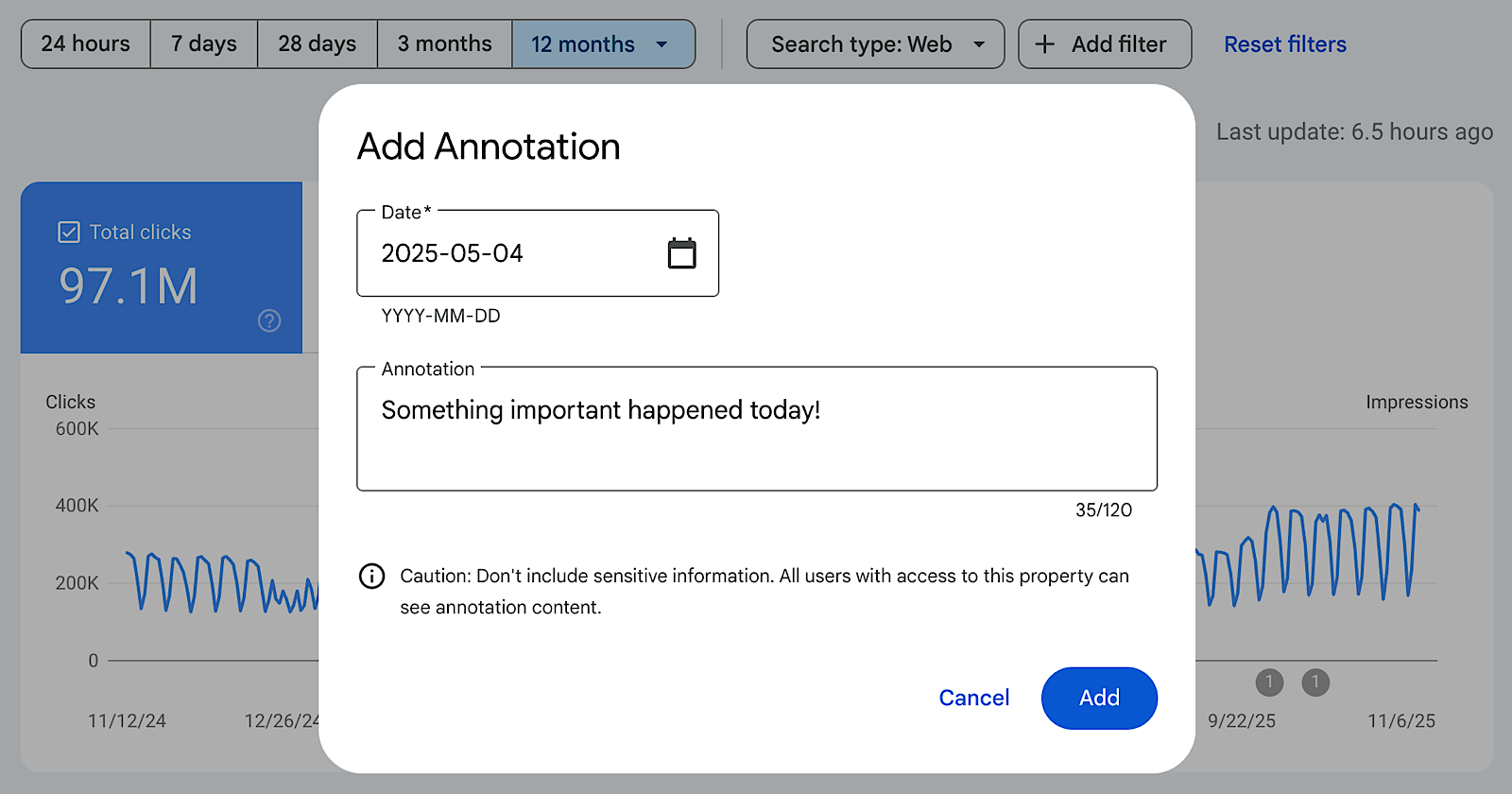
    Google launched custom annotations in Search Console performance reports, giving you a way to add contextual notes directly to traffic data charts.

    The feature lets you mark specific dates with notes explaining site changes or external events that affected search performance.

    What The Feature Does

    Custom annotations appear as markers on Search Console charts. Google’s announcement highlights several common use cases, including infrastructure changes, SEO work, content strategy shifts, and external events that affect business performance such as holidays.

    All annotations are visible to everyone with access to a Search Console property. Google recommends avoiding sensitive personal information in notes due to the shared visibility.

    Why This Matters

    Connecting traffic changes with specific actions taken weeks or months earlier usually means maintaining separate documentation outside Search Console.

    Annotations create a change log inside the performance reports you already use.

    If you manage multiple properties or work with a larger team, annotations can give everyone a shared record of releases, migrations, and campaigns without relying on external spreadsheets or project tools.

    How To Use It

    You can add an annotation by right-clicking on a performance chart, selecting “Add annotation,” choosing a date, and entering up to 120 characters of text. The note then appears directly on the chart as a visual reference point alongside clicks, impressions, or other metrics.

    Custom annotations are now part of Search Console performance reports and available through the chart context menu.

    Adds Annotations Console Custom Google Reports search
    Share. Facebook Twitter Pinterest LinkedIn Tumblr Email
    Awais
    • Website

    Related Posts

    How AI-generated content performs in Google Search: A 16-month experiment

    March 23, 2026

    7 Google Ads Shortcuts Every PPC Manager Should Be Using

    March 23, 2026

    EU signals imminent decision on Google DMA probe

    March 23, 2026

    What I Shared At SEJ Live

    March 23, 2026

    Google ads are showing identical website stats across multiple advertisers

    March 23, 2026

    Why Technical Expertise Alone Won’t Cut It Anymore

    March 23, 2026
    Leave A Reply Cancel Reply

    Top Posts

    At Least 32 People Dead After a Mine Bridge Collapsed Due to Overcrowding

    November 17, 20250 Views

    Here’s how I turned a Raspberry Pi into an in-car media server

    November 17, 20250 Views

    Beloved SF cat’s death fuels Waymo criticism

    November 17, 20250 Views
    Don't Miss

    Smoky Lamb With Spiced Yogurt Recipe

    March 23, 2026

    Coming together in just 30 minutes, this dinner can sidestep cutlery entirely in favor of…

    How AI-generated content performs in Google Search: A 16-month experiment

    March 23, 2026

    The Robot's Inner Critic: Self-Refinement of Social Behaviors through VLM-based Replanning

    March 23, 2026

    7 Google Ads Shortcuts Every PPC Manager Should Be Using

    March 23, 2026
    Stay In Touch
    • Facebook
    • YouTube
    • TikTok
    • WhatsApp
    • Twitter
    • Instagram
    Latest Reviews

    EU signals imminent decision on Google DMA probe

    March 23, 2026

    Generating Feature-Rich Emails for Benchmarking LLMs

    March 23, 2026
    Most Popular

    13 Trending Songs on TikTok in Nov 2025 (+ How to Use Them)

    November 18, 20257 Views

    How to watch the 2026 GRAMMY Awards online from anywhere

    February 1, 20263 Views

    Corporate Reputation Management Strategies | Sprout Social

    November 19, 20252 Views
    Our Picks

    At Least 32 People Dead After a Mine Bridge Collapsed Due to Overcrowding

    November 17, 2025

    Here’s how I turned a Raspberry Pi into an in-car media server

    November 17, 2025

    Beloved SF cat’s death fuels Waymo criticism

    November 17, 2025

    Subscribe to Updates

    Get the latest creative news from FooBar about art, design and business.

    Facebook X (Twitter) Instagram Pinterest YouTube Dribbble
    • About Us
    • Contact Us
    • Privacy Policy
    • Terms & Conditions
    • Disclaimer

    © 2025 skytik.cc. All rights reserved.

    Type above and press Enter to search. Press Esc to cancel.