Close Menu
SkytikSkytik

    Subscribe to Updates

    Get the latest creative news from FooBar about art, design and business.

    What's Hot

    At Least 32 People Dead After a Mine Bridge Collapsed Due to Overcrowding

    November 17, 2025

    Here’s how I turned a Raspberry Pi into an in-car media server

    November 17, 2025

    Beloved SF cat’s death fuels Waymo criticism

    November 17, 2025
    Facebook X (Twitter) Instagram
    • About Us
    • Contact Us
    SkytikSkytik
    • Home
    • AI Tools
    • Online Tools
    • Tech News
    • Guides
    • Reviews
    • SEO & Marketing
    • Social Media Tools
    SkytikSkytik
    Home»Guides»Gboard may soon make it easier to place the cursor exactly where you want it
    Guides

    Gboard may soon make it easier to place the cursor exactly where you want it

    AwaisBy AwaisFebruary 16, 2026No Comments2 Mins Read0 Views
    Facebook Twitter Pinterest LinkedIn Telegram Tumblr Email
    Gboard may soon make it easier to place the cursor exactly where you want it
    Share
    Facebook Twitter LinkedIn Pinterest Email

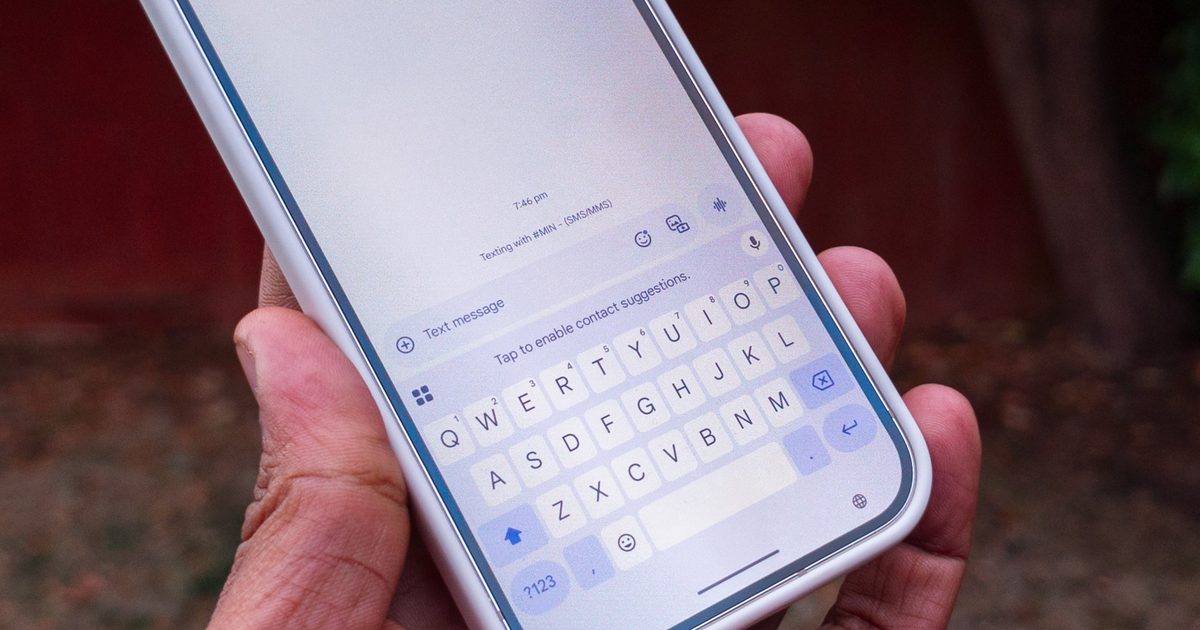
    If you’ve ever tried to move the cursor in a text field on an Android phone, you’ll know how frustrating it can be to place it exactly where you want it. Gboard helps a little with its glide feature, which lets you press and hold the spacebar and then swipe left or right to adjust the cursor’s position. But even this solution is not perfect.

    You can easily overshoot the mark while swiping on the spacebar, and the gesture doesn’t let you move up or down through longer blocks of text. Now, Google appears to be working on a new feature that could make cursor control a lot easier.

    Android Authority has spotted an in-development cursor mode while digging through the keyboard app‘s latest beta, and it could make adjusting the cursor’s position as simple as doing it on a laptop. Although the feature isn’t live in the current beta build, the publication managed to enable it early, offering a preview of how it might work once released.

    The cursor mode would essentially turn Gboard’s keyboard area into a virtual trackpad, letting users drag the cursor in any direction. To activate it, users will reportedly have to press and hold the spacebar, then move their finger or thumb across the trackpad to adjust the cursor’s position.

    At this point, it’s unclear whether the new cursor mode will replace the current glide gesture. Since it was spotted in a teardown, Google could still tweak the interface before launch, or even decide not to release the feature at all. The company will likely share more details once it’s ready for rollout.

    If it does make it to the stable release, the feature would be a welcome addition for anyone who spends a lot of time typing on their phone. Being able to move the cursor freely in any direction would make editing longer messages, emails, or notes far less fiddly, bringing the experience closer to what you’d expect from a laptop trackpad.

    Cursor Easier Gboard Place
    Share. Facebook Twitter Pinterest LinkedIn Tumblr Email
    Awais
    • Website

    Related Posts

    How to daisy-chain multiple monitors from a single cable

    February 19, 2026

    I finally found a great use for my TV’s USB port

    February 19, 2026

    A 32-inch 4K OLED 240Hz monitor for $799.98 is the kind of “finish the setup” deal that’s hard to ignore

    February 18, 2026

    AI is helping hackers make new malware faster and more complex than ever – and things may only get tougher

    February 18, 2026

    Is your Galaxy Z Trifold at risk of breaking? Fresh reports detail worsening screen issues

    February 18, 2026

    Apple Cider Vinegar’s Real Benefits, According to Registered Dietitians

    February 18, 2026
    Leave A Reply Cancel Reply

    Top Posts

    At Least 32 People Dead After a Mine Bridge Collapsed Due to Overcrowding

    November 17, 20250 Views

    Here’s how I turned a Raspberry Pi into an in-car media server

    November 17, 20250 Views

    Beloved SF cat’s death fuels Waymo criticism

    November 17, 20250 Views
    Don't Miss

    [2601.15871] Why Inference in Large Models Becomes Decomposable After Training

    March 17, 2026

    [Submitted on 22 Jan 2026 (v1), last revised 15 Mar 2026 (this version, v3)] View…

    Top Blog Platforms for SEO: Which Sites to Conside

    March 17, 2026

    Self-Hosting Your First LLM | Towards Data Science

    March 17, 2026

    YouTube tests sticky banner after ad skip

    March 17, 2026
    Stay In Touch
    • Facebook
    • YouTube
    • TikTok
    • WhatsApp
    • Twitter
    • Instagram
    Latest Reviews

    Post, Story, and Reels Dimensions

    March 17, 2026

    How nonprofits can build a digital presence that actually drives impact

    March 17, 2026
    Most Popular

    13 Trending Songs on TikTok in Nov 2025 (+ How to Use Them)

    November 18, 20257 Views

    How to watch the 2026 GRAMMY Awards online from anywhere

    February 1, 20263 Views

    Corporate Reputation Management Strategies | Sprout Social

    November 19, 20252 Views
    Our Picks

    At Least 32 People Dead After a Mine Bridge Collapsed Due to Overcrowding

    November 17, 2025

    Here’s how I turned a Raspberry Pi into an in-car media server

    November 17, 2025

    Beloved SF cat’s death fuels Waymo criticism

    November 17, 2025

    Subscribe to Updates

    Get the latest creative news from FooBar about art, design and business.

    Facebook X (Twitter) Instagram Pinterest YouTube Dribbble
    • About Us
    • Contact Us
    • Privacy Policy
    • Terms & Conditions
    • Disclaimer

    © 2025 skytik.cc. All rights reserved.

    Type above and press Enter to search. Press Esc to cancel.