



If your email workflows are driving less than 70 percent of your total email revenue, you’re leaving money on the table. Automated email workflows meet your customer in the moment. When someone browses a product, adds something to their cart, or signs up for your list, they’re giving you a signal. And, if done right, your workflows are your chance to respond at scale, without adding more to your team’s plate.
You only need to set them up once, and they run in the background, working around the clock to nurture leads, recover sales, and turn interest into action. In this guide, we’ll break down how to build email flows that not only look good in your email service provider (ESP) but also drive revenue.

Key Takeaways
- Every email workflow needs a trigger, filters, delays, and a clear exit condition to perform well.
- The five core workflows that drive revenue are: welcome series, browse abandon, abandon cart, post-purchase, and win-back.
- Workflows only run when triggered. Low performance could point to bigger issues like poor site traffic or weak segmentation.
- Open rate, click rate, revenue per flow, and engagement drop-off are the metrics that matter most.
What Are Email Workflows and How Do They Work?
At its core, an email workflow is a series of automated emails triggered by a user’s behavior. This can include signing up for a list, abandoning a cart, or making a purchase. Each workflow is designed to align with where someone is in their customer journey. If they’re new, you welcome them. If they’re shopping but don’t check out, you nudge them. If they just bought, you follow up. It’s not a case about raising your email cadence, but sending the right emails at the right time.
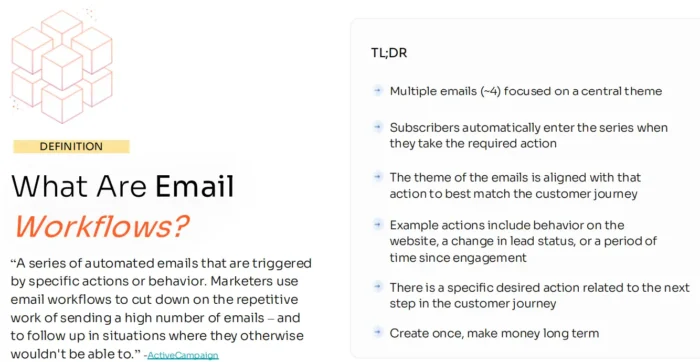
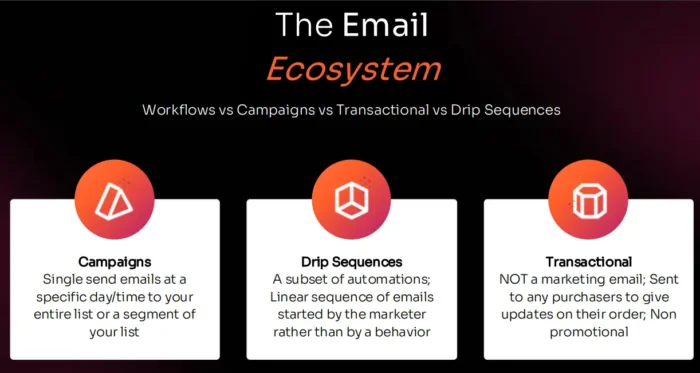
These aren’t one-off blasts. They’re part of a drip system that sends a chain of multiple emails at an interval you set (every week, every month, on holidays, etc.). Each email is personalized and goal-oriented. The moment a contact meets the right condition, they automatically enter the workflow and progress through it based on delays, filters, and rules you set up in advance.
This is where automated email marketing becomes a real growth engine. Done well, workflows turn casual interest into conversions, without relying on constant manual effort. And unlike campaigns, which stop after you hit “send,” workflows continue to run. That’s what makes them such a scalable (and often overlooked) channel for revenue.
Email Workflow Types
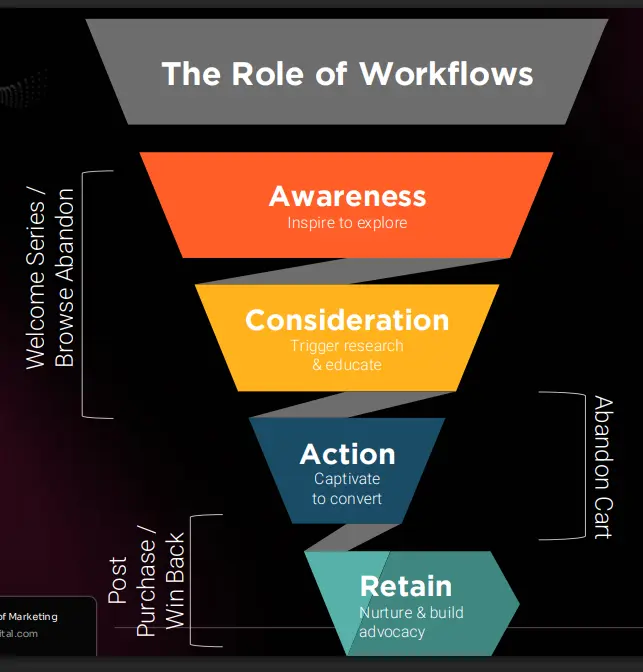
Not all email workflows do the same job. The best ones align with specific moments in your customer journey. Here are five must-haves:
- Welcome Series: Triggers when someone joins your list. Introduce your brand and guide them toward that first action.
- Browse Abandon: Sends when a user views a product or page but leaves without engaging. Remind them what they were interested in, answer objections, and keep the conversation going.
- Abandon Cart: Activates when a shopper adds something to their cart but doesn’t complete checkout. Use urgency or incentives to help them finish the purchase.
- Post-Purchase: Follows up after a sale and makes the experience feel complete for your customer. After saying thank you, it’s also an opportunity to suggest cross-sells or ask for a review.
- Win-Back: Targets subscribers who haven’t engaged in a while. Reignite interest with something personalized or exclusive before you lose them for good.
Each of these flows drives value differently, but together, they help automate the full customer lifecycle down the marketing funnel.
Elements of Email Workflows
Every successful email workflow is built from a few key components. Think of these as your toolkit for delivering the right message to the right person at the right time:
- Trigger: The action that starts the workflow. This could be someone signing up, browsing a product, making a purchase, or going inactive.
- Profile Filters: Rules that help control who enters the workflow. For example, only include first-time buyers, or exclude people who have already purchased recently.
- Exit Condition: The goal. Once the subscriber completes the desired action, like buying or booking a call, they automatically exit the flow.
- Delay: The time between emails in the sequence. Use delays to mirror your actual sales cycle or to avoid overwhelming your audience.
- Trigger Splits: Branching logic based on how someone entered the workflow. Useful for segmenting based on cart value, source, or form response.
- Conditional Splits: Branches based on profile or past behavior, like whether someone is a returning customer or how engaged they are.
Combining these elements makes your automations feel personalized, making your customers more likely to engage, and that’s what drives performance.
Measuring the Results
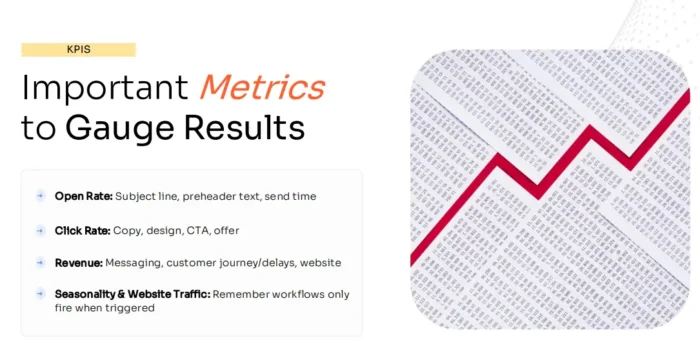
Identifying reliable metrics to track is essential for determining whether your email workflows are effective. Leveraging automation so you have less work to do is nice, but the real value kicks in when you can track and improve performance.
Here are the core metrics to watch:
- Open Rate: This is the percentage of recipients who are opening your emails. More specifically, it tells you if your subject lines are getting people to engage. If your open rate is low, try a split test with different wording, timing, or preview text to see if you can improve it.
- Click Rate: A good open rate means nothing without clicks. Look at your call-to-action, email layout, and how clearly you’re guiding users to the next step if you’re trying to improve this metric.
- Revenue: The ultimate KPI. If revenue per workflow is lagging, revisit the relevance of your message and the landing page experience to ensure they align with your goals. If your numbers are still struggling, you can also look at your email timing as a possible solution.
- Workflow Volume: Remember, automations only trigger when users take action. If your list isn’t entering flows, you may have an opt-in or segmentation problem.
- Engagement Drop-Off: Monitor where users stop clicking. If most people bounce after receiving email two, consider tightening your message or testing a shorter sequence.
Don’t just set and forget. Use these signals to refine over time and keep your automations earning while you sleep.
FAQs
What is an email workflow?
An email workflow is a sequence of automated emails triggered by a specific action, like signing up, abandoning a cart, or making a purchase. Each email is timed and tailored to guide the user toward a goal, eliminating the need for manual sends.
Conclusion
Most businesses barely scratch the surface of what email workflows can do. When your automations are dialed in, they work quietly in the background, turning browsers into buyers and first-time customers into loyal ones.
The key is building flows that reflect your actual customer journey, not just what your ESP makes easy to set up. Start with the essentials: welcome, browse abandon, cart abandon, post-purchase, and win-back. Then build from there.
If you’re ready to go deeper, check out our guides on how to write emails and craft targeted customer personas. Once you set up your automation sequences, dialing in your copy and targeting the right customers are great techniques to take your email revenue to the next level.
With the right creative and workflows, your emails won’t just support your marketing strategy; they’ll become one of its strongest revenue channels.

See How My Agency Can Drive More Traffic to Your Website
- SEO – unlock more SEO traffic. See real results.
- Content Marketing – our team creates epic content that will get shared, get links, and attract traffic.
- Paid Media – effective paid strategies with clear ROI.
Book a Call
Are You Using Google Ads? Try Our FREE Ads Grader!
Stop wasting money and unlock the hidden potential of your advertising.
- Discover the power of intentional advertising.
- Reach your ideal target audience.
- Maximize ad spend efficiency.

source: https://neilpatel.com/blog/email-workflows/
