


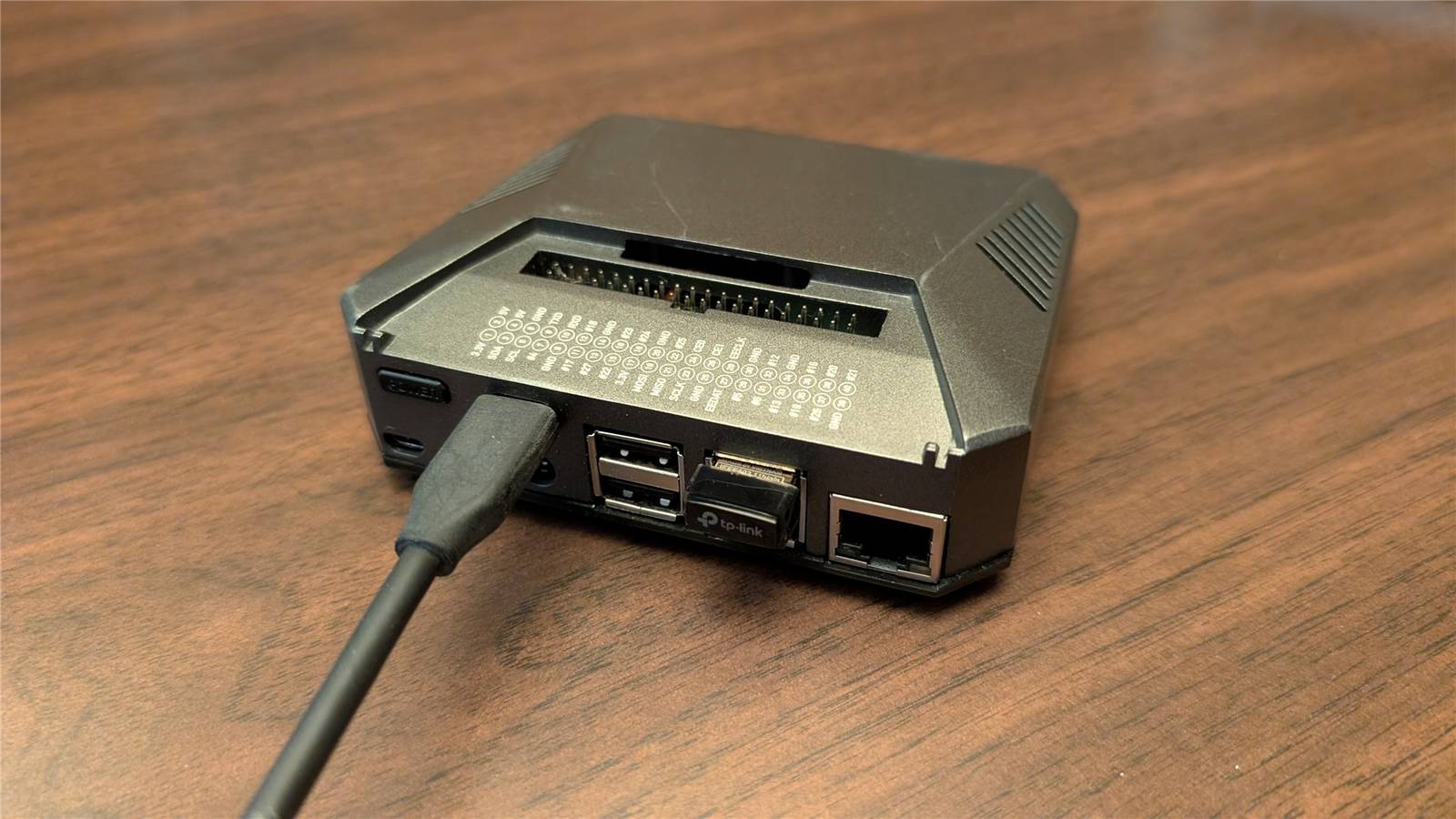
I use all sorts of software when I travel: a VPN, streaming music apps, cloud storage, and more. I turned my Raspberry Pi into a one-stop-shop travel router that combines all of those uses into one device, so I don’t have to worry about them individually on my phone, laptop, or console.
I always carry a travel router
I have a bag of tech gadgets and gizmos that I carry any time I travel. That includes a travel router, which I usually use for the VPN and to reduce the need to connect a million different devices to every hotel’s Wi-Fi network.
Moreover, while Wi-Fi networks are generally more secure than they used to be, I’ve encountered poorly-secured Wi-Fi networks way more frequently than I might like. HTTPS should ensure that any sensitive information I transmit is secure. On the other hand, it only takes 30 seconds to connect to a VPN which guarantees that all of my traffic—not just the stuff that is typically encrypted—is safe and secure. It probably isn’t strictly necessary, but I like the peace of mind.

I Always Bring a Travel Router on Vacation—Here’s Why
Never fight with tethering again.
Most travel routers are pretty simple devices. They offer a basic user interface, the ability to connect to Ethernet or Wi-Fi, and if you’re lucky, support for a VPN and onboard storage. Unfortunately, that also means they don’t have a ton of processing power. If you want to do anything above and beyond the basic features they offer, you’re probably out of luck.
That ultimately pushed me to set up my own Raspberry Pi Travel router.
Raspberry Pis make great travel routers
If you use a Raspberry Pi as your travel router, you have a huge range of things you can do with it in addition to functioning as a travel router. That is especially true if you use a more powerful Pi model, like the Raspberry Pi 4 or Pi 5.
In the time I’ve been testing my Pi as a travel router, I’ve basically turned the entire setup into a miniature portable home lab.
The most practical thing I run is a Wireguard VPN client, which lets me automatically tunnel the traffic from all of my connected devices to my home network. That ensures I can maintain secure access to everything I have self-hosted on my home network—all I need to do is punch in public IP and I’m good to go.

Cloudflare’s outage took down half the internet, but this open-source app saved my homelab
Don’t let a third-party outage keep you from accessing your self-hosted services.
However, I also run a PiHole—a type of adblocker—on my Pi Travel router too. It is an extremely convenient way to decrease the visual clutter, especially in mobile apps.
I also host a basic file server, which replicates the file-sharing function you get with many off-the-shelf travel routers. That same setup doubles as a media server for my car, which lets me carry as much music as I’d like without worrying about bandwidth, data caps, or data availability.
So far, the most useless (but hilarious) thing I’ve hosted on my Pi travel router is a Minecraft server. If you stick to the base game and don’t go crazy with mods, and you only have a few people on it, a Raspberry Pi 4 actually makes an admirable little game server. The Pi 5 is a pretty big step up, and I’d assume it is even more capable.
These are just a few of the things you could run on a Pi travel router. Realistically, you could run anything on your Pi Travel router that you might self-host on a Raspberry Pi at home; you’re really only limited by what you need and what projects you can find.
Making your own Raspberry Pi travel router
Making your own Raspberry Pi travel router is pretty straight forward. You need a handful of things:
- A boot drive (this could be a microSD card, flash drive, or NVMe SSD)
- A Raspberry Pi
- RaspAP (a project that turns your Pi into a travel router)
- A second Wi-Fi adapter (which must be compatible with Linux)
Begin by burning the RaspAP image to your boot drive using the Raspberry Pi Imager. If you have a Pi 5, I’d definitely recommend using an NVMe SSD over a microSD or flash drive—they’re faster and more reliable. I’ll be using a microSD card because my setup uses a Pi 4.
Make sure that you set your OS customization settings, otherwise you won’t be able to SSH into it later.
Plug in the Wi-Fi adapter to one of the blue USB ports, plug in your boot drive, then turn it on.
Connect to the Wi-Fi network the Pi creates (RaspAP) by entering ChangeMe when prompted, then open your browser and enter http://raspberrypi.local in the address bar.
You’ll have access to the RaspAP’s web UI, which lets you configure everything you might want to. It is also how you’ll make the Pi travel router connect to Wi-Fi networks when you’re out and about.

Of course, another big advantage of using a Raspberry Pi instead of a dedicated travel router is how easily it can become something else. The travel router setup only requires the microSD card and the USB Wi-Fi adapter. The rest of the time, I use it to run all sorts of other interesting projects instead.

- Brand
-
Raspberry Pi
- Storage
-
8GB
- CPU
-
Cortex A7
- Memory
-
8GB
- Operating System
-
Raspbian
- Ports
-
4 USB-A
It’s only recommended for tech-savvy users, but the Raspberry Pi 5 is a tinkerer’s dream. Cheap, highly customizable, and with great onboard specs, it’s a solid base for your next mini PC.
