


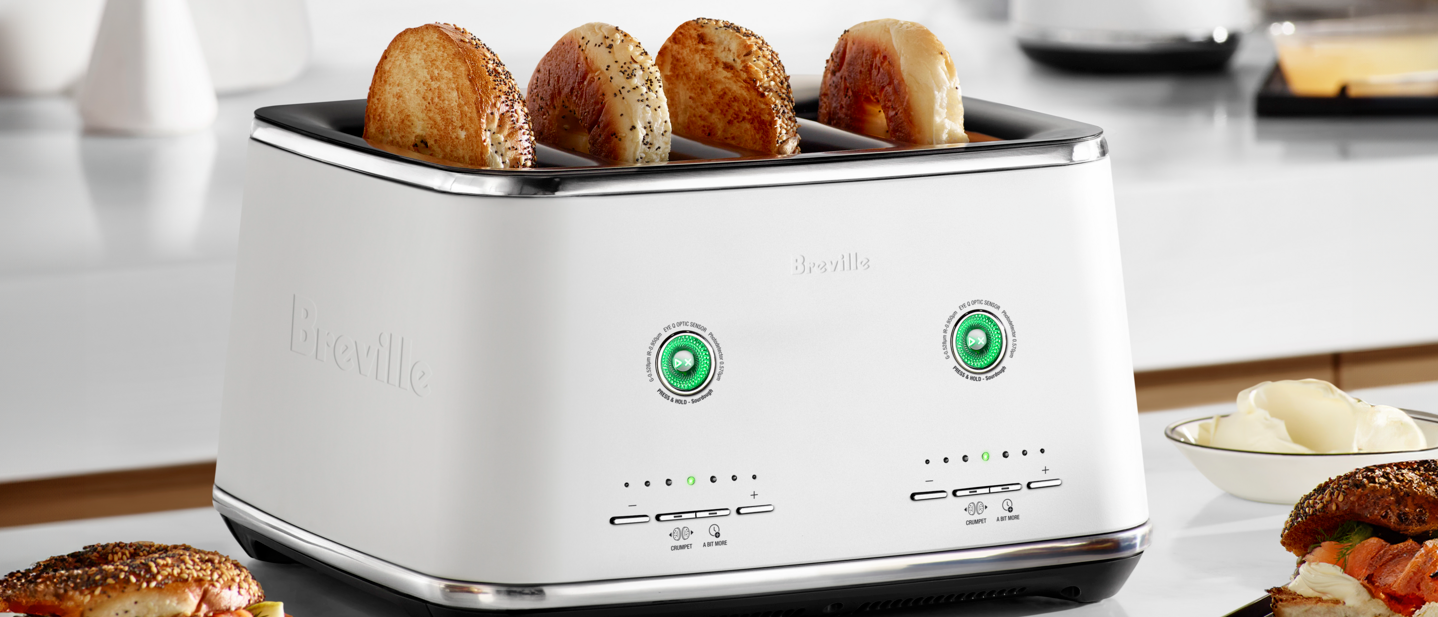
Breville Eye Q: Specs
Slices: 2 or 4
Material: Steel housing
Dimensions: 12.9 x 12.4 x 7.5 in / 33 x 31.7 x 19.1 cm
Weight: 12.5 lbs / 5.7kg
Settings: 3 + A bit more and Timer
Color options: Stainless Steel, Black Truffle, Noir and Sea Salt
Just when I thought toasters didn’t need smart settings, an iconic brand has proven me totally wrong.
Breville’s smart toaster uses optic sensors to detect color change in your bread 10 times every second, and stops toasting once the desired shade, out of the seven presets, is reached. The Eye Q also has a specialized Sourdough mode and Crumpet/Bagel mode to perfectly crisp up dense, thicker slices of artisan bread. But how does the Breville Eye Q actually fare when it comes to toasting? We put it to the test to find out.
Breville Eye Q Auto: Price and availability
Right now, the Breville Eye Q is available exclusively in Australia, starting at AU$469 for the two-slice and AU$629 for the four-slice. Breville hasn’t confirmed when the toaster will be available in other markets just yet.
When it comes to pricing, the Eye Q is definitely on the more expensive side, given that it houses optic sensor technology and an automatic lift, instead of a manual chute. The toaster comes in four colors: Brushed Stainless Steel, Noir (which is launch exclusive), Black Truffle and Sea Salt.
Breville Eye Q Auto: Design
The Breville Eye Q Auto lets you toast different types of bread — be it toast, sourdough, or bagels, or a combination of all — at their own ideal color and density setting. It does come in a 2-slice model; however, if you opt for the 4-slice, you’ll need to be wary of countertop space. Measuring 12.9 x 12.4 x 7.5 in / 33 x 31.7 x 19.1 cm and weighing 12.5 lbs / 5.7kg, it’s certainly a heavy toaster, taking up more room than Breville’s Bit More 4-Slice. This also applies to the toasting slots, as they are seemingly wider to accommodate longer and denser slices of artisanal bread.
The design is where the Breville Eye Q really shines, as it was aesthetically pleasing to look at, let alone use. The slots are controlled by the Toast Shade Selector, which allows you to choose your preferred color, and it’ll toast your bread to that level. To use the machine, you need to press the LED play/pause circular button. The button displays different colors depending on the mode in use. For normal toasting, it’ll glow green, sourdough mode will be blue, and for timer mode, the button will be red.
Image 1 of 3


To toast your desired carb, all you have to do is select your preset using the plus (or minus) buttons, and either press or hold the circular button depending on your preferred mode. If you find your chosen shade isn’t right for you, you can press the ‘A Bit More’ button for an extra bit of toasting. There’s also no need to worry about defrosting your bread, too, as the sensors will take care of it for you.
The Eye Q’s optic sensors monitor one slice across a pair, indicated by the little bread icon on the farthest slots. This is because Breville’s research shows most users toast the same kind of bread in both slots, so the sensor only needs to monitor one slice, and the toaster’s tech will ensure even heating throughout. In the instance of toasting one piece of bread, you’d pop it into the marked slot.

With automated one-touch lowering, the Eye Q will slowly raise and lower your bread when you press the button, eliminating the toaster’s popping sound. And as a bonus for Breville fans out there, the toaster will play the iconic music when switching it on/off. To cancel your toast, you’ll need to press the play/pause button and wait for the toaster to raise your slice.
Breville Eye Q Auto: Performance
As for performance, the Breville Eye Q has three modes for toasting — Normal (for sliced regular bread), Sourdough Mode (for sourdough and artisanal breads), and Crumpet Mode (for crumpets, bagels, and English muffins). For this review, I trialled all modes, using bread or toastable items with the desired settings as specified by Breville’s instruction manual.
Now, it’s worth noting that there is a Timer Mode setting on the Eye Q, just in case you prefer counting the minutes until your toast is done. This mode is also great for toaster waffles or Pop-Tarts, as these items don’t necessarily change color while toasting.
Normal mode
Image 1 of 2


Utilising all slots of the machine, I loaded up four slices of white bread, testing the lowest, middle and highest color setting on the Shade Selector.
I was thrilled with my initial results, with each batch delivering consistent coloring across all pieces of toast. The toasting shade was consistent with settings in almost all cases in terms of brownness and evenness. On the lowest setting, the slices were lightly warmed, with minimal browning, while the fourth setting and the highest setting were crispy brown, but not burnt.
Sourdough Mode
Image 1 of 2


As for Sourdough mode, I was particularly intrigued by the premise of the Eye Q, as Breville claims it reduces the chance of burnt crusts on artisanal breads. Switching on Sourdough mode is a little different to toasting as normal on the Eye Q. You need to hold the button and wait for the toaster to change into the mode before toasting your sourdough slices.
During the initial test, I was subject to some burnt crusts on our test sourdough. It was rather unfortunate, too, as everything else about the slices was ideally crisp, café-quality sourdough. That said, once I settled on slimmer sourdough slices, the results were perfection.
During our secondary tests, all four slices of sourdough were crisp and even colored, particularly when using the middle and highest settings.
Crumpet/Bagel mode
Image 1 of 3


Crumpet mode provides additional heat on one side to perfectly toast specialty items. To activate the setting, just press the crumpet button and adjust the shade to your preference.
Crumpets are a bit of an odd item to toast, as most toasters have just enough width to pop in a pair without it being a total fire hazard. That said, the Eye Q had plenty of space around each crumpet for it to slide in and out without raising any alarms.
Now the Eye Q did a superb job of toasting crumpets; however, the real test was toasting dense bagels. Overall, the toaster performed well in terms of evenness and consistency. When it comes to testing toasters for bagels, I look for an appropriate amount of browning on the front and less color with soft warmth on the back.
The Eye Q Auto excelled in both categories, which, after testing the machine, came as no surprise. That said, it did suffer a similar fate to my initial sourdough tests, where one thicker bagel crisped up too much on the backside, causing some burn spots. Other than that, the Eye Q delivered consistency and evenness on the other test bagels.
Breville Eye Q Auto: Ease of use and cleaning

The Breville Eye Q is extremely easy to use, with all controls illuminated, and the ‘A Bit More’ button allows you to add a small extra amount of toasting if your original shade setting isn’t quite enough.
The cleaning tray fits seamlessly into the sleek design, making it hard to spot at first glance, as it’s located under the machine. A small ledge just underneath the toaster easily pulls out to allow you to empty the crumbs. There’s also a storage compartment at the rear of the toaster that neatly houses the cord when not in use.
If you’re unsure, the Breville includes a comprehensive manual that explains the toaster’s structure and functions in detail, complete with illustrations and instructions.
Breville Eye Q Auto: Verdict

The Breville Eye Q Auto is a great, smart addition to any kitchen appliance lineup, especially if toast or toasted items are a large part of your daily breakfast routine. Now, it can be a bit tricky to find your desired shade using the selector, but Breville makes it easy to add ‘A Bit More’ if you find your shade isn’t quite right.
Once you do find your preferred hue, your next piece of toast will be exemplary, as the Breville delivered evenness and consistency throughout the shades I tested. The same goes for using the toaster for bagels and crumpets.
Where the toaster truly shines, though, is in its Sourdough mode, which creates a cafe-quality slice at home with ease. Again, opting for a thinner sourdough or artisanal slice helped avoid any accidental burnt crusts, but once that niggle is sorted, you’ll have consistent color and toastage on your sourdough.
