


working with k-NN, we know that the k-NN approach is very naive. It keeps the entire training dataset in memory, relies on raw distances, and does not learn any structure from the data.
We already began to improve the k-NN classifier, and in today’s article, we will implement these different models:
- GNB: Gaussian Naive Bayes
- LDA: Linear Discriminant Analysis
- QDA: Quadratic Discriminant Analysis
For all these models, the distribution is considered as Gaussian. So at the end, we will also see an approach to get a more customized distribution.
If you read my previous article, here are some questions for you:
- What is the relationship between LDA and QDA?
- What is the relation between GBN and QDA?
- What happens if the data is not Gaussian at all?
- What is the method to get a customized distribution?
- What is linear in LDA? What is quadratic in QDA?
When reading through the article, you can use this Excel/Google sheet.

Nearest Centroids: What This Model Really Is
Let’s do a quick recap about what we already started yesterday.
We introduced a simple idea: when we calculate the average of each continuous feature inside a class, that class collapses into one single representative point.
This gives us the Nearest Centroids model.
Each class is summarized by its centroid, the average of all its feature values.
Now, let us think about this from a Machine Learning point of view.
We usually separate the process into two parts: the training step and the hyperparameter tuning step.
For Nearest Centroids, we can draw a small “model card” to understand what this model really is:
- How is the model trained? By computing one average vector per class. Nothing more.
- Does it handle missing values? Yes. A centroid can be computed using all available (non-empty) values.
- Does scale matter? Yes, absolutely, because distance to a centroid depends on the units of each feature.
- What are the hyperparameters? None.
We said that the k-NN classifier may not be a real machine learning model because it is not an actual model.
For Nearest Centroids, we can say that it is not really a machine learning model because it cannot be tuned. So what about overfitting and underfitting?
Well, the model is so simple that it cannot memorize noise in the same way k-NN does.
So, Nearest Centroids will only tend to underfit when classes are complex or not well separated, because one single centroid cannot capture their full structure.
Understanding Class Shape with One Feature: Adding Variance
Now, in this section, we will use only one continuous feature, and 2 classes.
Up to now, we used only one statistic per class: the average value.
Let us now add a second piece of information: the variance (or equivalently, the standard deviation).
This tells us how “spread out” each class is around its average.
A natural question appears immediately: Which variance should we use?
The most intuitive answer is to compute one variance per class, because each class might have a different spread.
But there is another possibility: we could compute one common variance for both classes, usually as a weighted average of the class variances.
This feels a bit unnatural at first, but we will see later that this idea leads directly to LDA.
So the table below gives us everything we need for this model, in fact, for both versions (LDA and QDA) of the model.
- the number of observations in each class (to weight the classes)
- the mean of each class
- the standard deviation of each class
- and the common standard deviation across both classes
With these values, the entire model is completely defined.

Now, once we have a standard deviation, we can build a more refined distance: the distance to the centroid divided by the standard deviation.
Why do we do this?
Because this gives a distance that is scaled by how variable the class is.
If a class has a large standard deviation, being far from its centroid is not surprising.
If a class has a very small standard deviation, even a small deviation becomes significant.
This simple normalization turns our Euclidean distance into something a little bit more meaningful, that represents the shape of each class.
This distance was introduced by Mahalanobis, so we call it the Mahalanobis distance.
Now we can do all these calculations directly in the Excel file.

The formulas are straightforward, and with conditional formatting, we can clearly see how the distance to each center changes and how the scaling affects the results.

Now, let’s do some plots, always in Excel.
This diagram below shows the full progression: how we start from the Mahalanobis distance, move to the likelihood under each class distribution, and finally obtain the probability prediction.

LDA vs. QDA, what do we see?
With just one feature, the difference becomes very easy to visualize.
For LDA, the separation on the x-axis is always cut into two parts. This is why the method is called Linear Discriminant Analysis.
For QDA, even with only one feature, the model produces two cut points on the x-axis. In higher dimensions, this becomes a curved boundary, described by a quadratic function. Hence, the name Quadratic Discriminant Analysis.

And you can directly modify the parameters to see how they impact the decision boundary.
The changes in the means or variances will change the frontier, and Excel makes these effects very easy to visualize.
By the way, does the shape of the LDA probability curve remind you of a model that you surely know? Yes, it looks exactly the same.
You can already guess which one, right?
But now the real question is: are they really the same model? And if not, how do they differ?

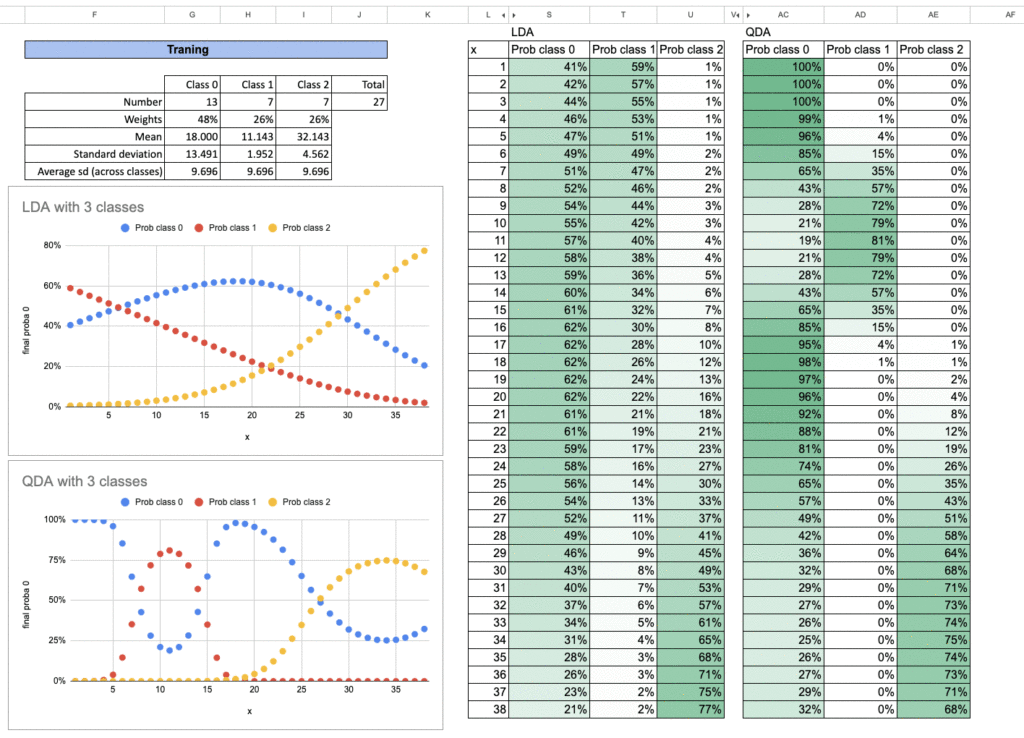
We can also study the case with three classes. You can try this yourself as an exercise in Excel.
Here are the results. For each class, we repeat exactly the same procedure. And for the final probability prediction, we simply sum all the likelihoods and take the proportion of each one.

Again, this approach is also used in another well-known model.
Do you know which one? It is much more familiar to most people, and this shows how closely connected these models really are.
When you understand one of them, you automatically understand the others much better.
Class Shape in 2D: Variance Only or Covariance as Well?
With one feature, we do not talk about dependency, as there is none. So in this case, QDA behaves exactly like Gaussian Naive Bayes. Because we usually allow each class to have its own variance, which is perfectly natural.
The difference will appear when we move to two or more features. At that point, we will distinguish cases of how the model treats the covariance between the features.
Gaussian Naive Bayes makes one very strong simplifying assumption:
the features are independent. This is the reason for the word Naive in its name.
LDA and QDA, however, do not make this assumption. They allow interactions between features, and this is what generates linear or quadratic boundaries in higher dimensions.
Let’s do the exercice in Excel!
Gaussian Naive Bayes: no covariance
Let us begin with the simplest case: Gaussian Naive Bayes.
So, we do not need to compute any covariance at all, because the model assumes that the features are independent.
To illustrate this, we can look at a small example with three classes.

QDA: each class has its own covariance
For QDA, we now have to calculate the covariance matrix for each class.
And once we have it, we also need to compute its inverse, because it is used directly in the formula for the distance and the likelihood.
So there are a few more parameters to compute compared to Gaussian Naive Bayes.

LDA: all classes share the same covariance
For LDA, all classes share the same covariance matrix, which reduces the number of parameters and forces the decision boundary to be linear.
Even though the model is simpler, it remains very effective in many situations, especially when the amount of data is limited.

Customized Class Distributions: Beyond the Gaussian Assumption
Up to now, we only talked about Gaussian distributions. And it is for its simplificity. And we also can use other distributions. So even in Excel, it is very easy to change.
In reality, data usually do not follow a perfect Gaussian curve.
For exploring a dataset, we use the empiric density plots almost every time. They give an immediate visual feeling of how the data is distributed.
And the kernel density estimator (KDE) as a non-parametric method, is often used.
BUT, in practice, KDE is rarely used as a full classification model. It is not very convenient, and its predictions are often sensitive to the choice of bandwidth.
And what is interesting is that this idea of kernels will come back again when we discuss other models.
So even though we show it here mainly for exploration, it is an essential building block in machine learning.

Conclusion
Today, we followed a natural path that begins with simple averages and gradually leads to full probabilistic models.
- Nearest Centroids compresses each class into one point.
- Gaussian Naive Bayes adds the notion of variance, and assumes the independance of the features.
- QDA gives each class its own variance or covariance
- LDA simplifies the shape by sharing the covariance.
We even saw that we can step outside the Gaussian world and explore customized distributions.
All these models are connected by the same idea: a new observation belongs to the class it most resembles.
The difference is how we define resemblance, by distance, by variance, by covariance, or by a full probability distribution.
For all these models, we can do the two steps easily in Excel:
- the first step is to estimate the paramters, which can be considered as the model training
- the inference step that is to calculate the distance and the probability for each class

One more thing
Before closing this article, let us draw a small cartography of distance-based supervised models.
We have two main families:
- local distance models
- global distance models
For local distance, we already know the two classical ones:
- k-NN regressor
- k-NN classifier
Both predict by looking at neighbors and using the local geometry of the data.
For global distance, all the models we studied today belong to the classification world.
Why?
Because global distance requires centers defined by classes.
We measure how close a new observation is to each class prototype?
But what about regression?
It seems that this notion of global distance does not exist for regression, or does it really?
The answer is yes, it does exist…

