


There are numerous budget-friendly compact PCs for those with limited space, but there’s often a trade-off in performance. While the ACEMAGIC M1 Mini PC is not ideal for graphics-intensive tasks or gaming, its processor and ports are stand-outs for productivity.


8/10
- Storage
-
1TB M.2 2280 NVMe PCIe 3.0 x 4 SSD
- CPU
-
Intel Core i9-11900H
- Memory
-
32GB (2 x 16GB) SO-DIMM DDR4 Dual Channel
- Operating System
-
Windows 11 Pro
The ACEMAGIC M1 Mini PC is a compact productivity workhorse.
- Incredibly compact
- Powerful processor
- Plenty of RAM and storage
- Lots of high-performance ports
- Only one Type-C USB port
- Requires included AC adapter for power

How We Test and Review Products at How-To Geek
We go hands-on with every product to ensure it’s worth your time and money.
Price and availability
The ACEMAGIC M1 Mini PC is available from Amazon and the ACEMAGIC website for a regular retail price of $600, although there are often significant discounts. In the box is the mini PC, AC adapter and power cable, HDMI cable, mounting plate and screws, and paperwork.
You can attach the PC to the back of a monitor or anything else that accepts a standard VESA mount using the included mounting plate and screws. Otherwise, four rubber feet help raise the compact PC to allow flow to the air intake and keep it in place on a desktop.
The configuration reviewed has the Intel I9 11900H processor, 32GB of RAM, and a 1TB SSD for storage. Additional configurations of the M1 Mini PC are available on both Amazon and the ACEMAGIC website.
- CPU
-
Intel Core i9-11900H
- Storage
-
1TB M.2 2280 NVMe PCIe 3.0 x 4 SSD
- Memory
-
32GB (2 x 16GB) SO-DIMM DDR4 Dual Channel
- Graphics
-
Intel UHD 11th Gen
- Operating System
-
Windows 11 Pro
- Ports
-
Gigabit Ethernet, USB-C, USB-A x 6, DisplayPort, HDMI
- Audio
-
3.5mm Audio Jack
- Wireless
-
WiFi 6, Bluetooth 5.2
- Dimensions
-
5.05 x 5.05 x 1.61 inches
- Weight
-
1.18 lbs
Sleek build with almost enough of everything

The M1 Mini uses the same or similar-looking case as other ACEMAGIC mini PCs, which is a compact, rounded cuboid shape made popular by the Mac Mini. The plastic case material is lightweight, but surprisingly durable, thanks in part to its compact 5.05 x 5.05 x 1.61-inch dimensions and roughly 1.18 lb weight. The case’s silver-colored finish looks classy and does a good job of resisting fingerprints.
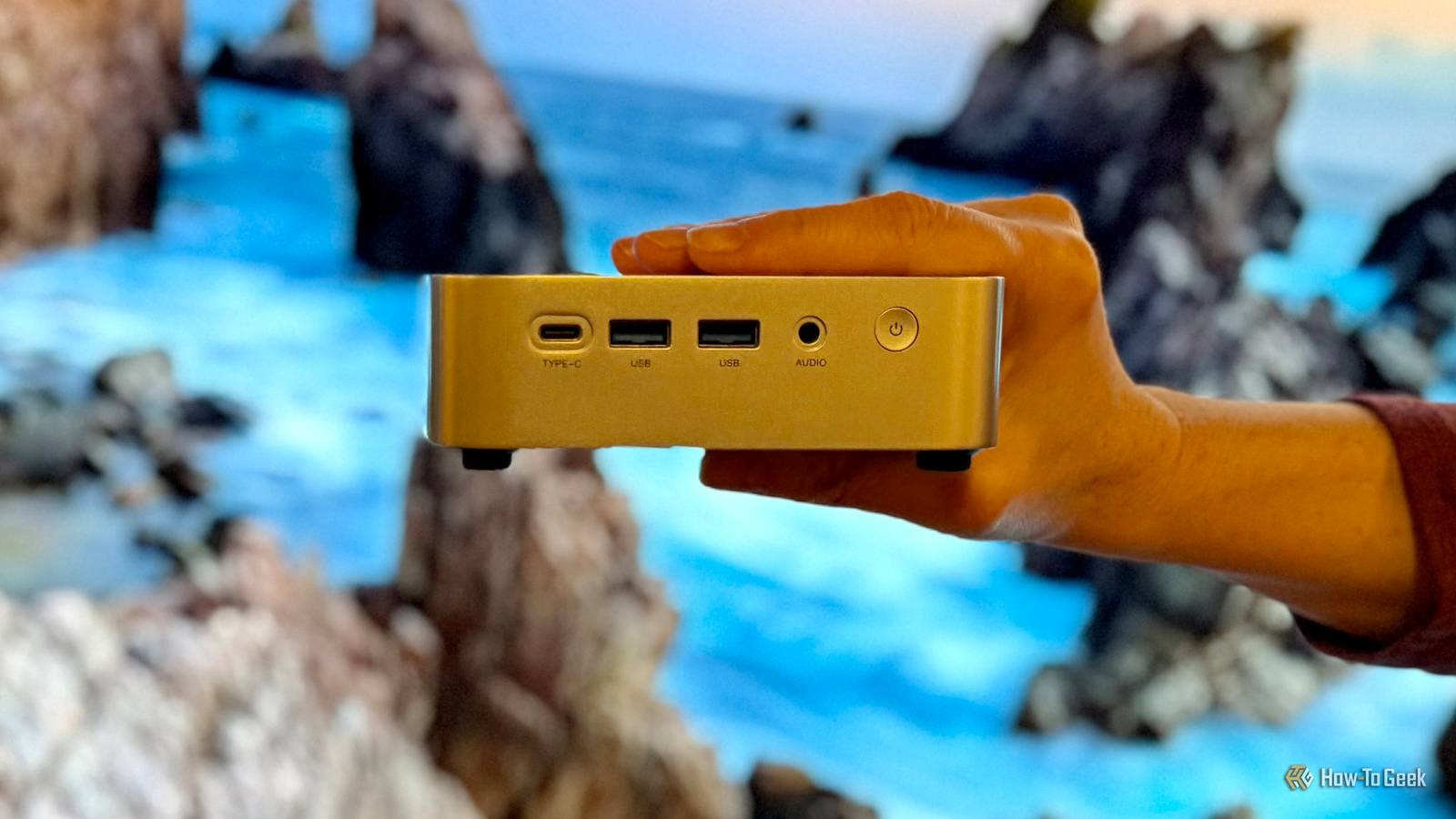
On the front of the M1 Mini is a power button, 3.5mm audio jack, two USB3.2 Gen2 Type-A ports, and a single USB4 Type-C (40Gbps) port that supports the DisplayPort 1.4 specification. On the rear are four USB 3.2 Gen1 Type-A ports, one 2.5GbE LAN port that supports from 10 to 2500Mbps auto-negotiation, a DisplayPort 1.4 port, an HDMI 2.0 port, and a DC-in barrel connector for the included AC adapter.

Although I love the large selection of high-performance ports, I’m a bit disappointed there’s only one USB-C port. Also disappointing is that this port can’t be used for power, only data and video, so you’re stuck with the included AC adapter. Having to use the included AC Adapter for power isn’t a deal-breaker by any stretch, but it would have been nice to have a USB-C port that could handle both power delivery and video with a compatible monitor to help minimize cables.
Still, what’s there is impressive, including the ability to support up to three 4K displays at 60Hz each over HDMI, USB-C, and DisplayPort. That’s a lot of potential multitasking productivity.

With this kind of horsepower in a tiny package, the cooling system needs to keep up. Fortunately, ACEMAGIC didn’t disappoint. Internally, there are dual heat dissipation fins, heat dissipation copper tubes, and a relatively quiet high-speed centrifugal fan. Cool air is pulled in from underneath the M1 Mini, and hot air is blown out through the vents on the left side and rear.
Getting started and setting up to go pro

In a nice touch, instead of Windows 11 Home, ACEMAGIC includes Windows 11 Pro, which has some advanced features that pair well with the more performance-oriented hardware. In an unusual move, however, there are multiple warning labels on the mini PC itself to avoid Wi-Fi or LAN usage on initial setup. According to ACEMAGIC, connecting to a network might trigger long updates, delaying desktop access. Not one to ignore a good warning, I powered on the M1 Mini and went through the initial Windows 11 setup without connecting to my network until the entire process was complete.
Once I rebooted, was back in the Windows desktop environment, and connected to my network, I was able to change my offline account to a standard Microsoft online one, which connected me to all of my usual services like Microsoft 365 Family, OneDrive, and Edge. It’s an annoyance not being able to do that during initial setup, but certainly not a deal-breaker.
I was pleasantly surprised by how vanilla the preinstalled operating system was. There’s no bloatware or third-party software of any kind, leaving over 900GB of storage space free on the 1TB SSD. It’s like I installed Windows 11 Pro myself from scratch, allowing me to install exactly what I want and nothing else.
Speedy performance, even for (some) gaming

With an Intel Core i9-11900H Processor, two 16GB DDR4 3200MHz SO-DIMMs for 32GB of total RAM, 1TB M.2 2280 NVMe PCIe 4.0 x 4 SSD, Wi-Fi 6E, and Bluetooth 5.2, you’d expect the M1 Mini to perform well. Spoiler, it does, with just a handful of exceptions.
Naturally, it installs and runs apps like Microsoft Word, Adobe Photoshop, Google Chrome, and more, without issue. Everything loads quickly and runs smoothly. Objective performance tests show how it subjectively feels.
Using PCMark 10, which covers a wide range of performance tests, the M1 Mini achieved a total score of 4,930, behind the average for a 2023 office laptop at 5,848, but still better than 41% of all results. Unsurprisingly, the lowest scores were in Rendering and Visualization (4,270), Video (5,030), and Digital Content Creation (5,368), with the highest in Chat (8,155), Web (9,182) and Apps (10,918). Again, for day-to-day productivity, the performance of this mini PC doesn’t disappoint.
The lack of a discrete GPU (or external eGPU support for that matter) is one reason why graphics-intensive performance is not the best, and the same goes for gaming. However, there’s still just enough raw horsepower to go along with the Intel UHD 11th Gen graphics for fun with some popular older games running at modest resolutions. Using 3DMark to benchmark gaming performance with the Steel Nomad Light DX12 test for lightweight PCs resulted in a score of just 497, but that’s sufficient, for instance, at a 1,920 x 1,080 resolution with low-to-medium settings to average 50+ FPS in games like League of Legends and Fallout: New Vegas.
When wired into one of my TP-Link Deco BE22000 Wi-Fi 7 satellites, Ethernet performance was excellent, with an average ping of 14ms, download speed of 1,900Mbps, and upload speed of 359Mbps. Unfortunately, WiFi performance was a bit underwhelming. While ping and upload speeds were roughly the same as over Ethernet, I rarely exceeded 500Mbps or so download. That’s still pretty good, of course, but as a point of comparison, my Samsung Galaxy Tab S10 Ultra can equal or exceed the wired speeds wirelessly.
Even though the M1 Mini features an incredibly compact case, it never gets overly hot, nor does the fan run particularly long or loudly. Even under heavy loads that bring it to its maximum 54W TDP, while the case gets warm—and you do hear the fan—it’s never to uncomfortable levels. As such, I’d have no qualms with mounting this computer to the back of a monitor with the included hardware should I ever need to.
Should you buy the ACEMAGIC M1 Mini PC?
There really are a ton of mini or compact PCs out there for competitive prices. I feel like ACEMAGIC took the right approach to standing out. While the M1 Mini PC might not be the least expensive option, particularly when not discounted like it often is, its performance for productivity purposes is undeniable.
While I would have liked more than one USB-C port, an option to provide power over USB-C, and even better WiFi performance, what is there, from the processor to the selection of ports to the thermal management, impresses. This is no PC for graphics-intensive operations or gaming, but for everything else, it’s fair to say that it delivers big things in a very small package.
8/10
- Storage
-
1TB M.2 2280 NVMe PCIe 3.0 x 4 SSD
- CPU
-
Intel Core i9-11900H
- Memory
-
32GB (2 x 16GB) SO-DIMM DDR4 Dual Channel
- Operating System
-
Windows 11 Pro
The ACEMAGIC M1 Mini PC is a compact productivity workhorse.
