


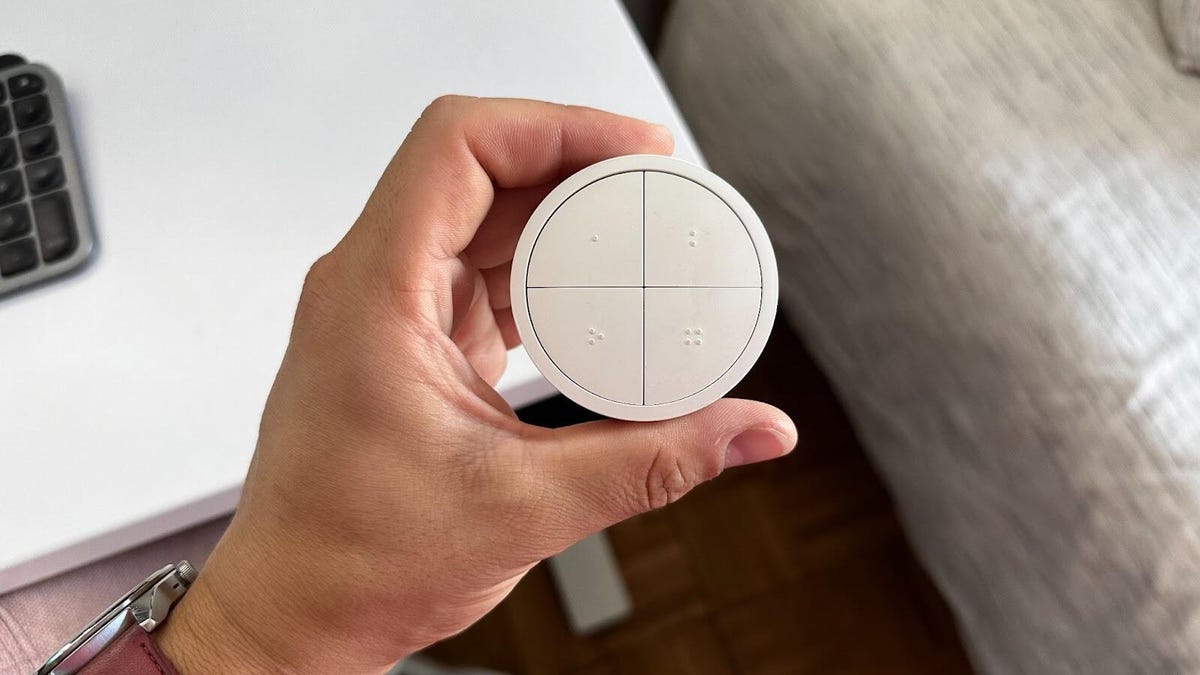
Phillips Hue smart lights are some of the best smart lights out there but controlling them with my phone or voice commands can be a bit of a hassle. That’s why I was so excited to find the Phillips Hue Tap Dial. This puck-shaped light controller has buttons to press and a dial that twists, allowing you to control multiple lights at once with a minimum of hassle.
This accessory is a game changer, and right now it’s on sale for Black Friday for just $40. That’s a solid 28% discount over the usual $55 price tag. You can snag it in black or white, and it’s well worth the price to better control your lights with a minimum of fuss.
For more, don’t miss our roundup of the best smart home deals overall.
Watch this: Stop Overpaying: Price-Check Before You Buy on Black Friday
Impulse Buys Under $25 That Make Unexpectedly Great Gifts
See all photos
SMART LOCK DEALS OF THE WEEK
Deals are selected by the CNET Group commerce team, and may be unrelated to this article.
On the surface, the Tap Dial is a simple way to control your lights
Spending $50 on a glorified light switch may seem like a bit much, especially when you consider that it’s nearly the same price as a single Philips Hue 75-watt White and Color Ambiance bulb. If you’re like me and firmly steeped in the Hue ecosystem, you’ve likely already come to terms with the fact that it’s an expensive ecosystem to be in. The customization options for this little guy will have tinkerers excited, and I believe it’s definitely worth its price.
The Dial looks like a hockey puck with four buttons on the face, with a rotating outer wheel to brighten or dim your lights. The four buttons each have little dots numbered 1 to 4, so you can feel which button you’re pressing, even in the dark. It’s fairly small and not a chore to bring it room to room if you so desire. You can place it on a wall inside of the included wall mount to use like a typical light switch. It’s magnetic, so you can stick it on your fridge or some other metal surface.
The customization options for the Tap Dial are extensive.
Under the hood, the Tap Dial is a dream for tinkerers
You’d think that setup for this little device would be simple, with only a few options involved, but you’d be wrong. The settings for the Tap Dial can be a bit complex and can require some tinkering to get just right, especially if you have multiple scenes you want to go through.
Either I completely missed the function in the app, or within the nearly two years I’ve had the dial, Philips resolved my main gripe. I’m not sure which is true, but my biggest annoyance was that I believed you could only use the Tap Dial for one room or “zone” in your home. While this may have always been how the device functioned, this has now been resolved (in my mind) and you can assign each button to a different room or zone. The twist-to-dim function can only be assigned to one room at a time, which makes sense.
To set up, you’ll head to the Hue app, then go to Settings > Accessories and select your Tap Dial. From there, you can assign functions to each of the buttons. First, you’ll need to choose whether the button is going to control your lights or automation. If you choose the former, you’ll need to choose the button behavior when you press it:
- Time-based light: Lighting based on the time of day or based on a customized timetable of your choosing.
- Scene cycle: Choose a primary scene that will always start upon a button press. Continue pressing to cycle through additional light scenes.
- Single scene: Always only the same scene on button press.
- Lights off: Selected lights turn off when the button is pressed.
By default, pressing and holding any of the buttons will turn off the lights assigned to it, but you can opt for turning all the lights off in your entire home or for it to do nothing. There’s also an advanced “smart on/off” option, which I haven’t dabbled with yet.
After you’ve customized the buttons to your liking, your last stop is to choose what the twist dial does, or what else it does, other than brightening or dimming your lights. There are only two options here, and both are easy to tweak. The first is choosing if you want to be able to turn your lights off completely with the dial or have them go down to the minimum brightness only as you twist to dim them. The second gives you the option to set a specific scene that will turn on if you twist the dial when the lights are off.
You can make your setup as simple or complex as you’d like, making the Tap Dial approachable for anyone.
The Hue Tap Dial makes a great gift
There’s a good chance that someone isn’t going to run out and drop a bunch of money on Hue lights after receiving this as a gift. The Tap Dial is easy to use, but the value it brings comes with the customization you can do with it. Still, you don’t have to want to jump into all the settings to make the Dial worth it. As I said above, it’s an approachable device for anyone since you can make it as simple or as complex as you’d like.
Hey, did you know? CNET Deals texts are free, easy and save you money.
If you know someone who already has a Hue setup in their home, this would be a great addition. Plus, if they love to dig into the settings or are self-described tinkerers, then this is definitely something worth considering. If you aren’t sure if someone has Hue lights, then the Tap Dial would be an even better smart home gift when paired with a new bulb.
Join Our Daily Deals Text Group!
Get hand-picked deals from CNET shopping experts straight to your phone.
