


Instagram giveaway post examples
Giveaways continue to work because they encourage people to interact with your Instagram content in a direct way, like commenting, tagging friends, and sharing the post with other social media accounts. This not only boosts visibility but also brings in new audiences who may be seeing your brand for the first time.
Follow–tag–share giveaway
Giveaway posts increase engagement because they require actions like tagging, following, and sharing. These interactions boost visibility and help you reach completely new audiences. The reward creates an incentive for participation.
Why it works
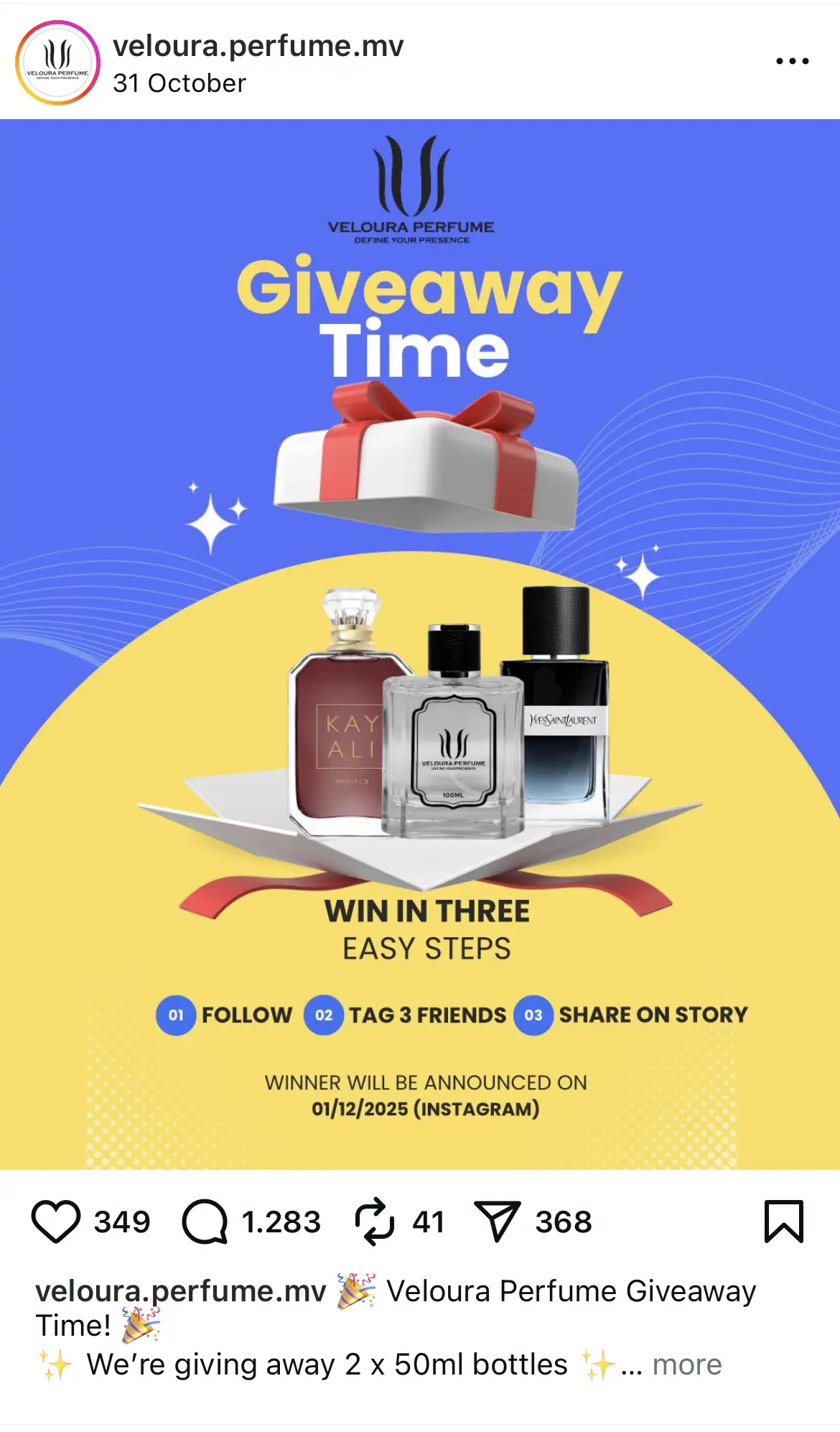
This giveaway post works because the design is bold, colorful, and instantly communicates what the viewer can win. The large “Giveaway Time” headline makes the purpose clear without needing to read the caption.
Showing the perfume bottles upfront helps followers understand the prize immediately, which increases participation. The three-step entry instructions at the bottom are simple and easy to follow, making the barrier to entry low and engagement high.
How to adapt it for your own brand
- Use a bright background and large headline to grab attention.
- Display the prize clearly so viewers know what they are entering for.
- Keep the entry steps short and easy to understand.
- Add the announcement date to set clear expectations.
- Place your logo or branding in a small, consistent spot to build recognition.
Milestone celebration giveaway
Celebration giveaways connect a brand milestone with audience participation. This creates a sense of community and shared excitement. They work especially well because people love being part of a brand’s wins.
Why it works
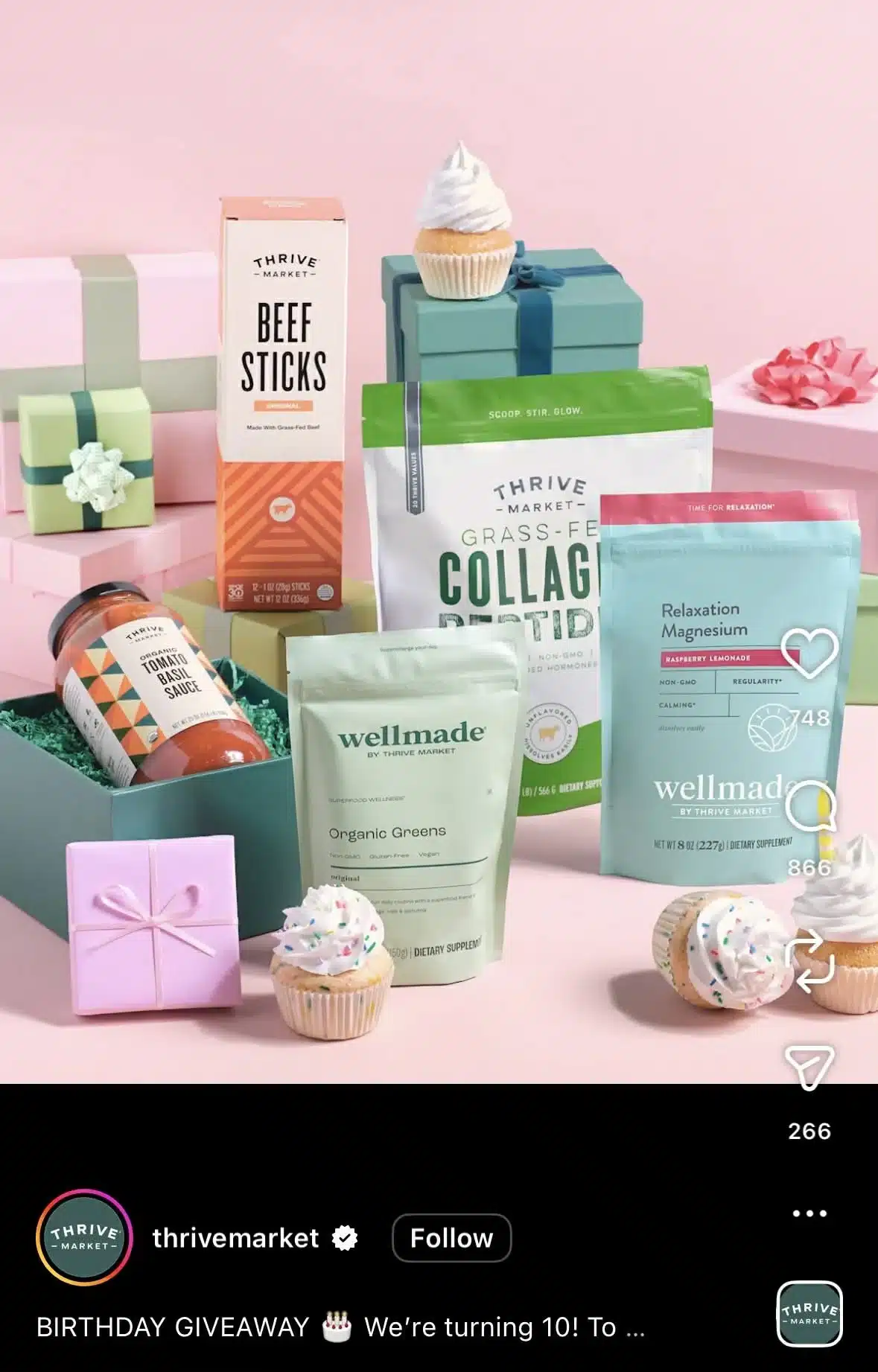
Giveaway posts like this work because they feel celebratory and instantly tell you there’s something to win. The setup is bright, clean, and fun, and the cupcake details make the anniversary theme obvious without needing a long explanation. The products are arranged in a way that makes them look like part of a gift spread, which helps viewers imagine receiving the bundle themselves.
How to adapt it for your own brand
- Use props that match the occasion so the giveaway feels tied to a real moment or milestone.
- Arrange your products like a gift set so viewers can immediately visualize what they could win.
- Keep the background clean and bright so the items pop on the feed.
- Add small themed elements, like cupcakes or ribbons, to make the visual more festive.
- Make sure the image alone explains the giveaway so the caption can focus on the entry steps.
Have followers create content and tag you (UGC contest)
UGC contests work because they encourage followers to create content for you. This strengthens community involvement and provides a stream of authentic social media posts that you can reshare. They naturally expand your reach when participants tag your account.
Why it works
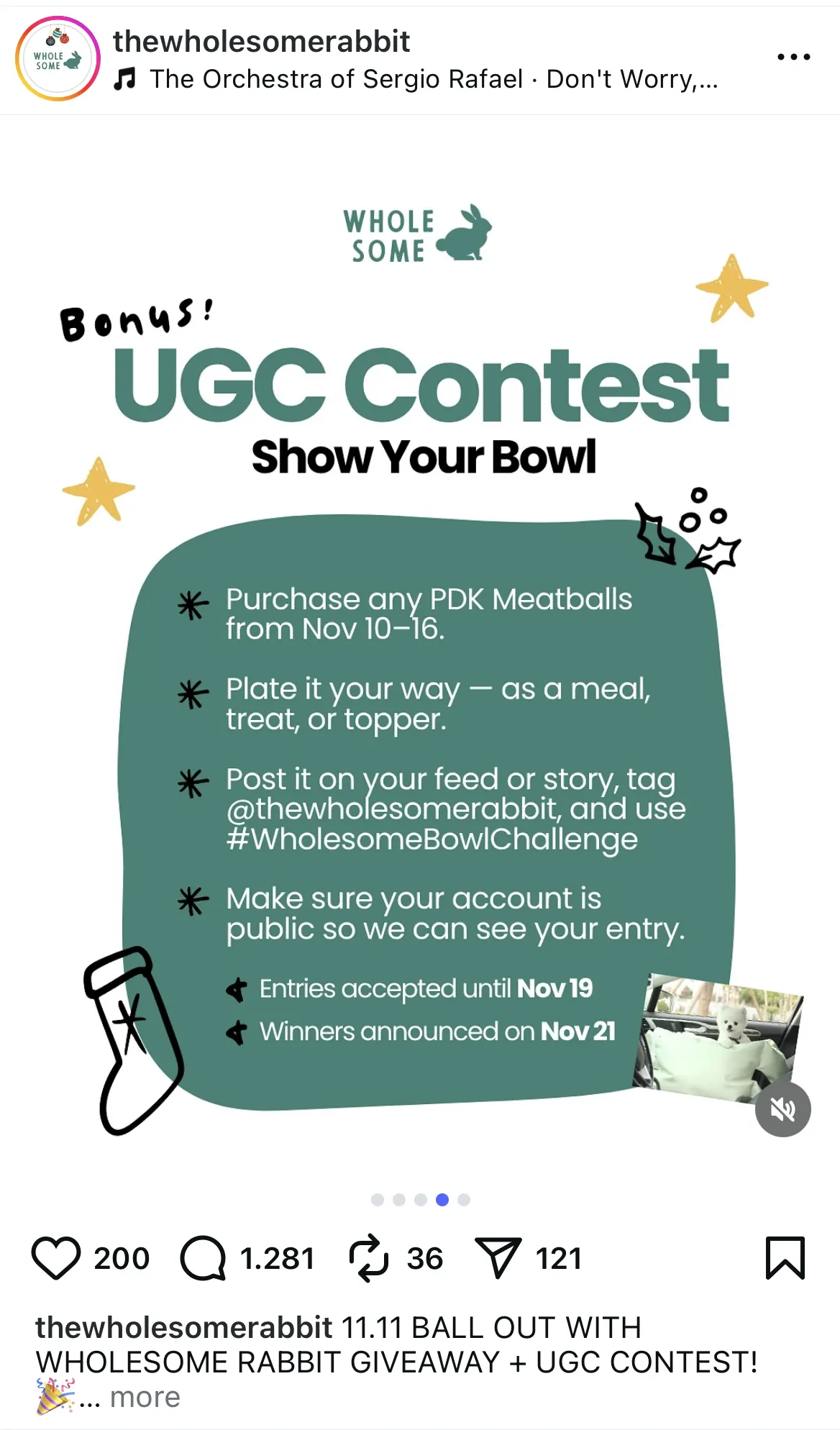
This UGC contest post works because the instructions are clear, the visuals are friendly, and the challenge itself is easy to participate in. The layout organizes each step in a readable format, which reduces confusion and encourages more entries.
Highlighting key dates in bold helps followers understand the timeline immediately. The playful design elements match the brand’s tone and make the contest feel fun rather than overly promotional.
How to adapt it for your own brand
- Break the contest rules into simple, scannable steps.
- Add a clear heading that explains what type of content followers should create.
- Highlight entry deadlines and announcement dates to set expectations.
- Add relevant hashtags that make it easy to track the content entries.
- Show a tiny preview of past UGC to spark participation and inspire ideas.
Instagram reel examples
Short videos are still one of the most powerful ways to reach people who don’t already follow you. Reels help you show behind-the-scenes moments, lifestyle shots, product shots, quick tutorials, and fun content that feels more personal than a static image.
For many brands, Reels are the fastest way to gain visibility on the social media platform as they often reach users far beyond your existing followers.
Instagram Reels of up to 15 seconds have an average completion rate of 72%, which surpasses longer Reels’ average of 46%, so whichever example you choose to adapt for your own accounts, make sure to keep it short.
Quick tutorial or how-to Reel
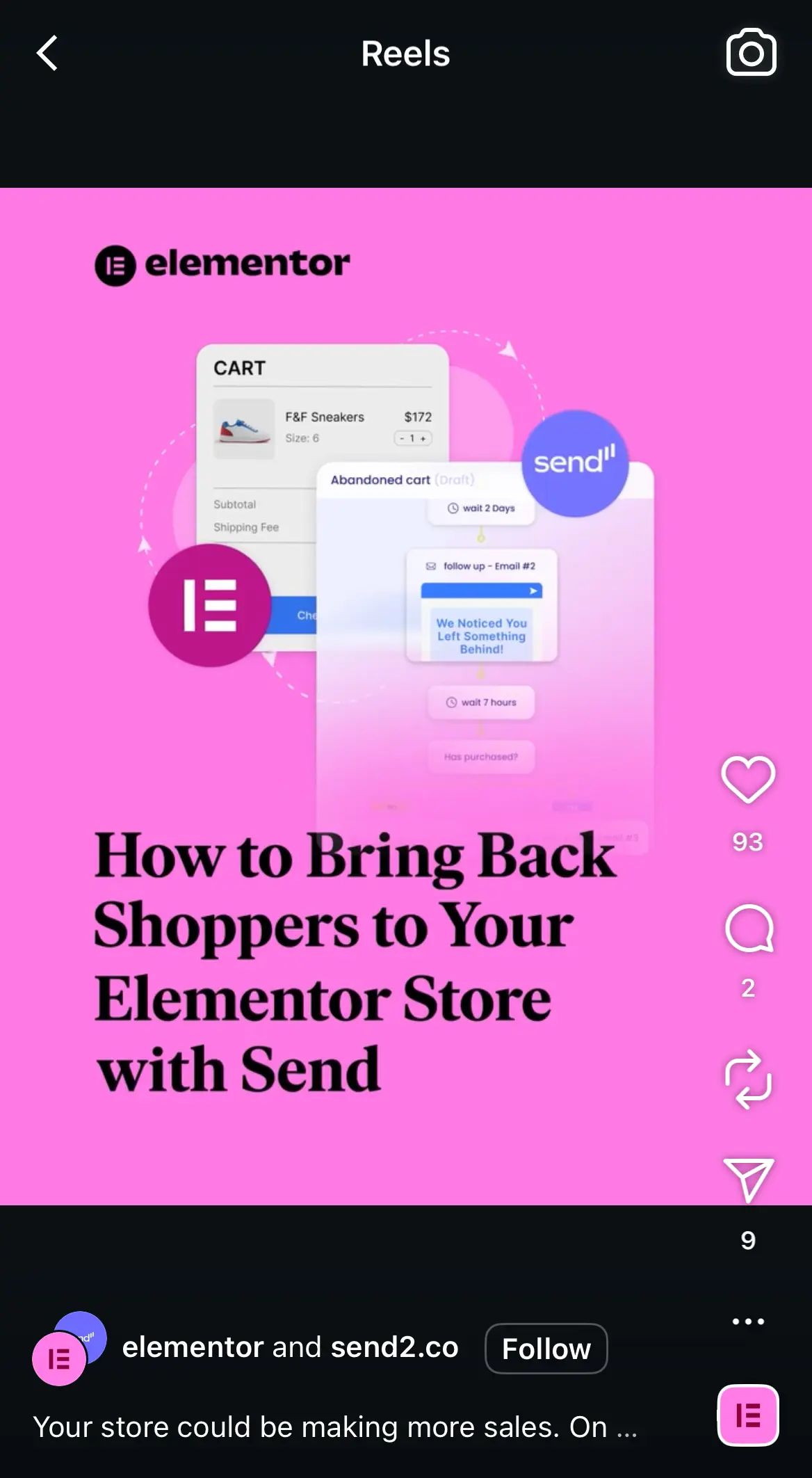
Tutorial Reels succeed because they deliver fast, valuable lessons in a short video format. Reels are heavily promoted by Instagram, so useful content can reach far beyond your followers. People save this type of video so they can return to it later.
Why it works
This tutorial-style Reel works because it delivers a specific promise right away. The bold headline tells viewers exactly what they will learn, which increases watch time and keeps the content focused.
The bright pink background grabs attention on the Reels feed, and the workflow graphic behind the text visually reinforces the topic. This combination of clarity and visual interest helps the Reel perform well with both current followers and new audiences.
Beyond this eye-catching graphic, the video features someone from Elementor describing the steps, alongside graphics to guide the user through the process. This makes the Reel easy to follow and gives it a friendly feel thanks to the presence of a real person.
Cross-promoting your Reels on other platforms (such as posting them as Shorts on your YouTube channel or as TikToks) is another great way to increase your reach across multiple social media accounts.
How to adapt it for your own brand
- Start with a clear headline that states the benefit of watching.
- Use a bold background color that helps your Reel stand out in the feed.
- Add simple graphics or screenshots that support the topic without overwhelming the frame.
- Keep the text large enough to read quickly on mobile.
- Choose a topic your audience wants help with so the Reel earns saves and shares.
Behind-the-scenes workflow Reel
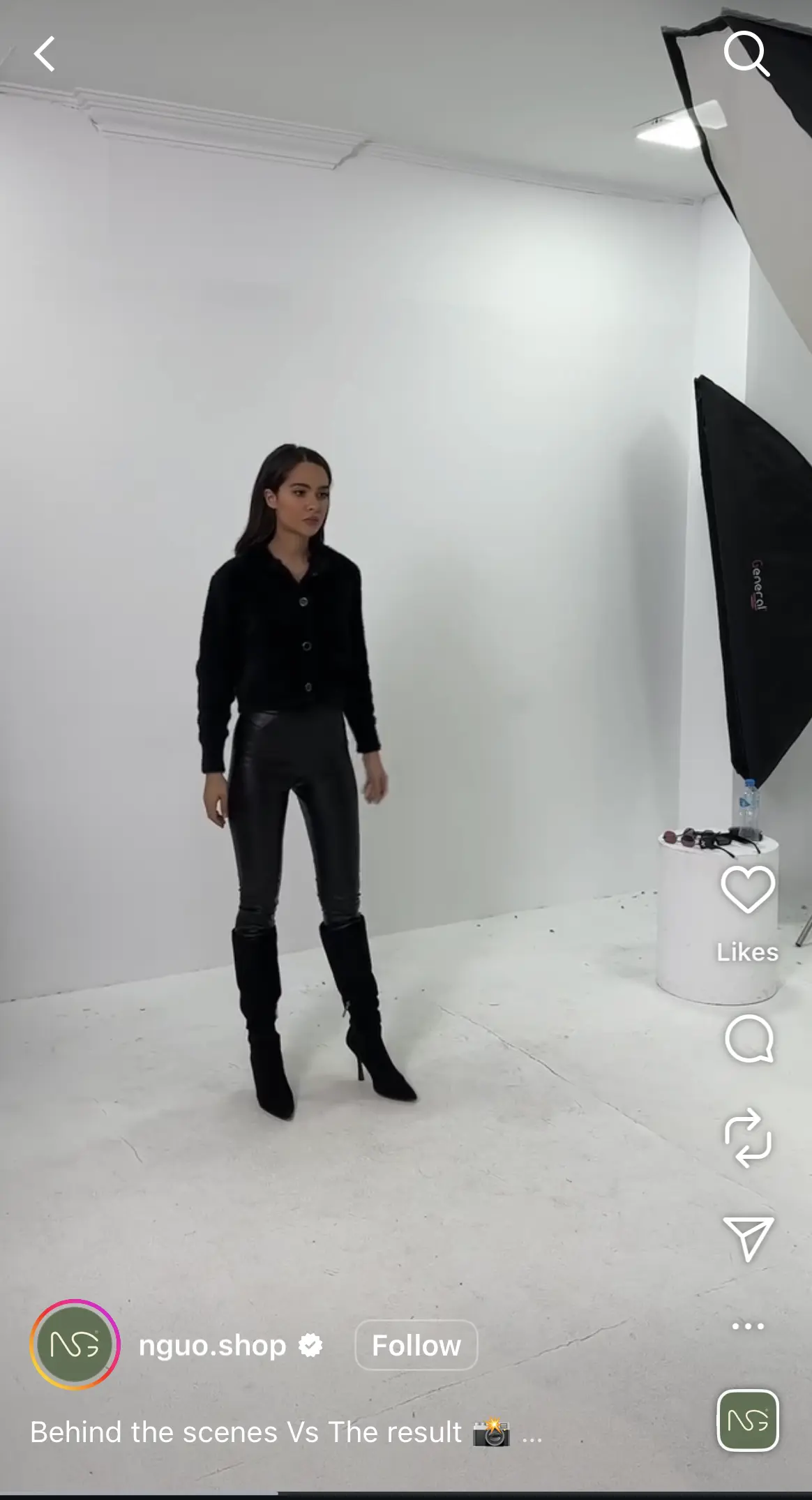
Behind-the-scenes content works because it feels honest and human. It gives viewers a look at your process, which builds trust and curiosity. This format helps brands feel more approachable and real.
Why it works
This behind-the-scenes Reel works because it shows the raw, unedited environment that followers rarely get to see. The simple studio setup, lighting gear, and model positioning make the brand feel transparent and approachable.
Viewers enjoy watching how polished product photos or campaign visuals come together, so this type of content naturally boosts watch time. It also builds trust because it highlights the real work that goes into creating the final images.
How to adapt it for your own brand
- Film short clips that show your process before the final polished result.
- Keep the setting natural so viewers feel like they are getting exclusive access.
- Capture moments that highlight your team, tools, or creative setup.
- Pair the behind the scenes footage with a reveal of the final photo or video.
- Add light text cues or a simple caption to explain what is happening in each clip.
Transformation Reel
Transformation videos stand out because they show dramatic results in motion. The reveal creates anticipation and encourages viewers to rewatch the clip. This increases the number of people who watch the full video and the overall reach.

Why it works
This transformation Reel works because it shows a product in action, so you see the before, the after, and the in-between. Viewers can clearly see texture, color, and detail, thanks to the close-up shot, making the later transformation feel more dramatic and satisfying.
The creator, pointing to specific areas, guides the viewer’s eye and builds anticipation for the reveal. This type of content performs well because it shows tangible results rather than abstract claims.
How to adapt it for your own brand
- Start your Reel with a close-up that highlights the problem or starting point.
- Use gestures or simple movements to direct attention where you want viewers to look.
- Keep the lighting bright and even to make the transformation clear.
- Add short text overlays if needed to explain what is being fixed or transformed.
- Make them shoppable posts so users can go straight to the product after witnessing its results.
Since Reels are such a huge part of your strategy when it comes to reaching a wider audience, making sure they get the most visibility possible is very important. When you create your Reel posts with SocialBee, you’ll find best posting time suggestions based on your past content performance in the Post Editor, so you can always maximize results.
