



The short answer: Who should (and shouldn’t) pay for LinkedIn Premium
If you’re using LinkedIn with a clear goal, it can be worth it. If you’re just scrolling, it’s not.
LinkedIn Premium makes sense when you’re actively trying to get something out of the platform, like landing a job, reaching recruiters, or finding clients. In those cases, the extra tools can help you move faster and be more targeted.
But if you’re using LinkedIn casually, posting here and there, checking updates, keeping your profile alive, the free version is more than enough.
It’s not a must-have tool. It’s more like a shortcut.
And whether that shortcut is worth paying for depends on what you’re trying to do, which we’ll break down next.
LinkedIn Premium plans explained (so you don’t pick the wrong one)
Before deciding if LinkedIn Premium is worth it, you need to know what you’re actually paying for, because not all plans do the same thing.
This is where most people get it wrong. They upgrade, explore a few features, and then feel like it’s not worth it. Not because LinkedIn Premium doesn’t work, but because they picked a plan that doesn’t match their goal.
Each plan is built for a different use case, job search, networking, sales, or hiring. So instead of thinking of LinkedIn Premium as one product, it helps to see it as a set of tools for different types of users.
Here’s a quick breakdown of the main LinkedIn Premium plans and what they’re designed for:
- Premium Career → for job seekers who want more visibility and access to recruiters
- Premium Business → for professionals focused on networking, partnerships, and industry competitive insights
- Sales Navigator → for B2B sales, lead generation, and finding decision-makers
- Recruiter Lite → for recruiters and hiring managers sourcing candidates
- All-in-One plan → a mix of features for people juggling multiple goals
1. LinkedIn Premium Career: Built for job seekers who want an edge
If there’s one LinkedIn Premium plan that makes the most sense for regular users, it’s this one.
Premium Career is clearly built for people who are in job-search mode, whether that means actively applying, trying to switch industries, or simply wanting to look more visible to recruiters.
It is the most relevant plan for anyone asking, “Should I actually pay for LinkedIn?” because it focuses less on sales or hiring and more on getting you noticed in the job market. LinkedIn describes it as a plan for job-seeking, visibility, recruiter access, and skill-building.
What you actually get with Premium Career
The biggest thing to know is that Premium Career is not some dramatic reinvention of LinkedIn. You still get the same platform. What you’re really paying for is extra access, extra insight, and a few shortcuts.
LinkedIn says Premium Career includes personalized insights, AI-powered tools, advanced search filters, and features meant to help you stand out to recruiters and hiring managers. It also includes access to LinkedIn Learning.
In practical terms, the most noticeable features are:
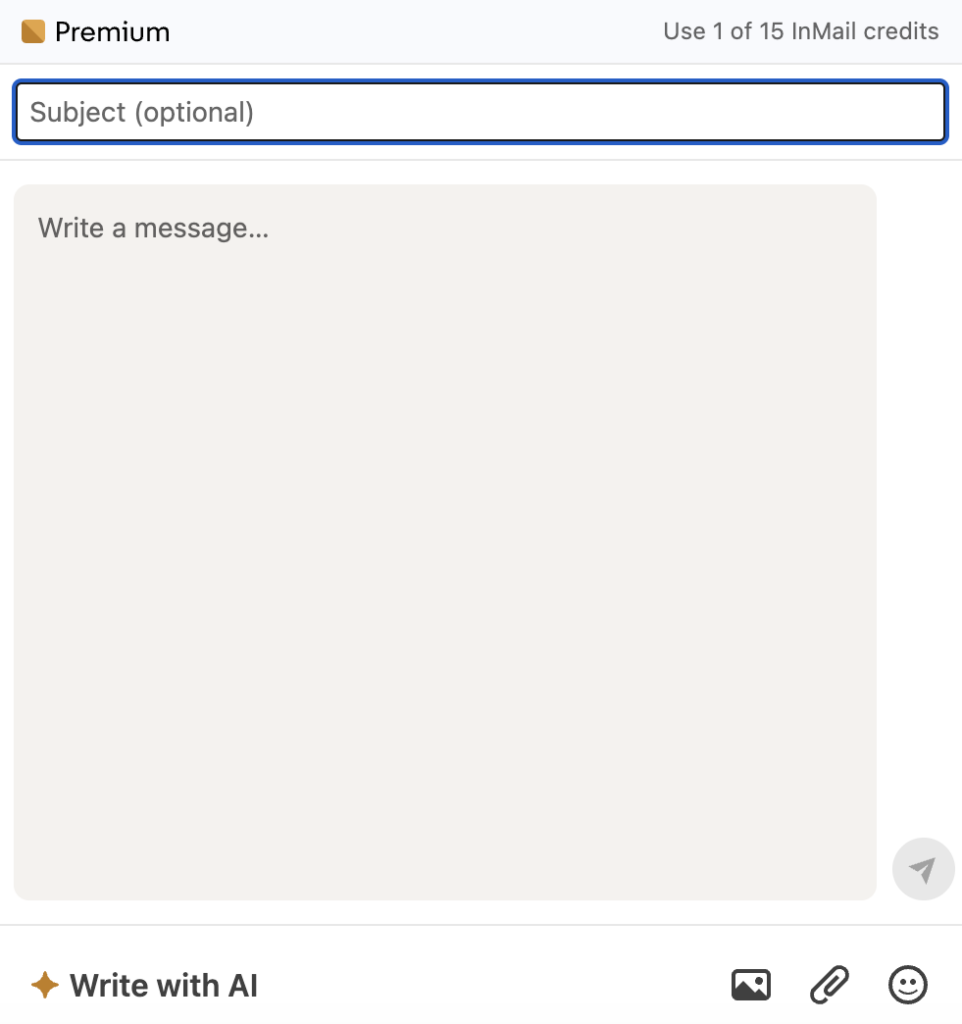
InMail credits
This is one of the most marketed Premium perks. It lets you message people outside your network without needing to send a connection request first.
That can be useful when you want to contact a recruiter directly, follow up on a role, or reach out to a hiring manager when there is a real reason to do so. LinkedIn positions this as one of the tools that helps you network faster.
One note of caution: Scammers often target active job seekers with fake offers. Watch for common warning signs of LinkedIn job scams like requests for personal information too early in the process, jobs requiring upfront payments, or recruiters who rush you to move conversations off LinkedIn to WhatsApp or Telegram.
LinkedIn scams specifically target the platform’s professional user base. It’s more sophisticated than typical social media fraud. Always verify recruiters through the company’s official website and never send money or sensitive documents to someone you’ve only met online.
Who viewed your profile
Premium Career gives you a much longer view of profile visitor history than the free version. LinkedIn’s own materials highlight access to profile viewer data as one of the main Premium advantages for job seekers. This can be useful if you want to know whether recruiters are landing on your profile after you apply or after you update your experience.
Applicant insights
This is where Premium Career becomes more relevant to actual job searching. LinkedIn includes job-related insights meant to show how you compare to other applicants and help you understand where you stand.
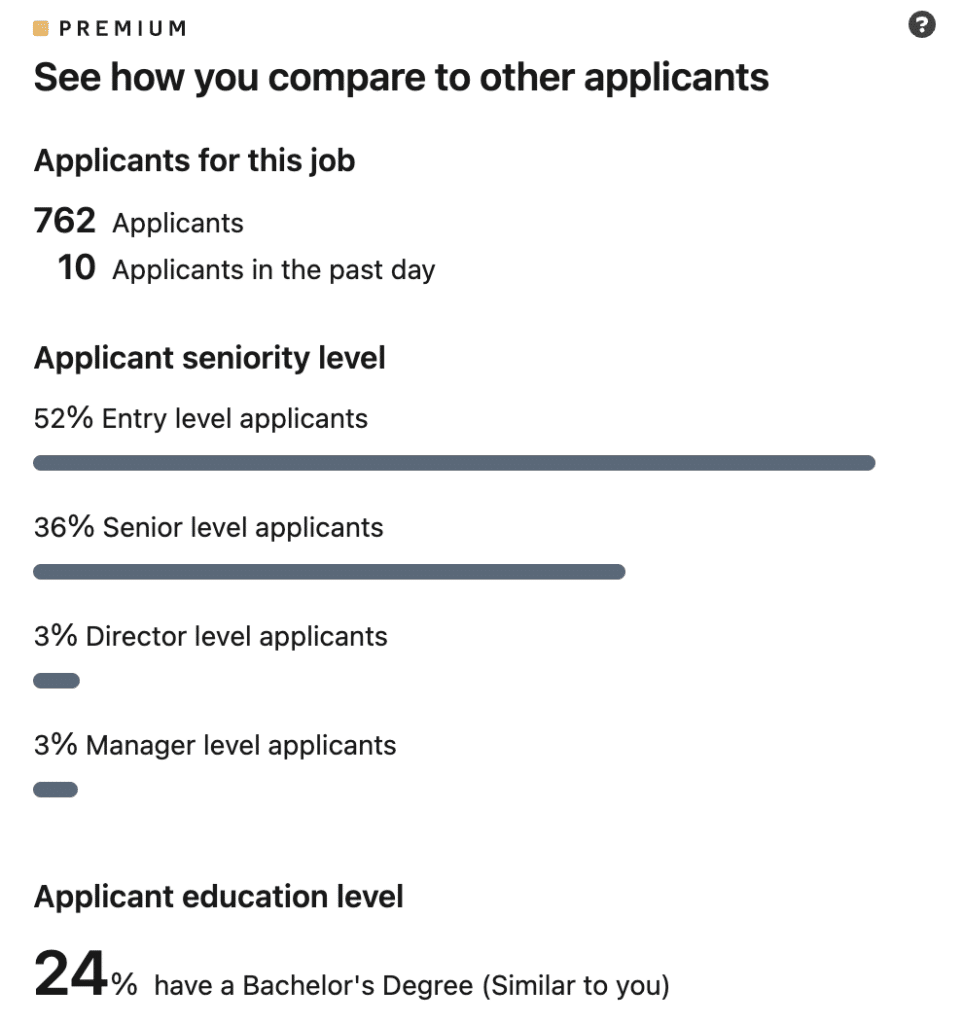
That does not guarantee anything, but it can help you judge whether a role is realistic or highly competitive before you invest too much energy.
Advanced search filters
This matters more than people think. LinkedIn specifically lists advanced search filters as part of Premium Career, and this can make the platform much more useful when you are trying to find recruiters, alumni, employees at a target company, or people with specific job titles.
LinkedIn Learning
Premium Career also includes access to LinkedIn Learning, which can be useful if you actually plan to use it to build skills while job hunting. That matters most for people trying to pivot, strengthen weak spots, or show more initiative on their profile.
Support and perks
LinkedIn also says Premium Career subscribers get Help Center support, AI-powered support chat in select languages, live expert chat during business hours, and access to Premium Perks in eligible countries after the trial ends and the first payment is made. Those are not the reason most people subscribe, but they are part of the offer.
Pricing: what it actually costs
According to LinkedIn’s current Premium Career page, pricing starts at US$39.99 per month or US$239.88 per year, with annual billing advertised as a 50% savings versus paying monthly. LinkedIn also notes that pricing can vary by currency and billing region.
That yearly price matters because it changes the way the plan feels. At monthly pricing, Premium Career can feel a bit expensive if you only use it lightly. At the annual price, it looks more reasonable on paper, but only if you know you’ll use it consistently.
Otherwise, it is easy to end up paying for features you barely touch. LinkedIn also says eligible users may get a free trial, and paid subscriptions may be refundable within 7 days if there has been no Premium usage
When Premium Career is worth it
- You’re actively job hunting and applying consistently
- You want to reach recruiters or hiring managers directly
- You’re targeting competitive roles and want extra visibility
- You’re switching industries and need more insights + access
- You’re using LinkedIn regularly as part of your job search strategy
- You want to understand how you compare to other applicants
When Premium Career isn’t worth it
- You’re only casually using LinkedIn
- You apply to a few roles here and there without real outreach
- You’re not using LinkedIn consistently
- Your profile is weak and you expect Premium to fix it
- Your headline, experience, or messaging isn’t clear yet
- Your outreach is generic or unfocused
- You’re early in your career and still figuring things out
- You lack direction, portfolio, or clarity on roles
- You need skills or positioning more than extra insights
2. LinkedIn Premium Business: For networking, visibility, and growth
If Premium Career is about getting hired, Premium Business is about being seen.
This plan is built for people who aren’t necessarily job hunting, but want to expand their network, build credibility, and explore opportunities more proactively. Think consultants, founders, marketers, or anyone trying to stay visible and connected in their industry.
It’s basically a step up from Career, with more access, more visibility, and slightly stronger outreach tools.
What you actually get with Premium Business
The easiest way to understand this plan is: you get everything from Career, plus more reach and better insights.
Here’s what that looks like in practice:
More InMail credits (and more outreach freedom)
Premium Business gives you around 15 InMail credits per month, compared to 5 on Career.
This matters if you’re regularly reaching out to people outside your network, not just occasionally.
Unlimited profile browsing
You can view profiles beyond your immediate network without hitting limits.
On the free version, this gets restricted pretty quickly, especially if you’re doing research or outreach.
Advanced search (but still not Sales Navigator-level)
You get access to deeper filters to find people and companies more efficiently.
This is useful, but still lighter than what Sales Navigator offers.
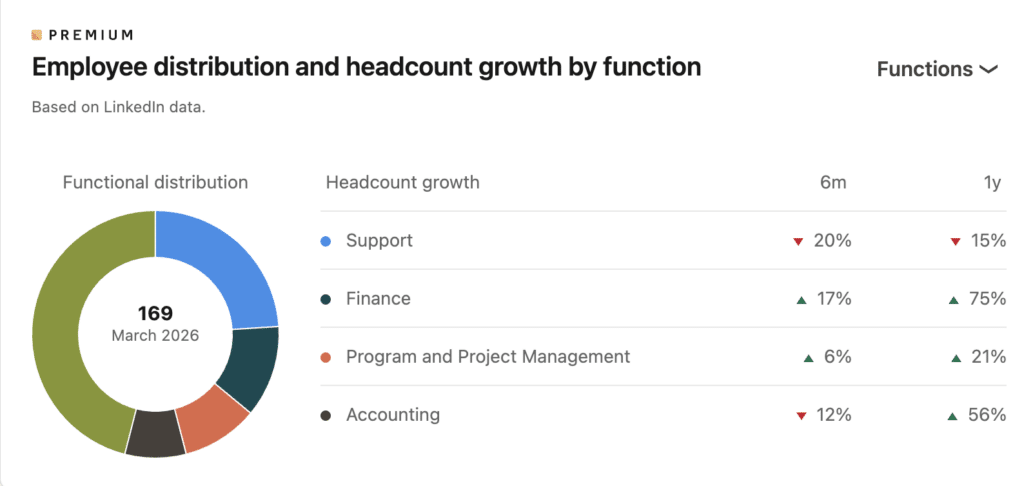
Business and company insights
You can see things like company growth, hiring trends, and activity signals.
Helpful if you’re researching prospects, partnerships, or markets.
Profile upgrades (subtle, but relevant)
You can add things like a custom CTA button and highlight sections on your profile.
This is more about positioning yourself than functionality.
LinkedIn Learning included
Same as Career, full access to professional courses and certifications.
Pricing: what it actually costs
Premium Business sits at around:
- $59.99/month
- ~$575/year (discounted annually)
So it’s roughly double the price of Premium Career.
That’s important, because the jump in value isn’t always double. You’re mostly paying for more access and scale, not completely new capabilities.
When Premium Business is worth it
- You’re actively building relationships in your industry
- You’re a freelancer or consultant trying to stay visible
- You regularly research companies, clients, or partners
- You want to expand your network beyond your immediate circle
- You’re consistently using LinkedIn as part of your workflow (not occasionally checking it)
- You sit between job search and sales, doing regular outreach but not full-scale prospecting
When Premium Business isn’t worth it
- You’re not actively using LinkedIn for outreach or research
- You’re only job hunting → Premium Career is enough
- You’re doing serious outbound sales → Sales Navigator is better
- You’re not consistent on LinkedIn → you won’t use the extra features
- You expect better results without changing how you use the platform
- You just want “more features” without a clear goal
3. LinkedIn Sales Navigator: The only plan that makes sense for B2B sales
This is where LinkedIn stops being a networking platform and turns into a sales tool.
Sales Navigator isn’t just a “better Premium.” It’s a completely different product built for one thing: finding the right people and closing deals faster.
If Premium Career helps you get hired and Premium Business helps you network, Sales Navigator is for people who treat LinkedIn like a pipeline.
What you actually get with Sales Navigator
The biggest shift here is that you’re no longer just browsing profiles. You’re actively building a list of leads and tracking them over time.
Here’s what that looks like in practice:
Advanced lead and account search (the real core)
This is the main reason people pay. You can filter by things like seniority, company size, growth, role, and more. It’s way deeper than Premium Business and lets you find exactly the type of decision-maker you’re targeting.
50 InMail credits/month (vs 15 on Business)
You get significantly more outreach capacity, which matters if you’re messaging people regularly.
Lead tracking and saved lists
You can save leads and accounts, organize them, and come back to them later. This turns LinkedIn into something closer to a lightweight CRM.
Real-time alerts and buyer signals
You get updates when someone changes jobs, posts content, or when a company is hiring or growing. This helps you time your outreach instead of sending cold messages blindly.
Lead recommendations and relationship insights
Sales Navigator suggests potential leads based on your activity and network. It also shows connection paths, so you can find warm introductions instead of going in cold.
Instead of guessing who needs a freelance project or going through layers of people, you can use advanced search filters to go straight to the right job title inside a company. That matters a lot when you’re juggling multiple platforms, outreach channels, and trying to keep your pipeline full.
CRM integrations (Advanced plans)
On higher tiers, you can sync with tools like Salesforce or HubSpot and manage leads more efficiently.
Pricing: what it actually costs
Sales Navigator is where LinkedIn gets expensive.
- Core plan: ~ $119.99/month or ~$1,079/year
- Advanced plan: ~ $159.99–$179.99/month
- Advanced Plus (enterprise): custom pricing (often ~$1,600+/year per seat)
So you’re looking at 2–3x the price of Premium Business.
When Sales Navigator is worth it
- You’re doing outbound sales consistently (weekly, not occasionally)
- You have a clear ICP (ideal customer profile)
- You’re targeting specific decision-makers
- Your deal size is high enough to justify the cost
- LinkedIn is a core part of your sales process
- You’re managing a pipeline, not just sending messages
When Sales Navigator isn’t worth it
- You only do occasional outreach
- You don’t have a clear target audience yet
- Your deal size is too small to justify the cost
- You’re not tracking leads or following up consistently
- You’re mainly networking or building visibility
- You’re still figuring out your offer or positioning
4. LinkedIn Recruiter Lite: For hiring without waiting for applications
This is LinkedIn’s entry-level hiring tool, but don’t let “Lite” fool you. It’s still a proper sourcing tool, just built for individual recruiters, founders, or small teams who don’t hire at scale.
Instead of waiting for candidates to apply, you go out and find them yourself. That’s the main shift.
What you actually get with Recruiter Lite
This plan is all about basic sourcing + direct outreach, without the complexity of enterprise recruiting tools.
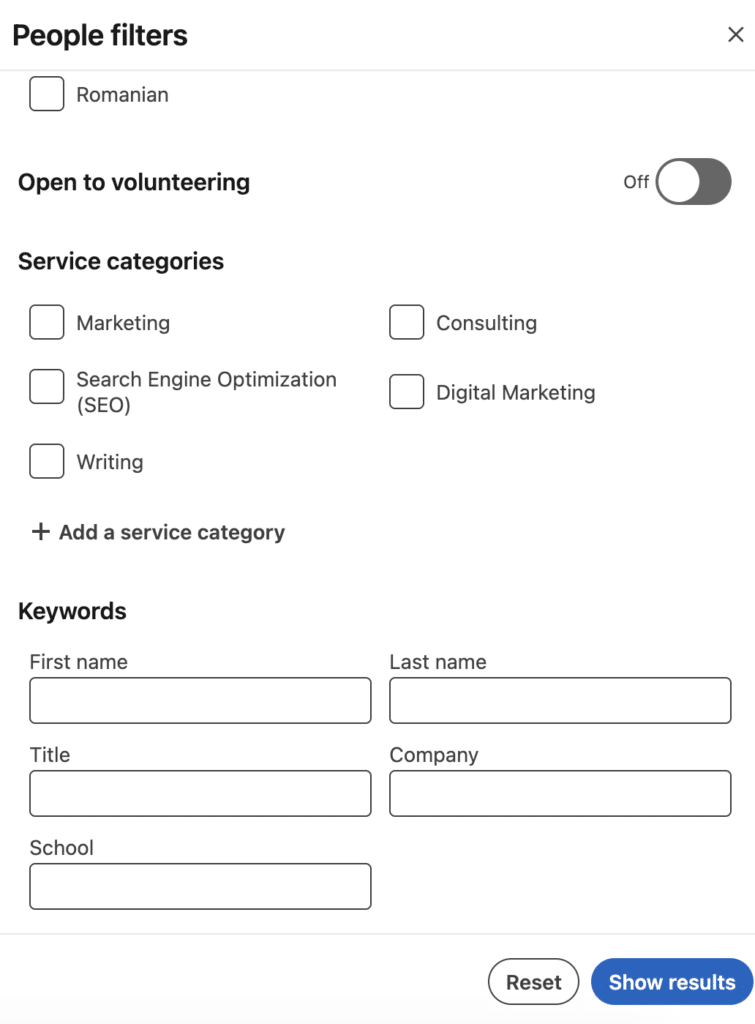
Advanced candidate search (20+ filters)
You get access to more granular filters like job title, years of experience, company size, and seniority. This makes it much easier to narrow down candidates compared to standard LinkedIn search.
Extended network access (up to 3rd-degree)
You can search and view candidates beyond your immediate network, which is essential for reaching passive talent.
30 InMail credits per month
You can message up to 30 candidates directly each month without needing to connect first. Enough for targeted outreach, not bulk hiring.
Saved candidates and light pipeline
You can save profiles, organize candidates, and track conversations. It’s a basic system, but works for managing a few open roles at once.
Saved searches and alerts
You can set up searches and get notified when new candidates match your criteria, helping you stay consistent without redoing the same work.
Pricing: what it actually costs
Recruiter Lite sits at the higher end of LinkedIn pricing.
- ~ $170/month
- ~ $1,600+/year per seat
And since it’s priced per user, costs scale quickly if you have multiple people hiring.
When Recruiter Lite is worth it
- You’re hiring a few key roles per year
- You want to proactively source candidates instead of waiting for applications
- You’re a founder or hiring manager doing your own recruiting
- You’re a solo recruiter or small team with low hiring volume
- You need better filtering than standard LinkedIn search
- You’re targeting passive candidates (not actively job hunting)
When Recruiter Lite isn’t worth it
- You’re hiring at scale or filling multiple roles at once
- You need collaboration features across a team
- You want full access to LinkedIn’s entire talent pool
- You rely on ATS integrations or advanced workflows
- You’ll run out of 30 InMails quickly
- You only hire occasionally and don’t need a constant subscription
5. LinkedIn All-in-One plan: Flexible, but not always worth it
This is LinkedIn’s attempt to bundle everything into one subscription.
Instead of choosing between job search, networking, sales, or hiring tools, the All-in-One plan gives you a bit of everything. It’s mainly built for founders, freelancers, and small business owners who are juggling multiple roles at once.
What you actually get with the all-in-one plan
The All-in-One plan is built to combine multiple LinkedIn use cases into one subscription. Instead of focusing on just job search, networking, sales, or hiring, it gives you a mix of tools across all of them. The idea is convenience, everything in one place, rather than depth in one specific area.
Centralized dashboard
Everything sits in one place. You get a single dashboard that combines sales, marketing, and hiring tools, along with suggested actions and AI recommendations to guide what to do next.
Prospecting tools and daily suggestions
You get AI-powered client suggestions and daily prospect recommendations based on your target audience, plus advanced search filters similar to tools for sales professionals.
InMail and outreach support
The plan includes InMail credits and AI-assisted messaging to help you reach people outside your network more effectively.
Marketing and visibility tools
You get credits to boost posts and increase reach, helping your content and profile get more visibility without needing separate ad tools.
Hiring support and job promotion credits
You can promote job openings and attract candidates directly through LinkedIn, without needing a separate recruiter plan.
Company page + brand growth features
The plan includes tools to manage your company page, grow followers, and improve visibility across LinkedIn.
Pricing: what it actually costs
The All-in-One plan costs around $99/month and is one of the more expensive LinkedIn options. Part of that is offset by included credits (like ads and post boosts), but only if you actually use them. In practice, the value depends on whether you’re using multiple features consistently, not just one.
When the All-in-One plan is worth it
- You’re a founder or small business owner managing sales + marketing + hiring at the same time
- You actually use all three areas regularly, not just one
- You want everything in one place instead of juggling multiple tools
- You plan to use the ad credits + job promotion credits (these can offset the ~$99/month cost)
- You care about visibility and growth, not just outreach or hiring
- You want guidance (AI suggestions, dashboards) instead of building your own system
When the All-in-One plan isn’t worth it
- You only need one core function (job search, sales, or hiring)
- You’re better served by a focused plan (Career, Business, Sales Navigator, or Recruiter Lite)
- You won’t use the ad credits or hiring key features consistently
- You prefer depth over convenience (this plan is broad, not specialized)
- You’re not actively running a business or multiple workflows on LinkedIn
- You want clear ROI → this plan is harder to justify unless you use everything
How to get similar results without paying for LinkedIn Premium
Before deciding is LinkedIn Premium worth it, it helps to look at what you can already do without upgrading your LinkedIn Premium account, or by using more affordable tools depending on your job search, outreach, or content strategy.
For many users, these options cover most of what LinkedIn Premium offers.
Connection requests with notes (300 characters)
A well-written message can perform just as well as InMail messaging. If you’re reaching out with a clear reason, whether to recruiters, hiring managers, or potential clients, you don’t need premium to start conversations.
LinkedIn job search tools and alerts
The standard version of LinkedIn already supports most job seekers. You can find jobs, apply, and track opportunities without needing LinkedIn Premium Career.
Salary research outside LinkedIn
Platforms like Glassdoor and Payscale offer detailed, regularly updated salary insights that often go deeper than LinkedIn’s built-in data.
Consistent content and personal brand building
This is where things get interesting.
Instead of paying for increased visibility through LinkedIn Premium, you can create it yourself through consistent posting. The more you show up, the more profile views, connection requests, and inbound opportunities you generate.
