
Close Menu
SkytikSkytik

    Subscribe to Updates

    Get the latest creative news from FooBar about art, design and business.

    What's Hot

    At Least 32 People Dead After a Mine Bridge Collapsed Due to Overcrowding

    November 17, 2025

    Here’s how I turned a Raspberry Pi into an in-car media server

    November 17, 2025

    Beloved SF cat’s death fuels Waymo criticism

    November 17, 2025
    Facebook X (Twitter) Instagram
    • About Us
    • Contact Us
    SkytikSkytik
    • Home
    • AI Tools
    • Online Tools
    • Tech News
    • Guides
    • Reviews
    • SEO & Marketing
    • Social Media Tools
    SkytikSkytik
    Home»Online Tools»Automated Intelligence reports for insights delivered to you
    Online Tools

    Automated Intelligence reports for insights delivered to you

    AwaisBy AwaisMarch 25, 2026No Comments3 Mins Read0 Views
    Facebook Twitter Pinterest LinkedIn Telegram Tumblr Email
    Automated Intelligence reports for insights delivered to you
    Share
    Facebook Twitter LinkedIn Pinterest Email

    Big news for productivity enthusiasts – Intelligence reports can now be created automatically!

    Designed to maximize efficiency, automated reports help you stay ahead by analyzing multiple articles at once using custom or predefined prompts, on a schedule you set. Extract key points, compare perspectives, identify trends, and uncover insights without repeating the same manual steps every time.

    Each generated report is saved as a new article in your account, ready for annotation, notes, sharing, or export. It’s a powerful way to streamline your workflow and turn information into structured insights.

    How to create an automated report

    To get started, go to Automate > Automated reports and click the button in the top right corner.

    Give your report a name, then choose the source it should analyze. This can be a single feed, a folder, a tag, or a Team channel (if you’re part of a Team). For best results, we recommend using monitoring feeds or tags, as they are designed to track specific topics or queries.

    Next, select the maximum number of articles to include. In most cases, a smaller, more focused set produces more accurate and useful insights.

    If you’re part of a Team, you can also make the report available to all members by enabling the option at the bottom.
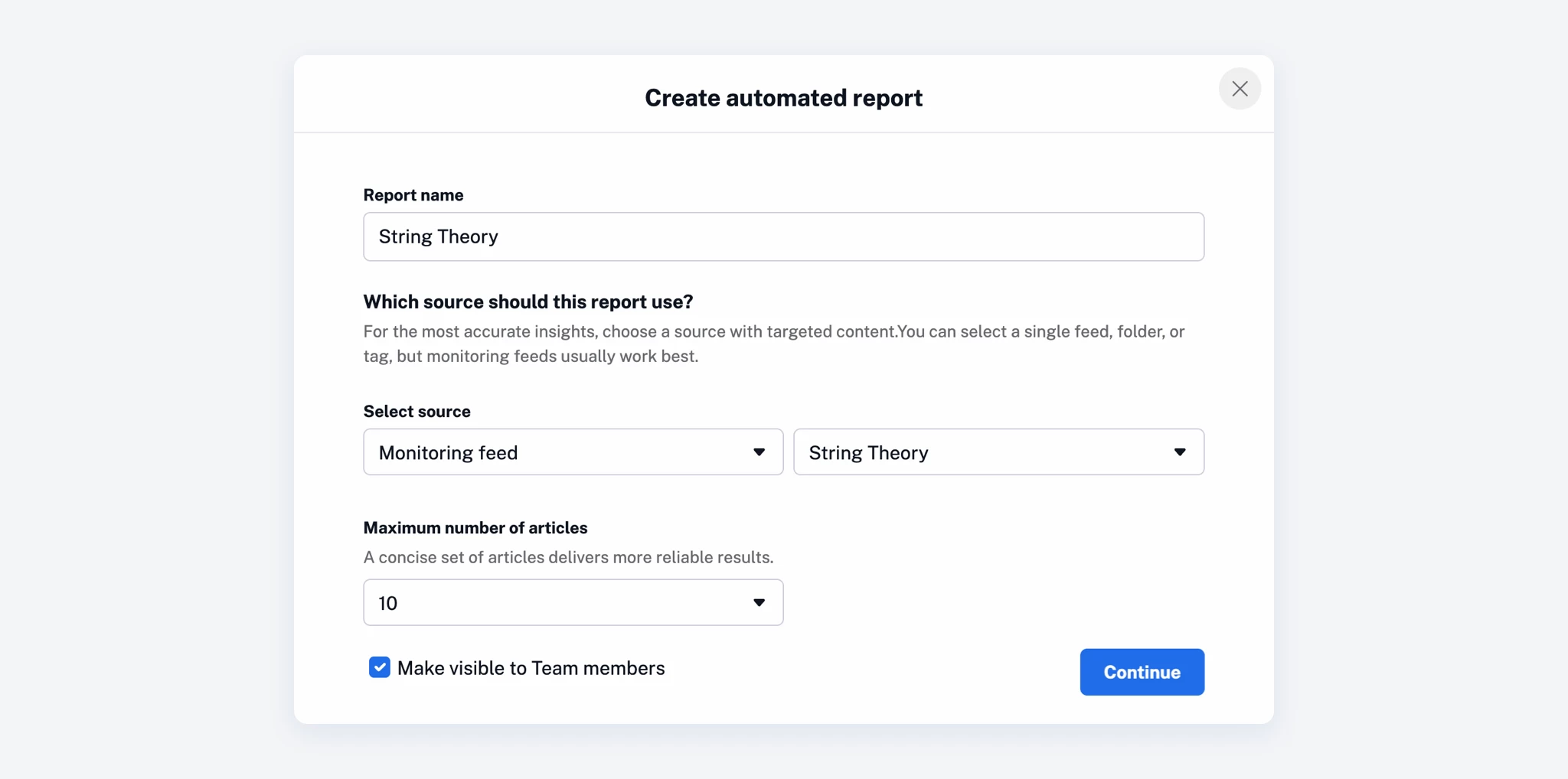
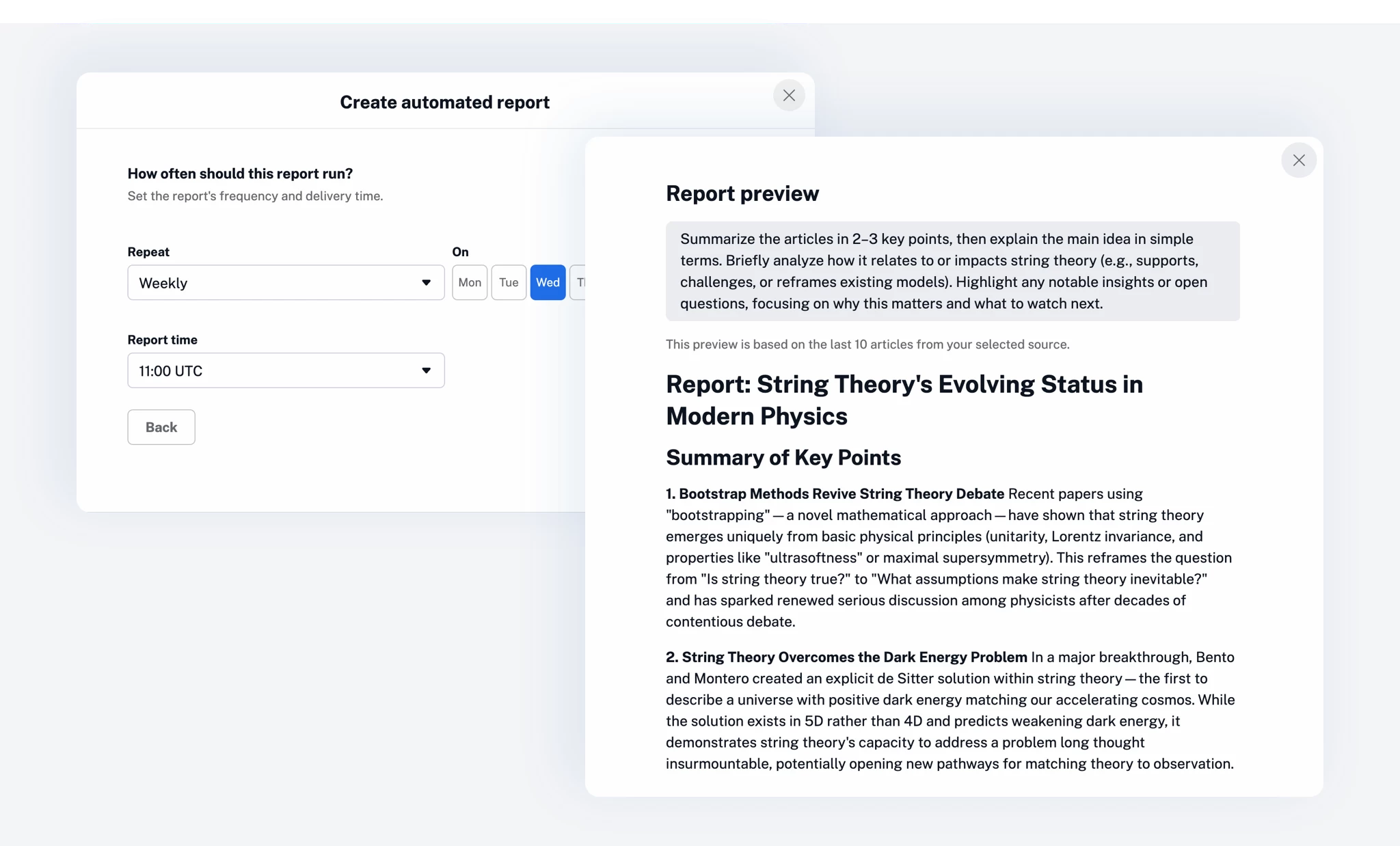
    After that, choose how often the report should run and when it should be delivered, then configure the prompt that will guide the report generation.

    Each automated report uses Inoreader Intelligence to extract insights from the selected articles – this can include summaries, comparisons, sentiment analysis, or structured research findings. You can either select one of the predefined prompts or define your own to match your exact goal.

    A preview option lets you review the output before saving.
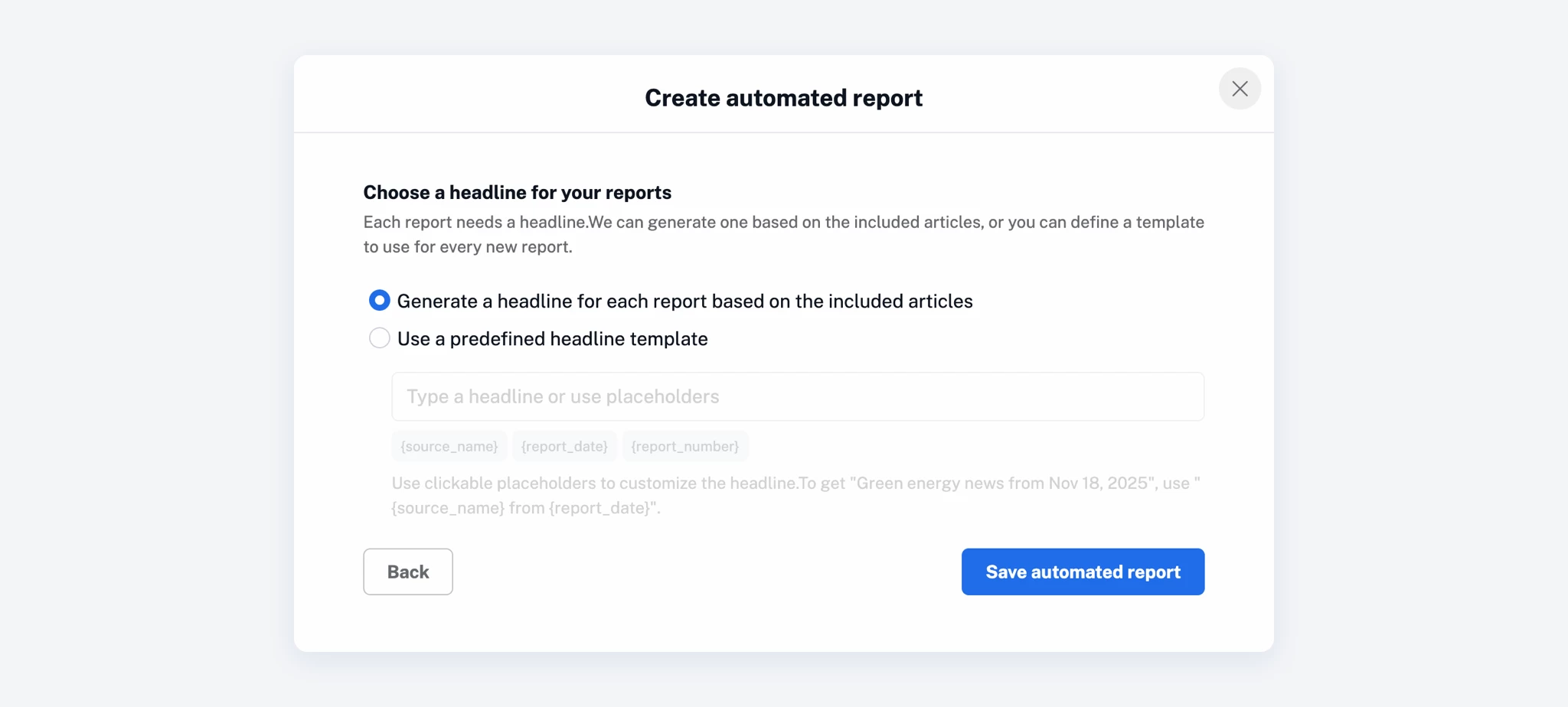
    As a final step, choose how your report headline should be generated.

    You can let Inoreader create a dynamic headline based on the included articles, or define a custom headline template to be used for every report.
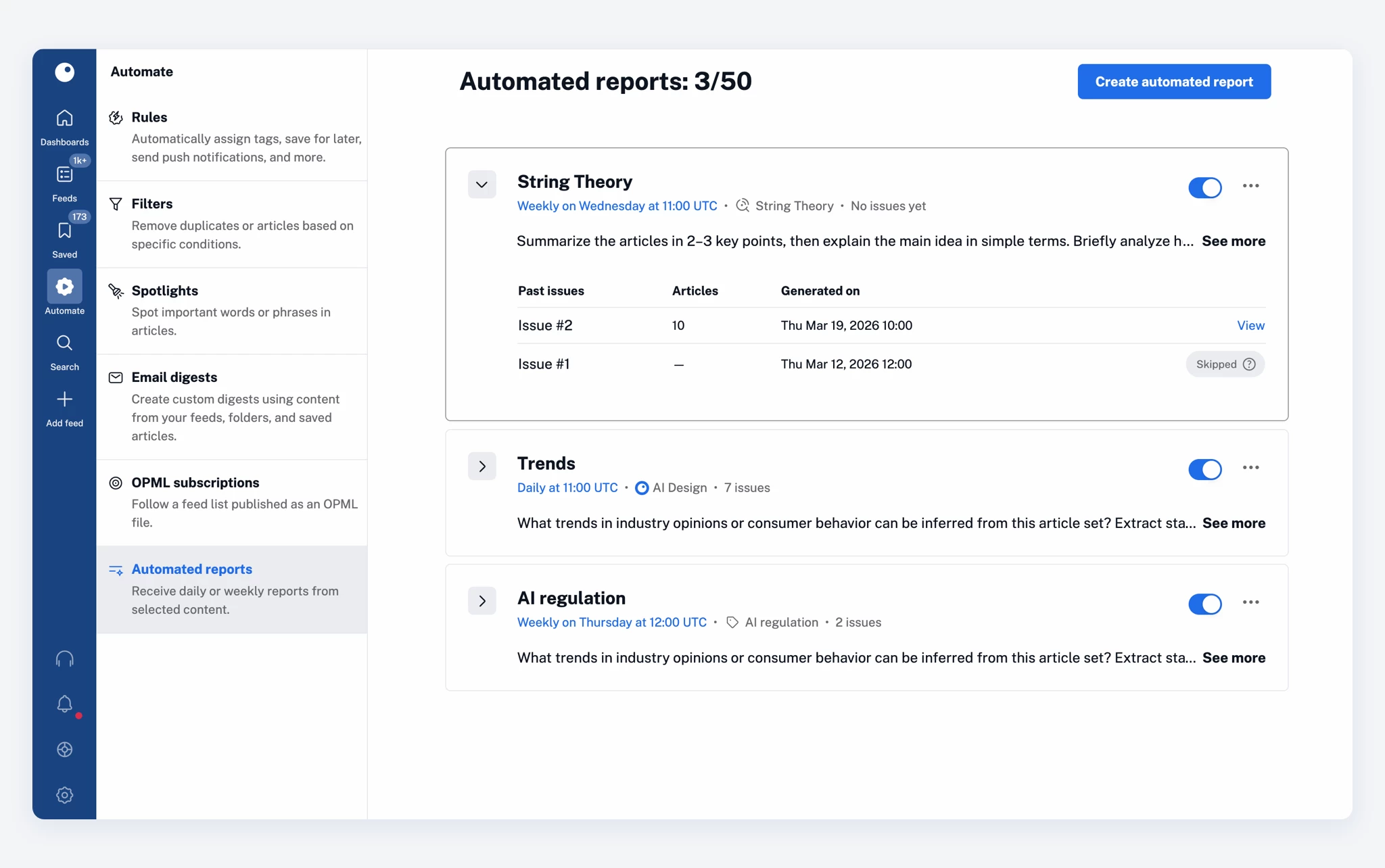
    Once saved, your report will appear in the Automated reports dashboard, where you can easily manage it – activate or deactivate it, edit its settings, clone it, or delete it.
    Use cases

    Automated reports can fit into a variety of workflows, depending on how you use Inoreader:

    • Daily briefings
      Get a clear summary of the most important articles from selected sources.
    • Topic monitoring
      Track ongoing developments around a key topic or industry and receive structured insights.
    • Competitive analysis
      Group articles by company, region, or theme, and extract key data points and trends.
    • Content creation
      Turn multiple articles into ready-to-use summaries for newsletters, blog posts, or social media.
    • Research workflows
      Automatically organize and extract insights from large sets of saved or tagged content.

    Availability and limitations

    Intelligence reports (whether created manually or automatically) are available as an add-on for Pro and Custom plans and are included in Team Intelligence plans.

    They use your Intelligence token quota, just like article summaries and other Intelligence features. If you run out of tokens, you can purchase more at any time to continue generating reports.

    You can learn more about usage limits and best practices in our blog post on Intelligence reports.

    Get started

    Try automated reports and let Inoreader do the heavy lifting for you!

    Automated delivered insights Intelligence Reports
    Share. Facebook Twitter Pinterest LinkedIn Tumblr Email
    Awais
    • Website

    Related Posts

    How to copy and paste in Google Docs: 3 methods

    March 25, 2026

    A Multi-Provider Framework for Automated PEGS Analysis Across Software Domains

    March 25, 2026

    ERP integration: How to connect systems

    March 25, 2026

    5 ways to automate Claude with Zapier MCP

    March 25, 2026

    4 ways to automate Microsoft Copilot with Zapier MCP

    March 25, 2026

    The 7 marketing calendar templates you need

    March 24, 2026
    Leave A Reply Cancel Reply

    Top Posts

    At Least 32 People Dead After a Mine Bridge Collapsed Due to Overcrowding

    November 17, 20250 Views

    Here’s how I turned a Raspberry Pi into an in-car media server

    November 17, 20250 Views

    Beloved SF cat’s death fuels Waymo criticism

    November 17, 20250 Views
    Don't Miss

    How to optimize influencer content for search everywhere

    March 25, 2026

    Influencer content isn’t just a brand awareness play. It’s showing up in Google SERPs, Google…

    [2603.03147] Agentic AI-based Coverage Closure for Formal Verification

    March 25, 2026

    How to copy and paste in Google Docs: 3 methods

    March 25, 2026

    This Bone Broth Soup Is a Meal, Not a Cleanse

    March 25, 2026
    Stay In Touch
    • Facebook
    • YouTube
    • TikTok
    • WhatsApp
    • Twitter
    • Instagram
    Latest Reviews

    ChatGPT citations favor a small group of domains: Study

    March 25, 2026

    A Multi-Provider Framework for Automated PEGS Analysis Across Software Domains

    March 25, 2026
    Most Popular

    13 Trending Songs on TikTok in Nov 2025 (+ How to Use Them)

    November 18, 20257 Views

    How to watch the 2026 GRAMMY Awards online from anywhere

    February 1, 20263 Views

    Corporate Reputation Management Strategies | Sprout Social

    November 19, 20252 Views
    Our Picks

    At Least 32 People Dead After a Mine Bridge Collapsed Due to Overcrowding

    November 17, 2025

    Here’s how I turned a Raspberry Pi into an in-car media server

    November 17, 2025

    Beloved SF cat’s death fuels Waymo criticism

    November 17, 2025

    Subscribe to Updates

    Get the latest creative news from FooBar about art, design and business.

    Facebook X (Twitter) Instagram Pinterest YouTube Dribbble
    • About Us
    • Contact Us
    • Privacy Policy
    • Terms & Conditions
    • Disclaimer

    © 2025 skytik.cc. All rights reserved.

    Type above and press Enter to search. Press Esc to cancel.