


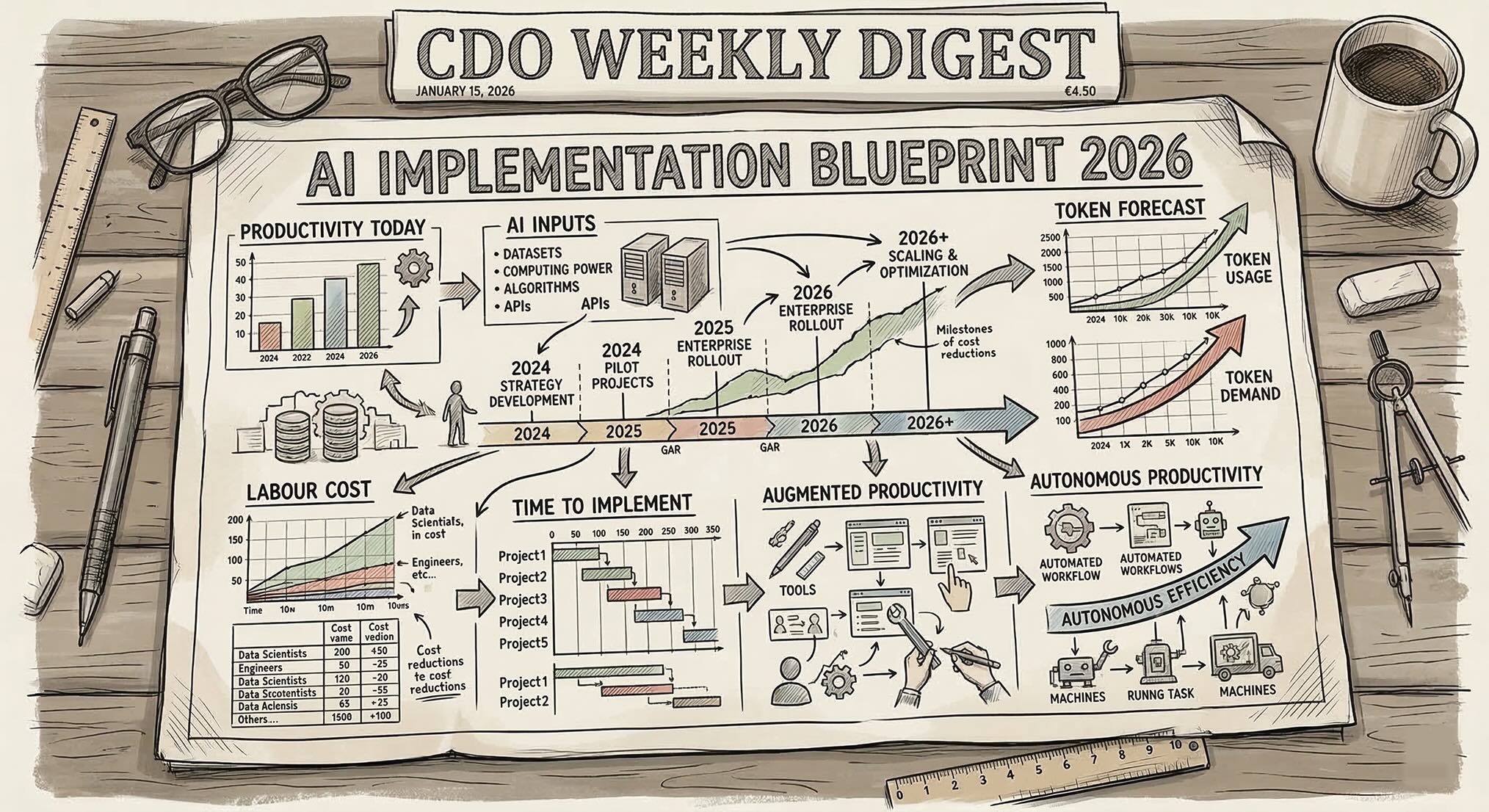
AI Officers tripled from the years 2019 to 2024, according to Linkedin Data. Now, roughly half of the largest companies in countries like the UK have appointed a CAIO. The goal is simple: accelerate growth and reduce costs with AI.
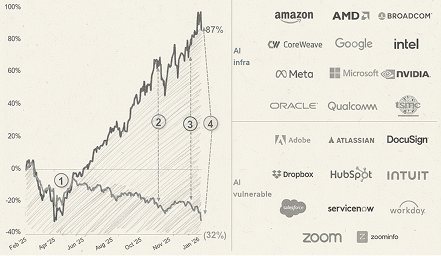
The impact of AI on the largest companies in the world is unquestionable. Companies like Atlassian have let go of thousands of employees (the stock is down 50% in the last 12 months). Block did a similar thing, and generally speaking vanilla SAAS stocks are suffering due to the perceived risk of AI making it easier to build alternatives.
Meanwhile, developer productivity tools such as Claude Code are taking the world by storm. Claude Code crossed $1bn revenue in December 2025, equivalent to 10,000 companies spending $100,000 on average — about a quarter of Databricks/Snowflake’s revenues.
In this guide we’ll outline a framework for evaluating the different avenues Chief Data and AI Officers have for advancing AI in their companies.
Understanding the goals of the business and the likeness of AI to automation as a whole is critical. Opportunity cost is also fundamental — AI Allows companies that could always have been “too slow” or “too inefficient” to blast through this glass ceiling and reinvent themselves.
In this article we’ll lay out an evaluation framework for CDAOs to understand the opportunity in their organisations. The Framework will categorize the opportunity into different opportunity or productivity areas. This article will also cover cost, timing, and opportuntiy cost considerations when evaluating AI initiatives.
The second part of the article will focus on real-world examples of AI evaluated within this framework as well as Data Team-specific examples based on interviews with thousands of data professionals in the past 12 months.
By the end of the article, you will have a clear framework and for assessing the possible impact of AI in your organisation, practical next steps, and clear examples of where AI is significantly benefiting companies and data teams.
Section 1: AI Evaluation Framework
What AI Enables: Automation and Productivity
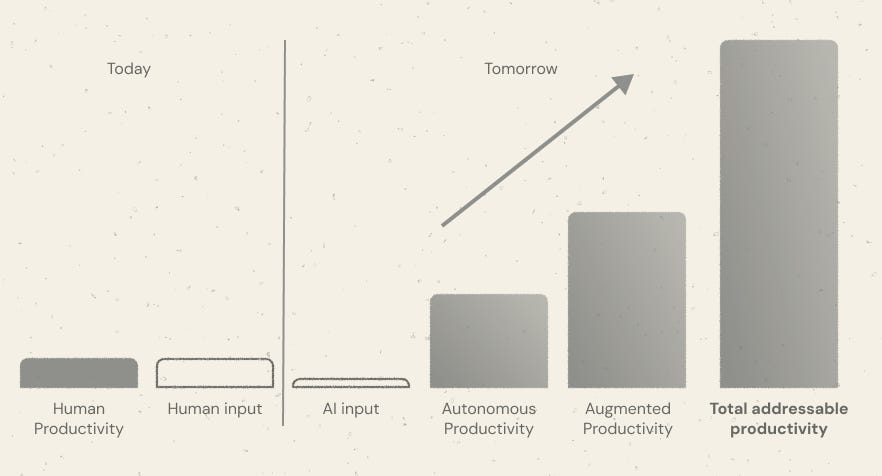
We define a seven key metrics of productivity for AI and Data Officers to establish:
- Human Productivity: the total amount of output currently produced by the workforce
- Human input: the amount of cost required to achieve the current level of Human Productivity
- AI input: the amount of cost required to achieve the full Productivity Gap
- Autonomous Productivity: the amount of work that could be reliably carried out by agents or automations
- Human-automatable Productivity: the amount of Work being done that the workforce could do with AI.
- Total addressable Productivity (“TAP”) and Productivity Gap: Autonomous work + Human-automatable work. Autonomous work + Human-automatable work – Human Productivity; the Productivity Gap
- ROI Gap: (TAP/ AI input) – 1. A measure of the increase in productivity AI can facilitate
Examples
- A call centre company running 100,000 calls a year could feasibly automate all of these with AI; therefore the autonomous work would be roughly equal to the Human Work. The Human-automatable Productivity is minimal, but with some AI there is perhaps a 20% uplift. The TAP is therefore about 0.2*Human Productivity. The AI input is significantly lower than the human input due to the reduced number of staff required to take calls.
- A software engineering company with 100 developers has a ten person SRE team. The SRE process can be automated with AI Agents by 50%. This reduces the AI input by 5%. The Autonomous Productivity makes up the shortfall in Human Productivity.
- Developers become 100% more productive with tools like Claude Code. The Augmented Productivity is equivalent to having abother 95 developers
- The TAP is roughly double the Human Productivity
Autonomous Productivity is very similar to Automation. With Automation, there is always an opportunity cost — of course, everything can be automated, but what makes AI different is that there are now some things that can be automated faster, and more cheaply. AI is not a panacea for any kind of automation, however.
Augmented Productivity fits nicely into AI use-cases like coding assistants. Much of Anthropic’s success is due to making good on its promise to make developers faster and more efficient.
AI Input also includes the cost of AI Credits.
AI Constraints: opportunity costs and time
Implementing AI inevitably incurs opportunity cost. Companies may not be able to implement AI in the short-term as it requires an investment and a reallocation of headcount. If you’re reading this, you are likely the result of new headcount — rather than repurpose existing resources, companies can introduce new headcount to take on AI implementation.
There is an opportuntiy cost of implementing now. Companies undergoing significant transformation activities or corporate affairs may not be in a position to spare additional resources to AI and automation initiatives.
The second component is time: implementing a steady state where the entire AI input and TAP is realised will take time. For small companies, this duration may be short. For large multinational enterprises, a radical change in the way things are done will inevitably take longer as historical patterns are changed and existing customer SLAs force the standard of AI implementation to be much higher.
Important considerations
- AI Opportunity cost: the cost to a company of implementing AI today
- Implementation time: the time taken to realise the TAP
Here is an example for a small software company.
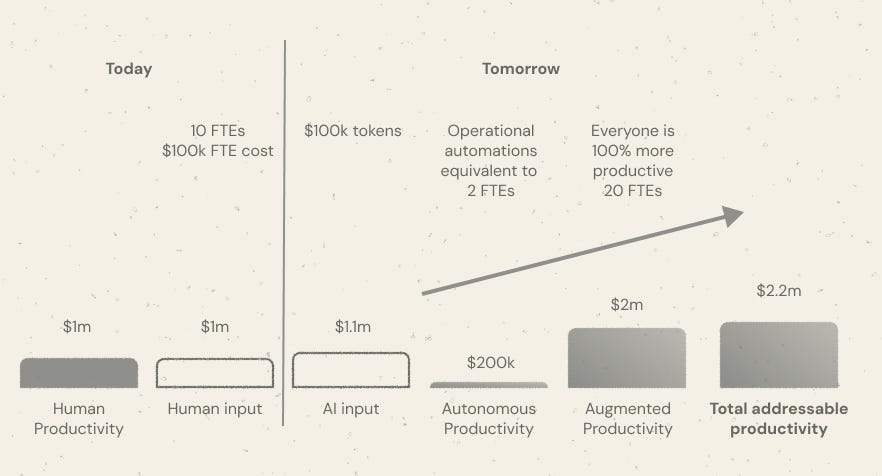
- The company employs 10 FTEs at $100k cost each
- The company spends $100k on tokens
- Automations / autonomous agents automating key operational activities that would have taken 2 FTEs
- Everybody in the company is writing code, so everyone ships twice as much
- The TAP is $2.2m. The Productivity Gap is $1.1m. The ROI is $2.2m / $1.1 -1 = 100%
This assumes an instant implementation time and essentially zero opportunity cost of implementation. In reality, leveraging Claude Code or similar tools for complex software development use-cases or data engineering use-cases will not be instant.
Summary
In this section we outlined a simple framework for evaluating the possible uplift from AI. We saw that there are two main areas for benefit; Autonomous Productivity and Augmented Productivity. Autonomous Productivity relates to processes that can be automated that take up human time that could be fully automted with agents. Augmented Productivity relates to work done that requires humans to action, such as writing code.
We saw that implementation times and the opportunity costs of implementation are major factors when considering whether or not to implement AI — this framework does not need to be AI-specific, but what is different about AI is that this time, the extent of benefits and time to value may be different to regular automation initiatives.
ROI can be driven by both Total Addressable Productivity and AI Input. In some industries, you may be under more of a cost-reduction mandate. In others, hopefully most, Chief Data and AI Officers should look to understand how existing resources can be repurposed to achieve greater level of productivities.
This means generally, AI is unlikely to result in a reduction in cost but rather an increase in productivity and therefore growth.
This framework is simple and has inherent limitations. The nature of work, makeup of labour, company goals, company activities, and market forces could all impact the quantum and feasibility of the TAP.
One interesting upside to consider is the value of achieving the goals of Autonomous Productivity and Augmented Productivity combined. The value of the former is more or less unbounded. The value of the second is labour-constrained, but enables Speed. A company that, in a year can move twice as fast as it used to and do 3 times as much potentially drives growth in other areas.
For example, a supermarket chain looking to aggressively expand and win market share could gain a clear external benefit from implementing AI, if it allows them to open stores faster than it would otherwise have done — especially if this materialises to a greater extent, relative to its competitors.
In the sections that follow, we will discuss different tools and approaches of Autonomous Productivity and Augmented Productivity.
Section 2: Autonomous Productivity
What is Autonomous Productivity?
Automous Productivity is the amount of work that could be reliably carried out by agents or automations without human involvement.
Automation has a deep history with repeatable patterns. The introduction of machinery provided thefirst wave of automation of jobs, which was in turn followed by other phases like the industrial revolution and then, of course, software automation.
We are now entering a phase of AI Automation. This is characterised by massive productivity gains for individuals, as they offload parts of their role entirely to AI. It is also characterised by massive extensions of capacity — companies no longer need to trade-off what resources they need, they can just have an AI Agent for every function
Examples of Autonomous Productivity
Things companies can automate:
- Customer support resolution – AI agents answering tickets, troubleshooting issues, and escalating only edge cases.
- Lead qualification and outreach – automated prospect research, cold email generation, and follow-ups.
- Content production – blog drafts, SEO research, social posts, and newsletter generation.
- Data analysis and reporting – automated dashboards, anomaly detection, and weekly business reports.
- Software testing and QA – agents running tests, identifying regressions, and suggesting fixes.
- Internal documentation – generating and maintaining SOPs, onboarding materials, and knowledge bases.
- Meeting summaries and action tracking – capturing notes, assigning tasks, and following up automatically.
- Market research – scanning competitors, summarizing trends, and generating insights.
- Recruiting workflows – screening resumes, scheduling interviews, and initial candidate outreach.
- Financial operations – invoice processing, expense categorization, and basic financial reporting.
Examples of Greater Capacity
Roles companies can hire they couldn’t before:
- 24/7 Customer Experience Manager – an AI agent dedicated to maintaining instant support coverage globally.
- Market Intelligence Analyst – continuously monitoring competitors, pricing changes, and industry signals.
- Growth Experimentation Manager – running dozens of marketing and product experiments simultaneously.
- Internal Knowledge Curator – maintaining living documentation and surfacing relevant knowledge to teams.
- Product Feedback Analyst – processing thousands of customer comments, reviews, and tickets into insights.
- SEO Researcher – constantly identifying new keyword opportunities and content gaps.
- Sales Development Representative (SDR) – performing personalized prospecting at massive scale.
- Operational Efficiency Auditor – monitoring workflows and recommending automation opportunities.
- Compliance Monitoring Officer – continuously scanning processes for regulatory or policy risks.
- Strategic Scenario Analyst – modeling business scenarios and producing decision support reports.
Autonomous Productivity for AI and Data Teams
We’ve spoken to hundreds of Data Teams and identified the top areas that folks are looking at AI to enable automations. These areas are included below and we will follow-up with actual survey data.
Note these exclude processes that could potentially require a human.
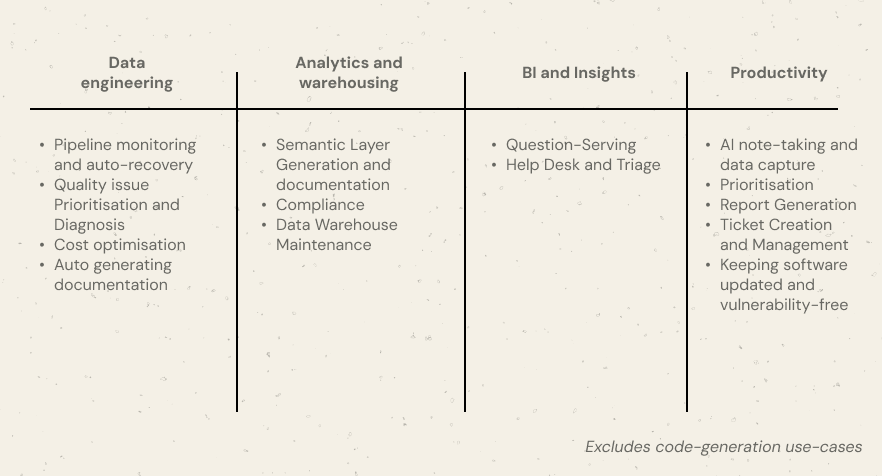
Data Engineering Use-cases
- Pipeline monitoring and auto-recovery – detecting failed jobs, retrying tasks, triggering fallbacks, and notifying only when escalation is required.
- Quality issue Prioritisation and Diagnosis – Identifying the most pressing quality issues and prioritising these
- Cost optimisation – detecting inefficient jobs and automatically rescheduling or scaling resources. Companies like Alvin and Espresso AI have made huge strides in this space
- Auto generating documentation — a real gripe for engineers is maintaining documentation. Generating architecture diagrams and self-updating documentation can be fully automated with AI
Data Warehousing and Analytics Engineering use-cases
All those Data Engienering use-cases, plus:
- Semantic Layer Generation and documentation — agents can generate entire semantic layers fairly easily while also keeping these in sync. When combined with other knowledge bases, the process can be fully automated. AI without context will of course, generate bad semantic layers.
- PII and GDPR Compliance — classical automation keeping warehouses in line with PII and GDPR compliance e.g. customer deletion requests
- Data Warehouse Maintenance — AI agents that can archive data, delete redundant fields, identify inconsistent definitions
Analytics and Insights use-cases
- Question serving and Text-to-SQL: Assistants like Snowflake Cortex and Databricks Genie allow business users to easily self-serve requests instead of relying a centralised data team (“Silo Trap”)
- Service Desk and Triage: where stakeholders have questions around processes they may require more granular interaction with an AI Agent that can serve requests that are not data-specific
General operational use-cases
- AI note-taking and data capture
- Prioritisation
- Report Generation (non KPI-specific, such as an internal report or incident management report that needs to be generated every [quarter])
- Ticket Creation and Management
- Keeping track of latest versions / patches / vulnerabilities of dependent software packages
Summary
The vast majority of autonomous productivity avenues for AI and data teams centre around process. Typically, many processes involving data teams require human input and are, therefore, poor candidates for Autonomous Productivity.
However, this changes when processes change.
For example, consider a scenario where there is a single-person data team that has accumulated a vast amount of tribal knowledge around data and architecture. Typically, that person would be a huge bottleneck for the business and stakeholders looking to answer basic questions.
The process does not have to be uniform for all types of query. A system of triage, where an AI Agent is used to identify and answer basic questions but the single person data team is called up for the top 1% of queries would represent a meaningful step in advancing Autonomous Productivity.
Similarly, when an incident arises, often Data Teams need to manually produce incident reports. This could become an automated workflow where something like an Orchestra Agent Pipeline is run with an incident or ticket ID, and the agent subsequently creates the incident report and stores it in
This report does not include an evaluation of the options for Autonomous Productivity outside of Data and AI Teams as the landscape is the list of things Chief Data and AI Officers could start to automate is almost infinitely long.
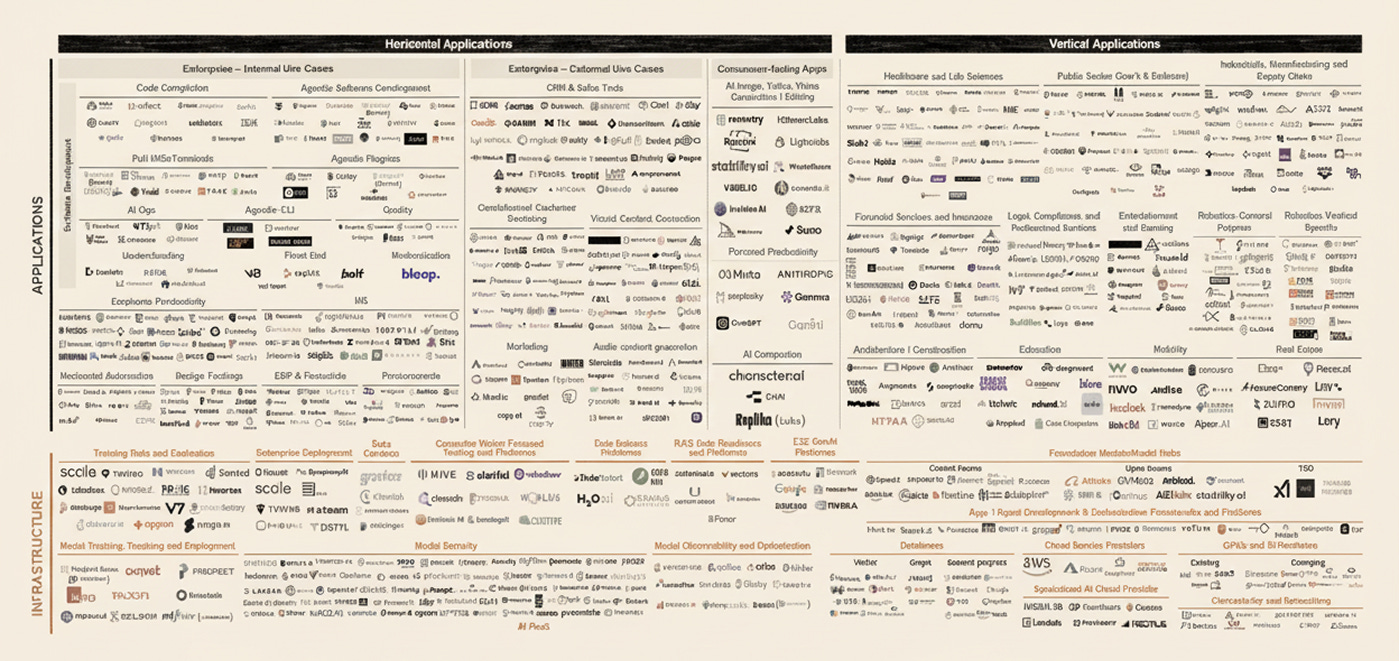
It will be critical for CDAIO’s to identify those areas of Autonomous Productivity in their business with the greatest uplift and the shortest implementation times.
Section 3: Augmented Productivity
What is Augmented Productivity?
Augmented Productivity refers to work that AI can significantly accelerate but cannot fully replace. These activities still require human judgment, creativity, or accountability, but AI can dramatically reduce the time required to complete them.
Rather than replacing roles entirely, AI acts as a force multiplier. Individuals can move faster, test more ideas, and operate at a level of output that previously required larger teams.
While Autonomous Productivity increases capacity through automation, Augmented Productivity increases the effectiveness of human workers.
Examples include writing software with AI assistance, generating analysis faster, or drafting documents that humans refine and finalize.
Examples of Augmented Productivity
Government & Legal
- Document review in government bureaucracies – civil servants using AI to summarize long regulatory filings, legislation drafts, and policy documents before making decisions.
- Legal research for lawyers – AI surfacing case law, summarizing precedents, and outlining arguments that attorneys refine.
- Contract review and drafting – AI flagging risks, inconsistencies, or missing clauses while lawyers approve final language.
- Public consultation analysis – AI clustering thousands of citizen responses and summarizing key concerns for policy teams.
Marketing & SEO
- SEO managers scaling content production – AI generating keyword clusters, briefs, outlines, and draft articles while humans edit and publish.
- Competitor monitoring – AI continuously scanning competitor sites and surfacing changes in pricing, positioning, or content strategy.
- Ad campaign iteration – marketers generating dozens of ad variants, testing messaging, and refining strategy faster.
- Content repurposing – turning one piece of content into newsletters, social posts, and video scripts.
Product & Startup Teams
- Product managers writing specs faster – AI drafting product requirement documents and user stories from rough ideas.
- Customer feedback synthesis – summarizing thousands of support tickets or reviews into product insights.
- Experiment ideation – generating growth experiments or product improvements based on user data and feedback.
- Investor communication preparation – drafting updates, board reports, and fundraising materials.
Sales & Business Development
- Sales outreach personalization – AI drafting tailored messages based on prospect research that sales reps review before sending.
- Account research – summarizing company news, org structures, and potential buying signals for sales teams.
- Proposal drafting – generating first drafts of RFP responses and client proposals.
- Deal preparation – summarizing previous conversations, stakeholder information, and contract details.
Operations & Internal Teams
- HR teams screening resumes faster – AI summarizing candidate profiles before human review.
- Meeting preparation – AI compiling context, previous decisions, and relevant documents before discussions.
- Internal knowledge search – employees asking AI questions about internal policies, docs, and systems.
- Report writing – AI drafting operational reports or summaries that managers finalize.
Creative & Media
- Video editing workflows – AI generating rough cuts, transcripts, and highlight segments that editors refine.
- Design ideation – generating visual concepts or layouts that designers evolve.
- Script writing assistance – drafting outlines or dialogue that writers edit.
These examples give some ideas for Chief Data and AI Officers for thinking about how their role can impact the business in a positive way using AI. CDAIOs should ensure they do not fall into the trap of thinking “just about data” — AI can be transformative for certain types of business, and AI implementation may not have anything to do with data at all.
In March 2026, a man claimed to have leveraged AI to create a cancer-mitigating vaccine for their dog in Australia. This is a good illustration of how AI can impact different companeis differently. Pharmaceutical companies and BioTechnology companies could theoretically be using AI to massively reduce the time to identify possible drugs. The way this gets implemented would vary massively. Big Pharma may not directly do anything, but partner more with AI-first drug discovery labs. Drug Discovery Labs may need to massively reorganise to go all in on AI, channeling investment funds into computation rather than research (Labour). Implementing either path requires a more C-Suite Approach vs. a Technical one, illustrating the potentially variable demands of a CDAIO despite a common mandate: “Use AI to accelerate growth and reduce costs as fast as possible”.
Augmented Productivity for AI and Data Teams
By speaking to thousands of data professionals and software professionals, below are a list of those things AI can augment but not fully automate. For the most part, these relate to code-generation use-cases.
- Software development – engineers using AI to draft functions, troubleshoot errors, and explore implementation approaches faster.
- Data analysis and exploration – analysts accelerating exploratory analysis, SQL writing, and dataset understanding with AI assistance.
- Technical documentation writing – generating drafts of architecture explanations, system documentation, and onboarding guides that engineers refine.
- Product development planning – AI helping structure feature proposals, product specs, and requirement documents.
- Research and strategy work – synthesizing industry information and generating first-pass strategic analysis.
- Documentation creation and editing – drafting blog posts, reports, or newsletters that humans refine for voice and accuracy.
- Code reviews and debugging support – AI identifying potential issues and suggesting fixes while humans make final decisions.
- Data modeling and architecture design – AI proposing schema ideas, transformations, or modeling approaches for human validation.
- Experiment design and analysis – generating hypotheses, structuring tests, and assisting interpretation of results.
- Presentation and communication preparation – drafting slide outlines, executive summaries, and reports that humans refine.
Given the technical nature of the work for Data and AI Teams, incorporating AI and automation into processes would appear of fundamental importance in 2026.
An important part of any AI Strategy for Technical parts of the labour force, and by Technical I mean anyone who can write code, is to amend processes to leverage AI. The ability for AI to generate code, documentation, review, and also formatting is unmatched.
Digging Deeper: example code-generation workflow
This code generation workflow outlines how a user can create a process whereby a Data Engineer simply asks a local agent to create a ticket. For example, the Data Engineer might say
“Create a Ticket that includes a spec for the following reuqest: “Create a data pipeline per my company’s standards that leverages dlt and Orchestra to load data from an api
and fetches the following objects . Ensure that pagination and incrementality is handled where possible. Ensure the entrypoint to the functions can take parameters such as the obejct name, the start date and end date for the data, and any other relevant filters””
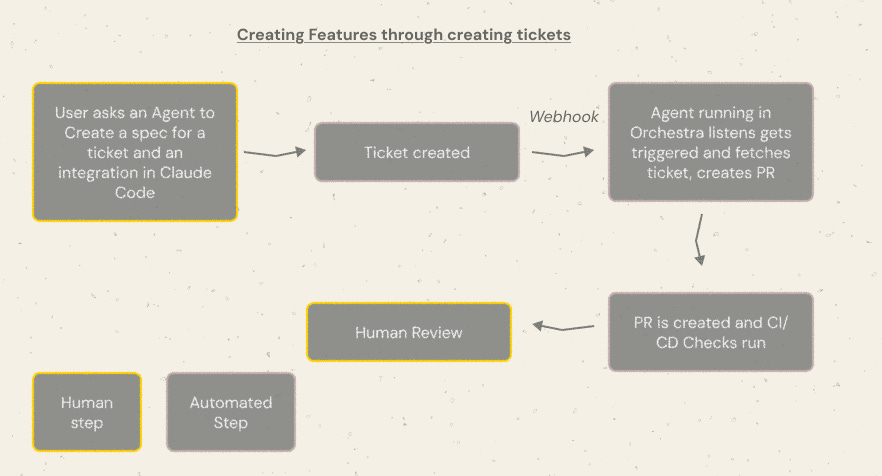
Following ticket creation a webhook is fired to an agent playground such as Orchestra. The Agent Playground runs the agent which creates a PR. The agent needs to be calibrated and tested first locally before it can go into production and be fully reliable. The PR is created, triggering CI and CD checks. These ideally also trigger agentic workflows which can in turn auto-fix the PR. Finally there is a human review step.
This means that Data and AI Teams’ focus shifts from
To
- Ability to Teach AI to write code how you want it
- Ability to write good tickets
- Ability to review PRs quickly
An interesting observation from the community is that the domain you are working in matters for AI and Data. For example, in the React /front-end development area, there is a large amount of below average code available in the internet. AI generally struggles to write good code in this domain.
The reality for data professionals may be similar. Many companies have their own way, rightly or wrongly, of coding Data Pipelines. Company-specific quirks should be avoided at all costs, and present a significant barrier to automation and benefit.
Consider a company that has decided to fork dbt, such as Monzo, the UK’s largest neobank. Monzo employs around 100 analytics engineers, and have a relatively complex and niche dbt set-up. It may be much harder to teach AI to code “like a Monzo Analyst” than to teach AI to write good, standard dbt-core code.
If processes are too niche to be automated, then this presents a genuine problem for CDAIOs. Data Leaders should quickly identify if proecsses are too niche and entrenched to be automated. Like any automation, AI struggles when clear targets are not defined or processes do not exist, since there are no “common paths” for it to follow — incident resolution is an excellent example, where the “Data Person” typically solves issues through a multitude of channels (Email, Slack, In-person etc), in a multitude of ways.
Section 4: AI inputs
What are AI Inputs?
AI Inputs refer to the total cost required to produce output using AI systems.
Where productivity frameworks typically measure how much output is produced, AI Inputs focus on the resources required to generate that output.
In practice, AI Inputs are the combination of two main components:
- Human labor required to operate AI systems
- Compute costs required to run AI models
Together, these form the true marginal cost of AI-driven work.
Even when AI performs a task autonomously, there is always an input cost: prompting systems, monitoring outputs, validating results, and maintaining infrastructure.
AI Inputs therefore represent the total economic cost of getting AI to do useful work.
The Two Core Components of AI Inputs
Labor Inputs
Even highly autonomous systems require human involvement. This can include:
- Prompt engineering and workflow design
- Supervising outputs and validating results
- Integrating AI into existing systems
- Managing AI infrastructure and agents
- Maintaining datasets, APIs, and integrations
For many companies today, labor remains the largest AI input cost, particularly during early implementation. There is no more valuable commodity than time.
Token and Compute Inputs
AI systems also incur direct computational costs.
These include:
- Tokens consumed when generating text, code, or analysis
- Compute used for inference and model execution
- Storage and infrastructure costs for AI pipelines
- API costs for external AI services
While token costs continue to fall rapidly, they still represent a real operational input to AI-driven workflows.
Implementation Costs
A third category of AI Inputs relates to the cost of implementing AI within an organization.
Unlike ongoing labor or token costs, these are typically upfront investments.
These can include:
- Building internal AI infrastructure
- Purchasing enterprise AI tools
- Integrating AI into internal systems
- Training employees to use AI effectively
- Designing new workflows around AI agents
For many organizations, these implementation costs represent the largest barrier to AI adoption, even when the long-term productivity gains are clear.
Examples of AI Inputs
These build on the examples in previous sections, drawing attention to the impact to labour of AI and associated token costs.
Government & Legal
- Document review in government bureaucracies
Reviewing long regulatory filings used to require hours of civil servant time. AI can summarize hundreds of pages in seconds. Labour shifts from reading documents to reviewing summaries. Token costs increase with long documents and large consultation submissions. - Legal research
Lawyers historically spent hours searching for relevant case law. AI can scan large legal databases quickly. Labour moves toward validating arguments and refining strategy. Token costs grow with the size of legal corpora and the complexity of research queries. - Contract review
Entire contracts can be analyzed by AI to flag risks and inconsistencies. Labour drops from full manual review to targeted verification. Token consumption rises with large legal documents and repeated review iterations. - Public consultation analysis
Governments processing thousands of citizen responses previously required large teams of analysts. AI can cluster and summarize responses rapidly. Labour shifts toward interpreting results. Token costs scale directly with the volume of responses.
Marketing & SEO
- SEO content production
Writing long-form content once required multiple writers. AI can generate outlines and drafts quickly. Labour shifts toward editing and quality control. Token usage increases with article length and the number of drafts generated. - Competitor monitoring
Marketing teams previously spent hours reviewing competitor sites and industry news. AI can scan and summarize this continuously. Labour drops to reviewing alerts. Token costs grow with the frequency of monitoring and number of sources analyzed. - Ad campaign generation
Marketers can generate dozens of ad variations instantly. Labour shifts from writing to selecting and refining the best options. Token costs increase with the number of variations generated. - Content repurposing
A single piece of content can be transformed into multiple formats. Labour moves from creation to review. Token consumption grows with the number of transformations requested.
Product & Startup Teams
- Product specification drafting
Writing detailed product specs once required long drafting cycles. AI can produce first drafts instantly. Labour shifts to refining requirements and validating edge cases. Token costs increase with the length and complexity of specifications. - Customer feedback synthesis
Product teams previously read through thousands of support tickets and reviews. AI can summarize and cluster this feedback quickly. Labour focuses on deciding what to build. Token usage grows with the size of the feedback dataset. - Experiment ideation
Generating product experiments or growth ideas can now be accelerated with AI. Labour shifts to prioritization and execution. Token costs remain relatively low compared to other use cases. - Investor communication preparation
AI can draft investor updates and board reports from internal data. Labour focuses on refining narrative and ensuring accuracy. Token usage increases with the size of reports and historical context provided.
Sales & Business Development
- Sales outreach personalization
Sales teams can generate personalized outreach messages at scale. Labour shifts from writing messages to reviewing them. Token costs increase with the number of prospects targeted. - Account research
AI can summarize company news, hiring signals, and organizational structure. Labour drops from manual research to reviewing summaries. Token costs increase with the number of accounts monitored. - Proposal drafting
RFP responses and proposals can be generated quickly. Labour shifts toward customization and relationship building. Token consumption grows with document length and number of proposals generated. - Deal preparation
AI can summarize past conversations and account history. Labour moves toward negotiation strategy. Token costs increase with long email threads and meeting transcripts.
Operations & Internal Teams
- Resume screening
HR teams can summarize candidate profiles instantly. Labour shifts toward evaluating shortlisted candidates. Token costs scale with hiring volume and resume length. - Meeting preparation
AI can analyze previous meeting notes, documents, and emails. Labour shifts to decision-making. Token consumption increases with the amount of historical context provided. - Internal knowledge search
Employees can query large internal documentation sets using AI assistants. Labour shifts from searching to applying answers. Token costs increase with the size of the knowledge base. - Operational report drafting
Reports that once required hours of manual writing can be generated quickly. Labour moves toward validation and interpretation. Token usage grows with report length and the number of data sources included.
AI Inputs for Data Teams
The impact of AI to AI Inputs appears to be vary significantly. It would appear, through anecdotal evidence, that companies in “defensive” positions, aiming to minimise costs while keeping revenues steady, are looking to reduce headcount while keeping output fixed.
Growth-stage companies such as Scale-ups appear to be doing the opposite; keeping inputs fixed while trying to maximise output via Augmented Productivity gains. This typically includes some expenditure for Token Costs.
Token Costs vary widlly. Developers building applications like Pete Steinberger, the creater of OpenClaw, has wracked up a $50k Codex bill in 5 months. Individual coding subscriptions vary from $20 to $100 a month.
Forecasting token usage is difficult. Companies should work-out the amount of spend they can allocate towards AI before embarking on the journey, and prioritise initiatives based on learnings from tests and implementations.
Implementation costs and opportunity costs are likely to be the most significant things for data teams. While using tools like Codex and Claude code to write code faster is relatively fast and low lift, process is different.
Un-entrenching compelx processes, documenting new ones, and dispersing this information within an organisation could be extremely time-consuming and slow. Furthermore, with data needs of the business ever-growing, Data Teams in particular face high opportunity costs to reallocation of resources to AI implementation.
Data Teams should find appropriate times to implement AI when opportunity costs are low, and/or stay close to Business leaders to understand the opportunity costs of AI. If there are significant upsides to be had, Data Teams should ensure this is communicated clearly and effectively to those in charge of resource prioritisation.
Summary | Good AI needs good Process
In this piece I outlined a framework for Chief Data and AI Officers to evaluate AI initiatives and to form a holistic AI strategy.
The framework focusses on gains in productivity of two kinds; Autonomous and Augmented. While Autonomous Productivity is theoretically boundless, Augmented Productivity relates to step-changes in productivity for members of the existing workforce.
We also identified some risks to AI implementation, particularly around implementation time, cost and the opportunity cost of implementing AI. Beyond the scope of this analysis were considerations around security, governance or failed implementations. For many enterprises, data or privacy breaches could be detrimental to business, which in turn introduce additional barriers and timing considerations for implementing AI.
We also identified some upside cases — where there is a “Benefit of Benefits”; a bonus for realising multiple gains in productivity (and their associated consequences) at once.
Critical to both Autonomous and Augmented Productivity use-cases are process. While LLMs excel at understanding unstructured data and existing in a non-deterministic environment, productivity gains stand to be large when processes can be repeatable.
For all AI’s appeal, enterprises fundamentally want reliable, accurate, and trustworthy AI. Without clean definitions and well-defined processes, simply adding an AI layer is unlikely to yield beneficial results.
Most enterprises should find that there is a significant Productivity Gap. Those that find that tribal knowledge, unstructured processes and human bottlenecks also exist are in the position to bargain with the C-Suite: structures for progress. Without structures, companies will not capitalise AI and miss-out on the “AI Boat”, and competitors will win.
This should come as good news, not just for Chief Data and AI Officers, but for Data Practitioners generally. A lack of consistency, an over-reliance on specific people for tribal knowledge, and undocumented processes are fundamentally the source of many issues data professionals face everyday, one such being data quality.
Companies that are unable to build their businesses with clearly-defined processes will not succeed in implementing AI effectively. This means that those that do must implement repeatable, well-documented processes, so AI and AI Agents can begin to carry out this work.
A familiar phrase in data is: “Garbage in, garbage out.” For years, the challenge hasn’t been explaining this to data teams — it’s been getting the business to care. AI may finally change that.
As companies rush to deploy AI across every function, a new reality is becoming clear: AI is only as good as the processes behind it. Messy systems, unclear ownership, and poor data quality don’t just produce bad dashboards anymore — they produce bad decisions at machine speed.
This is why 2026 may finally be the year the CDAIO truly comes into its own. Not as a technical leader, but as a business operator responsible for securing AI foundations.
For companies to be truly AI-driven, it’s no longer just “poor data in, poor data out.”It’s poor process in, poor intelligence out. For the first time, the entire executive team has a reason to care.
