


When Circle to Search was first released, it was marketed as an AI breakthrough. According to Google, it required specific hardware, like the new Pixel or Samsung Galaxy S series. You can only use Google’s Gemini AI, so you only get the results Google considers correct. After checking several different AIs, I realized each AI is good at different things. Which is why I want to have each of them while using Circle to Search.
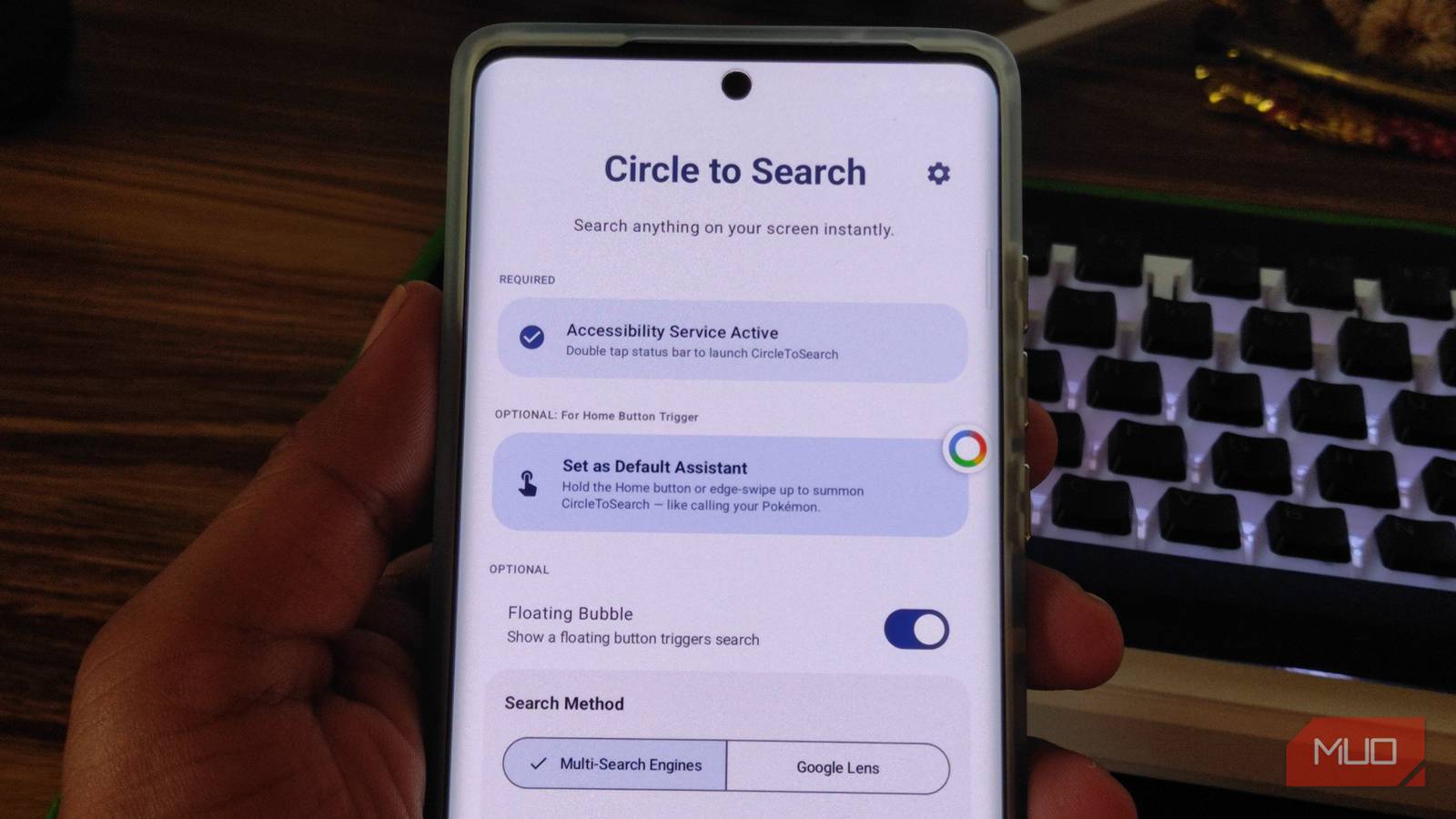
None of this was a problem with the open-source Circle To Search app, which lets anyone use this tech without hitting Google’s supposed hardware requirements. It works on budget Android phones, respects your choice of search engine, and functions better as a result. It’s a simpler version of Google’s Circle to Search, which is a smart choice.

- OS
-
Android
- Developer
-
AKS-Labs
Circle To Search is an open-source Android app that enables “Circle to Search” functionality on older devices without Gemini AI. It replaces Google’s bloat with choice, allowing you to route screen-crops to engines like DuckDuckGo or Yandex.
The freedom of choosing the right search engine
You aren’t limited by default

Google’s implementation of Circle to Search has one major flaw. It’s designed to feed the Google ecosystem. When you search for something, like a landmark, on your phone, you are given Google’s shopping links, YouTube recommendations, or Google Search results. You are searching Google’s index of the web, and with the default Circle to Search, there is no setting to change this.
Google’s implementation is useful. But with the Circle to Search app, you can make it better. You can easily change the search engine to one that best fits your needs. You can either set Google Lens as your permanent default, or pick one each time you circle something on your screen.
This adds a dimension of choice to the user experience. If you want privacy, you can choose DuckDuckGo or StartPage. If you want an effective image search, try Yandex. The extra tap is more of a feature than a drawback for power users.
Making features more accessible
Convenience is not just for flagship devices

Official Circle to Search has a long list of requirements. You need to have at least a Pixel 6 or later (S23 or later if Samsung), Android version 13 or later, and the Google app set as the default assistant app. This limits users in multiple ways. If you want to use something like ChatGPT or Perplexity as an assistant app, you can’t. If you have a perfectly functional old Android phone, you can’t use Circle to Search despite having efficient hardware.
None of these limitations matters with the CircleToSearch app. As long as you have an Android phone with Android 10 or higher, it will work. You do not need Google set as the default assistant, since you can select a custom search engine in the app.
There is also the benefit of accessibility. With Google’s Circle to Search, you have to use either gesture navigation or three-button navigation. This is not the case with CircleToSearch. You can set it to trigger with the default gesture or set a floating button to launch it from any screen. You can use the default Circle to Search with the app or disable the default implementation completely.
Advantage for power users
The power of desktop mode

This is my personal favorite feature in Circle To Search. There are times when I need to toggle on desktop mode just to get the right view of the search results and find the right information. Because the desktop view of the search results and webpages is usually more information-dense, I prefer it. But when I use Google’s Circle to Search feature, I am forced to use Google Search as my primary browser. In that case, I can’t toggle Desktop Mode until I open the link and launch Chrome.
With the Circle To Search app, you don’t really need to launch a browser to enable Desktop Mode. You can enable desktop mode directly from the search results page. When enabled, the app forces the search engine to return the full, desktop-class results page.
This aligns with the philosophy of “Power Users” who want their smartphone (or Android tablet, in my case) to act like a proper pocket computer, not just a doom-scrolling device. There’s also the fact that Google Lens aggressively pushes commercial results because that is where the revenue is; this app pushes raw data because that is what the user asked for.
There’s a hidden cost
Can we actually trust a third-party app?

To function, Circle To Search requires Android Accessibility Services permissions. This is the “master key” of Android permissions. It allows an app to “see” everything on your screen and “touch” the interface on your behalf. Historically, this permission has been the primary vector for banking malware (such as SharkBot), which abuses it to read 2FA codes or keystrokes. You are effectively handing the developer the keys to your virtual kingdom.
Furthermore, because this app modifies core system actions, it cannot be hosted on the Play Store. You must install the APK from GitHub. For the average user, downloading an executable file from the internet and granting it total screen access is a massive security red flag — and rightly so.

Gemini isn’t as useless as it was when you tried it two years ago
AI that I first despised is now my Google Assistant replacement.
You also lose the “Multimodal” AI context. Google’s version allows you to circle a shoe and type “Does this come in red?” Gemini understands the image’s context. The Circle To Search app is a strict image-search tool; it cannot have a conversation with you about the image.
But that is why we go open-source

While we use Google’s Circle to Search, even though it has all the permissions to “see” the screen, and then some. Since it’s part of the Android system, it has more access to the phone than any third-party app you get.
But there’s one thing you can do with the third-party Circle To Search app that you can’t do with Google. See the “code.” Since the former is an open-source app, all of its code is available on GitHub. If you want, you can check out what goes in and out. There’s the factor of transparency, which develops trust.
Choose function over hype
The Circle To Search app is not for everyone. If you want to have a conversation with an AI about your photos, or if the idea of sideloading an APK makes you nervous, stick to the default implementation.
But if you are a privacy enthusiast, an owner of an older phone, or a power user who resents the “dumbed-down” mobile web, this app is a revelation. It proves that the best features of the latest smartphones are often just software utilities trapped behind marketing.
