Close Menu
SkytikSkytik

    Subscribe to Updates

    Get the latest creative news from FooBar about art, design and business.

    What's Hot

    At Least 32 People Dead After a Mine Bridge Collapsed Due to Overcrowding

    November 17, 2025

    Here’s how I turned a Raspberry Pi into an in-car media server

    November 17, 2025

    Beloved SF cat’s death fuels Waymo criticism

    November 17, 2025
    Facebook X (Twitter) Instagram
    • About Us
    • Contact Us
    SkytikSkytik
    • Home
    • AI Tools
    • Online Tools
    • Tech News
    • Guides
    • Reviews
    • SEO & Marketing
    • Social Media Tools
    SkytikSkytik
    Home»Guides»I Created My Own Reaction Memes, Stickers and GIFs Using AI. Here’s How They Turned Out
    Guides

    I Created My Own Reaction Memes, Stickers and GIFs Using AI. Here’s How They Turned Out

    AwaisBy AwaisFebruary 6, 2026No Comments4 Mins Read0 Views
    Facebook Twitter Pinterest LinkedIn Telegram Tumblr Email
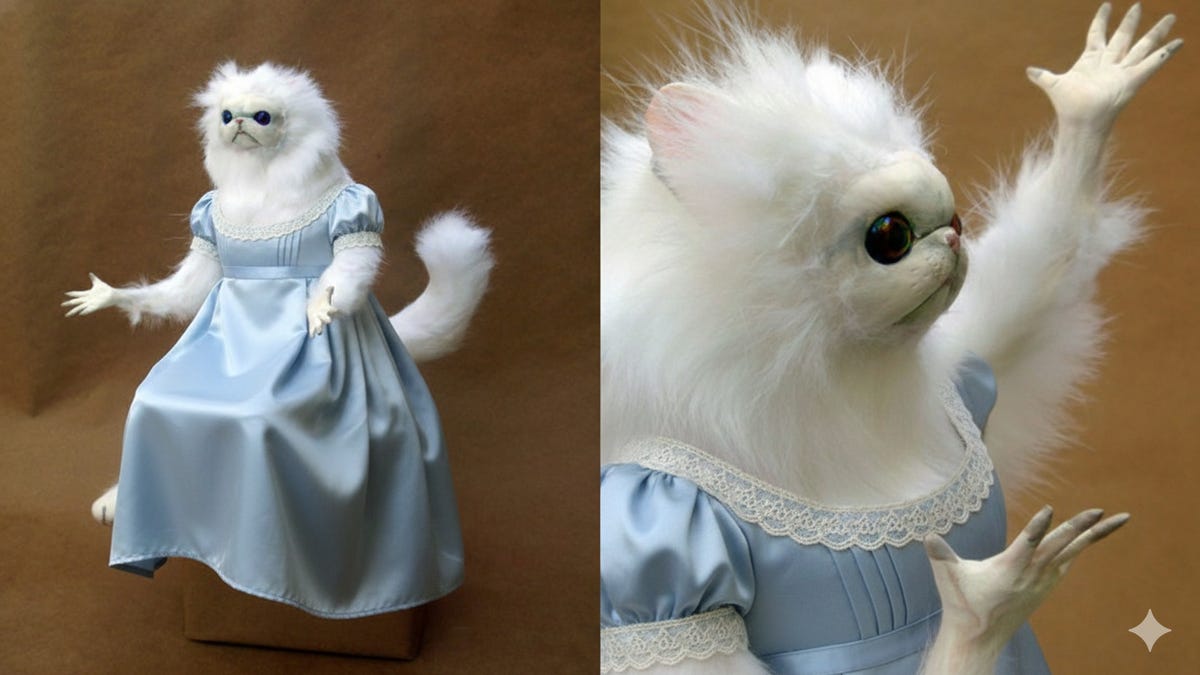
    A screenshot of the Monkey Cat meme transformed into a Bridgerton-style character using AI
    Share
    Facebook Twitter LinkedIn Pinterest Email

    A lot of internet discourse can be boiled down to keeping us laughing. Social networks like TikTok, messaging services like WhatsApp and forums like Reddit are awash with content designed to tickle the funny bone.

    Meme lords and original posters are often rewarded for their efforts with reactions in the comments that add to the hilarity, and now that generative AI is on the scene, you can create images perfectly crafted for every occasion.

    AI Atlas

    Here’s how to use AI to create reaction GIFs, stickers and images for comments and text threads.

    Enhance and modify memes

    We all have our favorites, and there are seemingly endless options. Mocking SpongeBob. Handsome Squidward. Savage Patrick. And that’s just from one show. There’s a whole universe of meme content ripe for the picking and simply begging to be remixed. 

    Google’s Gemini AI was much more adept than ChatGPT at generating fresh versions of old memes for specific comments in my testing. Keeping the overall effect of the original reaction meme is paramount, and Gemini succeeded more often than not.

    Ahead of the Super Bowl this weekend, Hide the Pain Harold became a football fan in team colors with a simple prompt, giving new meaning to the classic meme.

    A screenshot of the Hide the Pain Harold meme transformed into a football fan using AI

    Hide the Pain Harold will be perfect for some football fans on Super Bowl Sunday.

    Gemini/Screenshot by CNET

    You may need to tweak prompts and make edits. In this case, Gemini AI neglected to include the beanie on the character’s head, so an update to the result was necessary.

    Next, I gave the Monkey Cat meme the Bridgerton fashion treatment for fans in search of the perfect feeling to convey in the comments. I used this prompt in Gemini: “Change the creature in the image into a Bridgerton-style character. Keep the expression on the creature’s face the same – exactly the same. Keep the lighting exactly the same. The only thing that should change is the style of dress.”

    A screenshot of the Monkey Cat meme transformed into a Bridgerton-style character using AI

    Gemini/Screenshot by CNET

    Lastly, I transformed the skeptical dog meme into a wizard of the dark arts using a similar prompt to keep everything about the character the same, except for its style of dress and background:

    A screenshot of the Skeptical Dog meme transformed into a dark arts wizard using AI

    Gemini/Screenshot by CNET

    GIFs that keep on giving

    There are only so many ways you can reward someone else’s excellent comment or original post on Reddit. But Canva has a feature on its platform called Magic Media, which can generate just about any upvote animation you can imagine through simple text prompts.

    Created by Rachel Kane using Canva AI

    Click the Magic Media icon on Canva, and you’ll be able to generate a video through text prompts. Once you’ve got the desired clip, you can edit it in the timeline:

    A screenshot of directions for creating a GIF in Canva

    Canva/Screenshot by CNET

    You can then export it to GIF format by clicking the share button:

    A screenshot of how to create a GIF in Canva

    Canva/Screenshot by CNET

    Moments with meaning

    Not everything is a joke. Sometimes you forget your mom’s birthday for the second year in a row, and sending a card a week after the date would only make it worse. You need something sentimental, personalized and immediately available.

    Adobe Firefly AI can generate custom short-form videos in a variety of art styles, perfect for dropping into a hasty text or adding to the comments section of the passive-aggressive birthday post she tagged you in. 

    You can easily add emotional details that fit the relationship, so if your mom is a big fan of, say, fantasy books, Adobe Firefly AI can generate the birthday cake of her dreams in a few minutes.

    A screenshot of a GIF in Adobe Firefly AI

    Created by Rachel Kane using Adobe Firefly AI

    In-browser tools like Adobe Express or Canva can convert videos into looping GIFs with a single click:

    A screenshot of how to create a GIF in Adobe Firefly AI

    Adobe Firefly/Screenshot by CNET

    Be careful with this one, though — the last thing you want is to have to awkwardly explain to a disappointed recipient that the AI fantasy book-themed cake is not, indeed, real.

    created GIFs Heres Memes Reaction Stickers turned
    Share. Facebook Twitter Pinterest LinkedIn Tumblr Email
    Awais
    • Website

    Related Posts

    Will AI Take Your Marketing Job? Here’s What Two AI Experts Are Seeing : Social Media Examiner

    February 26, 2026

    New Platforms Won’t Save Social Media: Here’s What’s Actually Shifting

    February 25, 2026

    Is It Safe To Eat Ground Beef That Has Turned Gray?

    February 23, 2026

    Google Lost Two Antitrust Cases. Its Stock Rose 65%. Here’s Why

    February 20, 2026

    How to daisy-chain multiple monitors from a single cable

    February 19, 2026

    I finally found a great use for my TV’s USB port

    February 19, 2026
    Leave A Reply Cancel Reply

    Top Posts

    At Least 32 People Dead After a Mine Bridge Collapsed Due to Overcrowding

    November 17, 20250 Views

    Here’s how I turned a Raspberry Pi into an in-car media server

    November 17, 20250 Views

    Beloved SF cat’s death fuels Waymo criticism

    November 17, 20250 Views
    Don't Miss

    Two-Stage Hurdle Models: Predicting Zero-Inflated Outcomes

    March 18, 2026

    Introduction , we regularly encounter prediction problems where the outcome has an unusual distribution: a…

    Google brings vehicle feeds to Search campaigns

    March 18, 2026

    70+ AI art styles to use in your AI prompts

    March 18, 2026

    Manifold-Matching Autoencoders

    March 18, 2026
    Stay In Touch
    • Facebook
    • YouTube
    • TikTok
    • WhatsApp
    • Twitter
    • Instagram
    Latest Reviews

    SEO Test Shows It’s Trivial To Rank Misinformation On Google

    March 18, 2026

    Bridging Facts for Cross-Document Reasoning at Index Time

    March 18, 2026
    Most Popular

    13 Trending Songs on TikTok in Nov 2025 (+ How to Use Them)

    November 18, 20257 Views

    How to watch the 2026 GRAMMY Awards online from anywhere

    February 1, 20263 Views

    Corporate Reputation Management Strategies | Sprout Social

    November 19, 20252 Views
    Our Picks

    At Least 32 People Dead After a Mine Bridge Collapsed Due to Overcrowding

    November 17, 2025

    Here’s how I turned a Raspberry Pi into an in-car media server

    November 17, 2025

    Beloved SF cat’s death fuels Waymo criticism

    November 17, 2025

    Subscribe to Updates

    Get the latest creative news from FooBar about art, design and business.

    Facebook X (Twitter) Instagram Pinterest YouTube Dribbble
    • About Us
    • Contact Us
    • Privacy Policy
    • Terms & Conditions
    • Disclaimer

    © 2025 skytik.cc. All rights reserved.

    Type above and press Enter to search. Press Esc to cancel.