


Why you can trust TechRadar
We spend hours testing every product or service we review, so you can be sure you’re buying the best. Find out more about how we test.
Wavlink WL-UTD58: 30-second review
Specifications
Monitors: Up to 8K@60Hz or 3 × (PC), 2 × (Mac) 4K@144Hz via Thunderbolt 5
Front Ports: Thunderbolt 5 Host 140W PD, Thunderbolt 5, 3.5mm Audio, 2 x USB-A 3.2, SD card slot, MicroSD
Rear Ports: 2 × USB-A 3.2 Gen2, 2.5G Ethernet, 2 x Thunderbolt 5, 2 x USB-A 3.2
Audio: 3.5mm Combo Jack
Size: Approx. 219 mm ×97 mm × 35 mm
OS Compatibility: macOS, Windows 11
Accessories: 240W Power Adapter, Thunderbolt cable
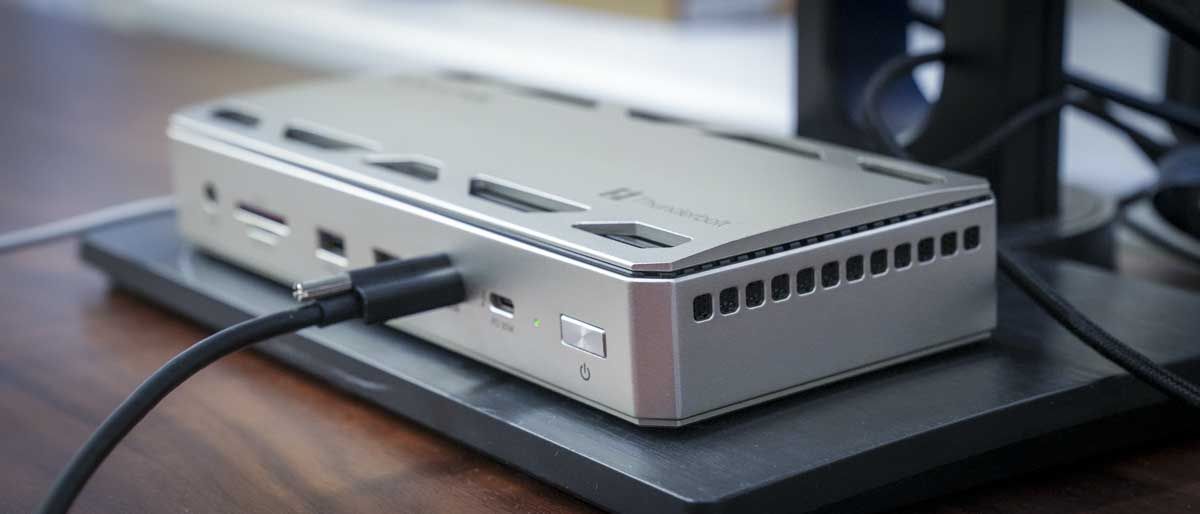
This is one of the best-looking desktop docking stations that I’ve seen. The high-quality aluminium build reinforces the premium price point. While the price is at the top end of desktop docks, for that money, you’re getting the latest technology alongside a build quality designed for years of use.
Getting set up is straightforward; it’s simple plug-and-play on both Windows 11 and macOS. As this is a high-end dock, it requires its own AC power and connects directly to your machine via a single Thunderbolt 5 cable, which is of course backward compatible with any device using the USB-C style connector.
What marks this docking station out is that the cable not only supplies data to the machine but also delivers up to 140W of charging power, ideal if you’re using a laptop like the Asus ProArt P16 or MacBook Pro.
Once connected, all your peripherals can be plugged in, and thanks to the Thunderbolt 5 connection, devices like control boards, hard drives or scanners operate as quickly as if they were plugged directly into the computer.
Port layout front and back is also well thought out, with SD and microSD card slots on the front for photographers and videographers, a couple of USBs for standard peripherals, and two Thunderbolt 5 ports for ultrafast connectivity, one for the host machine and the other along with two on the back for fast storage or high-demand hardware.
The back is well supported with a decent RJ-45 Ethernet port that supports up to 2.5Gb/s. If you’re working on a fast network, it’s more than capable of keeping up with large-scale video transfers. While my network doesn’t quite reach that speed, I was impressed with transfer performance over to the Zettlab D6 NAS.
One thing that did surprise me was that Wavlink seems to have decided to eliminate HDMI or DisplayPort from the back of the device. So, the only way to connect monitors is through USB-C. While this isn’t too much of an issue if you have the correct cables, it’s a shame that they’ve removed those older-generation ports entirely.
The other point is that, while the dock is beautifully designed with a futuristic yet ergonomic style, there’s still a large, heavy external power brick that needs to sit under the desk.
In use, once connected, it works well on both Mac and PC systems. While there is some variation in performance, especially with displays, it provides a solid way to quickly connect multiple devices via a single cable.
If you work in the creative sector and both transfer data, then I’ve found this is right up there with the best laptop docking stations. And there is an upgraded M version that enables you to install an SSD for internal storage.
My only major point is that it doesn’t come with any type of docking software. It’s just the dock, so when you disconnect at night, especially with a laptop, you need to ensure all hard drives are properly ejected. For a dock that’s otherwise so well thought out in design, the lack of software is something to consider.
Wavlink WL-UTD58: Price and availability

- How much does it cost? £359 / $399
- When is it out? Available now
- Where can you get it? You can get it Amazon
At present, the Wavlink WL-UTD58 is available for $299 / £359 and can be purchased directly through the Wavlink official store or major online retailers such as Amazon.com and Amazon.co.uk.
Wavlink WL-UTD58: Design

- Stylish design
- Thunderbolt 5
- Fast data transfer for video
The majority of desktop docks take on a very simplistic form, a rectangular box with ports on the front and back, and for the most part, that’s exactly what the Wavlink WL-UTD58 is.
However, the company has taken a step forward and introduced some ergonomic design into the unit, making the sleek anodised aluminium body look more stylish than most other options.
It’s also relatively compact and slimline compared with some alternatives. While it’s worth noting that a large power block is required, once that’s tucked away, the physical dimensions of the dock make it easy to position under a monitor.
The usual boxy shape is replaced by something a bit more ergonomic, with a slightly futuristic look reminiscent of gaming hardware, though here it’s been toned down, and the matte silver finish will suit anything from a design studio or office to a gaming setup.
On the front, you’ll find a 3.5mm audio combo jack, SD and microSD 4.0 card readers offering up to 312MB/s transfer, two USB-A ports offering 10Gbps, and the Thunderbolt 5 host port (140W PD 3.1). There’s also a Thunderbolt 5 downstream port offering 30W of PD power and the power button.
On the back, there are two Kensington lock ports for securing the dock, two Thunderbolt 5 downstream ports offering 15W of PD, two USB-A ports (10Gbps), an RJ-45 Ethernet port, and finally the DC input from the 20V AC adapter.
One major point about any dock is that you want it to stay in position as you plug in and out peripherals. Here, rubberised feet provide good grip, and the aluminium body adds just enough weight to keep it steady. While relatively lightweight compared to some alternatives, it remains stable and offers resistance when plugging devices in.
The exterior is very minimal, with no screen to indicate what’s connected, though there are subtle status LEDs to show when a port is in use.
The aluminium casing serves two purposes: first, for aesthetics, making this one of the best-looking desktop docks, and second, to dissipate heat. Despite no built-in fans, the heat sink and internal cooling make this nearly silent in operation.

Wavlink WL-UTD58: Features
The Wavlink WL-UTD58 is a dock that’s balanced on features. As it’s powered externally (not drawing power from your computer), it can charge laptops with up to 140W PD. The connection to your computer is via a Thunderbolt 5 host port.
This means the computer must support Thunderbolt 5, but if you’re looking for a future-proof dock and only have Thunderbolt 3, 4, or USB4, it’s fully backwards compatible and still offers fast transfer rates.
Thunderbolt 5 supports up to 40Gbps, so if you’re working with video or high-resolution images that usually require a direct computer connection, this dock still maintains high transfer speeds.
When it comes to ports, there’s a good selection: USB-A 3.2 Gen 2 and USB-C (10Gbps), SD and microSD card slots, and RJ-45 on the back for wired networking. The 240W power adapter provides ample power for all PD outputs, ranging from 140W (for laptop charging) down to 15W (ideal for phones).
A useful feature is the 3.5mm audio combo jack on the front, allowing quick connection of standard headsets.

Wavlink WL-UTD58: Performance

Getting started with the Wavlink WL-UTD58 is extremely straightforward. Connecting all the cables and powering on was just as straightforward. One Thunderbolt 5 cable connects the computer to the dock, then I plugged in all my peripherals and the network cable. The entire setup took just a few minutes. There’s no need for software or firmware installation; it’s simple plug-and-play.
In the studio, I’m currently using single monitors, but I tested a dual monitor setup on both macOS (with an M1 Max MacBook Pro) and Windows. Both OSs handled it well. Monitor positioning and alignment were managed through OS settings.
The 4K refresh rate of 144Hz was perfect for creative applications like Photoshop, Lightroom, Premiere Pro, and Final Cut Pro X. If you are looking to use the dock with a gaming system, then this should also suffice. My monitors max out at 4K at present, so I wasn’t able to test the 6 and 8K performance.
Performance overall was equivalent to a direct connection to the Mac, and the only minor issue was the lack of HDMI or DP ports, meaning I had to use Thunderbolt 5 cables directly into the monitors.
Another plus was the wired 2.5 Gbps network connection, enabling direct download of footage to the NAS, more reliable generally than a wireless connection, when you’re transferring TB of data.
On the front, the standard SD and microSD card readers were also useful when downloading image and video files from an SD card. While CFexpress Type B would be nice, SD remains far more common.
During the three weeks I’ve been testing the dock, it’s been reliable and ultimately just sits there under the monitor, connecting everything without issue.
My only real criticism, especially for a premium dock, is the lack of software. There’s no included utility, meaning on macOS, you must manually eject hard drives before unplugging. Some premium docks offer a peripheral eject app to handle this, which would be useful here.

Wavlink WL-UTD58: Final verdict
The sleek design of this dock makes it stand out, and with Thunderbolt 5 and high-speed data transfer, it’s a solid choice for creatives. However, at this price, there’s some emphasis on aesthetics over function, particularly in the absence of bundled software to safely eject connected drives.
That aside, what you do have is an ideal dock for creatives, with ultra-fast transfer rates ensuring smooth workflows for high-resolution or 8K video, although I could only push that resolution to dual 4K monitors, the display connection remained as good as if I had plugged directly into the Mac.
This is one of the few docks capable of handling that data level resolution and data transfer, and a couple of potential issues that I was keen to check through the test were the level of noise and heat. Thankfully, the aesthetic design proved to be more than looks, and the dock remained quiet and relatively cool to the touch.
By the end of the test, there was a great deal that I liked about this doc, especially like others, the fact that you can connect your monitors and accessories to your machine with a single cable, saving time each day.
While the build quality, features and design justify the price, the lack of software is a missed opportunity. However, across the board, it performs well.
Should I buy a Wavlink WL-UTD58?
Value | A premium dock ideally suited for the creative industry, but a little on the pricey sid | 4 / 5 |
Design | Overall a great design, though it’s a shame there are no HDMI or DP ports | 4.5 / 5 |
Features | A good hardware feature set, but no bundled software | 3.5 / 5 |
Performance | Transfer rates and general performance match plugging devices directly into your computer | 4 / 5 |
Overall | A good balance of features for this docking station with fast transfers at it’s heart, making it ideal for creative | 4 / 5 |

Buy it if…
Don’t buy it if…
For more extras for your set-up, we reviewed the best MacBook Pro accessories
