Close Menu
SkytikSkytik

    Subscribe to Updates

    Get the latest creative news from FooBar about art, design and business.

    What's Hot

    At Least 32 People Dead After a Mine Bridge Collapsed Due to Overcrowding

    November 17, 2025

    Here’s how I turned a Raspberry Pi into an in-car media server

    November 17, 2025

    Beloved SF cat’s death fuels Waymo criticism

    November 17, 2025
    Facebook X (Twitter) Instagram
    • About Us
    • Contact Us
    SkytikSkytik
    • Home
    • AI Tools
    • Online Tools
    • Tech News
    • Guides
    • Reviews
    • SEO & Marketing
    • Social Media Tools
    SkytikSkytik
    Home»Tech News»Lenovo’s Twisting Laptop Follows You Around the Meeting Room
    Tech News

    Lenovo’s Twisting Laptop Follows You Around the Meeting Room

    AwaisBy AwaisJanuary 13, 2026No Comments3 Mins Read0 Views
    Facebook Twitter Pinterest LinkedIn Telegram Tumblr Email
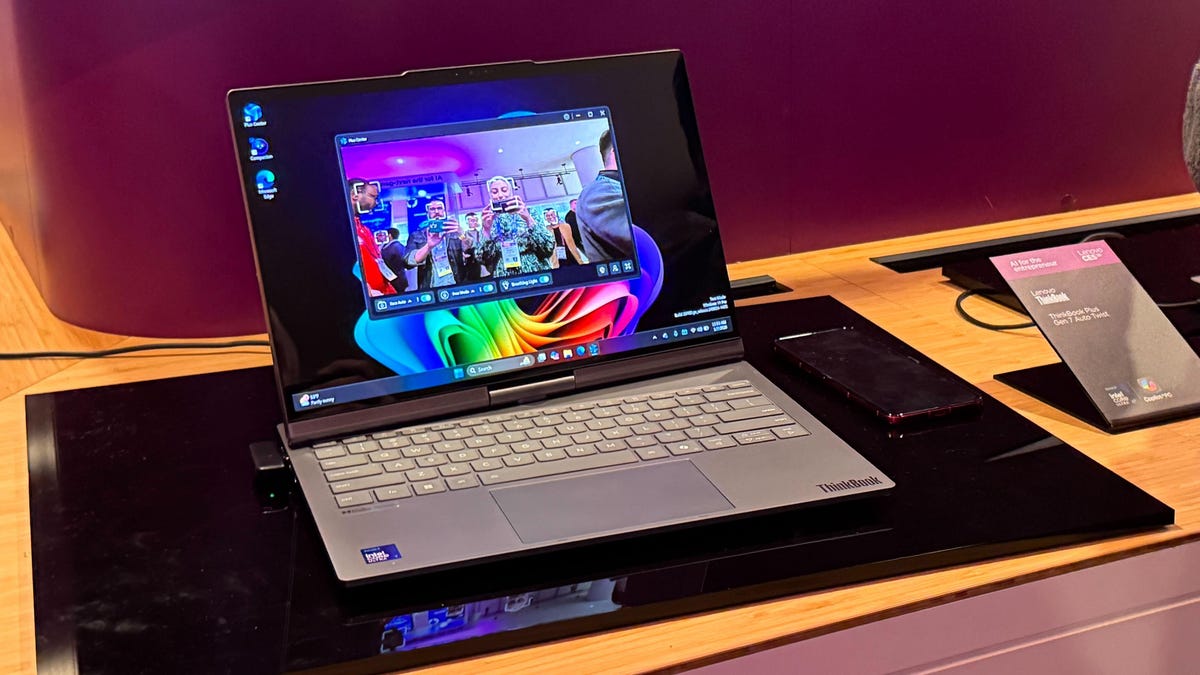
    A laptop with a slightly swiveled screen sitting on a deskmat.
    Share
    Facebook Twitter LinkedIn Pinterest Email

    Leave it to Lenovo to revisit the past for its next novel laptop. The ThinkBook Plus Gen 7 Auto Twist is meant for the workplace, letting people twist the display to show presentations or other material around meeting rooms, evoking the company’s prior designs such as the 2012 Lenovo ThinkPad Twist. 

    But the twist of this year’s Twist is how Lenovo is functionally applying AI to its rotating screen approach. The screen doesn’t just twist manually — it’s motorized, and uses the camera to follow you as you move around the laptop, like a physical version of Apple’s Center Stage tech. 

    Unlike some of Lenovo’s AI products showcased this year, the Gen 7 Auto Twist is actually coming to market in June 2026, with a starting price of $1,650. The laptop was first shown off as a concept device back at CES 2024, and looks much the same now that it’s finalized for commercial sale, though Lenovo said in a press release this new version rotates faster and more quietly. 

    At Lenovo’s showcase area at CES 2026, I saw the Gen 7 Auto Twist in action as it rotated its display to follow me. It also has another AI-powered mode in which the screen lights up with two large kewpie eyes, giving the laptop a surprisingly companionable personality. It’s meant to respond to voice commands as well, but the noisy demo floor made some of them hard to hear, so I’ll chalk that up to the environment — and note that it’s not something I can personally vouch for in the finished laptop.

    The Gen 7 Auto Twist is positioned as a lightweight (just over 3 pounds) work laptop rather than a powerful machine, running Intel Core Ultra Series 3 processors. Its 14-inch 2.8K OLED display is sharp but not particularly bright (500 nits), making it suitable for indoor use. 

    The Gen 7 Auto Twist is just one of many laptops Lenovo showed off at CES 2026, including its ThinkPad Rollable XD Concept laptop with a screen that rises vertically and its Legion Pro Rollable laptop concept intended for gamers to expand their display horizontally for better gaming on the go. 

    Lenovo hasn’t shared when, or if, those devices will be made into commercial versions, but since the Gen 7 Auto Twist was shown off at CES as a concept only two years ago, it’s possible we could see either of those rollables reach the market in the years to come. 

    laptop Lenovos meeting room Twisting
    Share. Facebook Twitter Pinterest LinkedIn Tumblr Email
    Awais
    • Website

    Related Posts

    LiveSense: A Real-Time Wi-Fi Sensing Platform for Range-Doppler on COTS Laptop

    March 10, 2026

    What Is Skimo? Everything to Know About the Newest 2026 Winter Olympic Sport

    February 16, 2026

    Samsung ad confirms rumors of a useful S26 ‘privacy display’

    February 16, 2026

    Amazon Props Up Misleading, Junky Laptops No One Should Buy

    February 16, 2026

    African defensetech Terra Industries, founded by two Gen Zers, raises additional $22M in a month

    February 16, 2026

    Australia vs. Sri Lanka 2026 livestream: Watch T20 World Cup for free

    February 16, 2026
    Leave A Reply Cancel Reply

    Top Posts

    At Least 32 People Dead After a Mine Bridge Collapsed Due to Overcrowding

    November 17, 20250 Views

    Here’s how I turned a Raspberry Pi into an in-car media server

    November 17, 20250 Views

    Beloved SF cat’s death fuels Waymo criticism

    November 17, 20250 Views
    Don't Miss

    Beyond Prompt Caching: 5 More Things You Should Cache in RAG Pipelines

    March 19, 2026

    , we talked in detail about what Prompt Caching is in LLMs and how it…

    How to create a dropdown list in Google Sheets

    March 19, 2026

    CraniMem: Cranial Inspired Gated and Bounded Memory for Agentic Systems

    March 19, 2026

    Microsoft Advertising simplifies automated bidding setup

    March 19, 2026
    Stay In Touch
    • Facebook
    • YouTube
    • TikTok
    • WhatsApp
    • Twitter
    • Instagram
    Latest Reviews

    Easy Fish Curry With Coconut Milk Recipe

    March 19, 2026

    DynaTrust: Defending Multi-Agent Systems Against Sleeper Agents via Dynamic Trust Graphs

    March 19, 2026
    Most Popular

    13 Trending Songs on TikTok in Nov 2025 (+ How to Use Them)

    November 18, 20257 Views

    How to watch the 2026 GRAMMY Awards online from anywhere

    February 1, 20263 Views

    Corporate Reputation Management Strategies | Sprout Social

    November 19, 20252 Views
    Our Picks

    At Least 32 People Dead After a Mine Bridge Collapsed Due to Overcrowding

    November 17, 2025

    Here’s how I turned a Raspberry Pi into an in-car media server

    November 17, 2025

    Beloved SF cat’s death fuels Waymo criticism

    November 17, 2025

    Subscribe to Updates

    Get the latest creative news from FooBar about art, design and business.

    Facebook X (Twitter) Instagram Pinterest YouTube Dribbble
    • About Us
    • Contact Us
    • Privacy Policy
    • Terms & Conditions
    • Disclaimer

    © 2025 skytik.cc. All rights reserved.

    Type above and press Enter to search. Press Esc to cancel.