


9. Poll to gather audience opinions
A poll post is an easy way to get people involved without asking them to do much. On a Facebook business page, it gives your Facebook audience something quick to react to, which helps keep Facebook posts active and visible between bigger updates.
Why it works
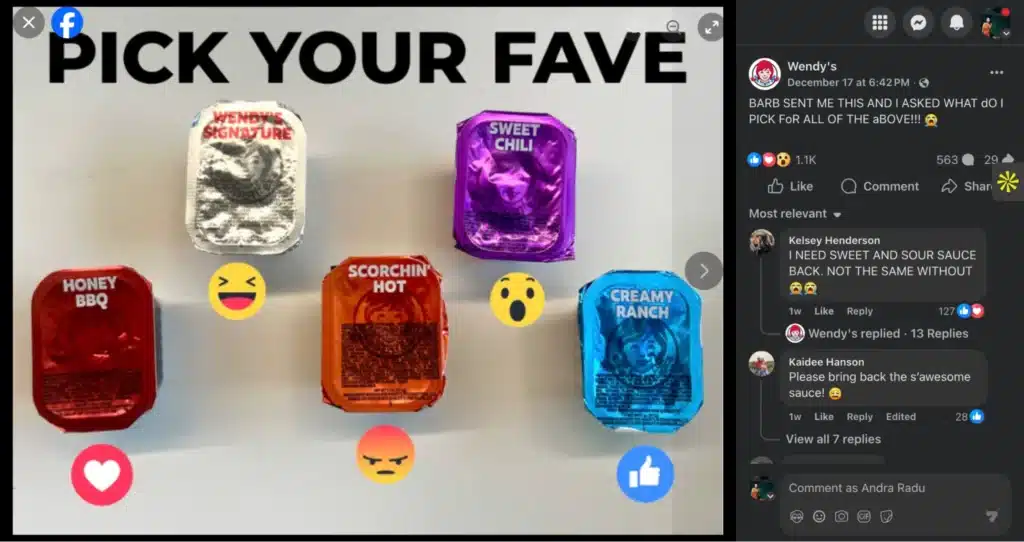
In this example, Wendy’s turns a simple question into a visual Facebook poll. All the sauce options are laid out clearly, and each one is paired with a reaction. You don’t need to read the caption to know what to do. People can react right away.
That’s why the comments fill up fast. Facebook fans jump in to share their favorites, disagree with each other, and tag friends. The post feels light and familiar, but it still ties directly back to the product or service.
At the same time, the brand gets useful customer feedback, better audience insights, and a clear read on audience sentiment without running a formal survey.
How to adapt it for your own brand
- Show all options in one clean image so the choice is obvious
- Stick to three to five options to keep it simple
- Use reactions, emojis, or short labels to guide how people respond
- Keep the caption short and focused on participation
- Watch reactions and comments to spot audience engagement patterns
- Use what you learn to shape future Facebook content or follow-up posts
10. User-generated content feature
A user-generated content feature is one of the easiest ways to make a Facebook page feel real. Instead of brand photos or planned shoots, you’re sharing a moment that already happened.
This kind of Facebook post fits naturally into the feed because it looks like something a person would post, not a campaign.
Why it works
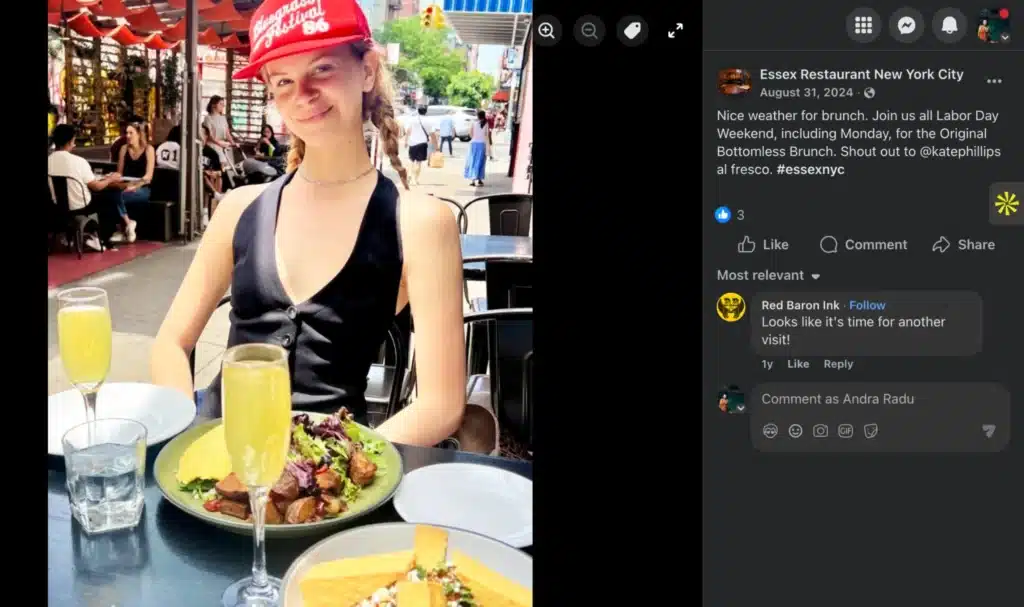
In this example, the restaurant reposts a customer photo from brunch. The lighting isn’t perfect. The setting isn’t staged. That’s exactly why it works. You can picture yourself at the table. The caption stays simple and lets the image do the talking.
The comments show what happens next. Facebook fans react, mention coming back, and tag friends. That interaction doubles as social proof. It reassures potential customers without the brand having to say much at all. Posts like this also feel good for the person being featured, which makes others more likely to tag the brand next time.
How to adapt it for your own brand
- Ask customers if you can reshare their photos or posts
- Pick images that feel natural and show real use of your product or service
- Keep captions short and casual so the post feels human
- Credit the person who shared the photo to encourage more tags
- Save strong UGC and repost it over the next few weeks
- Rotate these into your regular Facebook post ideas so your page stays balanced
Frequently asked questions
1. How to write a good post on Facebook?
A good Facebook post starts with one clear point. Pick one idea and write around it instead of trying to say everything at once. Use simple language, keep sentences short, and make sure the post is easy to understand without extra context.
Strong posts usually match the tone your Facebook audience already responds to and fit naturally into your overall social media marketing strategy. Posting regularly also helps, since consistency gives people a reason to keep paying attention.
2. What should I write on a Facebook post?
Write about things your audience already cares about or recognizes. That can be quick tips, personal stories, customer experiences, or short updates tied to industry news.
Many brands also reuse content from a blog post or turn trending topics into short, readable posts. The goal is to share post content that feels useful, familiar, or relatable instead of polished or sales-heavy.
3. What does a good Facebook post look like?
A good Facebook post is easy to scan. That might mean a short text update, a clean image with a clear message, or a simple video.
Relevant photos and highly visual layouts help, but the message still needs to be clear without explanation. A great Facebook post usually looks like it belongs in the feed, not like an ad dropped into it.
4. What Facebook posts get the most attention?
The most engaging posts tend to invite some kind of reaction. Interactive posts like Facebook polls, guessing games, and short relatable stories often perform well.
Posts that share customer testimonials or show behind-the-scenes moments also get strong responses because they feel grounded.
Over time, posts that generate engagement early are more likely to keep circulating thanks to the Facebook algorithm, which leads to more engagement overall.
5. How can I keep coming up with fresh Facebook content without repeating myself?
Most pages don’t run out of ideas. They run out of structure. A reliable way to keep fresh content ideas flowing is to rotate different types of posts instead of constantly inventing something new. That can include customer success stories, short post videos, an occasional informative post, or updates where you share industry news that’s relevant to your Facebook audience.
You can also reuse the same content in different formats. A long blog post can become short tips, open ended questions, or even short videos. Video content, including sharing YouTube videos, hosting live video, or posting quick Reels, is an excellent way to reach a wider audience and drive engagement, especially when posted at the right time.
Mixing in lighter posts helps too. Holiday posts, references to pop culture, or even a well-placed unpopular opinion can help your Facebook content feel current and spark a deeper connection. For bonus points, add free stuff or simple giveaways, which people love and which can help generate leads and attract new followers.
Ready to start sharing Facebook content
At the end of the day, the posts that work aren’t clever. They’re clear. They show real moments, invite real reactions, and give people a reason to stop for a second instead of scrolling past. When you rely on a few formats you understand and repeat them with intention, posting stops feeling random and starts feeling manageable.
The challenge usually isn’t coming up with ideas. It’s keeping everything organized, consistent, and easy to follow through on. That’s where planning makes the difference. When you can see what’s coming up, reuse what works, and stay on top of conversations, posting feels less like a chore and more like a habit.
If you want a simpler way to plan, schedule, and manage your Facebook content, start your 14-day free SocialBee trial and build a posting rhythm you can actually keep.
