


What is the LinkedIn algorithm?
The LinkedIn algorithm decides which posts appear in a user’s feed by ranking them for relevance, expertise, clarity, and engagement quality.
In simple terms, the algorithm sorts through hundreds of millions of posts shared every week and tries to match each post with the people who will find it most professionally useful. This is very different from consumer platforms where entertainment value or virality drives distribution.
On LinkedIn, the algorithm favors expert insight, industry relevance, and meaningful conversations that help members grow in their careers, industries, and businesses. In fact, 76% of marketers post their thought leadership content on LinkedIn primarily.
The algorithm determines which content types receive better distribution. For example, text posts can still outperform videos because they create longer dwell time. Carousels offer structure, which helps LinkedIn’s topic detection. And posts from first-degree connections or people you regularly interact with often appear higher than trending topics from strangers.
LinkedIn weighs several signals at once: topic expertise, clarity of expression, engagement rate, identity alignment, and user behavior. You’ll see these same signals throughout your own feed when you scroll through posts from your own network, brands you follow, and recommended voices.
How does the LinkedIn algorithm work?
When you create content, every post moves through LinkedIn’s quality filters, test distribution, and relevance ranking before earning wider reach.
1. LinkedIn classifies your post for quality
LinkedIn evaluates the clarity, relevance, and professionalism of your post before showing it to anyone.
LinkedIn assigns each post to one of four buckets:
- Spam
- Low-quality content
- Good content
- Expert content
This early classification sets the tone for the rest of your distribution. LinkedIn looks for signals such as:
- Clarity and professionalism
- Topic relevance for your audience
- Grammar and formatting
- Tagging behavior
- Posting frequency
- Promotional or misleading content
LinkedIn posts that get downgraded early often include:
- Vague personal stories without a clear takeaway
- Clickbait hooks
- Excessive outbound links
- Overuse of trending hashtags
- Engagement bait (“comment YES if you agree”)
- Self-promotion without real value
- Misleading or sensational claims
If LinkedIn flags a post as low quality, it limits its exposure during testing. That’s why it’s essential to focus on clear insights, professional relevance, and specific context from the first sentence to create high-quality content.
2. LinkedIn tests your post with a small audience
LinkedIn shows your post to a limited group of followers to measure early engagement and interest.
This testing phase has become increasingly important because the current LinkedIn algorithm rewards authentic engagement, not superficial metrics. The algorithm looks at how a small group responds in the first 60 to 90 minutes, often called the “golden hour.”
The platform evaluates signals such as:
- Dwell time
- Thoughtful comments
- Saves
- Shares
- Profile visits
- High-quality discussions in the comment section
- Clicks on your profile or company page
If users engaged during this small-audience test show real interest, LinkedIn continues distribution to a slightly larger group. If engagement remains steady, the algorithm expands even further over several days.
This explains why some posts unexpectedly go viral three or four days after publishing. Consistent interactions tell LinkedIn the post remains relevant for a wider audience.
3. LinkedIn ranks your post for broader distribution
If your post passes testing, LinkedIn distributes it to a wider audience based on identity, content quality, and member activity signals.
This is the phase where most users wonder, “Why did my post reach 50,000 people last week and only 3,000 today?” The answer usually lies in the identity and LinkedIn activity signals that guide distribution.
LinkedIn considers three big categories:
Identity signals
These help LinkedIn match your post to the right people based on:
- Job title
- Industry
- Skills
- Seniority
- Past interactions
- What your audience follows
This is why optimizing your LinkedIn profile, especially your headline and skills, has a real influence on reach. Clear expertise helps LinkedIn categorize your content correctly.
Content signals
These tell LinkedIn what your post is really about and how users interact with it:
- Topic clarity
- Use of native formats (carousel, document, text posts)
- Dwell time
- Comment depth and sentiment
- Video impressions and completion rate
- How frequently the post is saved or shared
The better LinkedIn understands the post and its related topics, the more confident the algorithm feels that you create engaging content and starts distributing it to relevant users.
Member activity signals
These reflect how people behave on LinkedIn:
- Prior engagement with you
- Affinity with your company page
- Hashtags followed
- Comment interactions with similar content
- Strength of connection
These signals explain why your first-degree connections often see your posts before your wider professional network.
The most important LinkedIn algorithm updates for 2026
LinkedIn now prioritizes expertise, conversation quality, and contextual relevance over recency or superficial engagement.
Based on how the market evolved in 2025 and the updates LinkedIn rolled out throughout the year, several trends are shaping the 2026 algorithm.
The key updates influencing how the current LinkedIn algorithm ranks and distributes content include:
- LinkedIn gives more visibility to expert-led content such as frameworks, industry breakdowns, and valuable insights.
- LinkedIn reduces distribution for clickbait, vague storytelling, overly promotional posts, and other low-quality content.
- Hashtags play a much smaller role in distribution because LinkedIn now relies on improved topic and text detection. (Source)
- Comment quality carries significantly more weight, with the algorithm detecting whether replies meaningfully contribute to the topic.
- Native formats like carousels, documents, native videos, and in-feed articles receive stronger distribution because they improve topic detection.
- Relevance now outweighs recency, allowing posts to stay active for several days when they maintain engagement. (Source)
- New performance metrics, such as Saves and Send, signal long-term value and influence how widely posts are distributed. (Source)
- The new “Post prompts” feature encourages creators to share structured, topic-aligned insights that are easier for the algorithm to categorize.
- The platform-wide expansion of newsletters reinforces LinkedIn’s preference for long-form, expertise-driven content.
- In-app event notifications contribute to stronger visibility for event-related posts and participation signals. (Source)
- More detailed creator analytics help users optimize content toward the signals LinkedIn favors, such as saves and quality comments.
- AI-generated job summaries and updated skill signals give LinkedIn more accurate identity data, improving content-to-audience matching. As LinkedIn’s CEO Ryan Rosklansky puts it, “AI is reshaping how people interact with all types of software,” and this is reflected in LinkedIn’s algorithm changes as well.
Together, these updates point to the same direction: LinkedIn is refining its feed to prioritize expertise, clarity, and professional relevance above all else.
What types of posts perform best on LinkedIn today
Posts that teach, spark discussion, or present expertise with clarity consistently outperform all other content types.
After reviewing hundreds of posts across business professionals, agencies, and industry creators, I’ve noticed five content types that reliably earn high engagement and reach a wider audience on any LinkedIn page. These formats align with how the algorithm evaluates relevance and how users behave on the platform.
1. Conversational posts that invite thoughtful responses
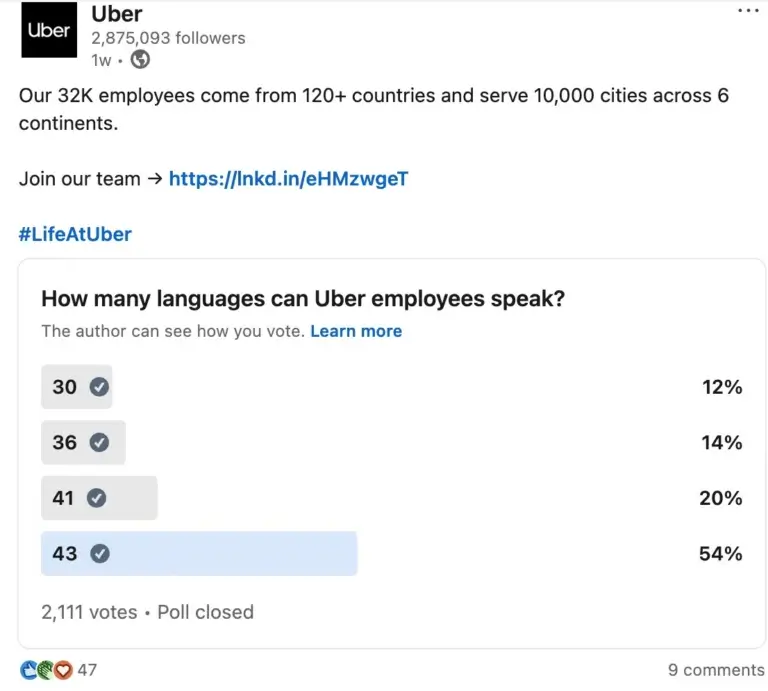
These posts feel like an open discussion rather than a broadcast. They often begin with a strong question or a surprising observation, and they encourage users to share opinions or experiences.
You can even do that by using LinkedIn’s built-in poll feature, which increases your chances of people taking the time to share their thoughts. In fact, polls have reached an engagement rate of 4.40%, doubling their 2023 engagement.
Examples:
- “What’s one industry belief you changed your mind about this year and why?”
- “If you could remove one vanity metric from social media reporting, which one would it be?”
- “What’s the smallest habit that had the biggest impact on your LinkedIn strategy?”
These posts work because they keep users engaged, increase dwell time, and generate thoughtful comments, three signals LinkedIn heavily rewards.
2. Practical insights and evergreen frameworks
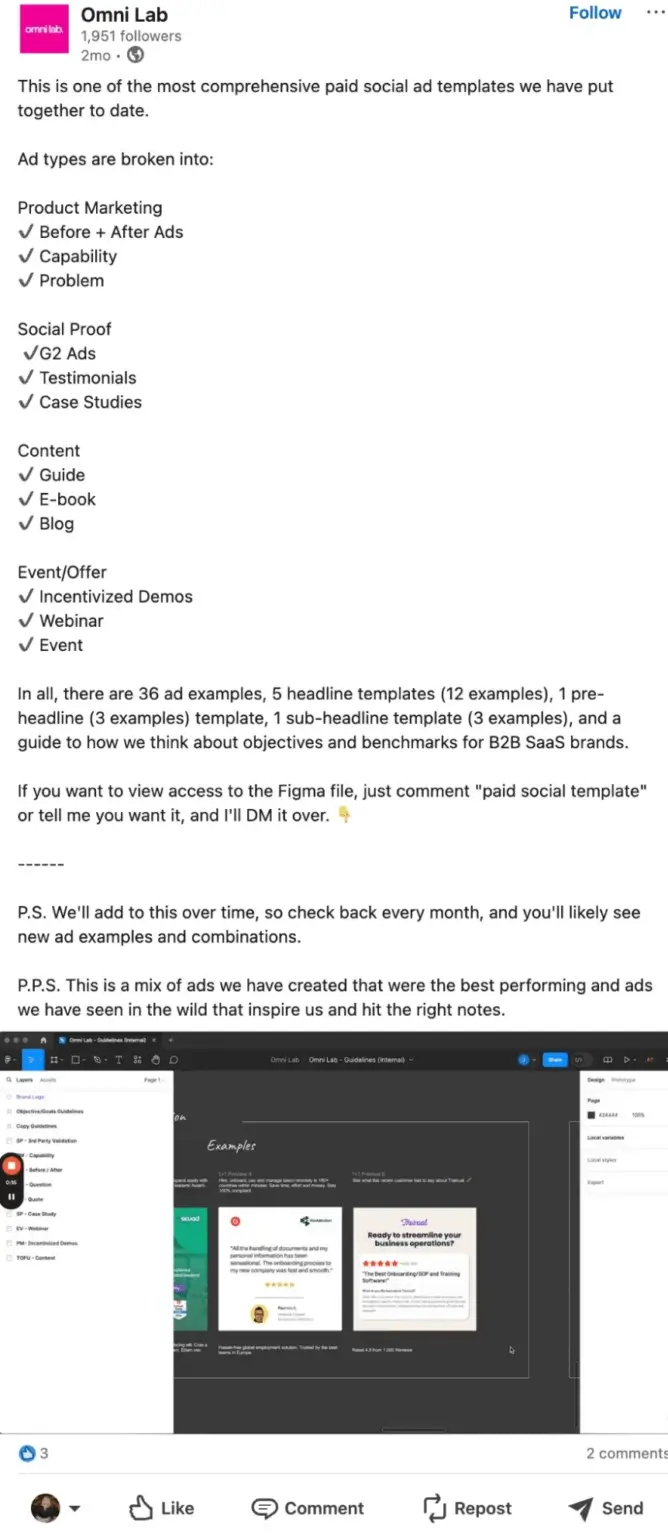
People use LinkedIn to learn. Posts that share more detail, structure, and repeatable processes often become reference points within industries.
Omni Labs gives us a great example with their comprehensive ad template that they made available to their audience:
Examples:
- Cheat sheets for onboarding a social media manager
- A three-step framework to maximize engagement in your social media strategy
- A breakdown of how employee advocacy programs influence reach
- A checklist for auditing a LinkedIn profile
As Ty Heath, director of market engagement at The B2B Institute at LinkedIn, explained in the Content Marketing Institute’s B2B Content Marketing Trends Research: The brands that win are those brave enough to challenge conventional wisdom with research-backed insights leaders can trust and act on. The most effective thought leadership supports decision-making with memorable mental models and frameworks.
Framework-driven posts tend to generate more saves and sends, which are strong indicators of long-term relevance.
3. Visual content that clarifies ideas
Visuals help users process information quickly, especially in a fast-moving feed. Carousels, charts, process diagrams, and annotated screenshots perform well because they signal expertise and make complex information easier to understand.
Multi-image posts generate the highest engagement on LinkedIn, averaging a 6.60% engagement rate.

Examples:
- A carousel breaking down the 2026 LinkedIn algorithm
- A chart comparing video impressions with text-based reach
- A screenshot walkthrough of optimizing a company page
- A progress timeline for a long-term project
These native formats give LinkedIn more context about your topic and encourage users to stay on the post longer, boosting dwell time.
4. Industry-specific stories and lessons learned
Stories rooted in your field or your clients’ experiences drive meaningful conversations. These posts offer authenticity and a unique perspective without becoming vague personal stories.

Examples:
- How a SaaS team used content to enter a new market
- Lessons learned by a digital marketing expert from running an audit for a manufacturing brand
- What changed after implementing employee advocacy across three departments
These stories work because they teach something real while adding personal context that helps build your personal brand.
5. Team milestones and collaborative wins
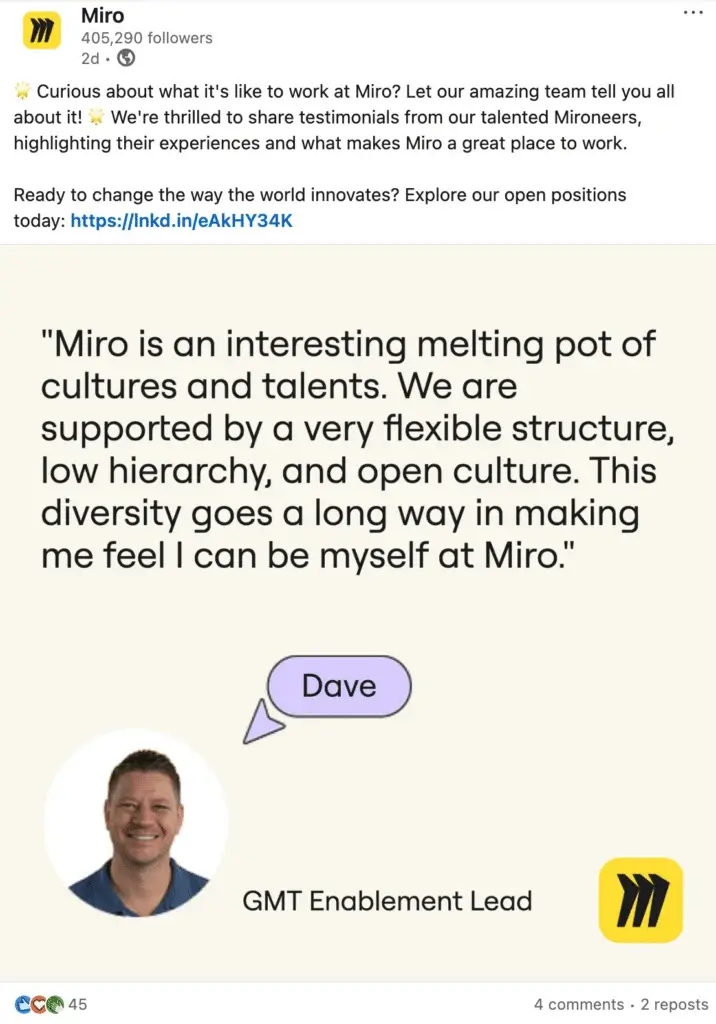
Professional platforms still reward human moments. Company achievements, team celebrations, and behind-the-scenes posts help build trust and community.
Letting your own team speak about your company brings a layer of authenticity to how your company presents itself online. Here is how Miro did it:
Examples:
- Introducing new hires
- Celebrating the completion of a major project
- Sharing wins from cross-department collaboration
These posts perform well when they include a professional takeaway rather than just a celebration.
How to optimize your content for the LinkedIn algorithm
You can increase your LinkedIn visibility by improving relevance, clarity, timing, and conversation quality.
The following steps will help you align your posting strategy with how the LinkedIn algorithm works in 2026.
1. Share clear, useful insights with immediate context
Clarity improves dwell time, comprehension, and perceived expertise.
When a post is ambiguous, the algorithm struggles to categorize it, and users bounce quickly. Both issues reduce your chances of reaching a wider audience.
A simple structure that always works:
- Start with a clear statement or insight
- Add a short explanation or example
- Share a takeaway or recommendation
- Invite thoughtful comments
This structure helps you focus on value and gives your audience a reason to stay on the post longer. Longer dwell time tells LinkedIn that you make valuable content.
You can apply the same structure to videos, text posts, or native formats like carousels. The post format matters less than the clarity if you want to create viral posts.
2. Post at the right times for your audience
Early engagement during the first 60 to 90 minutes (your “golden hour”) influences whether LinkedIn expands your post’s reach. Most LinkedIn users check their feed during work hours, typically between 8–9 AM and 2–3 PM in their local time zone.
If your audience is mostly online during early afternoon hours, publishing at 9 PM won’t produce enough early engagement to push your post forward. The best posting times vary by audience, industry, and geography.
Make sure to also avoid too frequent posting, as it can be seen as spam by the algorithm and will hurt your reach.
