


If your company’s idea of “using AI” is keeping ChatGPT open in a browser tab—congrats, you’re doing the bare minimum. And you’re also missing out on the real efficiency gains AI can deliver.
Because while ad hoc prompting is great for one-off tasks (“draft this email,” “summarize this doc,” “explain this bizarre spreadsheet formula”), it doesn’t scale. And it definitely doesn’t count as integrating AI into your workflows. Real value shows up when AI starts taking the thinking parts of busywork and making them repeatable and fast.
In this guide, I’ll break down what AI workflows actually are, how they differ from the other terms floating around, and how to build them without writing code or accidentally setting off a chain reaction of over-automated chaos. Then, we’ll explore a few real examples from teams who are using AI workflows to scale things like sales and customer success.
Table of contents:
What is AI workflow automation?
AI workflow automation is basically automation with a brain. You can delegate the parts of your work that are repetitive (but still complex) to software that can actually interpret context instead of just following rigid rules. AI deciphers messy inputs, adapts to variations, and handles tasks that don’t fit neatly into yes/no logic.
In practice, this looks like:
Reading an email and deciding whether it’s a customer issue, a sales lead, or something you can safely ignore until next Tuesday
Drafting customer outreach emails and replies based on sentiment, whenever a new lead comes into your CRM
Summarizing long documents (nobody has time for 47 pages of “context”) that come through your inbox, and sending the results to Slack
AI workflow automation bundles tasks like these into repeatable, reliable processes. It takes the judgment calls you make every day and turns them into something your business can scale. This frees up the mental energy you used to spend on low-value micro-decisions so you can focus on the parts of your job that actually need a human touch.
AI workflows vs. traditional automation
Traditional automation does exactly what you tell it—no more, no less. If your automation says “When a form is submitted, create a task,” that’s exactly what happens, even if the form is obviously spam or written in Klingon.
AI workflows expand on traditional automation by bringing judgment into the mix. They can read, classify, interpret tone, extract meaning, and make decisions that would be hard (or just annoying) to encode manually. Instead of spending hours building 27 filters to catch every possible variation of a customer message, you can let AI understand the intent and route it correctly.
AI workflows vs. AI orchestration
AI workflows are automations that include AI-powered steps. AI orchestration, meanwhile, is more about coordination and governance. Think of it as the conductor of the automation orchestra: it connects your people, tools, AI, and agents to run processes with flexibility and control.
While they overlap, orchestration is the layer that keeps your AI workflows from becoming a chaotic tangle of half-finished drafts, mystery errors, and rogue automations that swear they ran correctly even though they absolutely did not.
AI workflows vs. agentic AI workflows
A standard AI workflow executes a defined set of steps. Even if those steps involve intelligent decisions, the workflow itself doesn’t choose new goals or explore new paths. It’s still following your blueprint.
Agentic AI workflows, though, give AI the ability to take action based on broader objectives instead of predefined steps. Agentic AI is a system of AI agents that can plan, try something, evaluate whether it worked, and try again. For example:
A regular AI workflow can classify a lead and log it in your CRM.
An agentic workflow could evaluate the lead, decide it needs enrichment, fetch missing data, generate follow-up outreach, and adjust the approach if the first attempt doesn’t get a response.
Why AI workflow management matters
AI workflows can do a lot—but only if you manage them well. Otherwise, you end up with what many teams have right now: a handful of experimental automations and at least one rogue AI step that’s been mysteriously firing at 2 a.m. for reasons no one can explain.
AI workflows aren’t set-it-and-forget-it machines, and they’re not psychic. They need guardrails and the occasional review from an actual person. And if the input is chaotic, unclear, or literally a photo of someone’s monitor taken at a 37-degree angle, the system might still need help.
Good AI workflow management is the difference between dabbling with AI and actually getting value from it. But if you do it right, you’ll see benefits like:
Scalability without burnout. AI workflows let you scale the kinds of tasks humans used to triage manually.
Faster response times. Bots never put off a task until after lunch. Whether it’s routing leads, summarizing information, or generating drafts, AI workflows do the thing immediately.
Better use of human talent. Every hour you save on repetitive work is an hour your team can spend on strategy, creativity, customer relationships, or—wild idea—an actual break.
AI workflow examples
AI’s ability to analyze huge amounts of data, make nuanced decisions, and keep processes moving without human babysitting is changing how teams operate day to day. Here are a few real-world examples of what AI workflows look like in practice.
AI workflow example for sales

As Popl grew, their team was suddenly handling hundreds of form submissions every day in HubSpot and Salesforce—way more than a human could reasonably manage without giving up sleep, hobbies, or joy.
So they built a smarter system using Zapier and AI. Now, when someone submits a demo request through a HubSpot form, a Zap instantly kicks off a whole automated sequence: it checks the lead’s info in Google Sheets, notifies the right Slack channel, and routes the lead to the appropriate rep based on things like region and company size. Zero manual copying, zero inbox spelunking.
Then, they layered in OpenAI to handle inbound emails, too—using AI to triage messages, filter out spammy outreach, identify legit sales opportunities, and enrich leads by pulling in company data from email domains.
Over 100 workflows later, Popl has saved $20,000 annually by layering AI workflows into their sales processes.
Want something similar? Explore how automation and AI can streamline your sales pipeline—or just jump straight into this template that centralizes lead capture with AI so no opportunity falls through the cracks.

Unified lead capture
Easily channel leads from multiple sources into your CRM.
AI workflow example for customer success
ActiveCampaign had a retention problem: nearly 25% of users who didn’t get personalized onboarding were churning within 90 days. But with thousands of new signups each month, doing individualized onboarding manually wasn’t going to happen.
Their solution was to build an automated, AI-supported onboarding system that scales like a dream. As soon as someone signs up, ActiveCampaign tags them by language. That tag triggers a webhook to Zapier, which formats their data and sends it to Demio to automatically enroll the user in the right live onboarding session. If they attend, they get a personalized follow-up. If they don’t, they still get a personalized follow-up—just a different one. All automated and hands-off.
And the results were wild:
440% increase in webinar attendance
15% reduction in early churn
2× increase in product adoption within the first 90 days
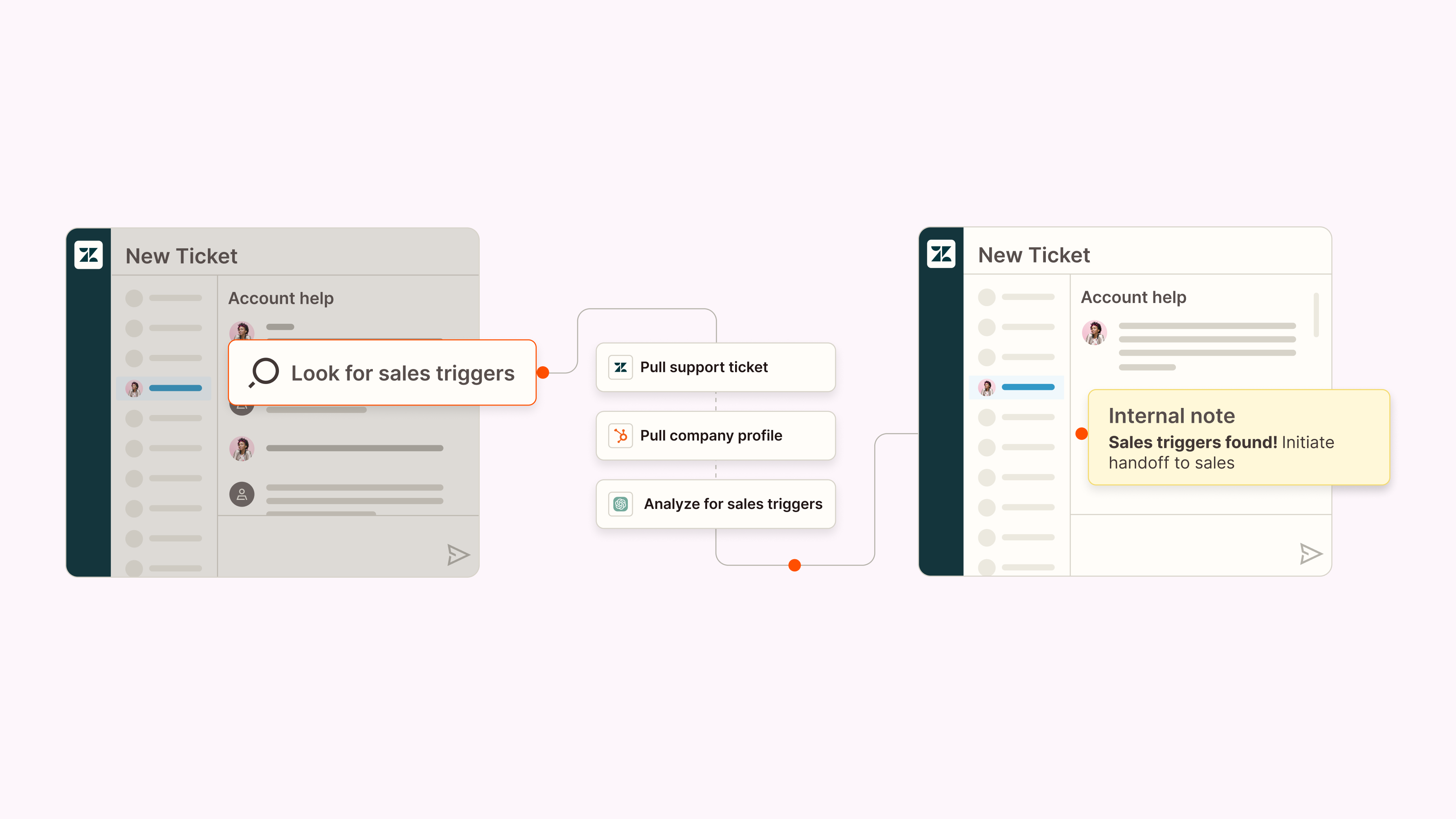
Want to put your customer success data to work? This Zapier template uses AI to uncover sales opportunities hiding inside support tickets—then routes them to the right team automatically.
Increase sales leads from support tickets
Identify whether support tickets contain buying signals so you can easily route new leads to sales.
AI workflow example for IT

When Remote scaled to more than 1,800 employees, their IT team of just three people was getting about 1,100 support tickets every month. If you’ve ever worked IT, you probably developed a migraine just reading that.
They needed a system that could triage requests, answer common questions, and keep everything organized without burning out their staff. Using Zapier and AI, they built an automated, multi-channel IT support workflow. Employees can now request help via Slack, email, or a chatbot. From there:
A webhook pulls user data from Okta
ChatGPT classifies and prioritizes the issue
A Notion record is created and synced to Zapier Tables
Zapier Agents search past tickets to suggest solutions
Slack sends real-time updates and AI-generated responses
IT team members can self-assign tasks with an emoji reaction (peak efficiency)
Now, 28% of all tickets are handled automatically, which saves the team 600+ hours every month. Want a similar setup? Check out how to bring automation into your IT processes, or use this ready-made template to launch your own AI-powered help desk.

IT help desk
Improve your IT support with AI-powered responses, automatic ticket prioritization, and knowledge base updates.
How to orchestrate AI workflows without coding
You don’t need a team of machine learning engineers or a secret underground lab to start orchestrating AI workflows. In reality, most businesses get the biggest wins by combining the tools they already use with a bit of AI-powered decision-making. And with Zapier’s no-code platform, you can build surprisingly sophisticated systems without using a single line of Python (unless you want to, which—no judgment).
The trick is to treat AI workflow orchestration like any other operational rollout: start small, experiment quickly, and iterate your way into something robust.
At Zapier, that’s exactly how we’ve woven AI into our own processes. We didn’t have all the answers upfront, but by documenting what worked and ruthlessly learning from what didn’t, we were able to scale AI thoughtfully and drive 97% adoption across teams. Here’s a step-by-step playbook to help you do the same.
1. Identify high-impact workflows
The best candidates for AI workflows are repetitive tasks that still require a pinch of human reasoning. These are the tasks that normally cause people to sigh deeply before diving in. Think:
Triaging support tickets by tone or topic
Summarizing customer feedback
Drafting first-pass content
Enriching or evaluating leads
Routing messages based on intent
They’re predictable enough to automate, but nuanced enough to benefit from AI’s pattern recognition or language-processing skills.
You’re not trying to automate everything. Just start with the work where AI removes friction or adds consistency without breaking your processes. A few early wins go a long way in building momentum.
Ask yourself:
Where are people making the same judgment calls over and over?
What work bottlenecks the team?
Where would faster insight make things better for customers or coworkers?
2. Evaluate data quality and compliance
Before you let AI loose on your workflows, take a hard look at your inputs. Are they clean? Structured? Not written in a dialect only your team understands? AI can handle messiness, but garbage in is still garbage out.
This is also the time to consider privacy and compliance. If you’re using customer data—especially anything sensitive—you need to know:
When in doubt, keep sensitive content out of your prompts.
3. Pilot and validate your workflows
Before rolling anything out widely, run a pilot. This is where you make sure your workflow adds real value (not just vibes) and catches edge cases.
Use this stage to:
Test with real inputs
Get feedback from the people doing the work
Adjust prompts, criteria, guardrails, or fallback logic
Document what’s working and what’s not
4. Train and onboard your team
Even the smartest AI system won’t help if no one uses it—or worse, if no one trusts it. Spend time showing your team how the workflow works, what decisions it’s making, and where humans still play a role.
Keep documentation simple, and give people a place to ask questions or report weird behavior. (There will be weird behavior. That’s part of the charm.) The more your team understands the “why,” the more likely they’ll be to adopt—and improve—the system.
5. Monitor, measure, and optimize
AI workflows are living systems. They get better over time, but only if you keep an eye on them. If something starts slipping, you’ll know to adjust prompts or add guardrails.
Track metrics like:
Orchestrating AI workflows doesn’t have to be complex. With the right structure and a little experimentation, you can build systems that scale across your business and give humans back the time they need for work that actually matters.
AI workflow tools
Here’s the fun thing about AI workflow tools: no one can quite agree on what belongs in this category. Depending on who you ask, “AI workflow tools” might mean everything from AI orchestration platforms like Zapier to project management tools with a sprinkle of AI and software that’s “AI-ready,” whatever that means.
If you need help finding the right AI workflow stack, we’ve tested and reviewed a lot of AI apps across categories. You can browse our roundups to find what fits your use case:
While there are plenty of great AI-powered apps out there, Zapier is the most well-rounded option for orchestrating AI workflows. With 8,000+ integrations across the tools your business already depends on—Slack, Salesforce, Notion, HubSpot, Gmail, and thousands more—you can build AI-powered workflows without writing a single line of code or filing a ticket with IT.
But Zapier isn’t just the glue connecting your apps. It’s the toolkit for building full, intelligent systems around your processes:
Tables gives you a centralized, structured home for the data your workflows rely on.
Forms lets you set up custom forms and user-facing inputs without touching front-end code.
Chatbots are AI-driven assistants that can respond to customers or teammates based on your workflows and data—not a generic model’s best guess.
Agents can actually take action inside your apps, whether triggered by a prompt, a workflow, or a schedule.
Canvas maps out and visualizes entire processes so you can design, refine, and collaborate on automations with clarity.
Together, these tools turn Zapier into the orchestration layer that connects your automations, your AI models, and your human-in-the-loop steps into one cohesive, reliable system. If your goal is to make AI useful across your business (not just floating around in someone’s browser tab), Zapier is where the orchestration actually happens.
Related reading:
