


If you’ve used any modern app, you’ll notice they mainly share a common denominator: feature creep. It’s simply the way things are done. Every app tries so hard to outdo the competition by including features or embellishments that the competitors do not yet have. Some are great, like these open-source options that I will happily pay for, but there are times when it’s just too much.
You can get back a level of quiet sanity by using apps that are simply specialists: they do one thing and do it well. These kinds of apps reduce cognitive load and are faster, clearer, and more dependable. I have been exploring these apps that refuse expansion and have come up with a few favorites.
Down for Everyone or Just Me
A single yes-or-no website outage check

The most important information I need when a website doesn’t load is knowing if it’s down for everyone or just for me. Fancy dashboards or uptime history don’t really count for much if I can’t tell if the website is down or not. Down for Everyone or Just Me is a web app that lets me paste a URL, and within seconds, it tells me if it’s a global or local issue.
Its restraint makes it stand out. You are not required to create an account; you don’t need to monitor domains or subscribe to alerts. Without trying to be a DevOps tool, it resolves that single frustration. It’s not a full-blown website monitoring service like Uptime.
Remove.bg
Automatic background removal at scale

The biggest problem with photo editing tools is the time investment required, even if you only need to learn how to perform simple tasks. I have used Remove.bg web app for about seven years now, and it specializes in just one aspect of photo editing: removing backgrounds.
It doesn’t require zooming in 300% or manually tracing the edges of an image. It’s an almost instantaneous and automatic process. All you need to do is upload an image, and the process automatically runs. Remove.bg has links to extra features in Canva. But as far as removing backgrounds is concerned, it offers a simple, bloat-free, and efficient interface.
f.lux
Screen warmth that follows your circadian rhythm
F.lux is one of the most minimalist tools (Windows and Mac) for adjusting screen color temperature. It chooses what’s best based on the time of day and warms it at night for reduced blue light exposure. After configuring it, it needs no further attention and will run in the background.
Even though you get built-in night mode on most modern operating systems, f.lux offers more granular control for color tuning and transitions. However, f.lux doesn’t layer extras like productivity tracking or wellness dashboards. It simply remains focused and fixes that one problem: late-night screen exposure. After installation, you can forget it, and your eyes will thank you.

- OS
-
Windows, Linux & Mac
- Pricing model
-
Free
f.lux automatically adjusts your computer display’s color temperature to match the time of day and lighting in your room.
Writebox
Writing with zero interface friction

I have tried several writing productivity ideas. One I particularly enjoyed was turning an old laptop into a writing machine. However, the Writebox web app is different. It does exactly what the name says: provides a giant text box for writing. This is a browser tool with no formatting bar, document structure, folders, or export prompts.
Its simplicity is the actual feature. In several distraction-free writing apps that I’ve tried, you’re generally getting UI chrome that subtly shifts your attention toward organizing rather than writing. Writebox strips this away. It is a tool for brain dumps and rough drafts. It has few configuration options and lets you focus on getting the thought out quickly.
Lightshot
Fast region capture with instant markup

A significant portion of my daily routine goes into taking screenshots. Although this feels like a simple action, most of the tools that I’ve used are anything but simple. ShareX, for instance, includes several tools: Color Picker, Image Beautifier, Ruler, OCR, and more. Lightshot is available for Windows and Mac, and focuses on taking and annotating screenshots.
Compared to other tools, Lightshot’s capture-to-markup loop is very tight; select a screen region and annotate it. If you have to document or explain ideas visually, it’s the fastest tool for the job. Without launching a utility suite, you capture and move on.
Just Press Record
Instant voice capture with built-in transcription
Just Press Record is an iOS/Mac app built around immediacy. You only have to launch the app, tap once, and it’s recording. The moment you stop the recording, you get an immediate transcript. It strips off the production interface, waveform editing timeline, and podcast toolset you may find in similar apps.
While technically it may seem to be doing two things, recording and transcribing, both serve the same goal of frictionless idea capture. The tool is made for those instances where typing slows you down. In traditional voice memo apps, you may get file management and editing tools that are not directly related to capture. It’s the closest you get to a digital notepad for spoken thoughts.
TinyPNG
Efficient image compression without editing tools

If you need to compress PNG and JPG images with minimal loss, the TinyPNG web app should be your go-to. The workflow is simple: drag, drop, and download.
You don’t get any extras: no resizing, no watermarking, no layout tools or asset management. There are several photo compression tools, many of which are full image editors. They often require launching a larger design environment. TinyPNG strips all the extra away and helps you focus on that one thing: making images smaller.
wttr.in
Plain-text weather with no visual clutter

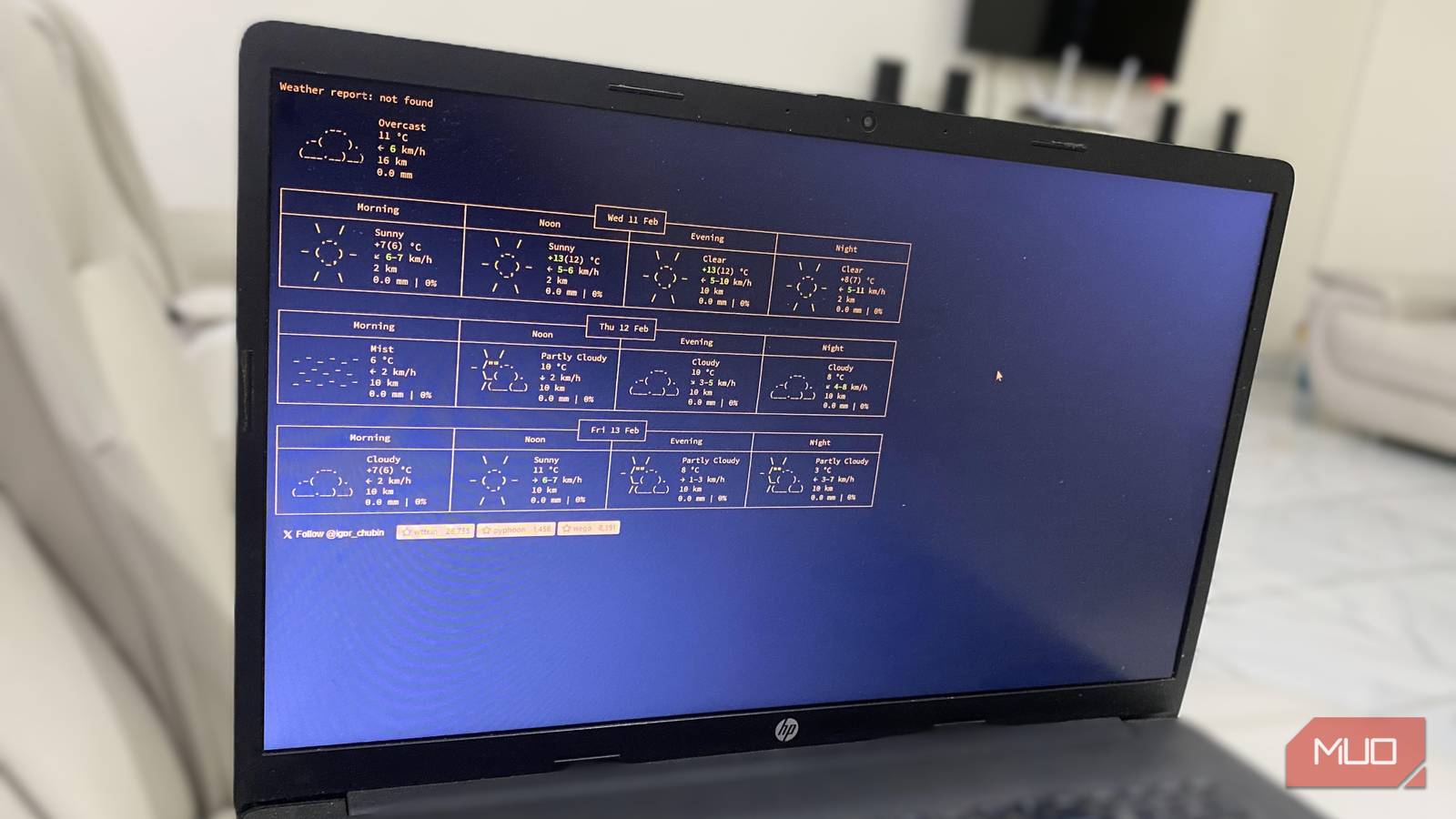
If you need weather information delivered in plain text, the wttr.in web app is your tool. Once you navigate to the site, it instantly shows you the weather conditions for morning, afternoon, and evening across three days.
If you work a lot in the command line, or you love lightweight tools, then you’d appreciate wttr.in. Unlike traditional weather apps, you do not find radar layers, video forecasts, and push notifications on wttr.in because it strictly focuses on readable data. This tool’s presentation is minimal, but its ambitions are as well.
When software remembers its job
I always find it refreshing to discover tools that stop exactly where they should. These tools do not layer dashboards on top of the interface, and they don’t expand into adjacent markets. They understand the one problem most people run into and provide a clear, simple solution.
In the end, you do not have to make big decisions while using an app, and this seriously cuts down on a lot of the friction we face. This is rare today, but also a reminder that the best tools are not always the ones with the most features.
